
MSAZ-320 · Lesson 6 of 12 · 21 min
Delta Lake operations and optimization
▶ Video coming soon A video version of this lesson is on the way.
By Monday, November 2, the cleaning notebook had run eleven times in testing, and each run had left its mark. The curated sales table in lh_curated now consisted of 1,904 Parquet files, most of them a few megabytes, and Keiko's daily store query had slowed from four seconds to nineteen. Nikolai was pleased, in his way. "Good," he said. "Now you have a real table to look after." The afternoon was about the operations that change Delta tables safely and the maintenance that keeps them fast.
MSAZ-310 introduced Delta tables: Parquet files plus a transaction log, with time travel, OPTIMIZE, V-Order and VACUUM. This lesson goes further, into the commands a data engineer uses every day and the settings DP-700 expects candidates to know.
Changing rows: UPDATE, DELETE and MERGE
Because the transaction log records which files make up each version, Delta tables support UPDATE and DELETE, which plain Parquet folders cannot. Behind the scenes Spark finds the files containing affected rows, writes new files without those rows or with the changed values, and records in the log that the old files were removed and the new ones added. Readers continue to see the previous version until the commit, then the new one.
MERGE combines insert, update and delete in one statement, matching incoming rows to existing rows on a key. It is the standard way to apply a day's changes to a table: when a matched row has changed, update it; when an incoming row has no match, insert it; and, if the source says a row was removed, delete it or mark it. Lesson 9 uses MERGE for slowly changing dimensions; here Ines used it for products, whose prices change.
%%sql
MERGE INTO lh_curated.stockline.products AS t
USING lh_raw.stockline_product_changes   AS s
ON    t.ProductId = s.ProductId
WHEN MATCHED AND (t.UnitPrice <> s.UnitPrice OR t.Description <> s.Description) THEN
  UPDATE SET t.UnitPrice = s.UnitPrice, t.Description = s.Description, t.ModifiedAt = s.ModifiedAt
WHEN NOT MATCHED THEN
  INSERT (ProductId, Sku, Description, UnitPrice, ModifiedAt)
  VALUES (s.ProductId, s.Sku, s.Description, s.UnitPrice, s.ModifiedAt);
The extra condition on the update, that the price or description actually differs, is worth copying. Without it, every matched row is rewritten even when nothing changed, which creates new files and log entries for no reason and makes the table's history harder to read.
Deletion vectors
Rewriting a whole Parquet file to remove one row is expensive. Delta tables can instead use deletion vectors: small side files that mark rows in an existing Parquet file as deleted, so a DELETE or UPDATE writes a few bytes now and leaves the full rewrite for later. Readers skip the marked rows. Over time, deletion vectors accumulate, and the table maintenance dialog in the lakehouse has an option to clean them up by rewriting the affected files, which keeps reads fast. Deletion vectors are a Delta table feature; check that every engine reading the table supports it before turning it on for a table other tools read directly.
The small-file problem and OPTIMIZE
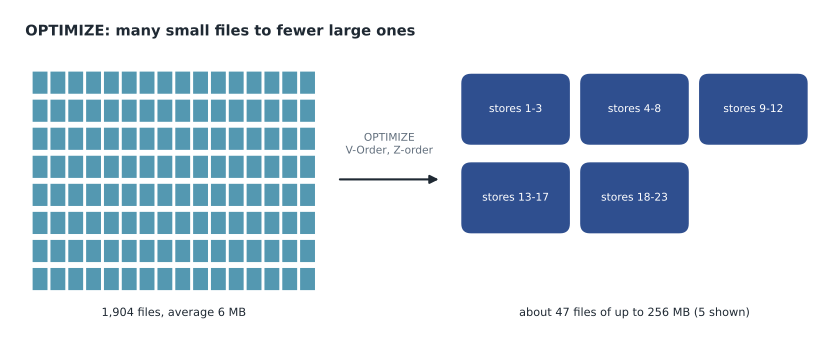
Every write creates at least one file per Spark task, and small frequent writes create many small files. Reading a table means opening every file in its current version, and opening a file has a fixed cost, so a thousand files of two megabytes read much more slowly than a few files of hundreds of megabytes each, even though the data is the same. OPTIMIZE rewrites small files into larger ones and records the swap in the log; time travel still sees the old files until VACUUM removes them.
# How OPTIMIZE changes the file count of the curated sales table
files_mb = [3] * 1_650 + [12] * 220 + [128] * 34   # sizes of current files, in MB
target_mb = 256                                     # target size for compacted files

total_mb = sum(files_mb)
small = [f for f in files_mb if f < target_mb]
after = -(-total_mb // target_mb)                   # files needed at the target size, rounded up
print(f"before: {len(files_mb):,} files, {total_mb:,} MB, average {total_mb / len(files_mb):.1f} MB")
print(f"after:  about {after} files of up to {target_mb} MB")
print(f"files to open on a full read falls by a factor of about {len(files_mb) / after:.0f}")before: 1,904 files, 11,942 MB, average 6.3 MB after: about 47 files of up to 256 MB files to open on a full read falls by a factor of about 41
What this code does
The program describes the curated sales table as a list of file sizes: many 3-megabyte files, some 12-megabyte files and a few 128-megabyte files. It adds up the total size and works out how many files of up to 256 megabytes would hold the same data, rounding up. The output compares the file count and average file size before and after compaction, showing that a full read would have to open far fewer files once the table is optimized.
The output shows 1,904 files holding 11,942 megabytes, an average of about 6 megabytes, becoming about 47 files. After Ines ran OPTIMIZE with V-Order from the lakehouse's Maintenance dialog, Keiko's query fell back to five seconds. The exact file sizes Fabric chooses depend on its settings and the table, so the program is an estimate of the shape of the change, not of the precise result.
Z-order and partitioning
OPTIMIZE can also cluster data. OPTIMIZE ... ZORDER BY (StoreNumber) rewrites files so that rows with similar store numbers sit together, which lets queries that filter on store skip files whose minimum and maximum store numbers rule them out. Delta keeps those minimum and maximum values for each file in the log, and data skipping is what makes Z-order pay off. It works best on one or two columns that appear often in filters and have many distinct values.
Partitioning is an older and blunter tool. Writing a table with partitionBy("SaleYear") puts each year in its own folder, and a query for one year reads only that folder. Partitioning helps when the column has few values, each partition holds a lot of data and almost every query filters on it. It hurts when partitions are small: partitioning the sales table by store and day would create about 25,000 folders of a few hundred kilobytes each, the small-file problem built in by design. Ines left the curated sales table unpartitioned, with Z-order on StoreNumber and SaleDate, and noted that the warehouse's gold tables would be shaped for reports separately.
V-Order settings
V-Order is a write-time optimization of the Parquet layout, applied to row groups, encoding and compression, which makes reads by the Fabric engines, especially Power BI's Direct Lake mode and the SQL engines, faster. The files remain standard Parquet that any Parquet reader can open. The cost is slower writes, about 15 in 100 on average according to Microsoft's documentation, and the table maintenance documentation notes it can also improve compression substantially. In new workspaces V-Order is turned off by default for Spark writes, to favour write-heavy engineering work; the session setting spark.sql.parquet.vorder.default controls it, a table property delta.parquet.vorder.enabled sets a default for one table, and the read-heavy resource profiles turn it on automatically.
| Setting | Scope | Hub choice |
|---|---|---|
| spark.sql.parquet.vorder.default | Spark session | false in ingestion notebooks writing lh_raw |
| delta.parquet.vorder.enabled table property | One table, for future writes | true on curated tables that reports read |
| parquet.vorder.enabled writer option | One write operation | Used for a one-off rewrite |
| OPTIMIZE with V-Order (maintenance dialog or command) | Rewrites existing files | Weekly on curated tables |
| Warehouse writes | Warehouse tables | V-Order applied automatically; leave it on |
The split made sense once written down. Raw tables are written every night and read mostly by the cleaning notebook, so write speed matters more. Curated tables are written once a night and read all day by people, so read speed matters more. A table property changes only future writes; existing files keep their layout until OPTIMIZE rewrites them.
VACUUM, retention and scheduling maintenance
VACUUM removes files that are no longer part of any table version newer than the retention threshold, seven days by default. Requests with a shorter retention fail by default, because they could break time travel or a long-running reader; a Spark property, spark.databricks.delta.retentionDurationCheck.enabled, must be set to false in the environment to allow it, which the hub's design note forbids. Mirrored databases manage their own vacuum, with a default retention of one day for those created after mid-2025.
Maintenance can run from the lakehouse explorer by hand, from a notebook, through the REST API, or from a pipeline with the Lakehouse Maintenance activity, which is in preview and runs OPTIMIZE, optionally with V-Order, and VACUUM. Ines added a weekly pipeline, pl_weekly_maintenance, that runs on Sunday at 3 a.m.: OPTIMIZE with Z-order and V-Order on the five curated tables, then VACUUM with the default retention. Running it after the busiest writes, and not during the nightly load, avoids two jobs competing for the same table.
How often to maintain
There is no single right schedule for maintenance; it depends on how a table is written and read. A table appended to every fifteen minutes collects small files quickly and benefits from compaction daily. A table rewritten once a night in a few large files may need OPTIMIZE only occasionally. The table's history, from DESCRIBE HISTORY, shows how many files each write added, and DESCRIBE DETAIL shows the current number of files and total size, so the decision can rest on numbers. Ines added both to a small notebook that reports, each Monday, the file count and average file size for every curated table, and the weekly maintenance pipeline handles the rest.
Maintenance also costs capacity. OPTIMIZE reads and rewrites data, and on a large table it can be one of the heavier background jobs of the week. Running it at a quiet time, and only on tables that need it, is part of the same respect for shared capacity that lesson 8 teaches for backfills.
A last point on maintenance concerns the SQL analytics endpoint. After heavy maintenance or large rewrites, the endpoint's view of a table catches up automatically, usually within moments, but a pipeline that queries the endpoint straight after a write can occasionally see the previous state. The pipeline activity that refreshes the SQL analytics endpoint's metadata, placed after the maintenance step, removes that small risk, and the hub's weekly pipeline uses it before the Monday file-count report runs.
Worked problem
Can the weekly VACUUM break a backfill?
A backfill notebook reloads October in the curated sales table on Saturday at 11 p.m. and is still reading an older version of the table to compare totals when VACUUM starts at 3 a.m. on Sunday. The version it reads was current until Friday at 1 a.m. Is the comparison safe?
Show solution
- VACUUM keeps every file needed by any version from the last seven days, counted back from Sunday at 3 a.m.: that is everything since the previous Sunday at 3 a.m.
- The version the backfill reads was current until Friday at 1 a.m., two days before VACUUM runs, well inside the seven days.
- So its files are kept and the comparison can finish.
- A retention of one day would have removed them, which is why short retention is blocked by default.
Answer: Yes. With the default seven-day retention, the files of a version from Friday are kept. Short retention is exactly the setting that could break it.
Schema changes
Delta enforces a table's schema on write, as MSAZ-310 showed. When a new column should be added, a write can include the option mergeSchema set to true, which adds the column and leaves it empty for older rows; ALTER TABLE ... ADD COLUMNS does the same in SQL. Changing a column's type or renaming it is harder and may require rewriting the table or turning on column mapping. Ines's rule was that schema changes on curated tables go through a pull request, because reports and the warehouse depend on them.
Common mistakes
MistakeRun MERGE without checking whether matched rows actually changed.
InsteadAdd a condition so only changed rows are rewritten.
MistakePartition every table by date and store.
InsteadPartition only by low-cardinality columns with large partitions; use Z-order for selective filters.
MistakeV-Order is on by default for all Spark writes in new workspaces.
InsteadIt is off by default for Spark in new workspaces; turn it on for read-heavy tables or use a read-heavy profile.
MistakeSet VACUUM retention to zero to save storage.
InsteadShort retention breaks time travel and running readers and is blocked by default.
Summary and key terms
- Delta tables support UPDATE, DELETE and MERGE because the log tracks which files make up each version.
- Deletion vectors mark deleted rows without rewriting files; clean them up periodically.
- Many small files slow reads; OPTIMIZE compacts them.
- Z-order clusters data for data skipping; partition only when partitions are large and filters always use them.
- V-Order speeds Fabric reads at some write cost and is off by default for Spark in new workspaces.
- VACUUM keeps seven days of files by default; schedule maintenance away from loads.
- MERGE
- A statement that updates, inserts and optionally deletes rows by matching incoming rows to a table on a key.
- Deletion vector
- A small file that marks rows in a Parquet file as deleted without rewriting it.
- OPTIMIZE
- A command that compacts small files of a Delta table into larger ones.
- Z-order
- Clustering rows by one or more columns so queries can skip files.
- Data skipping
- Using per-file minimum and maximum values to avoid reading files that cannot match a filter.
- Partitioning
- Storing a table in separate folders by the values of a column.
- Retention threshold
- How long VACUUM keeps files that are no longer part of the current version.
Practice problems
Work each problem on paper first, then reveal the answer to check.
Why add a change condition to WHEN MATCHED in a MERGE?
Show answer
So unchanged rows are not rewritten, avoiding needless files and log entries.
What do deletion vectors avoid?
Show answer
Rewriting a whole Parquet file to delete or update a few rows.
Why can partitioning by store and day hurt?
Show answer
It creates thousands of tiny partitions and files.
Which setting turns V-Order on for one table's future writes?
Show answer
The table property delta.parquet.vorder.enabled.
What is the default VACUUM retention?
Show answer
Seven days.
Lesson quiz · 5 questions
Score 60% or more to complete this lesson.
Create a free account to save your progress, take quizzes and earn a certificate.