
MSAZ-320 · Lesson 2 of 12 · 20 min
Data pipelines and orchestration
▶ Video coming soon A video version of this lesson is on the way.
On Friday, October 23, Ines opened the FDH Sales [Dev] workspace and created her first data pipeline, pl_nightly_sales. Nikolai had one request before she added anything to it: draw the night on the whiteboard first. Which steps must happen, in what order, which ones can run side by side, and what should happen when one of them fails? The drawing took twenty minutes and saved, by Ines's later estimate, two days of rework.
What a pipeline is
A data pipeline in Fabric is an item that runs a series of activities. It comes from the same family as Azure Data Factory and Azure Synapse pipelines, so people who know those tools will recognize the canvas, the activities and the expression language. A pipeline does not hold data. It moves data with copy activities, and it starts other work, such as notebooks, dataflows, stored procedures and SQL scripts, waiting for each to finish before deciding what to do next. That makes it the natural place to describe a whole night's work in one diagram.
Activities fall into three broad groups. Data movement activities copy data: the copy activity, and the copy job activity that runs a separate copy job item. Transformation activities run work in another engine: notebook, dataflow, stored procedure, script and Spark job definition activities, among others. Control flow activities shape the run itself: If Condition, Switch, ForEach, Until, Wait, Set Variable, Lookup, Get Metadata, Invoke Pipeline, Fail and a few more. Office 365 Outlook and Teams activities can send messages from inside a run.
| Activity | Group | What it does | Hub example |
|---|---|---|---|
| Copy data | Movement | Copies data from a source to a destination | StockLine sales to lh_raw |
| Notebook | Transformation | Runs a Fabric notebook, optionally with parameters | Clean raw sales into lh_curated |
| Script / Stored procedure | Transformation | Runs T-SQL in a warehouse or database | Load the star schema in wh_sales |
| Dataflow | Transformation | Refreshes a Dataflow Gen2 | Store list from a SharePoint file |
| Lookup | Control | Reads a value or a small result set | Read the last loaded watermark |
| Get Metadata | Control | Reads file or folder properties | Check that the price file arrived |
| If Condition / Switch | Control | Chooses a branch from an expression | Skip the load on a source holiday |
| ForEach | Control | Runs inner activities once per item in a list | Copy each of nine StockLine tables |
| Fail | Control | Ends the run as failed with a chosen message | Stop when row counts do not match |
| Invoke Pipeline | Control | Runs another pipeline | A parent pipeline calls child loads |
Dependencies between activities
Activities are connected by dependency arrows, and each arrow carries a condition. On success means the next activity runs only if the previous one succeeded. On failure means it runs only if the previous one failed, which is how error branches are built. On completion runs it either way. On skip runs it when the previous activity did not run at all. An activity with several incoming arrows waits for all of them, and its conditions are combined with AND. Activities with no arrow between them run in parallel, as far as the capacity allows.
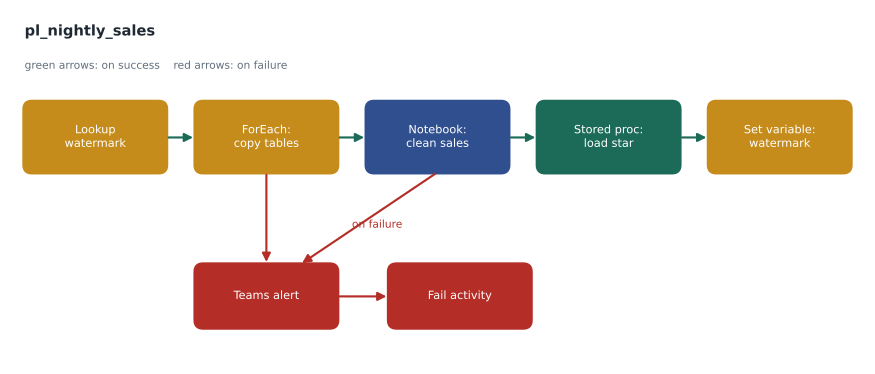
That AND rule is the source of a classic mistake. Ines first connected a Teams message activity to three copy activities with on failure arrows, expecting to hear about any failure. In a test where only one copy failed, no message arrived: the message waited for all three to fail. The fix is to place the alert on its own branch from each activity, or to put the activities inside a single container whose outcome is tested once, or to run the checks in a parent pipeline that inspects the child pipeline's outcome.
Parameters, variables and expressions
A pipeline becomes reusable when its values are not hard-coded. Parameters are values supplied when a run starts, such as a load date or a table name, and they cannot change during the run. Variables hold values that change during a run, such as a row count or a status message, and are set with the Set Variable activity. Activities can return outputs, such as the rows a Lookup read or the number of rows a copy wrote, which later activities refer to.
All of these are combined with the pipeline expression language. An expression starts with an at sign and calls functions. @pipeline().parameters.LoadDate reads a parameter. @activity('Lookup watermark').output.firstRow.LastSaleId reads a value returned by an activity. @utcNow() returns the current time, and @formatDateTime(utcNow(), 'yyyy-MM-dd') formats it. @concat('sales_', pipeline().parameters.LoadDate, '.parquet') builds a file name. Expressions can be typed into almost any setting, which is what DP-700 means by dynamic content.
{
  "name": "Copy sales increment",
  "type": "Copy",
  "dependsOn": [ { "activity": "Lookup watermark", "dependencyConditions": [ "Succeeded" ] } ],
  "typeProperties": {
    "source": {
      "type": "SqlServerSource",
      "sqlReaderQuery": "@concat('SELECT * FROM dbo.Sale WHERE SaleId > ', activity('Lookup watermark').output.firstRow.LastSaleId)"
    },
    "sink": { "type": "LakehouseTableSink", "tableActionOption": "Append" }
  },
  "policy": { "retry": 2, "retryIntervalInSeconds": 300, "timeout": "0.01:00:00" }
}
Ines kept the definition short in the lesson notes, but the parts matter. The dependsOn block is the arrow on the canvas. The query is built at run time from the watermark the Lookup returned, so the copy moves only sales with a higher SaleId. The policy block gives the activity two retries five minutes apart and a one-hour timeout, written as days.hours:minutes:seconds. Because pipelines connected to Git are stored as definitions like this, Walt could review a change to the query in a pull request without opening the canvas.
ForEach, and how many run at once
StockLine has nine tables the hub needs, and copying them one after another with nine copy activities would make the pipeline long and repetitive. Instead, Ines stored the table list in a small control table, read it with a Lookup, and passed it to a ForEach activity whose inner copy uses @item().TableName for the source and destination. The ForEach runs in parallel by default, with a batch count that limits how many iterations run at once, or it can be set to run sequentially. Ines set a batch count of three, because the StockLine server was also serving the tills' back end and she did not want nine queries hitting it at once.
Schedules and triggers
A pipeline can be run on demand, on a schedule or by an event. Schedules are set on the pipeline item and can repeat by minute, hour, day, week or month, with a start and end date and a time zone; a pipeline can have more than one schedule. Event-based triggers start a run when something happens, such as a file being created in a OneLake folder or an Azure Blob Storage container, using events from the Real-Time hub. The supplier price files would use a file-created trigger, so that a load started within minutes of each delivery rather than waiting for the night.
Time zones caught Ines once. Her first schedule ran at 1 a.m. in Coordinated Universal Time, which is 7 p.m. or 8 p.m. in Winnipeg, depending on daylight saving time, while the stores were still trading. The schedule's time zone setting fixed it, and the design note now gives every schedule in local time with the time zone named.
# Work out the earliest finish time of the nightly run from step durations and dependencies
steps = {                      # step: (minutes, steps it waits for)
    "lookup watermark":   (1,  []),
    "copy sales":         (6,  ["lookup watermark"]),
    "copy products":      (3,  ["lookup watermark"]),
    "copy stores":        (1,  ["lookup watermark"]),
    "refresh store list": (4,  []),
    "clean sales":        (12, ["copy sales", "copy products", "copy stores"]),
    "load star schema":   (9,  ["clean sales", "refresh store list"]),
    "write watermark":    (1,  ["load star schema"]),
}
finish = {}
def end(step):
    if step not in finish:
        minutes, after = steps[step]
        start = max((end(s) for s in after), default=0)
        finish[step] = start + minutes
    return finish[step]

for s in steps:
    print(f"{s:20} ends at minute {end(s):3}")
print("whole run:", max(finish.values()), "minutes after 1:00 a.m.")lookup watermark ends at minute 1 copy sales ends at minute 7 copy products ends at minute 4 copy stores ends at minute 2 refresh store list ends at minute 4 clean sales ends at minute 19 load star schema ends at minute 28 write watermark ends at minute 29 whole run: 29 minutes after 1:00 a.m.
What this code does
The program lists each step of the nightly run with how long it takes and which steps it has to wait for. For every step it works out the finish time as its own length added to the latest finish of the steps it waits for, so steps that can run side by side overlap. The output gives the minute at which each step ends and the length of the whole run, which is set by the longest chain of waiting steps, not by adding every step together.
The program's last line shows the run finishing 29 minutes after it starts. Adding every step together would give 37 minutes, but the three copies and the dataflow refresh overlap. The chain that sets the length, lookup, copy sales, clean sales, load star schema and write watermark, is the critical path. Speeding up the product copy would change nothing; speeding up the cleaning notebook would shorten the whole night.
Pipeline or notebook?
DP-700 asks candidates to choose between a pipeline and a notebook for orchestration. Notebooks can call other notebooks: notebookutils.notebook.run runs one notebook from another, and notebookutils.notebook.runMultiple runs several, in parallel or as a small dependency graph, inside one Spark session. That suits a chain of Spark steps that share code and data. Pipelines suit work that crosses engines, such as a copy from an on-premises server, a dataflow, a stored procedure and an email, and they give a visual run history, retries per activity and schedules or event triggers without code. The hub's nightly run crosses four engines, so it is a pipeline; inside it, the cleaning notebook calls two helper notebooks with runMultiple.
# In the cleaning notebook: run two helper notebooks after a shared setup step
dag = {
    "activities": [
        {"name": "setup",    "path": "nb_setup_dates"},
        {"name": "sales",    "path": "nb_clean_sales",    "dependencies": ["setup"]},
        {"name": "products", "path": "nb_clean_products", "dependencies": ["setup"]},
    ]
}
notebookutils.notebook.runMultiple(dag)
Worked problem
How long can a failing step hold up the night?
The copy sales activity has a timeout of 60 minutes, 2 retries and a retry interval of 5 minutes. On a bad night the StockLine server hangs, so every attempt runs until it times out. How long after the activity starts will the pipeline give up on it?
Show solution
- The first attempt runs until its timeout: 60 minutes.
- Each retry waits the retry interval first, then runs until the timeout: 5 + 60 = 65 minutes, twice.
- \[60 + 2 \times (5 + 60) = 190 \text{ minutes}\]
- 190 minutes is 3 hours and 10 minutes, so a 1 a.m. run would only reach its failure branch at 4:10 a.m.
Answer: 3 hours and 10 minutes. Ines shortened the timeout to 20 minutes, because a normal increment takes about 6, which brings the worst case to 20 + 2 × 25 = 70 minutes.
Monitoring a run
Every pipeline run appears in the monitoring hub and in the pipeline's own run history, with the status, duration and inputs and outputs of each activity. When a copy fails, the activity's output shows the error and, for copies, the rows read and written. Lesson 12 builds the hub's error handling on top of these outputs; MSAZ-321 covers monitoring in depth.
Common mistakes
MistakeAn activity with three on failure arrows runs when any of them fails.
InsteadIncoming conditions are combined with AND, so it runs only when all of them fail.
MistakeUse a variable for a value supplied when the run starts.
InsteadUse a parameter; variables are for values that change during the run.
MistakeSchedule times are always local.
InsteadSet the schedule's time zone explicitly; otherwise a run may start hours early or late.
MistakeA long timeout is harmless.
InsteadTimeouts multiply with retries; a long timeout can delay failure handling for hours.
Summary and key terms
- Pipelines orchestrate copies, notebooks, dataflows, SQL and messages; they do not hold data.
- Dependency conditions are success, failure, completion and skip; several incoming arrows are combined with AND.
- Parameters are fixed for a run, variables change during it, and expressions build values at run time.
- ForEach repeats activities over a list, in parallel up to a batch count or one at a time.
- Schedules and event-based triggers start pipelines; set schedule time zones explicitly.
- Notebooks can orchestrate other notebooks with runMultiple; pipelines suit work across engines.
- Data pipeline
- A Fabric item that runs and orchestrates a series of activities.
- Activity
- One step in a pipeline, such as a copy, a notebook run or a condition.
- Dependency condition
- The rule on an arrow between activities: on success, on failure, on completion or on skip.
- Parameter
- A value supplied when a pipeline or notebook run starts.
- Dynamic content
- A pipeline setting whose value is built at run time by an expression.
- ForEach
- A control activity that runs its inner activities once for each item in a list.
- Critical path
- The longest chain of dependent steps, which sets the length of a run.
Practice problems
Work each problem on paper first, then reveal the answer to check.
What does an on completion dependency mean?
Show answer
The next activity runs whether the previous one succeeded or failed.
How would you read the first row returned by a Lookup activity named Lookup watermark?
Show answer
@activity('Lookup watermark').output.firstRow
Why did Ines set a ForEach batch count of three?
Show answer
To limit how many queries hit the busy StockLine server at once.
Name two ways to start a pipeline other than by hand.
Show answer
A schedule and an event-based trigger, for example a file arriving.
When is a notebook a better orchestrator than a pipeline?
Show answer
For a chain of Spark steps that share code and a session, using runMultiple.
Lesson quiz · 5 questions
Score 60% or more to complete this lesson.
Create a free account to save your progress, take quizzes and earn a certificate.