
MSAZ-320 · Lesson 3 of 12 · 20 min
Copy activities and copy jobs
▶ Video coming soon A video version of this lesson is on the way.
Tuesday, October 27, was the day of the history load. Three years of StockLine sales, 41.2 million rows, had to travel from HF-SQL01 at head office into lh_raw before the Wednesday morning hub session, where Keiko planned to start checking totals. Ines had two tools for the job, the copy activity inside a pipeline and the newer copy job, and the afternoon was about knowing which to use and how to set each one up so the load finished in hours rather than days.
Connections and the on-premises data gateway
Both tools reach sources through connections. A connection stores where a source is and how to sign in to it, and is shared like any other Fabric object, with its own owners and users. Cloud sources, such as Azure SQL Database or an Azure storage account, are reached directly. Sources inside a private network, such as StockLine on HF-SQL01, are reached through an on-premises data gateway: a small Windows service installed on a server inside the network that makes outbound connections to Fabric, so nothing in the firewall has to open inbound. Harrow & Finch already ran a gateway cluster of two servers for Power BI, and Renata Kowal, the Fabric administrator, added a connection to the StockLine database on it, signed in with a read-only SQL login created by Walt Hadley.
For sources in an Azure virtual network that blocks public access, a virtual network data gateway does the same job without a server to maintain. Fabric can also reach some secured Azure sources through trusted workspace access and the workspace identity covered in MSAZ-310. Whatever the route, the connection decides what the copy can read, so a read-only login on the source is the first control on what the hub can ever take.
The copy activity
A copy activity has a source, a destination and settings for how to move data between them. The source can be a table, a query or a set of files. The destination can be a lakehouse table or folder, a warehouse table, a database, a storage account or one of many other stores. On the destination side, the table action chooses between appending to the table and overwriting it, and the activity can create the table if it does not exist. Mapping settings say which source column goes to which destination column; by default columns are matched by name, and types are converted where the connector supports it.
| Setting | What it controls | History load choice |
|---|---|---|
| Source | Table, query or files to read | Query on dbo.Sale with a SaleId range |
| Destination and table action | Where rows land; append or overwrite | lh_raw table stockline_sale, overwrite on the first run |
| Mapping | Which source column goes to which destination column | By name; the SaleTotal money column mapped to decimal(19,4) |
| Partition option | How the source read is split for parallel reading | Dynamic range on SaleId |
| Degree of copy parallelism | How many partitions are read at once | 4, agreed with Walt to protect the tills |
| Fault tolerance | Whether rows that fail conversion are skipped and logged | Skip and log incompatible rows |
| Staging | An interim store used for some source and destination pairs | Not needed for this pair |
Splitting a big read into partitions
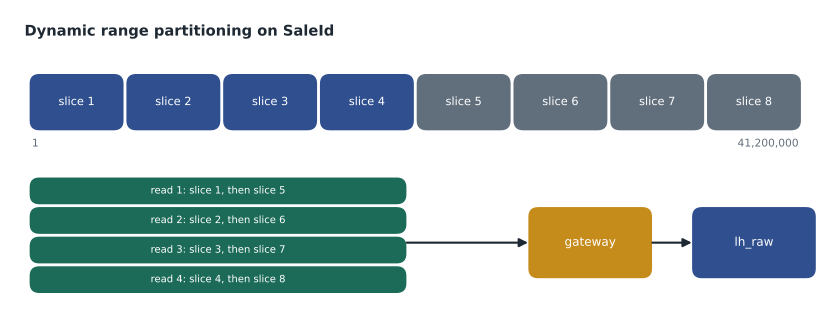
Read as one query, 41.2 million rows go through a single connection, one batch after another. Copy activities for SQL sources can instead split the read into partitions and read several at once. Physical partitions use the source table's own partitioning, which StockLine's table did not have. Dynamic range partitioning needs a column with evenly spread values, such as an increasing key, and a lower and upper bound; the copy divides the range into equal slices and reads several slices in parallel. The degree of copy parallelism caps how many are read at a time.
# How dynamic range partitioning splits the SaleId range into slices
lower, upper = 1, 41_200_000      # smallest and largest SaleId in the history
partitions = 8

width = (upper - lower + 1) // partitions
for p in range(partitions):
    start = lower + p * width
    end = upper if p == partitions - 1 else start + width - 1
print(f"partition {p + 1}: SaleId {start:>10,} to {end:>10,} ({end - start + 1:,} ids)")partition 1: SaleId 1 to 5,150,000 (5,150,000 ids) partition 2: SaleId 5,150,001 to 10,300,000 (5,150,000 ids) partition 3: SaleId 10,300,001 to 15,450,000 (5,150,000 ids) partition 4: SaleId 15,450,001 to 20,600,000 (5,150,000 ids) partition 5: SaleId 20,600,001 to 25,750,000 (5,150,000 ids) partition 6: SaleId 25,750,001 to 30,900,000 (5,150,000 ids) partition 7: SaleId 30,900,001 to 36,050,000 (5,150,000 ids) partition 8: SaleId 36,050,001 to 41,200,000 (5,150,000 ids)
What this code does
The program divides the range of sale numbers, from 1 to 41,200,000, into eight slices of the same width, the way a dynamic range copy splits a large read. For each slice it prints the first and last sale number and how many numbers the slice covers, with the last slice ending exactly at the top of the range. Because sale numbers rise steadily with no big gaps, each slice holds roughly the same number of rows, so several slices can be read at once and finish at about the same time.
Each slice in the output covers 5,150,000 SaleId values. Equal widths only mean equal work if the key is spread evenly; if StockLine had skipped from 20 million to 30 million after a system change, two slices would be nearly empty and the copy would be no faster than four. Ines checked first with a quick query counting rows per million SaleIds, which showed no gaps. She ran the load with eight partitions and a parallelism of four, so four slices were read at a time and the next began as soon as one finished.
Fault tolerance and logging
Real data contains surprises. A copy can stop at the first row it cannot convert, or it can skip incompatible rows and write them, with the reason, to a log folder for later review. Ines chose skipping with logging for the history load, because stopping 30 million rows in would have wasted hours. The log held 212 rows from one week in 2024 when a till upgrade had written negative quantities as text. Keiko and Walt looked at them the next morning, agreed the fix, and Ines loaded the 212 rows separately. Skipping without logging would have been a silent data loss; the log is what makes skipping safe.
Copy jobs
A copy job is a separate Fabric item built for one purpose: moving data from sources to destinations without building a pipeline. It walks through choosing a source, picking tables, choosing a destination and a copy mode, then runs once or on one or more schedules. In full copy mode each run copies everything. In incremental mode the first run copies everything and later runs copy only new or changed rows, using either a watermark column, such as a datetime or rowversion that increases when a row changes, or change data capture in the source, which also captures deletes. The copy job remembers where it got to, resumes from the last successful run after a failure, and can be reset to a full copy for the whole job or for one table.
| Write behaviour | What it does | Note |
|---|---|---|
| Append | Adds the new rows to the destination | The default; keeps every row ever copied |
| Merge | Updates rows that match on a key and inserts the rest | Uses the primary key by default; applies deletes when CDC is used |
| Overwrite | Replaces the destination data | For full copies |
| SCD Type 2 | Keeps a new version of a row each time it changes, with effective dates | Deletes become soft deletes; see lesson 9 |
For the products and stores tables, which change a few hundred rows a day, a copy job in incremental mode with merge on the primary key was all Ines needed: no pipeline, no watermark table to maintain, a schedule at 1:15 a.m., and a run history showing rows read and written. A pipeline can still run a copy job as one of its steps with the copy job activity, which lets the job take part in a larger sequence and in event triggers.
Copy activity or copy job?
Microsoft's guidance for data movement in Fabric sets the two side by side, along with mirroring, eventstreams and dataflows. In short, a copy job suits copying many tables with built-in incremental tracking and little configuration. A copy activity suits copies that are one step among many, need custom queries or dynamic settings, or must react to the outcome of other steps. Mirroring, in lesson 10, suits a continuously synchronised copy of a supported database with no schedule at all.
| Need | Copy job | Copy activity in a pipeline |
|---|---|---|
| Copy many tables with little setup | Strong: pick tables in a wizard | Possible with ForEach and a control table |
| Incremental tracking without code | Built in: watermark or CDC | You store and update the watermark yourself |
| Custom source query built at run time | Limited | Strong: dynamic content |
| Part of a larger sequence with conditions | Through the copy job activity | Natural |
| Deletes and SCD Type 2 without code | With CDC | Needs extra steps |
The StockLine sales increment stayed in the pipeline as a copy activity, because Ines wanted the custom range query, the row count check that follows it and the failure branch from lesson 2. The two choices sit happily together: the nightly pipeline starts at 1 a.m., the copy job for small tables at 1:15 a.m., and the cleaning notebook waits for both through a small check of the copy job's last run status.
One more setting deserves a mention because it surprises people. When a copy activity writes to a lakehouse table, the destination's table action and the activity's mapping decide what happens to columns the destination already has. Appending rows with a column the table lacks fails under Delta schema enforcement unless the table is set up to accept the new column, which is usually what you want: a new column in StockLine should be a deliberate change to the raw table, reviewed like any other, rather than something that slips in overnight.
Worked problem
Will the history load finish before morning?
The gateway servers and the StockLine read together sustained about 1,800 rows a second per partition in a test. With four partitions read at a time, how long will 41.2 million rows take, and will a load started at 1 p.m. finish before 8 a.m. the next day?
Show solution
- Rows per second with four partitions at once: 4 × 1,800 = 7,200.
- \[41{,}200{,}000 \div 7{,}200 \approx 5{,}722 \text{ seconds}\]
- 5,722 seconds is about 95 minutes, or 1 hour and 35 minutes.
- Started at 1 p.m., the load should finish at about 2:35 p.m., far ahead of 8 a.m.
Answer: About 1 hour and 35 minutes; it finished at 2:41 p.m. on the day, six minutes later than the estimate because one slice hit the 2024 rows that were logged and skipped.
Checking the result
A load is not finished when the activity turns green. Ines compared the row count the copy reported with a count on the source, 41,200,000 read against 41,199,788 written, a difference of exactly the 212 logged rows. Keiko's totals the next morning matched StockLine's own reports to the cent for every store but two, which led to the double-counting discovery described in MSAZ-310. Lesson 12 turns these checks into automatic tests.
Common mistakes
MistakeOpen an inbound firewall port so Fabric can reach the on-premises server.
InsteadUse an on-premises data gateway, which connects outbound.
MistakeSkip incompatible rows without logging them.
InsteadLog skipped rows so they can be reviewed and reloaded; otherwise data is lost silently.
MistakeDynamic range partitioning always speeds a copy up.
InsteadIt helps only when the partition column's values are spread evenly across the range.
MistakeA copy job cannot take part in a pipeline.
InsteadThe copy job activity runs a copy job as a pipeline step.
Summary and key terms
- Connections store how to reach a source; on-premises sources go through a data gateway.
- A copy activity has a source, a destination, a table action, mappings and performance settings.
- Partitioned reads and a degree of parallelism speed up large copies when keys are spread evenly.
- Fault tolerance can skip and log rows that fail conversion.
- Copy jobs copy many tables in full or incrementally, by watermark or CDC, with append, merge, overwrite or SCD Type 2.
- Choose a copy job for simple managed copies and a copy activity when the copy is one step in a larger flow.
- Connection
- A shared Fabric object storing how to reach and sign in to a data source.
- On-premises data gateway
- A service on a server inside a private network that lets Fabric reach sources there through outbound connections.
- Copy activity
- A pipeline activity that copies data from a source to a destination.
- Copy job
- A Fabric item that copies data in full or incrementally without a pipeline.
- Dynamic range partitioning
- Splitting a source read into equal ranges of a column so they can be read in parallel.
- Watermark
- A stored value, such as the highest timestamp or key loaded, that marks where the last incremental load stopped.
- Change data capture (CDC)
- A source database feature that records inserts, updates and deletes so they can be copied.
Practice problems
Work each problem on paper first, then reveal the answer to check.
Why does a gateway not need an inbound firewall rule?
Show answer
It makes outbound connections to Fabric.
What does the degree of copy parallelism limit?
Show answer
How many partitions are read at the same time.
Which copy job incremental method also captures deletes?
Show answer
Change data capture.
What did the fault tolerance log contain after the history load?
Show answer
The 212 rows that could not be converted, with the reason.
Give one reason to keep a copy as a pipeline activity instead of a copy job.
Show answer
For example, a custom query built at run time, or checks and failure branches around it.
Lesson quiz · 5 questions
Score 60% or more to complete this lesson.
Create a free account to save your progress, take quizzes and earn a certificate.