
MSAZ-310 · Lesson 8 of 12 · 21 min
Sensitivity labels and endorsement
▶ Video coming soon A video version of this lesson is on the way.
Carmen Ortiz, the privacy officer, came to the eighth hub session on Wednesday, November 4, with a printout of a spreadsheet. It had been emailed to a supplier the previous spring and contained, on a hidden tab, the names and phone numbers of 300 Finch Rewards members. Nobody had meant to send it; the workbook had been built from an old report that included a customer table. Her question was whether the hub would let that happen again. The answer involved two different features that people often confuse: sensitivity labels, which say how confidential data is and protect it, and endorsement, which says how trustworthy content is.
Sensitivity labels
Sensitivity labels come from Microsoft Purview Information Protection, the same service that labels Word documents and emails in Microsoft 365. Harrow & Finch's security team had already published four labels in 2026, as MSAZ-131 described: Public, General, Confidential and Highly Confidential. Once a Fabric administrator enables the tenant setting that lets users apply sensitivity labels, those same labels can be applied to Fabric items: lakehouses, warehouses, semantic models, reports, dataflows and many others. A label appears on the item in the workspace, the OneLake catalog and lineage view, so anyone who sees the item sees how sensitive it is.
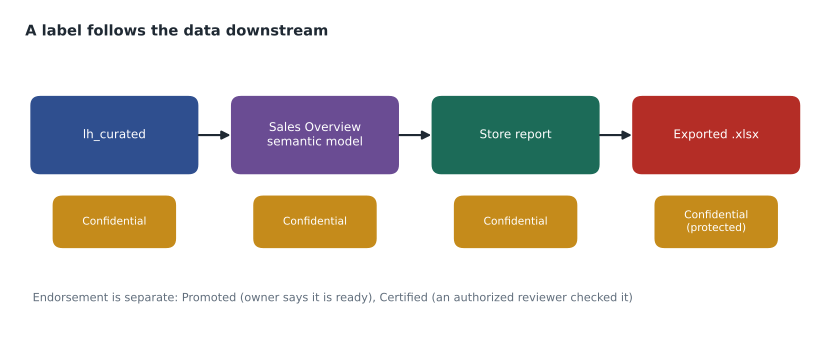
A label on a Fabric item is more than a tag. When data leaves Fabric, for example when someone exports a report's data to Excel, PowerPoint or PDF, the exported file carries the label, and if the label applies encryption, the file is encrypted so that only people allowed by the label can open it. Carmen's leaked spreadsheet would have been labelled Highly Confidential, encrypted to company accounts, and unreadable by the supplier.
How labels spread
Labelling every item by hand would never keep up, so Fabric spreads labels in several ways. A label policy in Purview can set a default label for new items and can make labelling mandatory, so an item cannot be saved without one. Labels are inherited from data sources in some cases: a semantic model that imports data from a labelled source can pick up the source's label. Most importantly, downstream inheritance passes a label along lineage: when a lakehouse is labelled Confidential, items built from it, such as the semantic model and the reports on that model, inherit the label, unless someone has deliberately set a different one. Inheritance only raises labels by default; it does not lower a more restrictive label someone has set by hand.
# Push the most restrictive label down a lineage chain
ORDER = ["Public", "General", "Confidential", "Highly Confidential"]
lineage = {"lh_curated": ["Sales Overview"], "Sales Overview": ["Store report", "Head office report"],
           "Store report": [], "Head office report": [], "rewards_mirror": ["Sales Overview"]}
labels = {"lh_curated": "Confidential", "rewards_mirror": "Highly Confidential",
          "Sales Overview": "General", "Store report": None, "Head office report": "General"}

def stricter(a, b):
    if a is None: return b
    if b is None: return a
    return a if ORDER.index(a) >= ORDER.index(b) else b

for _ in range(len(lineage)):                     # repeat until labels stop changing
    for source, targets in lineage.items():
        for t in targets:
            labels[t] = stricter(labels[t], labels[source])
for item in ["Sales Overview", "Store report", "Head office report"]:
print(f"{item:20} {labels[item]}")Sales Overview Highly Confidential Store report Highly Confidential Head office report Highly Confidential
What this code does
The program lists four labels from least to most sensitive, a small lineage of which items feed which, and the labels set by hand. It then passes labels downstream repeatedly: whenever an item feeds another, the receiving item keeps whichever of the two labels is stricter. Because the semantic model reads the mirrored Rewards database as well as the curated lakehouse, it and both reports end up Highly Confidential, which is the point Carmen wanted to see made.
The program's result surprised Keiko. She had planned to label Sales Overview as Confidential, but the model's design at the time included a small table from the Rewards mirror, so inheritance would make it Highly Confidential and encrypt every export. That was arguably correct, and it prompted a design change: the model would use only aggregated Rewards figures, built in lh_curated, so it could be Confidential, and the member-level table would stay out of it.
Applying and changing labels
In practice, a label is applied from the item's header or its settings pane, where a drop-down lists the labels the person is allowed to use under the company's label policies. Changing a label needs write permission on the item, and lowering a label, for example from Confidential to General, can require a written justification if the policy says so. For large numbers of existing items, administrators can set labels in bulk through the Fabric admin APIs, which is how Renata planned to label the two hundred old Power BI items left over from before the hub. Power BI Desktop files can carry a label too, so a report built on a laptop arrives in the service already labelled.
Labels are only as good as the labelling. A label applied once and never reviewed drifts out of date as a model gains new tables. That is one reason downstream inheritance matters so much: it keeps the labels of reports and models honest when someone adds a more sensitive source upstream, without relying on everyone to remember. It is also why Carmen wanted the quarterly unlabelled-items report described later in this lesson.
What the spreadsheet teaches
Carmen's spreadsheet was not a failure of any single control. The report it came from had no label, its model included a customer table it did not need, the export was allowed for everyone, and the person who emailed it had no way to see what the hidden tab held. The hub's design answers each of those gaps differently: mandatory labels, models that leave out member-level data, export settings scoped by group, and labels that travel with the file. No single feature would have been enough on its own, which is the general lesson of data protection.
Protection policies and DLP
Two Purview features go further than labels alone. Protection policies for Fabric let a security team say that items with a given label can be opened only by certain groups, whatever their workspace role, adding a control that follows the label. Data loss prevention policies for Fabric scan supported items, such as semantic models and lakehouses, for sensitive information types like credit card numbers or national identifiers, and can show policy tips to owners and alert the security team when they find a match. These features are configured in the Microsoft Purview portal, not in Fabric, and some depend on the tenant's Microsoft 365 or Purview licensing. Sunil planned to turn on a DLP policy for Fabric in simulation mode in December 2026, matching the approach his team had taken for email.
Endorsement: which content to trust
Labels answer how sensitive something is. Endorsement answers whether it can be relied on. Fabric has three endorsement badges.
| Badge | Who can apply it | What it means |
|---|---|---|
| Promoted | Anyone with write permission on the item | The owner thinks it is ready for others to use |
| Certified | Only people the Fabric administrator has authorized in the tenant settings | A designated reviewer has checked it against the organization's standards |
| Master data | Only people the Fabric administrator has authorized | The item is the authoritative source of core data, such as the product or customer list |
Endorsed items show their badge everywhere they appear and rank higher in the OneLake catalog and in the data hub when people search for data, so a store analyst looking for sales figures finds the certified model before a colleague's experiment. An endorsed item can also be marked discoverable, which lets people who do not yet have access find it and request access. Endorsement does not change permissions; it is information for the person choosing what to use.
The hub's plan was simple. Sales Overview was promoted on November 4 by Keiko, as its owner. After the pilot's first month, Elena and two finance analysts, the members of a new security group sg-fdh-certifiers that Renata authorized for certification, would review it against a checklist: totals reconcile with StockLine, measures documented, row-level security tested, refresh monitored. If it passed, it would be certified. The curated product table in lh_curated would be marked as master data once purchasing agreed it was the company's single product list.
Worked problem
Label or badge?
Which feature answers each request? (1) Purchasing wants analysts to stop building reports on an old product spreadsheet and use the hub's product table instead. (2) Carmen wants any export containing member details to be encrypted. (3) A new store manager wants to know which of three sales reports finance actually uses. (4) Sunil wants an alert if a semantic model starts containing credit card numbers.
Show solution
- (1) Mark the hub's product table as master data, or certify it, so it ranks first in searches and is clearly the authoritative source.
- (2) A sensitivity label with encryption, applied to items containing member details, so exports are protected.
- (3) Certification: the certified report is the one checked against finance's standards.
- (4) A Purview data loss prevention policy for Fabric, which scans for sensitive information types and alerts.
Answer: Master data or certification, a protective label, certification, and DLP.
Lineage and impact analysis
Both labels and endorsement work best together with lineage. Lineage view in a workspace draws every item as a box, from data sources through pipelines, lakehouses, warehouses and semantic models to reports and apps, with lines showing what feeds what. Impact analysis, opened from any item, lists everything downstream that would be affected by a change, across workspaces, with the owners to notify. Before Ines renamed a column in lh_curated, impact analysis showed two semantic models and five reports depending on the table, and she warned their owners first. When a label changes upstream, the same lineage is what downstream inheritance follows.
Governance as a habit
None of these features run themselves. Labels need a sensible default and a few people who understand when to raise them. Endorsement needs a small group who certify, and a checklist so that certification means the same thing each time. Lineage needs people to look at it before making changes. Nikolai suggested three habits for the pilot: every new item gets a label at creation, with General as the default; every item meant for others is promoted by its owner and reviewed for certification within a month; and every change to a curated table starts with impact analysis. Carmen asked for one more: a quarterly report from the admin monitoring workspace showing items with no label, so gaps could not quietly grow.
Labels in the wider Microsoft 365 picture
Because Fabric uses the same Purview labels as the rest of Microsoft 365, the protection is consistent across the places data ends up. A Confidential report exported to Excel and then attached to an email keeps its label in both places; Outlook shows it, and the same encryption rules apply. Purview's activity explorer records label changes, including when someone lowers a label, which a label policy can require them to justify. For Carmen, this was the strongest argument for using labels in the hub at all: the protection does not stop at the edge of Fabric, and the record of who changed what does not either.
Labels also affect what people can do in some places. A label with encryption may stop an export from opening in an older version of Office, and certain features, such as publishing to the web, can be blocked for labelled content by tenant settings. The hub kept encryption for Highly Confidential only, so that most everyday exports at the Confidential level would carry the label and the visual marking without the friction of encryption.
Common mistakes
MistakeA sensitivity label controls who can open the item in Fabric.
InsteadLabels classify and protect exported data; access in Fabric still comes from roles and permissions, unless a Purview protection policy adds a rule.
MistakeCertified and Promoted mean the same.
InsteadAnyone with write access can promote; only authorized reviewers can certify.
MistakeDownstream inheritance lowers labels to match the source.
InsteadInheritance raises labels to the stricter value; it does not overwrite a stricter label set by hand.
MistakeEndorsement grants access to the item.
InsteadEndorsement is information for choosing content; access is separate, though discoverable items let people request it.
Summary and key terms
- Sensitivity labels come from Microsoft Purview Information Protection and can be applied to Fabric items once the tenant setting is on.
- Labels follow data into exports such as Excel, PowerPoint and PDF, with encryption if the label applies it.
- Default labels, mandatory labelling, inheritance from sources and downstream inheritance spread labels automatically.
- Purview protection policies and DLP policies extend protection and detection to Fabric.
- Endorsement badges are Promoted, Certified and Master data; certification and master data need authorization.
- Lineage and impact analysis show what feeds what and what a change will affect.
- Sensitivity label
- A Purview classification, such as Confidential, applied to items and carried into exported files.
- Downstream inheritance
- Applying an item's label to the items built from it along lineage.
- Mandatory labelling
- A label policy setting that requires a label before an item can be saved.
- Promoted
- An endorsement badge set by an item's owner to show it is ready for use.
- Certified
- An endorsement badge set by an authorized reviewer after checking the item.
- Master data
- An endorsement badge marking an item as the authoritative source of core data.
- Impact analysis
- A view listing everything downstream of an item that a change would affect.
Practice problems
Work each problem on paper first, then reveal the answer to check.
Where are sensitivity labels defined?
Show answer
In Microsoft Purview Information Protection.
What happens to the label when data is exported to Excel?
Show answer
The file carries the label, and is encrypted if the label applies encryption.
Who can certify an item?
Show answer
Only people authorized by a Fabric administrator in the tenant settings.
Does a Certified badge give anyone access to an item?
Show answer
No; endorsement is information, and access is separate.
What should Ines check before renaming a column in a curated table?
Show answer
Impact analysis, to see which models and reports depend on it.
Lesson quiz · 5 questions
Score 60% or more to complete this lesson.
Create a free account to save your progress, take quizzes and earn a certificate.