
MSAZ-310 · Lesson 3 of 12 · 21 min
Workspaces and roles
▶ Video coming soon A video version of this lesson is on the way.
By the third hub session, on Thursday, October 22, the trial capacity held one workspace called Nikolai Sandbox, full of half-finished experiments. Nikolai deleted it in front of Ines and Keiko and said the real design started now. A workspace in Fabric is the container where items live: lakehouses, warehouses, notebooks, pipelines, semantic models and reports. It is also the main unit of access, of capacity assignment and of lifecycle management. Getting the workspace layout right early saves a great deal of reorganizing later, because moving items between workspaces is possible but not always simple.
What a workspace holds and controls
Every workspace is assigned to one capacity, belongs to at most one domain, and has a set of people or groups in roles. It can be connected to a Git branch, as lesson 9 describes, and assigned to a stage of a deployment pipeline, as lesson 10 describes. It has its own settings for Spark, such as the default pool and runtime version, and can have a workspace identity. Inside a workspace, folders can organize items, so a workspace with thirty items can group pipelines, notebooks and models without splitting into several workspaces.
Each user also has My workspace, a personal area for experiments. It is fine for trying something out, but content there cannot be shared through workspace roles, cannot be part of a deployment pipeline and leaves with the person. Nikolai's rule for the hub was simple: nothing anyone else depends on lives in My workspace.
The four workspace roles
Access to a workspace is given by adding a user, a Microsoft Entra security group, a Microsoft 365 group or a service principal to one of four roles. The roles are cumulative: each includes what the one below it can do.
| Role | Can do | Cannot do |
|---|---|---|
| Admin | Everything: update and delete the workspace, add or remove anyone in any role, change settings, connect Git | — |
| Member | Add people with Member, Contributor or Viewer roles; share items; edit OneLake security; create, edit and delete content | Add Admins, delete the workspace, change some workspace settings |
| Contributor | Create, edit and delete content; run notebooks and pipelines; read and write data in OneLake | Add people to roles, share items, edit OneLake security |
| Viewer | View content and use reports; query data only as OneLake security and item permissions allow | Create or edit items; read OneLake data directly unless a security role grants it |
Two details trip people up. The first is that Admins, Members and Contributors can read all the data in the workspace's OneLake items, whatever finer rules exist. OneLake security roles, row-level security and column-level security, covered in lesson 7, restrict Viewers and people given access to individual items; they do not restrict the three higher roles. Anyone who must not see some rows of a table should not be a Contributor in its workspace. The second is that a Viewer can run SQL queries through a lakehouse's SQL analytics endpoint and see the results, depending on the endpoint's security settings, even though they cannot open the files in OneLake directly. Viewer means view and query, not see nothing.
Groups, not people
Roles can be given to individual users, but the hub assigns them to groups. With nine workspaces planned, giving each person a role in each workspace by hand would mean dozens of assignments to keep in step every time someone joined or left. With groups, a new analyst is added to one Entra group and immediately has the right access everywhere. Renata's identity team already managed groups through the company's joiner and leaver process, so access would follow employment automatically.
| Group | Dev workspaces | Test workspaces | Prod workspaces |
|---|---|---|---|
| sg-fdh-leads (Nikolai, Elena) | Admin | Admin | Admin |
| sg-fdh-engineers (Ines and future engineers) | Contributor | Contributor | Viewer |
| sg-fdh-analysts (Keiko and the reporting team) | Contributor | Viewer | Viewer |
| Deployment service principal | — | Member | Member |
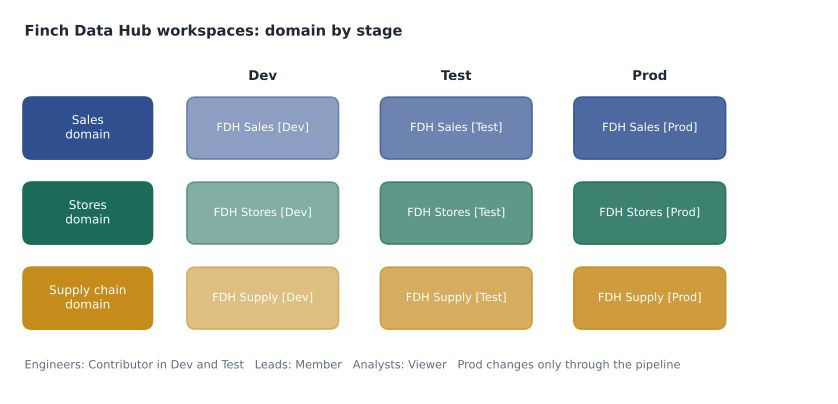
Elena questioned the Viewer role for engineers in production. Would Ines not need to fix a failed load at three in the morning? Nikolai's answer was that changes to production should come only through the deployment pipeline, run by a service principal or by the leads, and that a failed load would be rerun, not edited, in production. If an emergency fix ever needed direct access, a lead could add Ines to the Member role for an hour and remove her afterwards, and the change would show in the audit log. Elena accepted that, with the condition that the emergency process be written down before the pilot.
How many workspaces?
There is no single right number, but a few principles guided the hub's layout. A workspace should hold items that share the same people and the same lifecycle. Because roles apply to the whole workspace, items with very different audiences belong in different workspaces; finance data that only five people may see should not sit beside store sales that two hundred people read. Because a deployment pipeline promotes a workspace's content stage by stage, each stage needs its own workspace: one for development, one for test and one for production. And because domains group workspaces, each workspace should clearly belong to one business area.
That reasoning gave three domains times three stages, nine workspaces in all, named FDH Sales [Dev], FDH Sales [Test], FDH Sales [Prod] and so on. Keiko asked whether the reports should live in the same workspaces as the lakehouses. Many teams separate them, putting data items in one workspace and reports in another, so that report authors can be Contributors to the report workspace without being able to change the data. For the pilot, with one reporting team, Nikolai kept them together and noted it as a decision to revisit once other departments started building their own reports on the hub's semantic models.
Workspace settings worth knowing
The workspace settings pane has many options. Several appear in exam questions.
| Setting | What it does |
|---|---|
| License info | Shows and changes the capacity the workspace runs on |
| Domain | Assigns the workspace to a domain |
| Contact list | Who receives notifications about the workspace; defaults to the admins |
| Git integration | Connects the workspace to a branch in Azure DevOps or GitHub |
| Workspace identity | Creates an automatically managed identity for the workspace |
| Data Engineering/Science: Spark settings | Default Spark pool, runtime version, environment and library settings |
| OneLake | Options such as caching for shortcuts and whether data can be reached from outside Fabric, where the tenant allows |
| Monitoring | Workspace monitoring, which sends logs to an eventhouse in the workspace |
Workspace identity
Pipelines, shortcuts and semantic models often need to sign in to something outside Fabric, such as a storage account or a database. They can use the credentials of the person who set them up, but that ties the connection to someone who may leave. A workspace identity is an automatically managed service principal that belongs to the workspace. A workspace admin creates it in the workspace settings, and Fabric creates a matching app registration and enterprise application in Microsoft Entra ID, managing its credentials so nobody handles a secret. The identity can then be granted access to an Azure resource, for example the Storage Blob Data Reader role on a storage account, and used by connections and shortcuts in that workspace.
Workspace identity also enables trusted workspace access. A storage account can keep its firewall closed to the internet and still allow specific Fabric workspaces through a resource instance rule, so that shortcuts and pipelines in those workspaces can reach it while nothing else can. A workspace identity needs the workspace to be on an F capacity, not a trial or a Power BI Pro workspace. Nikolai planned to create workspace identities in January, when the hub workspaces moved to the paid capacity, and to grant each one access only to the storage it needs.
Worked problem
Who needs which role?
Five requests arrived during the week of October 27. For each, choose the lowest workspace role that meets the need: (1) Ines must create notebooks and run them in FDH Sales [Dev]; (2) the reporting team lead must add two new analysts to FDH Sales [Dev]; (3) a store manager must open the sales report in FDH Sales [Prod]; (4) Elena must connect FDH Sales [Dev] to Git; (5) a consultant must be able to share a report in FDH Stores [Dev] with a colleague.
Show solution
- (1) Creating and running items needs Contributor.
- (2) Adding people to roles needs Member; Members can add Members, Contributors and Viewers.
- (3) Opening a report needs Viewer, or access to the report through an app or a share; lesson 7 covers item-level access.
- (4) Connecting a workspace to Git is a workspace admin task, so Admin.
- (5) Sharing an item needs Member or higher; Contributors cannot reshare, so Member, or the consultant asks a Member to share it.
Answer: Contributor, Member, Viewer, Admin, Member.
Naming, descriptions and contacts
A workspace name is the first thing people see in the OneLake catalog and in lineage, so the hub adopted a pattern from the start: the prefix FDH for Finch Data Hub, the domain, and the stage in square brackets. Every workspace also gets a one-sentence description saying what it is for and who owns it, and a contact list naming the leads group rather than one person. When a store manager in 2028 finds a semantic model and wonders whom to ask about a strange number, the contact list answers the question. Item names follow a similar pattern, with short prefixes such as lh_ for lakehouses, wh_ for warehouses, nb_ for notebooks and pl_ for pipelines, so the type is clear even in places where Fabric does not show an icon.
Deleting and restoring
Deleting a workspace removes every item in it. Fabric keeps a deleted workspace for a retention period, during which a Fabric administrator can restore it from the admin portal; after that it is permanently removed. The length of that period is a tenant setting, and the hub's administrators checked it on day one rather than in the middle of an emergency. Individual items have their own recovery features: Git integration lets a team recreate an item's definition from the repository, and lakehouse and warehouse data have features such as Delta table history and warehouse restore points, covered in lessons 5 and 6. None of these replace thinking about who can delete things. Keeping engineers out of the Admin role in production removes the most likely way an important workspace gets deleted by mistake.
Moving items between workspaces
Items cannot always simply be dragged from one workspace to another. Reports can be copied or rebound to a semantic model in another workspace, and many item types can be exported and imported through Git or deployment pipelines, but data items such as lakehouses carry their OneLake folders with them and are best rebuilt in the right place. That is why Nikolai deleted his sandbox instead of trying to move its contents. The practical lesson is to decide the workspace layout before building anything that matters, and to treat a lakehouse's workspace as its permanent address.
Service principals and automation
People are not the only members of workspaces. A deployment process, a scheduled script or an external orchestration tool signs in as a service principal, an application identity in Microsoft Entra ID. For a service principal to call the Fabric REST APIs at all, a Fabric administrator must allow service principals in the tenant settings, usually for one security group that holds the approved ones. Once allowed, the service principal is added to a workspace role like any user. The hub's deployment service principal is a Member of the test and production workspaces so it can deploy content there, and has no role in development, where people do the building. Keeping automation identities in their own group, with names that say what they are for, makes the audit log readable when something changes at night.
Who can create workspaces
By default, many tenants let any user create a workspace, which is how workspace sprawl begins. A Fabric administrator can restrict workspace creation in the tenant settings to specific security groups. Renata limited it to the hub leads and the IT service desk on October 28, and set up a short request form for anyone else. Capacity assignment is controlled separately: even a person who can create a workspace cannot put it on a paid capacity unless the capacity admin has allowed them. Between the two settings, the company can let people experiment in My workspace while keeping shared, paid compute for planned work.
Common mistakes
MistakeViewers cannot see any data.
InsteadViewers can use reports and can query data through SQL endpoints or OneLake security roles where those allow it.
MistakeRow-level security protects data from Contributors.
InsteadAdmins, Members and Contributors can read all data in the workspace's OneLake items; restrict them by keeping them out of the workspace.
MistakeContributors can share items.
InsteadSharing and resharing items needs Member or higher.
MistakeA workspace identity is a password you store in a connection.
InsteadIt is a service principal whose credentials Fabric manages, so no secret is handled by people.
Summary and key terms
- A workspace contains items and is the main unit of access, capacity assignment and lifecycle.
- The roles Admin, Member, Contributor and Viewer are cumulative; assign them to groups.
- Admins, Members and Contributors can read all OneLake data in the workspace; finer security restricts Viewers and item-level users.
- Use separate workspaces for different audiences and for each deployment stage.
- A workspace identity is a managed service principal for connections and trusted workspace access, and needs an F capacity.
- Restrict workspace creation and capacity assignment to control sprawl.
- Workspace
- A container for Fabric items, assigned to one capacity, with its own roles and settings.
- My workspace
- A personal workspace for each user, not suitable for shared content.
- Workspace role
- Admin, Member, Contributor or Viewer, giving a set of permissions on everything in a workspace.
- Workspace identity
- An automatically managed service principal that belongs to a workspace.
- Trusted workspace access
- Letting specific Fabric workspaces through a storage account firewall using their workspace identity.
- Workspace folder
- A folder inside a workspace used to organize items.
Practice problems
Work each problem on paper first, then reveal the answer to check.
Which role is the lowest that can add a Viewer to a workspace?
Show answer
Member.
Why should Contributors not include people who must be restricted by row-level security?
Show answer
Because Contributors can read all the data in the workspace's OneLake items.
Why assign roles to groups instead of individuals?
Show answer
Access then follows group membership, so joiners and leavers are handled in one place.
What does a workspace identity need from the capacity?
Show answer
The workspace must be on an F capacity.
Where can content in My workspace not be used?
Show answer
It cannot be shared through roles or be part of a deployment pipeline.
Lesson quiz · 5 questions
Score 60% or more to complete this lesson.
Create a free account to save your progress, take quizzes and earn a certificate.