
MSAZ-310 · Lesson 5 of 12 · 21 min
Lakehouses and Delta tables
▶ Video coming soon A video version of this lesson is on the way.
The fifth hub session, on Wednesday, October 28, was the first in which data moved. Ines had loaded three years of StockLine sales, 41.2 million rows across 23 stores, into a lakehouse called lh_raw the previous afternoon. Nikolai wanted Keiko and Ines to understand what had actually been created, because almost everything else in the hub would build on lakehouses and Delta tables.
What a lakehouse is
A lakehouse is a Fabric item that combines the flexibility of a data lake with the structure of a database. Like a lake, it stores files of any kind, cheaply, and lets Spark process them at scale. Like a database, it holds tables with schemas that SQL can query. The name is a blend of the two, and the design comes from the open-source Delta Lake project, which added transactions and table structure on top of plain Parquet files.
Creating a lakehouse in a workspace creates three things at once. The lakehouse itself is the place where engineers work with Spark, notebooks and the lakehouse explorer, which shows the Tables and Files areas. A SQL analytics endpoint is created automatically, giving a read-only T-SQL view of every Delta table in the Tables area; Keiko could connect to it from SQL Server Management Studio or Power BI and query the sales table immediately. Semantic models are no longer created automatically alongside each lakehouse as they once were; a model is now created deliberately when one is needed. Lakehouses can also organize tables into schemas, such as stockline and rewards, rather than keeping every table at one level, which helps once a lakehouse has dozens of tables.
Delta tables
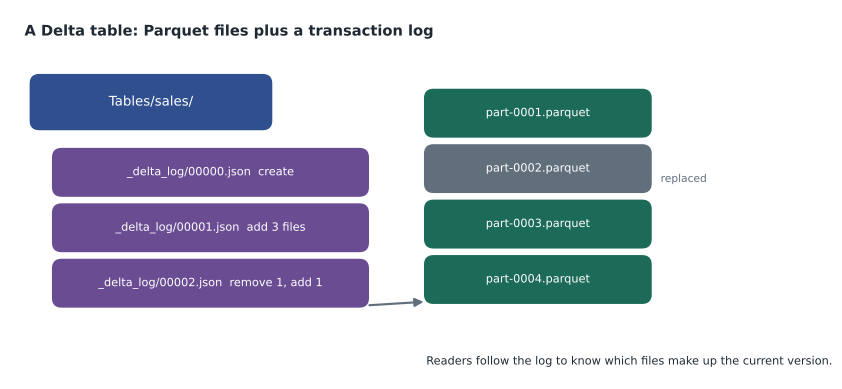
Each table in the Tables area is a Delta table: a folder of Parquet files together with a transaction log in a subfolder called _delta_log. Parquet is a columnar file format; it stores each column's values together, compresses them well and lets an engine read only the columns a query needs. On its own, though, a folder of Parquet files has no idea which files belong to the current version of a table. If a job fails halfway through writing, a reader might see half a change.
The transaction log fixes that. Every change to the table, whether an insert, an update, a delete or a schema change, is written as a new numbered entry in the log, listing which files were added and which were removed. A reader works out the current table by replaying the log: start empty, add and remove files as each entry says, and the files left are the table. Because a change only takes effect when its log entry is written, and the entry is written in one step, readers see either the whole change or none of it. That is what makes Delta tables transactional.
# Replay a tiny Delta transaction log to find the table's current files
log = [
    {"version": 0, "add": [], "remove": []},                                  # create table
    {"version": 1, "add": ["part-0001", "part-0002", "part-0003"], "remove": []},
    {"version": 2, "add": ["part-0004"], "remove": ["part-0002"]},           # an update rewrote one file
]

def files_at(version):
    current = set()
    for entry in log:
        if entry["version"] > version:
            break
        current |= set(entry["add"])
        current -= set(entry["remove"])
    return sorted(current)

for v in range(3):
print(f"version {v}: {files_at(v)}")version 0: [] version 1: ['part-0001', 'part-0002', 'part-0003'] version 2: ['part-0001', 'part-0003', 'part-0004']
What this code does
The program holds a three-entry transaction log, each entry listing the Parquet files added and removed. To find the table at a version, it starts with no files and works through the entries in order up to that version, adding and removing files as each one says. The output lists the files that make up the table at versions 0, 1 and 2, showing that the update in version 2 swapped one file for another without touching the rest.
Replaying the log also explains time travel. Because old log entries and, for a while, old files remain, a query can ask for the table as it was at an earlier version or time. Ines used that the same morning when a test update set every store's region to the same value: she queried version 5 of the table, the one before her mistake, confirmed it was correct, and restored it. Fabric's lakehouse explorer, Spark SQL and notebooks all support viewing a table's history.
-- Spark SQL in a notebook attached to lh_raw
DESCRIBE HISTORY sales;                       -- one row per version: operation, time, user
SELECT COUNT(*) FROM sales VERSION AS OF 5;   -- the table before the faulty update
RESTORE TABLE sales TO VERSION AS OF 5;       -- put it back
Keeping tables healthy
Delta tables need occasional maintenance. Many small writes, such as a pipeline appending a few thousand rows every fifteen minutes, leave many small Parquet files, and reading many small files is slower than reading a few large ones. The OPTIMIZE command rewrites small files into larger ones. Fabric can also write files with V-Order, a Microsoft optimization of the Parquet layout that makes reads by Power BI and the SQL engines faster. Old files that are no longer part of any recent version stay in storage until VACUUM removes them; by default VACUUM keeps files needed for the last seven days of history, so time travel to older versions stops working once it runs.
For a foundations course, the main point is where maintenance is done. A lakehouse table has a Maintenance option in the lakehouse explorer that runs optimize, with or without V-Order, and vacuum with a chosen retention. The same commands can run from notebooks or be scheduled in pipelines. How often to run them, and how to tune file sizes for heavy workloads, is covered in the data engineering course, MSAZ-320.
Worked problem
How long can the team go back?
Ines runs VACUUM on the sales table every Sunday at 2 a.m. with the default retention of seven days. On Thursday at 10 a.m. Keiko asks whether she can see the table as it was on the previous Thursday at 9 a.m. Will time travel work?
Show solution
- The last VACUUM ran on Sunday at 2 a.m. It removed files that were no longer needed for any version newer than seven days before that moment, that is, older than the previous Sunday at 2 a.m.
- Keiko wants the table as of the previous Thursday at 9 a.m., which is four days after the previous Sunday. Files for that version were still within seven days when VACUUM ran on Sunday, so they were kept.
- No VACUUM has run since Sunday, so nothing else has been removed.
Answer: Yes. The version from the previous Thursday is within the seven days VACUUM kept on Sunday, so time travel works; after next Sunday's VACUUM it will not.
Getting data into a lakehouse
There are several ways to load a lakehouse, and later courses cover them in depth. A file uploaded to the Files area can be loaded into a new or existing table with Load to Tables, which works for CSV and Parquet files. Pipelines with a copy activity, or the simpler copy job, can move data from many sources. Dataflows Gen2 use Power Query to transform data on the way in. Notebooks use Spark, in Python, Scala, R or SQL, for anything complex. Shortcuts, from lesson 4, make data appear without loading it. Ines used a pipeline for the history load and a notebook for the first cleaning steps.
# PySpark in a notebook: read raw CSV files and write a Delta table
df = (spark.read.option("header", True)
               .csv("Files/stockline/sales/*.csv"))
(df.write.mode("overwrite")
         .format("delta")
         .saveAsTable("stockline.sales"))
Layers: raw, curated and serving
Most lakehouse designs organize data in layers, often called the medallion architecture: bronze for data as it arrived, silver for cleaned and conformed data, and gold for data shaped for a particular use, such as a star schema for reporting. The names matter less than the idea. Each layer has a clear job, and data moves forward through them, so that a problem in a report can be traced back step by step to the source.
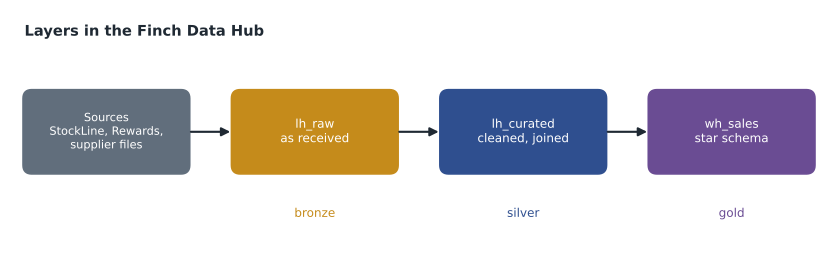
For the hub, Nikolai chose plainer names than bronze and silver, because store managers would one day see them in the catalog. lh_raw holds data exactly as received, never edited. lh_curated holds cleaned, typed and joined tables, such as sales with one consistent store key and products with one current price. The gold layer, the star schema that reports use, would go in a warehouse, wh_sales, for reasons lesson 6 explains. Each layer could live in its own workspace for stricter separation; the pilot kept lh_raw and lh_curated in the same sales workspaces, with the option to split later.
Schemas that protect themselves
Delta tables also enforce their schema. If a pipeline tries to append rows with a column the table does not have, or with a text value where the table expects a number, the write fails instead of quietly corrupting the table. That behaviour, called schema enforcement, caught a real problem during the history load: one year of StockLine extracts had the store number stored as text with a leading zero. When a schema really should change, for example when StockLine adds a loyalty-tier column, the writer can ask for schema evolution, which adds the new column to the table and leaves it empty for older rows. The change is recorded in the transaction log like any other, so the table's history shows exactly when its shape changed and who changed it.
Unmanaged files and managed tables
Data in the Tables area is managed: Fabric knows each folder is a table and shows it to the SQL endpoint and other engines. Data in the Files area is not: a Spark notebook can read and write it, but the SQL endpoint does not see it. A common beginner's mistake is writing Delta files into a Files folder and then wondering why the table does not appear in SQL. The fix is to save them as a table in the Tables area, or to create a shortcut in Tables that points at the folder.
Why open formats matter
Because the data is Delta and Parquet, it is not locked in. Tools outside Fabric that read Delta, such as Azure Databricks or open-source Spark, can read the hub's tables through OneLake's ADLS API, subject to Fabric permissions. If Harrow & Finch ever moved some work elsewhere, the data would not need converting. Elena, who had spent years exporting data out of proprietary formats, considered that the single best argument for the design.
The SQL analytics endpoint in practice
The SQL analytics endpoint deserves a closer look, because it is how most analysts first meet a lakehouse. It appears as a separate item next to the lakehouse and has its own connection string, so tools such as SQL Server Management Studio, Visual Studio Code with its SQL extension, and Power BI can connect with Microsoft Entra sign-in. It exposes every Delta table in the Tables area as a table and lets people create views, functions and stored procedures over them, and grant SQL permissions on those objects. What it cannot do is change table data: inserts, updates and deletes go through Spark, pipelines or dataflows.
The endpoint keeps its metadata in step with the lakehouse automatically, usually within moments of a table being written. Keiko noticed a short delay that day, when a new table appeared in the lakehouse explorer a minute before it appeared in her SQL query window; a metadata refresh can be triggered if it ever matters. For the pilot, the endpoint was mainly a checking tool: Keiko wrote T-SQL queries to compare the lakehouse's sales totals with the old reporting database, store by store, and found that two stores had been double-counted in the old reports since a till migration in 2024.
Common mistakes
MistakeA lakehouse table is just a folder of Parquet files.
InsteadIt is Parquet files plus a transaction log that defines which files make up each version.
MistakeThe SQL analytics endpoint can update lakehouse tables.
InsteadThe SQL analytics endpoint is read-only; tables are written by Spark, pipelines, dataflows and other loaders.
MistakeTime travel works for any past version forever.
InsteadOnce VACUUM removes old files, versions that needed them can no longer be read.
MistakeDelta files written to the Files area appear as tables.
InsteadOnly Delta tables in the Tables area, or Tables shortcuts, are managed tables seen by the SQL endpoint.
Summary and key terms
- A lakehouse combines files and tables and comes with a read-only SQL analytics endpoint.
- Delta tables are Parquet files plus a transaction log; replaying the log gives the current version, and changes are all or nothing.
- Time travel reads earlier versions until VACUUM removes their files; the default retention is seven days.
- OPTIMIZE compacts small files and V-Order speeds up reads by Fabric engines.
- Data can be loaded with Load to Tables, pipelines, dataflows, notebooks or shortcuts.
- Layered designs, such as raw, curated and serving, make data easier to trace and trust.
- Lakehouse
- A Fabric item that stores files and Delta tables and provides a SQL analytics endpoint.
- SQL analytics endpoint
- A read-only T-SQL interface to the Delta tables in a lakehouse or mirrored database.
- Delta table
- A table stored as Parquet files with a transaction log that makes changes atomic and versioned.
- Transaction log
- The _delta_log folder of numbered entries recording which files each change added and removed.
- Time travel
- Querying a Delta table as it was at an earlier version or time.
- V-Order
- A Microsoft optimization of Parquet file layout for faster reads in Fabric.
- Medallion architecture
- A layered design with bronze, silver and gold stages of data.
Practice problems
Work each problem on paper first, then reveal the answer to check.
What does the _delta_log folder contain?
Show answer
Numbered entries recording which Parquet files each change added and removed.
Why can readers never see half of a Delta change?
Show answer
A change takes effect only when its log entry is written, in one step.
What stops time travel to an old version from working?
Show answer
VACUUM removing the files that version needed.
Which lakehouse area does the SQL analytics endpoint read?
Show answer
The Tables area.
Name two ways to load data into a lakehouse table.
Show answer
For example Load to Tables, a pipeline copy activity, a dataflow or a notebook.
Lesson quiz · 5 questions
Score 60% or more to complete this lesson.
Create a free account to save your progress, take quizzes and earn a certificate.