
MSAZ-310 · Lesson 6 of 12 · 21 min
Warehouses
▶ Video coming soon A video version of this lesson is on the way.
Keiko had written T-SQL for a decade and only a little Python. When Nikolai opened the sixth hub session, on Thursday, October 29, by asking where the reporting star schema should live, she answered at once: somewhere she could write it in SQL. That instinct is a good starting point for understanding the Fabric warehouse, which is built for teams who think in T-SQL and need to write data, not only read it.
What a Fabric warehouse is
A warehouse in Fabric is a relational data warehouse with full read and write T-SQL. Tables are created with CREATE TABLE, loaded with INSERT, UPDATE, DELETE, COPY INTO and CREATE TABLE AS SELECT, and transformed with views and stored procedures, much as in SQL Server or Azure Synapse dedicated SQL pools. Underneath, though, the data is stored as Delta Parquet in OneLake, like everything else in Fabric, and compute is provided by the capacity rather than by a dedicated cluster. There is no warehouse size to choose, no distribution key to tune, and no indexes to create; the engine manages file layout and statistics itself.
Because the storage is Delta in OneLake, a warehouse's tables can be read by other engines. A Spark notebook can read wh_sales tables through OneLake, a semantic model can use them in Direct Lake mode, and a lakehouse in another workspace can have a shortcut to them. Only the warehouse engine writes them, which keeps its transactions consistent.
Lakehouse endpoint or warehouse?
Both a lakehouse's SQL analytics endpoint and a warehouse answer T-SQL queries over Delta tables. The difference is who writes the data and how.
| Feature | Lakehouse SQL analytics endpoint | Warehouse |
|---|---|---|
| T-SQL reads | Yes | Yes |
| T-SQL writes (INSERT, UPDATE, DELETE) | No, read-only | Yes |
| Multi-table transactions | No | Yes |
| Who loads the tables | Spark, pipelines, dataflows, shortcuts | T-SQL, pipelines, dataflows |
| Views, functions, procedures | Yes, over existing tables | Yes |
| Files and unstructured data | Yes, in the lakehouse Files area | No |
| Typical users | Data engineers and Spark developers | SQL developers and analytics engineers |
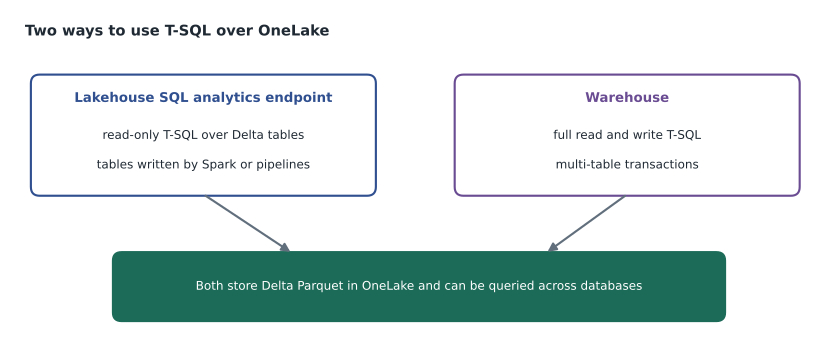
The decision in the hub followed the people. Ines would clean and join data in Spark, so lh_curated is a lakehouse. Keiko and the reporting team would build and maintain the star schema in T-SQL, with stored procedures that load each dimension and the fact table in a single transaction, so the gold layer is a warehouse. A team made entirely of Spark developers could keep the gold layer in a lakehouse too; nothing in Fabric forces the choice.
Cross-database queries
A warehouse can query other warehouses and lakehouse SQL analytics endpoints in the same workspace by three-part name, database.schema.table, without copying data. Keiko's load procedure reads cleaned sales from lh_curated and writes the fact table in wh_sales in one statement.
-- In wh_sales: load yesterday's sales into the fact table from the curated lakehouse
BEGIN TRANSACTION;

DELETE FROM dbo.FactSales WHERE SaleDate = @LoadDate;

INSERT INTO dbo.FactSales (DateKey, StoreKey, ProductKey, Quantity, NetAmount)
SELECT d.DateKey, st.StoreKey, p.ProductKey, s.Quantity, s.NetAmount
FROM   lh_curated.stockline.sales AS s
JOIN   dbo.DimDate    AS d  ON d.CalendarDate = s.SaleDate
JOIN   dbo.DimStore   AS st ON st.StoreNumber = s.StoreNumber
JOIN   dbo.DimProduct AS p  ON p.Sku = s.Sku AND p.IsCurrent = 1
WHERE  s.SaleDate = @LoadDate;

COMMIT TRANSACTION;
Wrapping the delete and insert in one transaction means a report never sees a day with no sales halfway through the load. If any step fails, the whole transaction rolls back and yesterday's rows stay as they were. That guarantee, across several tables if needed, is the main reason to choose a warehouse for the gold layer.
A star schema in brief
The gold layer uses a star schema: a central fact table of measurable events, here one row per product per store per day, surrounded by dimension tables that describe them, such as date, store and product. Reports filter and group by dimension attributes and sum the fact table's measures. Star schemas suit both people and engines: the questions analysts ask map onto them naturally, and semantic models in Power BI work best with them. The design of star schemas and the semantic models built on them is the subject of MSAZ-311; here it matters only as the reason the gold layer exists.
import sqlite3
db = sqlite3.connect(":memory:")
db.executescript("""
CREATE TABLE DimStore (StoreKey INTEGER, StoreName TEXT, Region TEXT);
CREATE TABLE FactSales (StoreKey INTEGER, SaleDate TEXT, NetAmount REAL);
INSERT INTO DimStore VALUES (12, 'Store 12', 'North'), (15, 'Store 15', 'West'), (21, 'Store 21', 'North');
INSERT INTO FactSales VALUES
  (12, '2026-11-04', 18250.40), (15, '2026-11-04', 9410.15), (21, '2026-11-04', 12780.00),
  (12, '2026-11-05', 17990.10), (15, '2026-11-05', 10120.65), (21, '2026-11-05', 13305.25);
""")
rows = db.execute("""
SELECT s.Region, COUNT(DISTINCT s.StoreKey) AS stores, ROUND(SUM(f.NetAmount), 2) AS sales
FROM FactSales f JOIN DimStore s ON s.StoreKey = f.StoreKey
GROUP BY s.Region ORDER BY sales DESC""").fetchall()
for region, stores, sales in rows:
    label = "store" if stores == 1 else "stores"
print(f"{region:6} {stores} {label:6} {sales:,.2f} dollars")North 2 stores 62,325.75 dollars West 1 store 19,530.80 dollars
What this code does
The program builds a two-table star schema in memory: a store dimension that says which region each store is in, and a fact table of daily sales amounts. It then joins the two, groups by region and adds up the sales, which is the same pattern a report uses on the real warehouse. The output shows the North region, with two stores, ahead of the West region, with one, over the two days of invented figures.
Loading a warehouse
Several routes load a warehouse. COPY INTO reads files, such as Parquet or CSV in OneLake or an Azure storage account, straight into a table and is the fastest way to bulk-load. CREATE TABLE AS SELECT creates and fills a table from a query in one step. INSERT ... SELECT from a lakehouse endpoint, as in Keiko's procedure, moves data between items in a workspace. Pipelines and Dataflows Gen2 can also use a warehouse as their destination. For the history load, Keiko used CREATE TABLE AS SELECT from lh_curated, which built a 41.2-million-row FactSales table in under four minutes on the trial capacity.
Protecting warehouse data over time
Warehouses have their own safety features. A table clone makes a zero-copy copy of a table at a point in time: only metadata is copied, so it is instant and costs almost no storage, and it is handy for testing a change against real data. Time travel lets a query read a table as it was at an earlier moment, within a retention window. Restore points capture the whole warehouse at a moment; Fabric creates system restore points automatically on a regular schedule and keeps them for a limited period, and users can create their own before a risky change. Restoring a warehouse to a restore point replaces its current state, so it is a tool for recovering from a serious mistake, not for routine fixes.
Worked problem
Choosing a recovery tool
Three things went wrong during the week of November 2 in the test warehouse. (1) Keiko's procedure loaded November 8 twice and doubled that day's sales. (2) An analyst wanted to test a new product hierarchy against real data without disturbing anyone. (3) A script dropped two dimension tables and altered five others. Which feature fits each?
Show solution
- (1) Only one day in one table is wrong. Rerunning the procedure, which deletes the day before inserting, fixes it; time travel can confirm the correct totals first. No warehouse-wide restore is needed.
- (2) A table clone of DimProduct gives the analyst a private copy instantly, with no storage cost until it changes.
- (3) Many objects are damaged at once. Restoring the warehouse to the restore point taken before the script ran puts every table back together, at the cost of losing any other changes since that point.
Answer: Rerun the load, clone the table, restore the warehouse.
Security in a warehouse
Warehouses support familiar SQL security on top of Fabric's workspace roles and item permissions. GRANT, DENY and REVOKE control access to schemas, tables, views and procedures. Row-level security, column-level security and dynamic data masking restrict what a user sees within a table. As lesson 7 explains, these SQL rules apply to people who reach the warehouse with item permissions or the Viewer role; workspace Admins, Members and Contributors can see everything. The reporting team's plan was to give most business users access through the semantic model rather than SQL at all, and to keep SQL access to the warehouse for a small group of analysts.
Monitoring queries
A warehouse records its own activity. Query insights, a set of views in each warehouse, keep a history of completed queries with their duration, the data they read and who ran them, and summarize the longest-running and most frequent queries. Dynamic management views show what is running right now. Keiko used query insights after the history load to find that one of her dimension loads scanned the whole sales table each day; adding a date filter cut its run time from four minutes to twenty seconds. Warehouse activity also appears in the Capacity Metrics app as consumption on the capacity, which lesson 11 covers.
Engine behaviour worth knowing
Because the engine manages itself, a Fabric warehouse has fewer knobs than SQL Server, but a few behaviours are worth understanding. Statistics on columns are created and updated automatically as queries need them, so the optimizer knows how many rows to expect; they can also be created by hand for an important column. Results of repeated queries and frequently read data are cached, so the second run of a report query is usually much faster than the first. Large loads go fastest when they write many rows in one statement rather than row by row in a loop, which is the opposite of habits learned on operational databases. And because storage is Delta, every write creates new files and a log entry, so many tiny updates are costly; batching them is better.
Keiko found one habit hard to break. In the old reporting database she had built indexes whenever a report was slow. In the warehouse there are no indexes to build, and the right responses to a slow query are different: filter earlier, select fewer columns, check whether statistics are current, and look at the query's plan and cost in query insights. After a week, she said, she missed the indexes less than she had expected.
Moving the old reporting database
Harrow & Finch's nightly reporting ran from a SQL Server reporting database with about sixty views and twenty stored procedures, built up since 2014. Keiko did not plan to move it table by table. Instead, she listed which reports were still used, using the report server's own logs, and found that only twenty-two of the sixty views fed anything a person had opened in the last six months. Those twenty-two became the requirements for the warehouse; the rest were archived. Microsoft offers a migration assistant for moving SQL Server and Synapse warehouse objects into Fabric, which converts much of the T-SQL automatically, but Keiko judged it simpler to rewrite her twenty-two on the new star schema. Either way, a migration is a chance to retire what nobody uses, and a team that moves everything moves its old problems too.
What a warehouse is not
A Fabric warehouse is for analytics, not for running an application. It handles large scans, joins and aggregations well, and bulk loads quickly, but it is not designed for thousands of small transactions a second from a point-of-sale system. That workload belongs in an operational database, such as Azure SQL or the SQL database item in Fabric, which lesson 12 compares. Nor does a warehouse hold files: supplier PDFs and images stay in a lakehouse's Files area or in storage reached by a shortcut.
Common mistakes
MistakeA Fabric warehouse needs a size and a distribution key chosen up front.
InsteadWarehouse compute comes from the capacity and the engine manages layout; there is no size or distribution key to set.
MistakeWarehouse tables are stored in a proprietary format.
InsteadWarehouse tables are Delta Parquet in OneLake and can be read by other engines.
MistakeA lakehouse SQL endpoint and a warehouse are the same item.
InsteadThe endpoint is read-only over lakehouse tables; the warehouse supports writes and multi-table transactions.
MistakeRestoring a restore point is the way to fix one bad day of data.
InsteadA restore point resets the whole warehouse; fix one table with a reload, time travel or a clone.
Summary and key terms
- A Fabric warehouse offers full read and write T-SQL and multi-table transactions over Delta tables in OneLake.
- There is no cluster size or index to manage; compute comes from the capacity.
- Choose a warehouse when a T-SQL team writes and transforms data, and a lakehouse when Spark and files dominate.
- Cross-database queries join warehouses and lakehouse endpoints in a workspace by three-part names.
- COPY INTO, CREATE TABLE AS SELECT and INSERT ... SELECT load warehouses; pipelines and dataflows can too.
- Table clones, time travel and restore points protect data; SQL security adds row, column and masking rules.
- Warehouse
- A Fabric item providing a relational data warehouse with full T-SQL over Delta tables in OneLake.
- Cross-database query
- A query that uses three-part names to read other warehouses or lakehouse endpoints in the same workspace.
- COPY INTO
- A T-SQL statement that bulk-loads files into a warehouse table.
- Table clone
- A zero-copy copy of a warehouse table made by copying metadata.
- Restore point
- A captured state of a whole warehouse that it can be restored to.
- Star schema
- A model with a fact table of events surrounded by dimension tables that describe them.
- Query insights
- Views in a warehouse that record completed queries and their cost.
Practice problems
Work each problem on paper first, then reveal the answer to check.
Name one thing a warehouse can do that a lakehouse SQL endpoint cannot.
Show answer
Write data with INSERT, UPDATE or DELETE, or run multi-table transactions.
Where are warehouse tables stored?
Show answer
In OneLake, as Delta Parquet.
Which statement is the fastest way to bulk-load files into a warehouse table?
Show answer
COPY INTO.
What does a table clone copy?
Show answer
Only metadata, so it is instant and uses almost no extra storage.
Why put the delete and insert of a daily load in one transaction?
Show answer
So readers never see the day missing or half-loaded, and a failure rolls back cleanly.
Lesson quiz · 5 questions
Score 60% or more to complete this lesson.
Create a free account to save your progress, take quizzes and earn a certificate.