
MSAZ-282 · Lesson 9 of 12 · 22 min
Backup and point-in-time restore
▶ Video coming soon A video version of this lesson is on the way.
Replicas protect against hardware and regional failures, but they faithfully copy every mistake. When an analyst ran an UPDATE without a WHERE clause on the StockLine price table in 2017, the change was on the mirror within a second. What saved the day was a log backup taken nine minutes earlier and Walt's practised restore to a point just before the mistake. Backups are still the answer to human error, corruption, ransomware and any other problem where the data itself is wrong. In Azure SQL Database and Managed Instance the service takes the backups; the DBA's job becomes choosing retention and redundancy, knowing how to restore, and keeping the few backups that the platform does not take. On SQL Server virtual machines, backups are again the customer's responsibility, with help from Azure.
Automated backups in SQL Database and Managed Instance
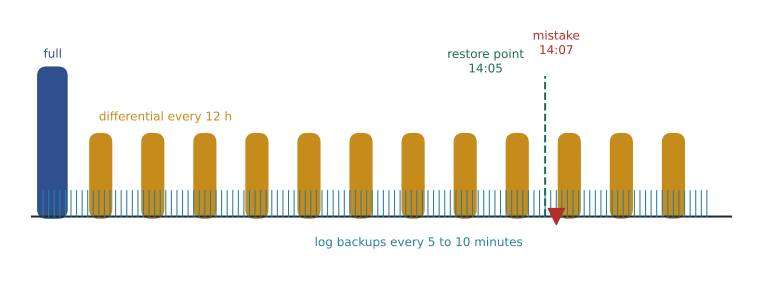
Both platform services back up every database automatically. They take full backups weekly, differential backups every 12 or 24 hours, and transaction log backups roughly every 5 to 10 minutes, depending on activity. The schedule is managed by the service and cannot be changed, but the result is the same as a well-run maintenance plan: a chain of backups from which the service can restore the database to any point within the retention period. Backups are compressed and encrypted when the database uses transparent data encryption, which is on by default.
| Setting | Azure SQL Database | Azure SQL Managed Instance |
|---|---|---|
| Point-in-time restore retention | 1 to 35 days (Basic tier up to 7); default 7 | 1 to 35 days; default 7 |
| Retention for a deleted database | Restorable within its retention period | Restorable within its retention period |
| Backup storage redundancy | Locally redundant, zone redundant or geo-redundant (default geo) | Locally redundant, zone redundant or geo-redundant (default geo) |
| Geo-restore | Available with geo-redundant backup storage | Available with geo-redundant backup storage |
| Customer-initiated backups | Not available (copies and exports instead) | COPY_ONLY backups to Azure Blob Storage |
| Long-term retention | Up to 10 years | Up to 10 years |
Backup storage redundancy matters more than it looks. Locally redundant storage keeps three copies in one data centre; zone-redundant storage keeps them across availability zones; geo-redundant storage also copies them asynchronously to the paired region, which is what makes geo-restore possible when the primary region is lost. The choice also affects residency: geo-redundant backups for a database in Canada Central are stored in Canada East, which keeps them in Canada. Harrow & Finch's Azure Policy requires zone-redundant or geo-redundant backup storage for every production database, which is why Walt's test template from lesson 2 was refused.
Restoring to a point in time
A point-in-time restore always creates a new database; it never overwrites the existing one. That is a safety feature. After the 2017 incident, Walt restored a copy beside the live database, checked the old prices, and then copied the correct rows back, without taking StockLine offline. In Azure he would do the same: restore Pricing as Pricing_restore to 14:05, compare and repair, then drop the copy. If the whole database must be replaced, the usual way is to rename the damaged database, rename the restored copy to the original name, and keep the damaged one for a while for investigation. Restores can be started from the portal, PowerShell, the CLI or REST, and on Managed Instance also between instances in the same subscription and region.
az sql midb restore --resource-group rg-stockline-prod-cc --managed-instance hf-mi-stockline \
    --name Pricing --dest-name Pricing_restore --time "2026-11-19T20:05:00Z"

az sql db restore --resource-group rg-rewards-prod-cc --server hf-sql-rewards-prod-cc \
    --name finchrewards --dest-name finchrewards_restore --time "2026-11-19T20:05:00Z" --service-objective GP_Gen5_4
Times are given in UTC, which catches people out. A mistake noticed at 14:07 Winnipeg time in November, when Central Standard Time is six hours behind UTC, means a restore point of 20:05 UTC. Walt's runbook includes a conversion table for both standard and daylight time, because a restore to the wrong hour either misses the data or brings the mistake back.
Worked problem
How long will the restore take?
Restore time depends mostly on database size and on how much log must be replayed. Microsoft does not publish one figure, so Walt measured a test restore of a 60 GB copy of Pricing on the non-production instance: it took 14 minutes. Pricing in production is 40 GB, and StockLine is 410 GB. Estimate each restore, assuming time grows in proportion to size.
Show solution
- Rate from the test: 60 GB in 14 minutes is about 60 ÷ 14 ≈ 4.3 GB per minute.
- Pricing: 40 ÷ 4.3 ≈ 9.3 minutes.
- StockLine: 410 ÷ 4.3 ≈ 95.3 minutes, or about an hour and a half.
- Log replay adds time if the restore point is far from the last differential, so these are minimum estimates.
Answer: Pricing would take about 10 minutes and StockLine about an hour and a half. A full restore of StockLine therefore cannot meet its one-hour RTO, which is why its disaster recovery relies on the failover group, and restores are reserved for errors that replicas copy.
Deleted databases and geo-restore
If a database is dropped by mistake, it can be restored within its retention period from the list of deleted databases on its server or instance. Dropping the logical server or the managed instance itself removes its backups, which is why production resource groups at Harrow & Finch carry a delete lock. Geo-restore uses the geo-redundant copies of backups in the paired region to create a database on any server or instance, even when the primary region is unavailable. The geo-replicated backups lag the primary by up to about an hour, so geo-restore's RPO is roughly an hour and its RTO is the time to restore, which can be several hours for large databases. For tier 3 databases such as SalesHistory, that is the whole disaster-recovery plan.
Backups you take yourself
Managed Instance allows customer-initiated backups with the COPY_ONLY option to Azure Blob Storage, which do not break the automated backup chain. Walt will take one each month of StockLine for the auditors, who want a copy they control and can keep outside the service. Managed Instance will not take a copy-only backup of a database protected by transparent data encryption with a service-managed key, because nobody outside the service could ever decrypt it; the database must use a customer-managed key in Azure Key Vault, which the restoring server can also be given access to. Walt's design uses a customer-managed key for that reason. Azure SQL Database does not allow native backups at all; the equivalents are database copies and BACPAC exports.
-- On the managed instance: a credential for the storage container, using a managed identity.
CREATE CREDENTIAL [https://hfbackupaudit.blob.core.windows.net/stockline]
    WITH IDENTITY = 'Managed Identity';

BACKUP DATABASE StockLine
    TO URL = 'https://hfbackupaudit.blob.core.windows.net/stockline/StockLine_2026-11-30.bak'
    WITH COPY_ONLY, COMPRESSION, CHECKSUM, STATS = 10;

-- Restoring a native backup into a managed instance (for example, from SQL Server):
RESTORE DATABASE StockLine_audit_check
    FROM URL = 'https://hfbackupaudit.blob.core.windows.net/stockline/StockLine_2026-11-30.bak';
Backups on SQL Server virtual machines
On a SQL Server virtual machine, Walt is back in charge of backups, with the full T-SQL BACKUP and RESTORE commands and any schedule he wants. Azure helps in three ways. The SQL IaaS Agent extension can run automated backups to a storage account, with a retention period and optional encryption. Azure Backup can protect SQL Server databases inside virtual machines with application-consistent backups, log backups as often as every 15 minutes and central reporting. And SQL Server's own backup to URL writes directly to Azure Blob Storage, with a shared access signature credential or, on recent versions in Azure, a managed identity. The warehouse system uses Azure Backup, because the vendor's support team is familiar with it and because Walt can see all its backup jobs in one place.
-- Backup to URL from the warehouse VM with a shared access signature credential.
CREATE CREDENTIAL [https://hfbackupwms.blob.core.windows.net/wms]
    WITH IDENTITY = 'SHARED ACCESS SIGNATURE', SECRET = '<SAS token without the leading question mark>';

BACKUP LOG WMS TO URL = 'https://hfbackupwms.blob.core.windows.net/wms/WMS_log_202611191400.trn'
    WITH COMPRESSION, CHECKSUM;

RESTORE DATABASE WMS_check FROM URL = 'https://hfbackupwms.blob.core.windows.net/wms/WMS_full_20261115.bak'
    WITH MOVE 'WMS' TO 'F:\Data\WMS_check.mdf', MOVE 'WMS_log' TO 'G:\Log\WMS_check.ldf', NORECOVERY;
RESTORE LOG WMS_check FROM URL = 'https://hfbackupwms.blob.core.windows.net/wms/WMS_log_202611191400.trn'
    WITH STOPAT = '2026-11-19T14:05:00', RECOVERY;
Backup storage cost
Backup storage is not free without limit. For Azure SQL Database in the vCore model, backup storage up to the database's maximum data size is included, and anything above that is billed per GB per month; Managed Instance includes backup storage up to the instance's reserved storage. Longer retention, high change rates and geo-redundant storage all raise the amount and the price. Walt's rule is to set point-in-time retention to what the business needs, not to the maximum, and to use long-term retention for anything older than a few weeks.
Worked problem
How much backup storage is billable?
Finch Rewards has a maximum data size of 250 GB. With 14 days of point-in-time retention, its backups use 610 GB. Use an illustrative price of 0.20 dollars per GB per month for geo-redundant backup storage above the included amount. What is the monthly backup storage charge?
Show solution
- Included backup storage: equal to the maximum data size, 250 GB.
- Billable storage: 610 − 250 = 360 GB.
- Monthly charge: 360 × 0.20 = 72 dollars.
Answer: Finch Rewards would pay about 72 dollars a month for backup storage at these illustrative prices. Cutting retention to 7 days would reduce the amount, but the loyalty team asked for 14 days because some errors are found only at month end.
Choosing a backup strategy
The study guide asks a DBA to recommend a backup and restore strategy, not just to know the commands. Walt's recommendation for each database answers five questions. How far back must a point-in-time restore reach? That sets the retention, usually 7 to 35 days. Where must the backups survive? That sets the redundancy: zone-redundant for databases whose disaster recovery is a failover group, geo-redundant where geo-restore is the disaster-recovery plan. How old a copy might anyone ever ask for? That sets long-term retention, the subject of the next lesson. Does anyone outside the service need a copy? That decides whether copy-only backups or exports are needed. And how quickly must a restore finish? That decides whether the restore can be the recovery plan or only a tool for errors.
The answers for the Harrow & Finch estate follow the recovery tiers from lesson 4. Tier 1 and tier 2 databases have 14 days of point-in-time retention, because some pricing and loyalty errors are found only at the end of a two-week promotion, and zone-redundant backup storage, because their regional disaster recovery is a failover group. SalesHistory keeps 7 days with geo-redundant storage, because geo-restore is its whole plan. The warehouse virtual machines keep 30 days in Azure Backup, set by the vendor's support policy. Writing these choices down, with the reason for each, matters as much as configuring them: a reviewer who sees 35 days of retention on a test database without a reason will rightly ask why the company is paying for it.
One more habit completes the strategy. Every backup policy is only as good as the last restore that proved it, so the monthly restore test in lesson 11 rotates through all the databases, and its measured times feed back into the recovery estimates in the runbook.
Restores on Managed Instance also run in the background and appear in the instance's list of operations, so a long restore can be watched with the same commands used for scaling in lesson 2, and cancelled if it was started with the wrong time.
Common mistakes
MistakeA point-in-time restore overwrites the database.
InsteadIt always creates a new database, which can then replace the original or be used to copy data back.
MistakeReplicas make backups unnecessary.
InsteadReplicas copy mistakes and corruption; only backups recover the data as it was.
MistakeRestore times are given in local time.
InsteadRestore points are given in UTC, so convert carefully.
MistakeAzure SQL Database allows native COPY_ONLY backups to Blob Storage.
InsteadThat is a Managed Instance feature; SQL Database uses copies and BACPAC exports.
Summary and key terms
- SQL Database and Managed Instance take full, differential and log backups automatically; retention is 1 to 35 days, 7 by default.
- Backup storage can be locally, zone or geo-redundant; geo-redundant storage enables geo-restore and keeps copies in the paired region.
- Point-in-time restore creates a new database; give the restore point in UTC.
- Deleted databases can be restored within retention; geo-restore gives an RPO of about an hour for tier 3 databases.
- Managed Instance supports COPY_ONLY backups to URL; SQL Server VMs use native backups, automated backups or Azure Backup.
- Backup storage above the included amount is billed, so set retention to what the business needs.
- Point-in-time restore
- Restoring a database, as a new database, to any moment within its retention period.
- Backup storage redundancy
- Whether backups are kept locally, across zones or also in the paired region.
- Geo-restore
- Restoring a database from geo-redundant backups in another region.
- COPY_ONLY backup
- A backup that does not affect the normal backup chain.
- Backup to URL
- A SQL Server backup written directly to Azure Blob Storage.
- STOPAT
- A RESTORE option that stops recovery at a chosen point in time.
Practice problems
Work each problem on paper first, then reveal the answer to check.
How often are log backups taken in SQL Database and Managed Instance?
Show answer
About every 5 to 10 minutes.
What is the default point-in-time retention?
Show answer
Seven days.
A mistake happened at 09:30 Central Standard Time. What UTC time should the restore target, just before it?
Show answer
Just before 15:30 UTC.
Why does StockLine use a customer-managed TDE key?
Show answer
Managed Instance will not take COPY_ONLY backups of a database encrypted with a service-managed key.
What makes geo-restore possible?
Show answer
Geo-redundant backup storage.
Lesson quiz · 5 questions
Score 60% or more to complete this lesson.
Create a free account to save your progress, take quizzes and earn a certificate.