
MSAZ-282 · Lesson 6 of 12 · 22 min
Active geo-replication
▶ Video coming soon A video version of this lesson is on the way.
Built-in availability keeps a database running when a node or a zone fails. It does not help when the whole region is in trouble, or when a networking fault cuts a region off from the rest of the internet. For that, a copy of the database must already be running somewhere else. Azure SQL Database offers two features for this: active geo-replication, which works database by database, and failover groups, which are built on the same replication and add group management and stable connection names. This lesson covers geo-replication, because it is the foundation; lesson 7 covers failover groups, which Microsoft recommends for most production designs. Active geo-replication is a feature of Azure SQL Database only. Managed Instance uses failover groups for the same purpose.
How geo-replication works
Active geo-replication creates a readable secondary database on a logical server in another region, or in the same region if that is what you need. The secondary is seeded with a full copy of the primary and then kept up to date by streaming the transaction log, using the same technology as availability groups. Replication is asynchronous: a transaction commits on the primary as soon as it is hardened there, without waiting for the secondary. That keeps the primary fast whatever the distance between regions, at the cost of a small window of data, usually well under a few seconds, that has not yet reached the secondary. A primary can have up to four secondaries, and a secondary can itself be the source of a further secondary, although Microsoft advises keeping chains short.
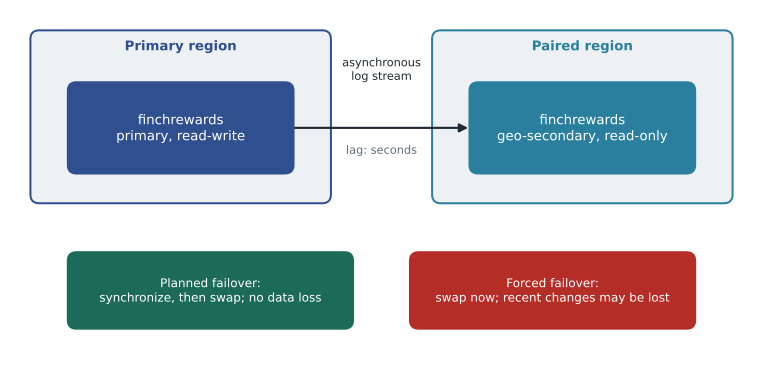
Each secondary is a separate database with its own compute size, its own firewall context through its logical server, and its own cost. Microsoft's guidance is that a secondary that may become the primary should use the same service tier and compute size as the primary. A smaller secondary saves money until the day it must take the whole production workload, when it may also fall behind during busy periods because it cannot apply the log as fast as a larger primary generates it. Secondaries are readable, so they can carry reports or read-only API calls in the other region, which offsets some of their cost.
Configuring geo-replication
Geo-replication can be set up in the portal, with PowerShell or the CLI, or with T-SQL run in the master database of the primary's logical server. The secondary's logical server must already exist, and the identity used must have permission on both servers. If the database uses Microsoft Entra authentication only, the Entra administrators and users carry over, because users are stored in the database; logins on the logical servers, used by SQL authentication, must be created on the secondary server with the same security identifiers, or users will be orphaned after a failover.
az sql db replica create --resource-group rg-rewards-prod-cc --server hf-sql-rewards-prod-cc \
    --name finchrewards --partner-resource-group rg-rewards-dr-ce --partner-server hf-sql-rewards-dr-ce \
    --service-objective GP_Gen5_8 --secondary-type Geo

az sql db replica list-links --resource-group rg-rewards-prod-cc --server hf-sql-rewards-prod-cc \
--name finchrewards --output table-- Run in master on the primary's logical server.
ALTER DATABASE finchrewards
ADD SECONDARY ON SERVER [hf-sql-rewards-dr-ce]
WITH (ALLOW_CONNECTIONS = ALL, SERVICE_OBJECTIVE = 'GP_Gen5_8');
-- Check the link from the primary database.
SELECT partner_server, partner_database, replication_state_desc, role_desc,
replication_lag_sec, last_replication
FROM sys.dm_geo_replication_link_status;Choosing the secondary region
Each Azure region has a paired region, chosen by Microsoft, which is usually the natural place for a disaster-recovery secondary: Azure staggers planned updates across pairs, prioritizes the recovery of one region of each pair in a widespread outage, and geo-redundant storage, including the default backup storage, replicates to the pair. For Harrow & Finch the pair is Canada East, in Quebec City. Pairing is not compulsory: a secondary can be placed in any region where the service is available, and some newer regions have no pair at all. The choice should weigh distance, which affects replication lag, residency rules, which keep personal information in Canada under the company's own policy, and the capacity available in the target region in a crisis.
Monitoring replication
The most important number for geo-replication is the replication lag: the time between a transaction committing on the primary and it being applied on the secondary. It is reported by sys.dm_geo_replication_link_status as replication_lag_sec, and as a metric that can drive the alerts from lesson 3. Lag rises during large batch operations, index rebuilds and data loads, because they generate log faster than it can be shipped and replayed, and it is the best estimate of the data that would be lost in a forced failover at that moment. Walt sets a metric alert at 30 seconds of lag, sustained for 10 minutes, for the Finch Rewards secondary.
Worked problem
How much data could a forced failover lose?
During the Saturday evening peak, Finch Rewards commits about 45 point-earning transactions per second. The replication lag is normally 2 seconds, but during a nightly index rebuild it reached 18 seconds. Estimate the transactions at risk in a forced failover in each case.
Show solution
- Normal: 45 transactions per second × 2 seconds = 90 transactions.
- During the rebuild: 45 × 18 = 810 transactions, although the evening load would not usually coincide with the 02:00 rebuild.
- At 02:00 the load is about 3 transactions per second, so the real exposure during the rebuild is about 3 × 18 = 54 transactions.
Answer: About 90 transactions are at risk at the evening peak and about 54 during the rebuild. Both are within the 1-hour RPO for Finch Rewards, and the loyalty team can replay missed point awards from the till system's own records.
Planned and forced failover
There are two ways to change roles. A planned failover, which the portal calls Failover and T-SQL calls FAILOVER, first synchronizes the secondary completely, then swaps the roles, so no committed data is lost. It needs both regions to be working, and is used for drills, planned region moves and failing back after a disaster. A forced failover, called forced failover allowing data loss, makes the secondary the primary at once without waiting for synchronization. It is used when the primary region is down or unreachable, and anything that had not reached the secondary is lost. After a forced failover, when the old primary comes back, it becomes a secondary and any transactions it had that were never replicated are discarded.
-- Planned failover: run in master on the SECONDARY's logical server.
ALTER DATABASE finchrewards FAILOVER;

-- Forced failover when the primary region is unavailable, also run on the secondary's server:
ALTER DATABASE finchrewards FORCE_FAILOVER_ALLOW_DATA_LOSS;
Applications are the hard part of geo-replication. Because each database's primary and secondary have different server names, an application connected to hf-sql-rewards-prod must be told to connect to hf-sql-rewards-dr after a failover, by changing its configuration, its DNS alias or its connection logic. For one database, this is manageable. For a group of databases that must fail over together, such as an application that uses three databases, doing it one database at a time risks a split where some databases are in one region and some in the other. That is exactly the problem failover groups solve.
| Question | Active geo-replication | Failover group |
|---|---|---|
| Available for | Azure SQL Database | Azure SQL Database and Managed Instance |
| Unit of failover | One database | A group of databases (all user databases on Managed Instance) |
| Secondaries per primary | Up to four | One, in another region |
| Connection names after failover | Change: each database's server name differs | Stay the same: listener endpoints follow the primary |
| Secondary in the same region | Possible | No |
| Typical use | Read scale-out across regions, special cases | Recommended for most disaster-recovery designs |
Cost and licensing
A geo-secondary is billed like any database of its size. For Finch Rewards, an 8-vCore General Purpose secondary roughly doubles the database's compute cost, plus storage in the second region. Two features can reduce the bill. If the secondary is used only for disaster recovery and carries no read workload, it can be designated as a standby replica, which removes the SQL Server licence portion of the vCore price under Microsoft's failover rights. And a secondary used for reads replaces separate reporting copies that would otherwise cost money too.
Worked problem
What does the standby designation save?
Finch Rewards' secondary uses 8 vCores. Use illustrative prices: 0.40 dollars per vCore hour for compute with the SQL licence included, of which 0.14 is the licence portion. The secondary runs 730 hours a month. What does the secondary cost a month with and without the standby designation?
Show solution
- With the licence included: 8 × 730 × 0.40 = 2,336 dollars a month.
- Without the licence portion: 8 × 730 × (0.40 − 0.14) = 8 × 730 × 0.26 = 1,518.40 dollars.
- Saving: 2,336 − 1,518.40 = 817.60 dollars a month.
Answer: At these illustrative prices the standby designation saves about 818 dollars a month, but only if the secondary carries no read workload. If the loyalty team wants regional reads, the saving is lost.
Geo-replication and security
Security settings travel unevenly between a primary and its secondary, and the differences surface only after a failover. Transparent data encryption is replicated with the database: if the primary uses a customer-managed key in Azure Key Vault, the secondary's logical server must have access to the same key, or to a key vault in its own region holding the same key material, before the link is created, otherwise replication cannot start. Auditing settings, Microsoft Defender for SQL and diagnostic settings belong to the logical server and the database resource, so they must be configured on the secondary too. Walt adds a short check to the template that creates each secondary: it deploys the same auditing, diagnostic and Defender settings as the primary, so the secondary is never the one database in the estate that nobody is watching.
Networking is the other half. If the primary is reached only through a private endpoint, the secondary needs its own private endpoint in a virtual network in the secondary region, and the application servers that will run there after a failover need a route to it. Public network access, firewall rules and connection policy are server settings and are not copied. In practice, most of the work of geo-replication is not the replication itself, which is a single command, but making sure everything around the secondary is ready for the day it becomes the primary.
When geo-replication is the right choice
Because failover groups are recommended for most disaster-recovery designs, Walt asks Elena when he would still choose plain geo-replication. She gives three cases. The first is read scale-out across regions: a database that needs readable copies in two or more other regions, for example for a reporting team in another country, can have up to four geo-secondaries, while a failover group has only one secondary. The second is a single database whose application already handles the change of server name, such as a service that reads its connection string from a configuration store that can be updated during failover. The third is a migration or region move: a secondary is created in the new region, the application is switched with a planned failover, and the old primary is then removed. For Finch Rewards, which needs one secondary for disaster recovery and stable connection names, a failover group is the better fit, and the next lesson builds one on top of the same replication.
Common mistakes
MistakeGeo-replication is synchronous, so a failover never loses data.
InsteadGeo-replication is asynchronous; a forced failover can lose what has not yet replicated.
MistakeManaged Instance supports active geo-replication.
InsteadActive geo-replication is for SQL Database; Managed Instance uses failover groups.
MistakeA planned failover is the right command when the primary region is down.
InsteadA planned failover needs both regions; use a forced failover allowing data loss when the primary is unavailable.
MistakeA smaller secondary is a safe way to save money.
InsteadA secondary that may become primary should match the primary's tier and size.
Summary and key terms
- Active geo-replication keeps up to four readable secondaries of a SQL database in other regions by streaming the log asynchronously.
- Match the secondary's tier and size to the primary's, and consider the paired region first.
- Replication lag, shown in sys.dm_geo_replication_link_status, estimates the data a forced failover would lose.
- A planned failover synchronizes first and loses nothing; a forced failover is immediate and may lose recent changes.
- Each database's servers have different names, so applications must change connections after a failover, which failover groups avoid.
- Secondaries cost like any database; a standby designation can remove the licence portion if no reads run there.
- Active geo-replication
- A SQL Database feature that keeps readable secondary copies of a database in other regions.
- Geo-secondary
- A readable copy of a database kept up to date by geo-replication.
- Replication lag
- The delay between a commit on the primary and its application on the secondary.
- Planned failover
- A role change that synchronizes first, so no data is lost.
- Forced failover
- An immediate role change that allows the loss of changes not yet replicated.
- Paired region
- The region Microsoft pairs with another for staggered updates and recovery priority.
Practice problems
Work each problem on paper first, then reveal the answer to check.
How many geo-secondaries can one primary have?
Show answer
Up to four.
Which view shows the replication lag of a geo-replication link?
Show answer
sys.dm_geo_replication_link_status, in the replication_lag_sec column.
Where is the planned failover command run?
Show answer
On the logical server of the secondary that will become primary.
Why do users become orphaned after failover with SQL authentication?
Show answer
The logins on the secondary server must exist with the same security identifiers.
What is the Harrow & Finch secondary region?
Show answer
Canada East, the paired region.
Lesson quiz · 5 questions
Score 60% or more to complete this lesson.
Create a free account to save your progress, take quizzes and earn a certificate.