
MSAZ-282 · Lesson 2 of 12 · 21 min
Automation with PowerShell, CLI and runbooks
▶ Video coming soon A video version of this lesson is on the way.
Some of the work Walt automated on HF-SQL01 never touched a database at all. Every spring he asked the infrastructure team to add memory to the virtual host before the busy weeks; every quarter he copied the production database to the test server for the developers; every January he checked that the backup drives had space for another year. In Azure those tasks become operations on Azure resources: change the vCores of a managed instance, copy a database to another server, raise a storage limit. They are done through the Azure Resource Manager API, and the DP-300 outline expects a DBA to drive that API with Azure PowerShell, the Azure CLI and ARM or Bicep templates, and to monitor and troubleshoot what those tools deploy.
Three ways to talk to Azure Resource Manager
Every change to an Azure resource, whether made in the portal or a script, is a request to Azure Resource Manager. The Azure CLI, a cross-platform command-line tool whose SQL commands begin with az sql, and Azure PowerShell, a set of PowerShell modules whose SQL cmdlets live in the Az.Sql module, are two front ends to the same API. Neither can do something the other cannot in any way that matters for the exam; teams choose by habit. Walt has written PowerShell for years and will use it. Renata Quist, who builds the deployment pipelines, prefers the CLI because her build agents run Linux. Templates are the third front end: instead of a list of commands, a Bicep or ARM template describes the resources that should exist, and Resource Manager works out what to create or change.
The distinction that matters is imperative versus declarative. A script is imperative: it says do this, then this. If it runs twice, it may try to create something that already exists and fail, so scripts need checks. A template is declarative: it says this is how things should be. Deploying the same template twice changes nothing the second time, which makes templates the better choice for building environments. Scripts remain the better choice for actions, such as scaling for a weekend, starting a copy or triggering a failover test, where there is no lasting end state to describe.
| Task | Best fit | Why |
|---|---|---|
| Build the non-production managed instance and its network | Bicep template in a pipeline | Repeatable, reviewable, safe to redeploy |
| Scale StockLine up before the spring rush and down after | Scheduled runbook calling PowerShell | An action at a time, with no lasting end state |
| Copy Finch Rewards production to test each quarter | Script or runbook | A one-off action with parameters |
| Add a new store database to the elastic pool | Bicep template (database resource) | The database is a lasting part of the estate |
| Check that every database has the right backup redundancy | Azure Policy or a Resource Graph query | An audit across many resources |
PowerShell and CLI for database tasks
Walt's first script copies the Finch Rewards production database to the test server, the job he used to do by restoring a backup. In Azure SQL Database a copy is a single operation that creates a transactionally consistent copy on the same or another logical server. Because the test copy holds real customer data, the same script then runs a masking step against the copy before the developers get access to it.
Connect-AzAccount -Identity          # in a runbook; interactively, Connect-AzAccount on its own
$src = @{ ResourceGroupName = 'rg-rewards-prod-cc'; ServerName = 'hf-sql-rewards-prod-cc'; DatabaseName = 'finchrewards' }
New-AzSqlDatabaseCopy @src -CopyResourceGroupName 'rg-rewards-test-cc' `
    -CopyServerName 'hf-sql-rewards-test-cc' -CopyDatabaseName 'finchrewards-qtr' `
    -ServiceObjectiveName 'GP_S_Gen5_2'
Get-AzSqlDatabaseActivity -ResourceGroupName 'rg-rewards-test-cc' -ServerName 'hf-sql-rewards-test-cc' `
-DatabaseName 'finchrewards-qtr'az sql db copy --resource-group rg-rewards-prod-cc --server hf-sql-rewards-prod-cc --name finchrewards \
--dest-resource-group rg-rewards-test-cc --dest-server hf-sql-rewards-test-cc --dest-name finchrewards-qtr \
--service-objective GP_S_Gen5_2
az sql mi update --resource-group rg-stockline-prod-cc --name hf-mi-stockline --capacity 16 --no-wait
az sql mi op list --resource-group rg-stockline-prod-cc --mi hf-mi-stockline --output tableThe second command shows a habit worth copying. Scaling a managed instance can take a long time, so the CLI's no-wait option starts the operation and returns at once, and the operations list shows its progress. A script that waits for a long-running operation inside a runbook may hit the runbook's time limit, so long operations are better started, then checked by a later step or a separate schedule.
Azure Automation runbooks
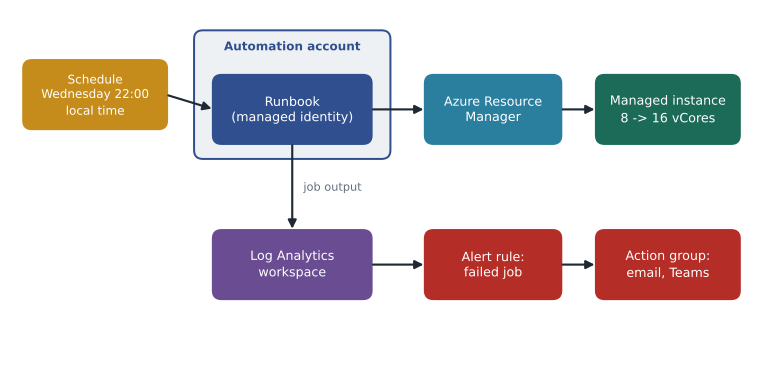
A script on Walt's laptop is not automation; it is a reminder he has to remember. To run unattended, the script must live somewhere that has a schedule, an identity and a log. Azure Automation provides that. An Automation account holds runbooks, which are PowerShell or Python scripts, plus schedules, shared variables and encrypted credentials, and it can run each runbook in Azure or on a hybrid worker inside the company network. Each run produces a job with its output, errors and status, which can be sent to a Log Analytics workspace and alerted on.
The runbook's identity is the key design choice. Microsoft's guidance is to give the Automation account a managed identity and grant that identity only the Azure roles it needs, rather than storing a password or using the old Run As accounts, which were retired in 2023. For the spring scale-up, the identity needs permission to change one managed instance, so Walt assigns the SQL Managed Instance Contributor role scoped to that instance alone. For tasks inside a database, such as running a stored procedure, the identity also needs a database user created from its Microsoft Entra name, just as the elastic job agent did in lesson 1.
param([int]$VCores = 16)
Connect-AzAccount -Identity | Out-Null
$mi = Get-AzSqlInstance -ResourceGroupName 'rg-stockline-prod-cc' -Name 'hf-mi-stockline'
if ($mi.VCores -eq $VCores) { Write-Output "Already at $VCores vCores; nothing to do."; return }
Set-AzSqlInstance -ResourceGroupName $mi.ResourceGroupName -Name $mi.ManagedInstanceName `
    -VCore $VCores -Force -AsJob | Out-Null
Write-Output "Scale to $VCores vCores started at $(Get-Date -Format o)."
Schedules in Azure Automation have a time zone of their own. Walt sets both spring schedules in Central Time (Winnipeg), so they follow daylight saving time: the scale-up on the Wednesday at 22:00 and the scale-down the Tuesday after the long weekend at 22:00. Because Azure stores and reports job times in UTC, the job history will show a scale-up started at 03:00 UTC on Thursday.
Worked problem
Reading the schedule in UTC
In 2027, the spring scale-up is planned for 22:00 local time on Wednesday, May 19, in Winnipeg, which is on Central Daylight Time (five hours behind UTC) by then. The scale takes about 2 hours 40 minutes. At what UTC time will the job history show the start, and when should the instance be ready in local time?
Show solution
- Central Daylight Time is UTC minus 5 hours, so 22:00 local is 22:00 + 5:00 = 03:00 UTC.
- Adding 5 hours carries the time past midnight, so the UTC date is Thursday, May 20.
- Finish in local time: 22:00 + 2 hours 40 minutes = 00:40 on Thursday, May 20.
- The first deliveries are scanned at 05:30, leaving 4 hours 50 minutes of margin.
Answer: The job history will show a start at 03:00 UTC on Thursday, May 20, 2027, and the instance should be ready around 00:40 local time, well before the first scans.
Other places automation can run
Azure Automation is not the only home for scripts. Azure Functions run code in response to a timer or an event, and suit small tasks that developers already maintain. Azure Logic Apps are workflows built from connectors, useful when a task joins several services, for example: when a long-term backup finishes, post a message in Teams and add a row to a spreadsheet. Azure DevOps or GitHub Actions pipelines run deployments when code changes. The study guide does not ask you to master each of these, but it does expect you to know that database tasks can be automated with several Azure services and to choose one that matches who will maintain it.
Automating deployments with templates
MSAZ-280 introduced Bicep for building databases. This course adds what happens around the deployment. A deployment can be scoped to a resource group, a subscription, a management group or a tenant, and it runs in one of two modes. Incremental mode, the default, adds and updates the resources in the template and leaves others alone. Complete mode deletes resources in the resource group that are not in the template, which is powerful and dangerous; Renata's pipelines never use it for database resource groups. Before any change reaches production, the pipeline runs a what-if operation and saves its output, so a reviewer can see that a template will update one database's settings and not delete a server.
az deployment group what-if --resource-group rg-stores-prod-cc --template-file storedb.bicep \
    --parameters storeNumber=24 poolName=pool-storesched-prod

az deployment group create --resource-group rg-stores-prod-cc --template-file storedb.bicep \
    --parameters storeNumber=24 poolName=pool-storesched-prod --name store24-$(date +%Y%m%d)

az deployment operation group list --resource-group rg-stores-prod-cc --name store24-20261120 \
    --query "[?properties.provisioningState=='Failed'].properties.statusMessage"
Monitoring a deployment means reading its operations. Every deployment has a name, a history in the resource group and an entry in the activity log, and each resource it touches is an operation with its own status and message. When a deployment fails, the overall error often says only that one or more operations failed; the useful message is in the failed operation, which might say that a name is already taken, that a quota is exhausted, that a policy denied the request, or that the identity running the pipeline lacks a role. Walt's first deployment of a test pool failed with a policy denial, because the company's Azure Policy requires every database to use zone-redundant or geo-redundant backup storage and his template had asked for locally redundant storage. The fix was in the template, not the policy.
| Symptom | Likely cause | Where to look |
|---|---|---|
| Deployment fails at once with an authorization error | The pipeline or runbook identity lacks a role | Activity log, role assignments |
| RequestDisallowedByPolicy | An Azure Policy assignment denies a setting | The failed operation message, Policy compliance |
| Name not available | A server or database name is already used | The failed operation message |
| Deployment succeeds but nothing changes | The template matches the current state | What-if output shows no changes |
| Runbook job suspended or stopped | Unhandled error, or the fair-share time limit | Automation job output and streams |
Python example
Elena asks Walt to check how much the scale-up schedule really saves, using the figures from MSAZ-280, before he presents the runbook to the change board. He writes the calculation as a short Python script so he can change the assumptions in front of the board.
price = 0.55          # illustrative dollars per vCore hour
hours_per_week = 168
base, peak = 8, 16
for peak_weeks in (1, 2, 3):
    scaled = (52 - peak_weeks) * hours_per_week * base * price + peak_weeks * hours_per_week * peak * price
    always_peak = 52 * hours_per_week * peak * price
print(f"{peak_weeks} peak week(s): scaled {scaled:,.2f} always 16 vCores {always_peak:,.2f} saving {always_peak - scaled:,.2f}")1 peak week(s): scaled 39,177.60 always 16 vCores 76,876.80 saving 37,699.20 2 peak week(s): scaled 39,916.80 always 16 vCores 76,876.80 saving 36,960.00 3 peak week(s): scaled 40,656.00 always 16 vCores 76,876.80 saving 36,220.80
What this code does
The script takes an illustrative price per vCore hour, the hours in a week and the two instance sizes, and works out the year's compute cost two ways for one, two and three busy weeks: scaling up only for the busy weeks, or keeping the larger size all year. Each line of output shows both totals and the difference. The difference is the money the scheduled runbook saves, which shrinks slightly as the busy period gets longer.
The output shows that the saving hardly depends on how long the busy period lasts, because most of the year is spent at the smaller size either way. That gives Walt an easy answer when the change board asks whether to scale up a week earlier for safety.
Common mistakes
MistakeScripts and templates are interchangeable for every task.
InsteadTemplates suit lasting resources; scripts and runbooks suit actions such as scaling, copying and failover tests.
MistakeA runbook should sign in with a stored administrator password.
InsteadGive the Automation account a managed identity with the narrowest role it needs.
MistakeComplete mode is a safer way to deploy database templates.
InsteadComplete mode deletes resources not in the template; incremental mode with what-if is the safe default.
MistakeA failed deployment's top-level error explains the problem.
InsteadThe useful message is usually in the failed operation inside the deployment.
Summary and key terms
- Azure PowerShell, the Azure CLI and templates all call Azure Resource Manager; templates are declarative and safe to redeploy, scripts are imperative actions.
- Use scripts or runbooks for actions such as scaling, copying and failover tests, and templates for lasting resources.
- Azure Automation runbooks add schedules, a managed identity and job logs; grant the identity the narrowest role.
- Start long operations without waiting and check them later, and make runbooks check the current state first.
- Preview deployments with what-if, avoid complete mode for database resource groups, and read failed operations to troubleshoot.
- Azure Resource Manager
- The Azure service that receives and carries out every request to create, change or delete resources.
- Runbook
- A script stored and run by Azure Automation, on a schedule or on demand.
- Automation account
- The Azure Automation resource that holds runbooks, schedules, variables and credentials.
- What-if
- A deployment preview that lists the changes a template would make.
- Incremental mode
- The default deployment mode, which adds and updates resources but deletes nothing.
- Complete mode
- A deployment mode that deletes resources in the scope that are not in the template.
Practice problems
Work each problem on paper first, then reveal the answer to check.
Why is a template better than a script for building the non-production instance?
Show answer
It is declarative, so deploying it again changes nothing unless the template changed.
Which identity should a runbook use to scale a managed instance?
Show answer
The Automation account's managed identity with a narrowly scoped role.
What does the CLI's no-wait option do?
Show answer
Starts a long operation and returns immediately, so its progress is checked later.
What does what-if show?
Show answer
The resources a deployment would create, change or delete.
Where is the useful error when a deployment fails?
Show answer
In the failed operation's status message inside the deployment.
Lesson quiz · 5 questions
Score 60% or more to complete this lesson.
Create a free account to save your progress, take quizzes and earn a certificate.