
MSAZ-282 · Lesson 11 of 12 · 22 min
Testing disaster recovery
▶ Video coming soon A video version of this lesson is on the way.
In 2016 Harrow & Finch had a disaster-recovery plan that everyone agreed was excellent. Then the company tested it for the first time, on a Sunday in October, and discovered that the standby server's copy of StockLine was eleven days old, that nobody had the password for the standby's administrator account, and that the tills had the primary server's IP address written into a configuration file on every till. The test took fourteen hours. Walt keeps the after-action report in his binder as a reminder that a recovery plan is a hypothesis until it has been tested. The DP-300 outline asks a DBA to plan a testing procedure for an HA/DR solution, and to monitor and troubleshoot it. This lesson covers how to test without causing the outage you are trying to prevent, what to measure, and how to learn from the result.
What a test should prove
A disaster-recovery test answers four questions. Can we recover? That is, do the replicas, backups, scripts and permissions actually work. How long does it take? The measured time from the simulated failure to working users, which is the achieved RTO. How much data do we lose? The achieved RPO, measured by comparing the last transaction on the old primary with the first missing one on the new. And do the people know what to do? A test that succeeds only because Walt is in the room has not tested the plan, so Elena's rule is that the person who wrote a runbook is never the person who runs it in a test.
Kinds of test
Tests range from discussion to a real failover. A tabletop exercise walks through a scenario on paper with the people who would respond: the region is down, what happens now? It costs little and finds gaps in decisions and contacts. A component test checks one part, such as restoring a database from an LTR backup or failing over a test database's geo-replication. A planned failover drill moves a production failover group to the secondary region and back with no data loss, during a quiet period. A full simulation cuts off the primary, for example by blocking network traffic in a test environment, and forces a failover as if the region had failed. Each level gives more confidence at more risk and cost, so the schedule mixes them.
| Test | Risk to production | What it proves | Harrow & Finch schedule |
|---|---|---|---|
| Tabletop exercise | None | Decisions, contacts and runbook order | Twice a year |
| Restore test | None (restores to a new database) | Backups and LTR are restorable and how long they take | Monthly, rotating databases |
| Test-environment forced failover | None | Forced failover and application recovery | Quarterly |
| Production planned failover drill | Low, with a brief disconnect | Real failover, real applications, real people | Twice a year, in quiet weeks |
| Application retry test (user-initiated HA failover) | Low | Applications survive a local failover | Before each major release |
Planning the first test
Walt's first test runs in the test subscription, because nothing is in production yet. On November 10, 2026 he ran a component test: a geo-restore of the Finch Rewards test database into the paired region, to measure how long a tier 3 style recovery would take. The plan, written beforehand, named the scope (one test database), the success criteria (the restored database opens, its row counts match a list taken before the test, and the API's test suite passes against it), the timekeeper (Hana Sato), the person running the runbook (Ravi Menon, a junior DBA who had not written it) and the rollback (delete the restored database). It also named what would stop the test: any sign that production resources were affected.
Worked problem
What did the first test achieve?
Hana's timesheet for the November 10 geo-restore test reads: simulated failure declared at 10:00; Ravi found the runbook and confirmed the restore point by 10:09; restore started at 10:12; restore finished at 10:43; firewall and connection settings for the API updated by 10:58; test suite passed at 11:06. The latest geo-replicated backup was from 09:21, and the last test transaction before 10:00 was at 09:58. What were the achieved RTO and RPO?
Show solution
- Achieved RTO: from 10:00 to 11:06 is 66 minutes.
- Of that, the restore itself took 10:12 to 10:43, which is 31 minutes, and the steps before and after took 35 minutes.
- Achieved RPO: changes from 09:21 to 09:58 would be lost, which is 37 minutes.
- Both are inside a tier 3 objective of 24 hours, and the RPO is consistent with geo-restore's usual lag of up to about an hour.
Answer: The test achieved an RTO of 66 minutes and an RPO of 37 minutes. More than half the recovery time was spent outside the restore, mostly on network settings, which became the first improvement.
The review found two things worth fixing. The firewall rules for the restored database had to be added by hand, because they were server-level rules; Walt changed the API's access to use a private endpoint defined in a template that can be deployed in the paired region in minutes. And Ravi lost three minutes finding the runbook, which was in Walt's personal folder; it now lives in the team's wiki, with a printed copy in the operations room.
Running a production failover drill
A planned failover drill on production is the most valuable test, and the most carefully prepared. Microsoft's guidance for failover groups is that a planned failover causes a short disconnect and no data loss, so it can be done in a quiet period. Walt's checklist for the first StockLine drill, planned for a Tuesday night in autumn 2027, covers: a change record approved a week ahead; a notice to store managers and the help desk; alert processing rules to suppress expected alerts; a check that replication is healthy and the secondary is synchronized before starting; the planned failover command; timed checks that the tills, the warehouse interface and the morning report reconnect through the listener; a period of normal running in the secondary region; and the planned failover back. Every step has an owner and a stop condition.
-- Before the drill, on the primary managed instance: is every database synchronized with the secondary?
SELECT DB_NAME(database_id) AS db, synchronization_state_desc, synchronization_health_desc, last_commit_time
FROM sys.dm_hadr_database_replica_states
WHERE is_local = 0;

-- After failover, from each application server: which region am I in?
SELECT @@SERVERNAME AS server_name, DATABASEPROPERTYEX(DB_NAME(), 'Updateability') AS updateability, SYSUTCDATETIME() AS checked_utc;
Testing forced failover safely
A forced failover is what will happen in a real regional disaster, so it should be tested too, but never with production data at risk. The safe way is a dedicated test environment with its own failover group and test data, where the team can simulate the loss of the primary, for example by stopping the application's access to it and forcing the failover, then measure what was lost by comparing transaction records. The test also shows what happens afterwards: the old primary rejoins as a secondary, and any transactions it held that never reached the secondary are discarded. Applications that write to other systems, such as the loyalty points sent to the email platform, may then disagree with the database, and the runbook needs a step to reconcile them.
Restore tests
Backups need testing as much as replicas. Each month, Walt's runbook restores one production database, in rotation, to the non-production instance or server, runs DBCC CHECKDB on it, checks a few row counts and records how long the restore took. Every six months, one LTR backup is restored. The checks are automated: a runbook starts the restore, a job runs the checks, and the results go to the operations log, with an alert if a restore fails or takes much longer than the last one. Restore times measured this way are the only reliable input for the RTO calculations in lesson 4.
Worked problem
Is the restore getting slower?
The monthly restore test for StockLine's non-production copy took 22, 23, 25 and 31 minutes in the last four months, while the database grew from 380 to 410 GB. Walt's alert fires when a restore takes more than 20 in every 100 longer than the previous one. Did the alert fire, and is the slowdown explained by growth?
Show solution
- Change from 25 to 31 minutes: 31 − 25 = 6 minutes, and 6 ÷ 25 = 0.24, or 24 in every 100.
- 24 is more than 20, so the alert fired for the latest test.
- Growth over the period: 410 ÷ 380 ≈ 1.079, about 8 in every 100.
- Restore time grew from 22 to 31 minutes: 31 ÷ 22 ≈ 1.41, about 41 in every 100, far more than the growth.
Answer: The alert fired, and growth explains only a small part of the slowdown. The likely cause is something else, such as the size of the log to replay or a smaller non-production instance, so Walt investigates rather than ignoring it.
Monitoring and troubleshooting HA/DR
Between tests, monitoring shows whether the design is still ready. For geo-replication and failover groups, watch replication state and lag, and alert if the link is not healthy or the lag grows; for availability groups, watch synchronization health and the send and redo queues from lesson 8; for backups, watch the last successful backup time and restore tests. Common problems have common causes. A secondary that falls behind is usually smaller than the primary or busy with reads. A failover group that cannot fail over may have a secondary that is not synchronized, or, on Managed Instance, a networking change that blocked the replication ports. Users who cannot sign in after failover usually depend on logins that exist only on the old primary. And applications that do not reconnect usually cache DNS or connection strings with a server name instead of the listener.
| Symptom after a test failover | Likely cause | Fix |
|---|---|---|
| Some users cannot sign in | Logins exist only on the old primary | Create logins with the same SIDs, or use contained or Entra users |
| Nightly jobs did not run | Agent jobs were not created on the secondary instance | Deploy jobs to both instances and compare weekly |
| Tills still try the old region | Server name or long DNS cache instead of the listener | Use the listener name; lower DNS caching |
| Failover command refused | Secondary not synchronized or link unhealthy | Check replication state; wait or fix the network |
| Reports are slow after failover | Secondary sized smaller than the primary | Match tier and size, or scale before failing over |
Learning from each test
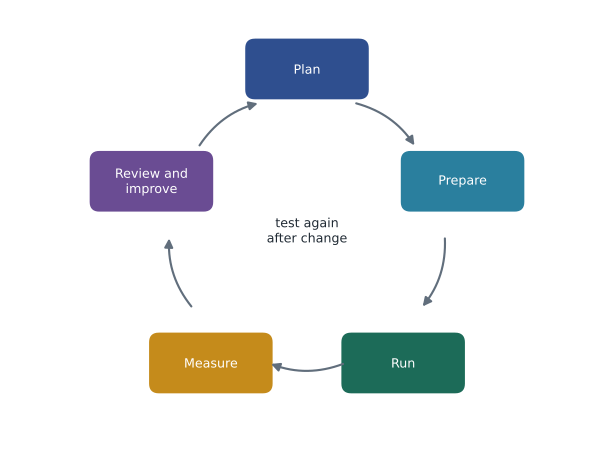
Every test ends with an after-action review within a week, while memories are fresh. The review is blameless: its purpose is to improve the system and the runbook, not to find someone at fault, because people who fear blame hide the problems a test is meant to find. Walt's template has five headings: what we planned, what happened with times, what went well, what got in the way, and what we will change, with an owner and a date for each change. Open changes are tracked in the runbook's improvement list from lesson 12, and the next test checks that they were made. Over several cycles, the achieved RTO for a design usually falls quickly at first, as the obvious gaps close, and then levels off near the time the technology itself needs.
Tests also need to be repeated after change. A new database added to a failover group, a change to the network between regions, a new version of the application or a new member of the on-call rota can each break a design that worked last month, so the runbook lists the kinds of change that trigger an extra test before the next scheduled one.
Common mistakes
MistakeA disaster-recovery plan that is well written does not need testing.
InsteadPlans fail on details only a test reveals; test regularly and after changes.
MistakeThe person who wrote the runbook should run the test so it goes smoothly.
InsteadSomeone else should run it, to prove the runbook works without its author.
MistakeForced failover should be tested on production to be realistic.
InsteadTest forced failover in a test environment; use planned failovers for production drills.
MistakeA successful failover is the only result that matters.
InsteadMeasure achieved RTO and RPO, and record every delay and gap for improvement.
Summary and key terms
- Tests prove that recovery works, how long it takes, how much data is lost and whether people can follow the plan.
- Mix tabletop exercises, restore tests, test-environment forced failovers and production planned failover drills.
- Plan each test with scope, success criteria, roles, stop conditions and rollback.
- Measure achieved RTO and RPO from timed records, and fix the slowest steps first.
- Test backups by restoring them regularly and checking them with DBCC CHECKDB.
- Monitor replication health, lag and backups between tests; most failover problems are logins, jobs, DNS and sizing.
- Tabletop exercise
- A discussion-based walk-through of a disaster scenario with the people who would respond.
- Failover drill
- A planned failover of a real system to test the recovery design.
- Achieved RTO
- The recovery time actually measured in a test or incident.
- Achieved RPO
- The data loss actually measured in a test or incident.
- Stop condition
- A pre-agreed sign that a test must be halted and rolled back.
- After-action review
- A meeting after a test or incident that records what happened and what to improve.
Practice problems
Work each problem on paper first, then reveal the answer to check.
Why should someone other than the runbook's author run a test?
Show answer
To prove the runbook works without its author.
What were the achieved RTO and RPO of the November 10 test?
Show answer
66 minutes and 37 minutes.
Where should forced failover be tested?
Show answer
In a test environment with test data.
What should a monthly restore test check besides the restore itself?
Show answer
For example: DBCC CHECKDB, row counts and how long the restore took.
Name a common reason users cannot sign in after failover.
Show answer
Their logins exist only on the old primary.
Lesson quiz · 5 questions
Score 60% or more to complete this lesson.
Create a free account to save your progress, take quizzes and earn a certificate.