
MSAZ-282 · Lesson 8 of 12 · 23 min
Always On availability groups on VMs
▶ Video coming soon A video version of this lesson is on the way.
The warehouse management system is the odd one out in Harrow & Finch's estate. Its vendor supports it only on SQL Server that its own engineers can reach at the operating-system level, so MSAZ-280 placed it on a SQL Server 2022 virtual machine. That choice brings back a responsibility that Managed Instance took away: on a virtual machine, Azure keeps the virtual machine running, but SQL Server's high availability and disaster recovery are the customer's to design, build, patch and test. The DP-300 outline asks a DBA to configure Always On availability groups and failover cluster instances on Azure virtual machines, to configure log shipping, and to monitor and troubleshoot them. This lesson covers all three, with the most attention on availability groups, which are what the warehouse will use.
What the virtual machine gives you on its own
A single SQL Server virtual machine has some protection without any SQL Server feature. Azure moves a virtual machine to healthy hardware after a host failure and restarts it, and Microsoft's SLA for a single virtual machine with premium storage covers that. But a restart takes minutes, SQL Server must recover its databases afterwards, and nothing protects against a failed operating system update, a corrupted database or the loss of the zone. To do better, there must be a second copy of SQL Server ready to take over: a replica in an availability group, or a second node in a failover cluster instance.
Availability groups in Azure
An Always On availability group is a set of user databases that fail over together between SQL Server instances, called replicas, each with its own copy of the databases. The primary replica accepts reads and writes and sends its transaction log to the secondaries. A secondary can use synchronous commit, where the primary waits for the secondary to harden the log before confirming a commit, giving no data loss on failover, or asynchronous commit, where it does not wait, which suits distant replicas. Availability groups need a Windows Server Failover Cluster underneath to track which node is the primary and to decide failover, or on Linux, a cluster manager such as Pacemaker.
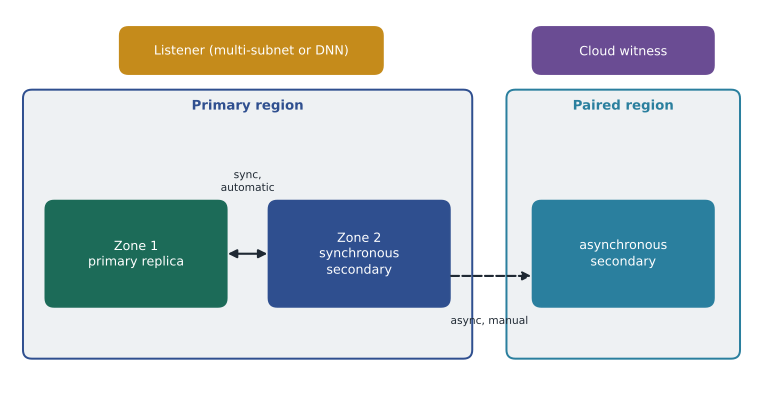
The warehouse design follows Microsoft's usual pattern. Two SQL Server virtual machines run in different availability zones of Canada Central with synchronous commit and automatic failover, which covers a failed virtual machine or zone with no data loss and a failover of seconds. A third replica runs in Canada East with asynchronous commit and manual failover, for regional disasters. The cluster uses a cloud witness, a small blob in an Azure Storage account, so that it can keep quorum when one node is lost.
Quorum
A failover cluster stays online only while a majority of its votes is present; this stops two halves of a split cluster from both thinking they are the primary. Each node usually has one vote, and a witness adds one more, so that an even number of nodes still has a tie-breaker. With three nodes and a witness, there are four votes, and the cluster needs three to keep running. Microsoft's guidance for Azure is to use a cloud witness, or an Azure shared disk as a disk witness, and to consider removing the vote of a distant disaster-recovery node so that a network problem between regions cannot cost the primary region its quorum.
Worked problem
Does the cluster survive the loss of a zone?
The warehouse cluster has three nodes: node A in zone 1, node B in zone 2 and node C in the paired region, plus a cloud witness. Walt removes the vote from node C. How many votes does the cluster have, how many does it need, and does it survive if zone 1 fails?
Show solution
- Votes with node C's vote removed: node A 1 + node B 1 + witness 1 = 3.
- A majority of 3 is 2 votes.
- If zone 1 fails, node A is lost, leaving node B and the witness: 2 votes.
- 2 votes is a majority, so the cluster stays up and node B takes over as primary.
Answer: The cluster has 3 votes and needs 2, so it survives the loss of zone 1. With node C still voting, a link failure to the paired region plus the loss of one zone would leave only 2 of 4 votes, which is not a majority.
Connecting to the primary: listeners in Azure
On premises, an availability group listener is a virtual network name with a virtual IP address that moves to whichever node is primary. In Azure, a virtual IP cannot simply move between virtual machines, so there are three ways to give applications one name. The first, and Microsoft's preferred approach for new deployments, is to put each replica in its own subnet. A multi-subnet listener then has one IP address per subnet, and clients that use MultiSubnetFailover=True try them all and connect to the one that answers. The second, for replicas in a single subnet, is a distributed network name listener, which registers the IP addresses of all nodes and lets the client find the primary, with no load balancer. The third, older approach puts an Azure Load Balancer in front of the virtual network name. Many existing deployments use it, but it adds a component to configure and probe.
| Approach | Subnets | Needs a load balancer | Notes |
|---|---|---|---|
| Multi-subnet listener | One per replica | No | Preferred for new deployments; clients use MultiSubnetFailover=True |
| Distributed network name (DNN) listener | One shared subnet | No | For single-subnet designs; requires a supported SQL Server build |
| Virtual network name with Azure Load Balancer | One shared subnet | Yes | Older pattern; health probe and floating IP must be set correctly |
Building the availability group
Creating an availability group on Azure virtual machines follows the same broad steps as on premises, with a few Azure-specific choices. The virtual machines are created in the planned zones and subnets with SQL Server images and registered with the SQL IaaS Agent extension. The Windows failover cluster is built and given a cloud witness. The Always On availability groups feature is enabled on each instance, the databases are put in the full recovery model and backed up, and the group is created with its replicas and their commit modes, failover modes and seeding mode. Automatic seeding, which streams the databases to new replicas over the network, avoids taking and copying backups by hand. Microsoft's portal can also deploy the whole design from a template, but Walt plans to build it once by hand in a test subscription so he understands each part.
-- Run on the primary replica (node A).
CREATE AVAILABILITY GROUP ag_wms
WITH (AUTOMATED_BACKUP_PREFERENCE = SECONDARY, DB_FAILOVER = ON)
FOR DATABASE WMS
REPLICA ON
  N'HF-WMS-A' WITH (ENDPOINT_URL = N'TCP://hf-wms-a.hf.local:5022', AVAILABILITY_MODE = SYNCHRONOUS_COMMIT,
                    FAILOVER_MODE = AUTOMATIC, SEEDING_MODE = AUTOMATIC),
  N'HF-WMS-B' WITH (ENDPOINT_URL = N'TCP://hf-wms-b.hf.local:5022', AVAILABILITY_MODE = SYNCHRONOUS_COMMIT,
                    FAILOVER_MODE = AUTOMATIC, SEEDING_MODE = AUTOMATIC),
  N'HF-WMS-C' WITH (ENDPOINT_URL = N'TCP://hf-wms-c.hf.local:5022', AVAILABILITY_MODE = ASYNCHRONOUS_COMMIT,
                    FAILOVER_MODE = MANUAL, SEEDING_MODE = AUTOMATIC);

-- Then on each secondary:
ALTER AVAILABILITY GROUP ag_wms JOIN;
ALTER AVAILABILITY GROUP ag_wms GRANT CREATE ANY DATABASE;
Failover cluster instances
A failover cluster instance, or FCI, protects a whole SQL Server instance rather than a set of databases. There is one copy of the data on shared storage, and the instance runs on one cluster node at a time; if that node fails, the instance starts on another node and attaches the same storage. In Azure the shared storage can be Azure shared disks, premium file shares or Storage Spaces Direct. Because there is only one copy of the data, an FCI protects against server failure but not against storage failure or corruption, and on its own it gives no disaster recovery. It suits applications that need instance-level objects, such as Agent jobs and logins, to move automatically with the instance. The warehouse vendor supports either, and Walt chooses the availability group because it keeps separate copies of the data in two zones.
Log shipping
Log shipping is the oldest and simplest of the options. A job on the primary backs up the transaction log every few minutes to a share or to Azure Blob Storage; a job on each secondary copies the backups and restores them with NORECOVERY or STANDBY. Failover is manual: restore the last logs, bring the secondary online with RECOVERY and point applications at it. RPO is roughly the backup interval plus copy time, and RTO is minutes to hours. Log shipping has no cluster, works between any editions that support it and across long distances, and is still used for low-cost disaster recovery and for keeping a delayed copy that protects against a mistake replicated everywhere else. HF-SQL02, the finance server that stays on premises until 2027, will ship its logs to a storage account in Azure every 15 minutes, giving an offsite copy at almost no cost.
Worked problem
What RPO does log shipping give?
HF-SQL02 backs up its log every 15 minutes. Copying a backup to Azure takes up to 3 minutes. If the server is destroyed just before a backup is due, how much data could be lost, and how does that compare with finance's RPO of 1 hour?
Show solution
- The worst case is just before the next backup: up to 15 minutes since the last log backup.
- If the last backup had not finished copying, it would be lost too: add up to 3 minutes of copy time.
- Worst-case loss: about 15 + 3 = 18 minutes, rounded up to the next interval for safety, 30 minutes.
- 30 minutes is within finance's 1-hour RPO.
Answer: Log shipping every 15 minutes gives a worst-case data loss of about 18 minutes, comfortably inside the 1-hour RPO for the finance server.
Hybrid replicas and the Managed Instance link
Availability groups can stretch from premises to Azure: an on-premises primary can have an asynchronous replica on an Azure virtual machine, connected over a VPN or ExpressRoute, as a stepping stone during migration or as long-term disaster recovery. A related feature is the Managed Instance link, which uses a distributed availability group to replicate databases from SQL Server to Managed Instance. MSAZ-280 used it for StockLine's migration. With SQL Server 2022 or later, the link can also serve as disaster recovery in both directions: a database can fail over to Managed Instance and later fail back to SQL Server. That is how the DP-300 outline's mention of availability groups on Managed Instance should be read: the instance does not let you build your own availability group, but it can join one through the link.
Monitoring and troubleshooting
The availability group dashboard in SQL Server Management Studio, and the dynamic management views behind it, show each replica's role, connection state and synchronization health, and for each database the log send queue, which is log not yet sent to a secondary, and the redo queue, which is log received but not yet applied. A growing send queue usually means a slow network or a busy primary; a growing redo queue means the secondary cannot keep up, often because it is smaller than the primary or busy with reports. On a virtual machine, Walt also watches the cluster log for lost heartbeats, because Azure networks can delay heartbeats during host maintenance; Microsoft publishes relaxed cluster heartbeat and threshold settings for Azure that reduce unnecessary failovers.
SELECT ar.replica_server_name, drs.database_id, drs.synchronization_state_desc, drs.synchronization_health_desc,
       drs.log_send_queue_size AS log_send_queue_kb, drs.redo_queue_size AS redo_queue_kb,
       drs.last_commit_time
FROM sys.dm_hadr_database_replica_states AS drs
JOIN sys.availability_replicas AS ar ON ar.replica_id = drs.replica_id;
Common mistakes
MistakeA single SQL Server VM is highly available because Azure restarts it on new hardware.
InsteadA restart takes minutes and protects only against host failure; a second replica or node is needed for high availability.
MistakeA failover cluster instance keeps two copies of the data.
InsteadAn FCI has one copy on shared storage; an availability group keeps a copy on each replica.
MistakeIn Azure, availability group listeners always need a load balancer.
InsteadMulti-subnet listeners and distributed network name listeners work without one.
MistakeAsynchronous replicas lose no data on failover.
InsteadOnly synchronous replicas guarantee no data loss; asynchronous replicas may be behind.
Summary and key terms
- On SQL Server VMs, the customer designs, builds and tests high availability and disaster recovery.
- Availability groups replicate sets of databases; synchronous replicas give no data loss, asynchronous replicas suit distant regions.
- Clusters need a majority of votes; use a cloud witness and consider removing votes from distant nodes.
- Prefer multi-subnet listeners or distributed network names to load balancers for new Azure designs.
- FCIs protect an instance with one copy of the data on shared storage; log shipping gives simple, cheap, manual disaster recovery.
- Watch synchronization health and the send and redo queues, and tune cluster heartbeats for Azure.
- Availability group
- A set of databases that fail over together between SQL Server replicas.
- Synchronous commit
- A mode where the primary waits for a secondary to harden the log before confirming a commit.
- Cloud witness
- A blob in Azure Storage used as a tie-breaking vote for a failover cluster.
- Distributed network name
- A cluster name that registers every node's IP address so clients can find the primary without a load balancer.
- Failover cluster instance
- A SQL Server instance that runs on one cluster node at a time over shared storage.
- Log shipping
- Regularly backing up the log on a primary and restoring it on one or more secondaries.
Practice problems
Work each problem on paper first, then reveal the answer to check.
Why does the warehouse design put two replicas in different zones?
Show answer
So a failed zone or VM fails over automatically with no data loss.
How many votes does a cluster need if it has two voting nodes and a cloud witness?
Show answer
Two, a majority of three.
What client setting is needed with a multi-subnet listener?
Show answer
MultiSubnetFailover=True.
What does a growing redo queue suggest?
Show answer
The secondary cannot apply the log as fast as it receives it.
What gives the finance server an offsite copy at almost no cost?
Show answer
Log shipping to an Azure storage account.
Lesson quiz · 5 questions
Score 60% or more to complete this lesson.
Create a free account to save your progress, take quizzes and earn a certificate.