
MSAZ-280 · Lesson 8 of 12 · 20 min
Elastic pools
▶ Video coming soon A video version of this lesson is on the way.
Grace Oduya's store operations team has been asking for months for a better shift scheduling tool. In October 2026 the developers built one: a small web app for each store, backed by its own small database holding that store's staff, shifts, swaps and time-off requests. There are 23 stores, so there are 23 databases, each under 2 GB. Each one is busy for a short time around shift changes, mostly early morning and late afternoon, and almost idle the rest of the day. Hana Sato asks Walt how to host them in Azure without paying for 23 databases that sit idle most of the time. Elena's answer is the subject of this lesson: an elastic pool.
What an elastic pool is
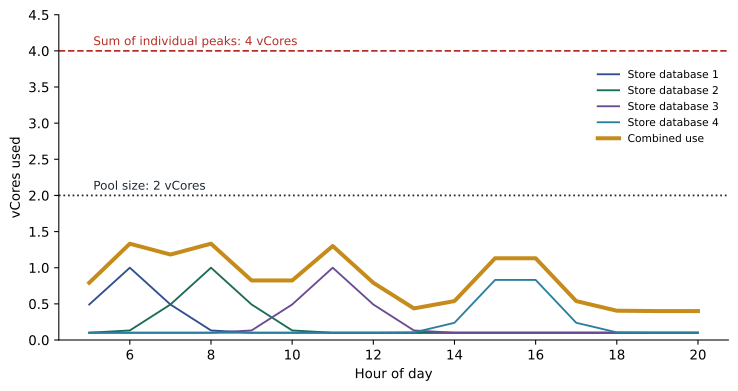
An elastic pool is a set of compute and storage resources on one logical server that many Azure SQL databases share. Instead of giving each database its own fixed size, you size the pool, and each database in it draws on the pool's resources as it needs them, within limits you set. The idea works because databases rarely peak at the same moment. If 23 store databases each need 1 vCore at their busiest, but no more than five of them are busy at once, a pool of a few vCores can serve all of them, where 23 separate 1-vCore databases would cost far more.
Pools are available in both purchasing models. A DTU-based pool is sized in elastic DTUs, or eDTUs, in the Basic, Standard and Premium tiers. A vCore-based pool is sized in vCores and offers the General Purpose, Business Critical and Hyperscale tiers. The pool has a maximum storage size shared by its databases, and each tier and size has a maximum number of databases the pool can hold. Pools use provisioned compute only; serverless is a separate compute option for single databases, not for pools.
Per-database limits
Each database in a pool can be given a minimum and a maximum. The per-database maximum, in vCores or eDTUs, stops a single busy database from consuming the whole pool, which matters if one store runs a large report while others are trying to approve shift swaps. The per-database minimum guarantees each database a floor of resources even when the pool is busy, but it reserves that floor permanently: the pool must be large enough to hold every database's minimum at once, so a high minimum reduces the number of databases that fit. Most pools of small, similar databases use a minimum of zero and a maximum that is a fraction of the pool.
Sizing a pool
The basic sizing rule compares two numbers. The first is the sum of each database's peak, which is what you would pay for if every database had its own size. The second is the peak of the combined use, measured across all the databases at the same moment, which is what the pool must provide. The larger the gap between them, the more a pool saves. Microsoft's guidance adds a rule of thumb: a pool tends to pay off when there are at least two databases and their peaks do not overlap much, and it pays off more as the number of databases grows, because the chance of every database peaking together falls.
Walt has no history for the new scheduling databases, but the app has run in a pilot at four stores since October, on a test server. He takes their busiest hour by hour from the pilot's monitoring and uses that to estimate.
| Hour | Store 12 | Store 15 | Store 3 | Store 8 | Combined |
|---|---|---|---|---|---|
| 6:00 | 0.9 | 0.2 | 0.1 | 0.1 | 1.3 |
| 7:00 | 0.4 | 1.0 | 0.2 | 0.1 | 1.7 |
| 11:00 | 0.1 | 0.1 | 0.8 | 0.2 | 1.2 |
| 15:00 | 0.2 | 0.1 | 0.3 | 1.0 | 1.6 |
| 16:00 | 0.6 | 0.3 | 0.2 | 0.6 | 1.7 |
| Peak | 0.9 | 1.0 | 0.8 | 1.0 | 1.7 |
Worked problem
Sizing a pool for all 23 stores
In the pilot, each store's database peaks at about 1 vCore, and the four databases together never used more than 1.7 vCores at once. Walt assumes the full set of 23 stores will behave like the pilot: the combined peak grows in proportion to the number of databases, and he adds 25 in every 100 of headroom. Separately sized databases would each need 1 vCore. Compare the two approaches.
Show solution
- Sum of individual peaks for 23 databases: 23 × 1 = 23 vCores.
- Combined peak scaled from the pilot: 1.7 × (23 ÷ 4) ≈ 9.8 vCores.
- With headroom: 9.8 × 1.25 ≈ 12.2 vCores, so the nearest pool size above it, 14 vCores, is a safe first choice. (Available pool sizes come in fixed steps; check the current list.)
- Saving in vCores compared with separate databases: 23 − 14 = 9 vCores.
Answer: A pool of about 14 vCores serves all 23 store databases, against 23 vCores for separate databases. Scaling the pilot in proportion is cautious, because more databases usually overlap less, so Walt plans to measure after launch and shrink the pool if the real combined peak is lower.
# Combined use of four store databases, hour by hour (vCores), from the pilot.
use = {
    "6:00":  [0.9, 0.2, 0.1, 0.1],
    "7:00":  [0.4, 1.0, 0.2, 0.1],
    "11:00": [0.1, 0.1, 0.8, 0.2],
    "15:00": [0.2, 0.1, 0.3, 1.0],
    "16:00": [0.6, 0.3, 0.2, 0.6],
}
peaks = [max(hour[i] for hour in use.values()) for i in range(4)]
combined = {h: round(sum(v), 1) for h, v in use.items()}
print("Individual peaks:", peaks, "sum =", round(sum(peaks), 1))
print("Combined by hour:", combined)
print("Combined peak:", max(combined.values()))
scaled = max(combined.values()) * 23 / 4
print("Scaled to 23 stores:", round(scaled, 1), "with headroom:", round(scaled * 1.25, 1))Individual peaks: [0.9, 1.0, 0.8, 1.0] sum = 3.7
Combined by hour: {'6:00': 1.3, '7:00': 1.7, '11:00': 1.2, '15:00': 1.6, '16:00': 1.7}
Combined peak: 1.7
Scaled to 23 stores: 9.8 with headroom: 12.2What this code does
The program lists how much compute each of the four pilot databases used in its busiest hours. It finds each database's own peak and adds those peaks together, which is what separately sized databases would need. Then it adds the four databases together hour by hour and finds the highest combined value, which is what a shared pool must supply. The last line scales that combined peak to all 23 stores and adds a margin, giving a first estimate of the pool size.
Dana Whitcombe asks for the comparison in dollars, so Walt converts the vCore figures at an illustrative General Purpose compute price of 0.55 dollars per vCore hour and 730 hours a month. Twenty-three separate 1-vCore databases would cost 23 × 730 × 0.55 = 9,234.50 dollars of compute a month. A 14-vCore pool would cost 14 × 730 × 0.55 = 5,621 dollars. The saving, about 3,613 dollars a month, comes entirely from the fact that the stores do not all change shifts at the same moment. Walt also notes what the pool does not change: each database still has its own backups and its own point-in-time restore, and storage is billed for the pool's allocated size rather than database by database.
Creating a pool and moving databases into it
A pool is created on a logical server, then databases are created in it or moved into it. Moving a database into a pool, out of a pool or between pools is an online operation: the database stays available and connections drop only briefly at the end, like any other scaling operation. That makes pools easy to adjust. A database that grows into a heavy user can be moved out to its own size, and a new store's database can be created directly in the pool.
az sql elastic-pool create --name pool-storesched-prod --server hf-sql-storesched-prod-cc --resource-group rg-storesched-prod-cc --edition GeneralPurpose --family Gen5 --capacity 14 --db-min-capacity 0 --db-max-capacity 2 --max-size 256GB --zone-redundant true

az sql db create --name storesched-012 --server hf-sql-storesched-prod-cc --resource-group rg-storesched-prod-cc --elastic-pool pool-storesched-prod
In T-SQL, a database can be moved into a pool with ALTER DATABASE, which is handy inside scripts that already connect to the logical server.
ALTER DATABASE [storesched-015]
    MODIFY (SERVICE_OBJECTIVE = ELASTIC_POOL (name = [pool-storesched-prod]));
Monitoring a pool
Once the pool is live, two views matter: the pool as a whole and the databases inside it. At the pool level, the portal and Azure Monitor show processor, data input-output, log write and storage use as a share of the pool's limits. If the pool regularly runs near its processor limit, it needs more vCores, or a heavy database needs to move out. At the database level, sys.dm_db_resource_stats in each database and sys.elastic_pool_resource_stats in master show which databases use most. A pool that never goes above half its capacity is oversized and can be scaled down, which is the usual result in the first month for a new pool sized cautiously.
-- In master: pool use over the last day, in 15-second samples summarised by hour.
SELECT DATEADD(hour, DATEDIFF(hour, 0, end_time), 0) AS hour_start,
       MAX(avg_cpu_percent) AS peak_cpu,
       MAX(avg_storage_percent) AS peak_storage
FROM sys.elastic_pool_resource_stats
WHERE elastic_pool_name = 'pool-storesched-prod'
  AND end_time > DATEADD(day, -1, SYSUTCDATETIME())
GROUP BY DATEADD(hour, DATEDIFF(hour, 0, end_time), 0)
ORDER BY hour_start;
When a pool is the wrong choice
A pool is not always better. If databases peak at the same time, for example a set of databases that all run the same report at 9:00, the combined peak is close to the sum of peaks and the pool saves little, while the busy hour may still starve some databases. If one database is much larger or busier than the rest, it is better on its own size, so it does not crowd out the others. If a database needs serverless auto-pause, Hyperscale features that the pool tier does not offer in the region, or a different service tier from its neighbours, it should sit outside the pool. And isolation can matter more than cost: a software-as-a-service provider may keep a large customer's database out of a shared pool because of a contract.
Pools also have operational limits. A pool holds a maximum number of databases that depends on its tier and size, and the storage limit is shared, so one database that grows fast can fill the pool for everyone. Walt sets an alert at 80 in every 100 of pool storage, giving the team time to raise the size before a store's scheduling app stops accepting new shifts.
| Situation | Pool or separate? | Reason |
|---|---|---|
| Many small databases with peaks at different times | Pool | Combined peak is far below the sum of peaks |
| Databases that all peak at the same time | Usually separate | Little saving and a risk of contention |
| One large, busy database among small ones | Separate for the large one | Avoid crowding out the others |
| A test database idle most of the day | Separate serverless | Pools cannot auto-pause |
| Tenants who require isolation by contract | Separate | Isolation outweighs cost |
Pools and elastic jobs
Pools often go together with elastic jobs, the Azure SQL Database replacement for SQL Server Agent. Because each store's database is separate, a schema change, such as adding a column for a new kind of leave, must be applied to all 23. An elastic job agent can run the same T-SQL script against a target group, for example every database in the pool, with retries and logging. MSAZ-282 covers elastic jobs in detail; for now Walt notes that the pool's databases will be one target group, so that future changes reach every store in one run.
Common mistakes
MistakeDatabases in an elastic pool can use serverless auto-pause.
InsteadPools use provisioned compute; serverless is an option for single databases.
MistakeA higher per-database minimum always improves performance at no cost.
InsteadMinimums are reserved for every database at once, so they reduce how many databases fit in the pool.
MistakeMoving a database into a pool requires taking it offline.
InsteadMoving into, out of or between pools is an online operation with only a brief reconnect at the end.
MistakeA pool always saves money.
InsteadIf databases peak together, or one database dominates, a pool saves little and may cause contention.
Summary and key terms
- An elastic pool shares compute and storage among many Azure SQL databases on one logical server.
- Pools exist in the DTU model (eDTUs) and the vCore model (General Purpose, Business Critical, Hyperscale); they use provisioned compute.
- Per-database minimum and maximum settings protect databases from each other; minimums are reserved for every database.
- Size a pool from the combined peak of its databases, not the sum of their individual peaks, and add headroom.
- Databases move in and out of pools online; monitor pool and database use and adjust.
- Keep databases that peak together, dominate the pool, need serverless or require isolation out of the pool.
- Elastic pool
- A shared set of compute and storage resources used by several Azure SQL databases on one logical server.
- eDTU
- Elastic database transaction unit, the unit used to size DTU-based elastic pools.
- Per-database maximum
- The most resources any one database in a pool may use.
- Per-database minimum
- A floor of resources reserved for each database in a pool.
- Combined peak
- The highest total resource use of all databases in a pool at the same moment.
- Elastic job
- A scheduled T-SQL job that runs against one or more Azure SQL databases, such as every database in a pool.
Practice problems
Work each problem on paper first, then reveal the answer to check.
Why can a pool be smaller than the sum of its databases' peaks?
Show answer
Because the databases peak at different times, so their combined use stays well below the sum of the peaks.
What does the per-database maximum protect against?
Show answer
One busy database consuming the whole pool and starving the others.
Which purchasing models offer elastic pools?
Show answer
Both: DTU-based pools sized in eDTUs and vCore-based pools sized in vCores.
Which system view in master shows pool-level resource use?
Show answer
sys.elastic_pool_resource_stats.
Give one case where a database should stay outside the pool.
Show answer
For example: it needs serverless auto-pause, it is much busier than the others, it peaks at the same time as them, or it must be isolated by contract.
Lesson quiz · 5 questions
Score 60% or more to complete this lesson.
Create a free account to save your progress, take quizzes and earn a certificate.