
MSAZ-280 · Lesson 12 of 12 · 20 min
Azure Arc-enabled SQL Server
▶ Video coming soon A video version of this lesson is on the way.
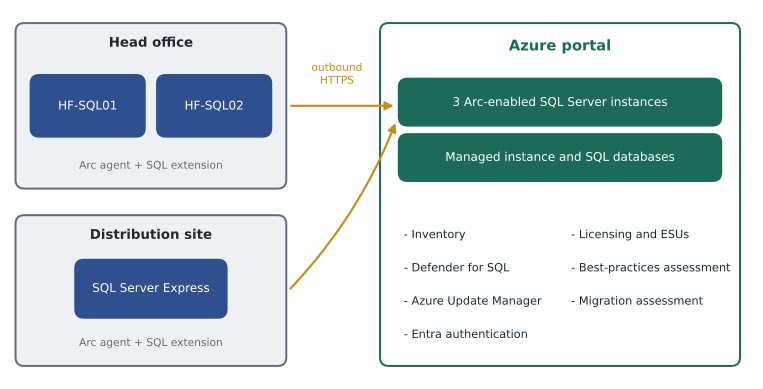
Project Skylight's plan ends in 2027, but not every SQL Server at Harrow & Finch will be in Azure by then. Three will still be on premises in 2027. HF-SQL01 runs StockLine until its migration in the spring. HF-SQL02, a SQL Server 2014 instance behind the finance team's old budgeting tool, waits for its vendor's new version. And a small SQL Server Express instance at the Brandon distribution centre stores the dock scanners' pallet data. It must keep working even if the link to head office goes down, so it stays on site. Walt does not want two ways of managing his estate, one for Azure and one for everything else. The last topic of this course, Azure Arc-enabled SQL Server, is how he avoids that.
What Azure Arc does
Azure Arc extends Azure's management layer to machines and services that run outside Azure: in a company's own data centre, at the edge or in another cloud. A server connected to Arc appears in the Azure portal as a resource, in a resource group and subscription like any Azure resource. It can be tagged, governed with Azure Policy, given role-based access and watched with Azure Monitor. The server itself does not move; Arc installs an agent, the Connected Machine agent, that talks outbound to Azure over HTTPS, so no inbound ports need to be opened.
Arc-enabled SQL Server builds on that. When a connected Windows or Linux server runs SQL Server, an Azure extension for SQL Server discovers each instance and projects it, and its databases, into Azure as resources of their own. From there, Azure services that normally manage Azure SQL can reach the on-premises instance: inventory and properties, licensing, security, assessment, patching and migration. The DP-300 study guide asks you to identify use cases for Arc-enabled SQL services, and the clearest way to do that is to go through those capabilities one by one.
Inventory
The first benefit is simply knowing what exists. Once every server is connected, Walt can list all SQL Server instances across head office, the distribution centre and Azure in one view, with each instance's version, edition, cumulative update level, number of cores, databases, sizes and recovery models. He can query them with Azure Resource Graph, filter them by tag and export the list for the auditors. On premises, Walt kept this list in a spreadsheet he updated when he remembered. Now it updates itself.
resources
| where type =~ 'microsoft.azurearcdata/sqlserverinstances'
| extend version = tostring(properties.version), edition = tostring(properties.edition),
         cores = toint(properties.vCore), licenseType = tostring(properties.licenseType)
| project name, resourceGroup, version, edition, cores, licenseType
| order by name asc
Licensing and Extended Security Updates
Arc changes how SQL Server can be paid for. Each Arc-enabled instance has a licence type: Paid, meaning it is covered by a licence with Software Assurance or a subscription; PAYG, meaning pay-as-you-go billing through the Azure subscription, charged per core per hour while the instance runs; or LicenseOnly, meaning a licence without Software Assurance. Pay-as-you-go suits servers that will be retired soon or that run only part of the year, because the company pays only for the hours used rather than buying a licence. Setting the licence type correctly also lets Microsoft's licence reports show exactly what the company is entitled to and using.
Arc is also the route to Extended Security Updates for SQL Server versions past the end of support, billed monthly through Azure rather than bought as a yearly purchase. This matters to Harrow & Finch twice over. SQL Server 2014 reached the end of extended support in July 2024, and Extended Security Updates for it run until July 12, 2027, so HF-SQL02 must be upgraded or replaced before then. And SQL Server 2016, the version of HF-SQL01, reached the end of extended support on July 14, 2026. Until StockLine moves to Managed Instance in the spring of 2027, HF-SQL01 needs Extended Security Updates to keep receiving security fixes. Enabling them through Arc, for exactly the months needed, was the first Arc change Walt made in November 2026.
Worked problem
What do Extended Security Updates cost until migration?
HF-SQL01 has 8 cores licensed. Suppose Extended Security Updates through Arc cost an illustrative 0.06 dollars per core per hour, billed for every hour the subscription is enabled. Walt enables them from December 1, 2026, and plans to switch them off after StockLine's cutover at the end of April 2027, five months later. Assume 730 hours per month. What is the estimated cost?
Show solution
- Hours: 5 months × 730 hours = 3,650 hours.
- Core-hours: 8 cores × 3,650 hours = 29,200 core-hours.
- Cost: 29,200 × 0.06 = 1,752 dollars.
- If the migration slips by one month: 8 × 730 × 0.06 = 350.40 dollars more.
Answer: About 1,752 dollars at the illustrative rate, plus about 350 dollars for every month the migration slips, which gives the project a small, visible reason to keep its date.
Security
Microsoft Defender for SQL, part of Defender for Cloud, protects Arc-enabled instances in the same way as Azure SQL databases. It runs vulnerability assessments that check configuration against a baseline, such as the sysadmin role holding too many members or a login with a weak password policy, and it raises alerts for suspicious activity such as SQL injection attempts or brute-force sign-ins. On SQL Server 2022 and later, Arc also enables Microsoft Entra authentication for the on-premises instance, so people can sign in with their organizational identities and multifactor authentication instead of SQL logins. Sunil Rao's team turns Defender on for all Arc-enabled SQL servers through a policy, so new servers are covered automatically.
Assessment and patching
The best-practices assessment for Arc-enabled SQL Server checks each instance against the same guidance Microsoft uses for its own support engineers: memory settings, tempdb configuration, database file placement, index fragmentation, backup history, and dozens of other items. Results appear in the portal with an explanation and a recommended fix. Walt schedules it weekly for all three instances. Its first run on HF-SQL02 found that the budgeting database had no full backup in nine days, because a scheduled task had been running under an account whose password expired, which nobody had noticed.
Patching uses Azure Update Manager, the same service that patches Azure virtual machines. It can assess which Windows and SQL Server updates each server is missing, and apply them on a schedule in a maintenance window. For the distribution centre's Express instance, which has no SQL Server Agent and no DBA on site, scheduled patching through Update Manager replaces Walt's quarterly trip to the warehouse. Arc can also take automated backups and offers point-in-time restore for Arc-enabled instances, with backups written to the server's local storage or a share, which helps sites like the distribution centre that have no backup software of their own; Walt treats these as useful extras and checks which are generally available before he relies on them.
| Use case | What Arc provides | Harrow & Finch example |
|---|---|---|
| Inventory and governance | Instances and databases as Azure resources, Resource Graph queries, tags and Azure Policy | One list of all SQL Server instances for the auditors |
| Licensing | Licence type per instance, pay-as-you-go billing | Pay-as-you-go for HF-SQL02 until it is retired |
| Extended Security Updates | Monthly ESU billing through Azure | Security fixes for SQL Server 2016 on HF-SQL01 until migration |
| Security | Defender for SQL, Microsoft Entra authentication (SQL Server 2022 and later) | Defender alerts for all three on-premises instances |
| Assessment | Best-practices assessment on a schedule | Found a missing backup on HF-SQL02 |
| Patching | Azure Update Manager schedules and reports | Patching the distribution centre Express instance |
| Migration | Readiness assessment, target sizing and Managed Instance link migrations | The StockLine assessment and migration in lesson 6 |
Migration
Arc is also the starting point for migration. Lesson 6 used the SQL Server migration experience in Azure Arc to assess StockLine for each Azure SQL target and to recommend a size, and the same experience will run the migration itself with the Managed Instance link. Because Arc already knows each instance's version, size and features, a migration plan can begin from facts rather than from a questionnaire. Microsoft documents migration to SQL Server on Azure virtual machines through Arc as coming soon; for that target the Database Migration Service remains the main tool.
Connecting a server
Connecting a server takes two steps. First, the Connected Machine agent is installed, usually with a script generated in the portal that signs in with a service principal so that many servers can be onboarded at once. Second, the Azure extension for SQL Server is installed, which happens automatically if the subscription is set to do so, and discovers the instances. Each server needs outbound HTTPS access to a published list of Azure endpoints, directly or through a proxy. The data sent to Azure is metadata about the server and its instances, not the contents of the databases.
azcmagent connect --service-principal-id 00000000-0000-0000-0000-000000000000 --service-principal-secret <from the secure store> --resource-group rg-arc-servers-cc --tenant-id 00000000-0000-0000-0000-000000000000 --location canadacentral --subscription-id 00000000-0000-0000-0000-000000000000 --tags "site=head-office,owner=dba"

az connectedmachine extension create --machine-name HF-SQL02 --resource-group rg-arc-servers-cc --name WindowsAgent.SqlServer --type WindowsAgent.SqlServer --publisher Microsoft.AzureData --location canadacentral --settings "{'LicenseType':'PAYG'}"
One detail of the residency policy matters here. Arc stores the metadata of each connected server in the Azure region chosen when it is connected. Walt connects all three servers to Canada Central, the same region as the rest of the estate, so the inventory stays with the company's other resources.
Governing Arc-enabled servers
Once the servers are in Azure as resources, Renata's governance rules apply to them as they do to everything else. Each Arc-enabled server sits in the resource group rg-arc-servers-cc with tags for site, owner and planned retirement date, so a report can show which on-premises servers still have no retirement plan. Azure Policy assignments at the subscription level make sure every Arc-enabled SQL Server has the SQL Server extension installed with a licence type set, has Defender for SQL enabled and sends its logs to the central Log Analytics workspace. Role-based access control decides who may change those settings: Walt's team can manage the SQL extension and run assessments, but only the platform team can disconnect a server from Arc. None of this gives anyone access to the data inside the databases; that still depends on SQL Server permissions, which MSAZ-281 covers.
Putting the estate together
At the last DBA clinic of the course, Elena asks Walt to draw the whole Harrow & Finch database estate as it will look at the end of 2027. He draws it without looking at his notes. StockLine and Pricing on a Business Critical managed instance in Canada Central, migrated online with the Managed Instance link. Finch Rewards on provisioned General Purpose Azure SQL Database in production and serverless in test. The 23 store scheduling databases in an elastic pool. SalesHistory on Hyperscale with a named replica for reports. The warehouse system on SQL Server on a memory-optimized Azure virtual machine. The distribution centre's Express instance on premises, connected to Arc. Every Azure resource defined in Bicep and deployed by the pipeline. And one portal for all of it.
Elena points to what is still missing from the drawing: who may sign in, how data is encrypted, how slow queries are found, how the backups are proved and what happens if the region is lost. Those are the subjects of MSAZ-281 and MSAZ-282. Walt closes his binder, which now has a new section at the front with the title Azure, and books the next clinic.
Common mistakes
MistakeAzure Arc moves on-premises databases into Azure.
InsteadArc manages servers where they run; only metadata is sent to Azure.
MistakeArc requires opening inbound ports on the on-premises firewall.
InsteadThe Connected Machine agent communicates outbound over HTTPS.
MistakePay-as-you-go licensing is only for SQL Server in Azure virtual machines.
InsteadArc-enabled SQL Server can be billed pay-as-you-go per core per hour through the Azure subscription.
MistakeA server past the end of extended support cannot get security fixes.
InsteadExtended Security Updates can be bought, including monthly through Arc, for a limited period.
Summary and key terms
- Azure Arc projects servers that run outside Azure into Azure as resources, using an agent that talks outbound over HTTPS.
- The Azure extension for SQL Server discovers instances and databases so they can be inventoried, governed and queried with Resource Graph.
- Arc supports licence types Paid, PAYG and LicenseOnly, and monthly Extended Security Updates for SQL Server versions past end of support.
- Defender for SQL, Microsoft Entra authentication (SQL Server 2022 and later), best-practices assessment and Azure Update Manager all work with Arc-enabled instances.
- The SQL Server migration experience in Azure Arc assesses, sizes and migrates instances, including near-zero-downtime migration with the Managed Instance link.
- Arc keeps one management view across Azure SQL resources and the servers that stay on premises.
- Azure Arc
- An Azure service that extends Azure management to servers and services running outside Azure.
- Connected Machine agent
- The agent installed on a server to connect it to Azure Arc.
- Azure extension for SQL Server
- The Arc extension that discovers SQL Server instances on a connected server and projects them into Azure.
- Pay-as-you-go licensing
- Billing a SQL Server licence per core per hour through an Azure subscription.
- Extended Security Updates
- Security updates sold for a limited time for products past the end of extended support.
- Azure Resource Graph
- An Azure service for querying resources across subscriptions with a query language.
- Best-practices assessment
- A scheduled check of a SQL Server instance against Microsoft's configuration guidance.
Practice problems
Work each problem on paper first, then reveal the answer to check.
Does Azure Arc send database contents to Azure?
Show answer
No; it sends metadata about the server, instances and databases.
Why does HF-SQL01 need Extended Security Updates in late 2026?
Show answer
SQL Server 2016 reached the end of extended support on July 14, 2026, and StockLine will not move to Managed Instance until spring 2027.
Name the three licence types an Arc-enabled instance can have.
Show answer
Paid, PAYG and LicenseOnly.
Which service patches Arc-enabled servers on a schedule?
Show answer
Azure Update Manager.
Name two use cases for Arc-enabled SQL Server.
Show answer
Any two of: inventory, licensing, Extended Security Updates, Defender for SQL, Entra authentication, best-practices assessment, patching, migration assessment.
Lesson quiz · 5 questions
Score 60% or more to complete this lesson.
Create a free account to save your progress, take quizzes and earn a certificate.