
MSAZ-280 · Lesson 3 of 12 · 21 min
Deploying Azure SQL Database
▶ Video coming soon A video version of this lesson is on the way.
The first database Walt deploys in Azure will not be StockLine. Elena wants him to practise on something that cannot hurt a store: a copy of the Finch Rewards test database in the hf-nonprod subscription. Hana Sato's developers need it anyway, and building it by hand once, slowly, will show Walt every decision that a deployment involves. Later, in lesson 11, he will turn the same decisions into code. This lesson walks through those decisions in the order the Azure portal asks them, then shows the same deployment with the Azure CLI.
The logical server comes first
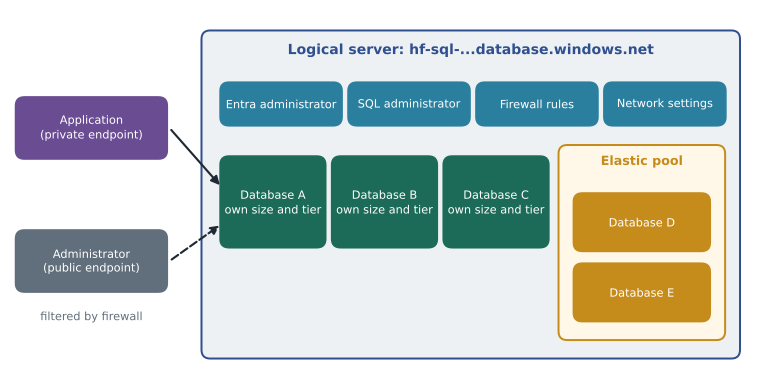
An Azure SQL database always lives on a logical server. Despite the name, a logical server is not a machine you can sign in to. It is an Azure resource that acts as a parent for databases and elastic pools and holds settings they share: a globally unique name that becomes part of the connection address, the administrator sign-in, the Microsoft Entra administrator, firewall rules, network settings, auditing defaults and the region. Databases on the same logical server are still separate: each has its own compute size and tier, and they do not share memory or processor unless they are placed in the same elastic pool.
The server name must be unique across all of Azure, because it becomes a DNS name such as hf-rewards-test-cc.database.windows.net. Harrow & Finch's naming standard, set by Renata in September 2026, uses the workload, the environment and a short region code. Walt picks hf-sql-rewards-test-cc for the server and finchrewards for the database, in the resource group rg-rewards-test-cc in the Canada Central region.
Authentication choices at creation
The portal asks how people will sign in before it asks anything about performance. There are three choices: Microsoft Entra authentication only, SQL authentication only, or both. Microsoft Entra authentication lets users and applications sign in with their organizational identities or managed identities, with multifactor authentication and central disabling of accounts when someone leaves. SQL authentication uses a user name and password stored in the database engine. Harrow & Finch's security manager, Sunil Rao, has set a rule for new databases: Microsoft Entra only, with an Entra group, not a single person, as the server's Entra administrator. Walt chooses the group sg-dba-admins. MSAZ-281 covers logins, users and permissions in depth; for now the important point is that the choice is made at the server and can be changed later.
Compute and storage
Next comes the workload environment and the compute size. The portal offers a development and production preset, which only changes the suggested defaults. Walt opens the configuration page and chooses the vCore model, the General Purpose tier, serverless compute with a minimum of 0.5 vCores and a maximum of 2 vCores, and an auto-pause delay of one hour, which follows the cost comparison in lesson 2. He sets a maximum data size of 32 GB, which is plenty for test data and can be raised later without downtime. He leaves standard-series hardware selected because serverless requires it.
The same page asks about backup storage redundancy. Automatic backups of Azure SQL Database are copied to a storage account managed by Microsoft, and the customer chooses how that storage is replicated: locally redundant within one data centre, zone-redundant across availability zones in the region, or geo-redundant to the paired region. Geo-redundant backup storage allows a geo-restore to the paired region if the whole primary region is lost; locally redundant and zone-redundant storage keep backup data inside the primary region, which some residency policies prefer. For the test database Walt chooses locally redundant backup storage, the cheapest. For production StockLine data the team will choose differently, and MSAZ-282 explains why.
Production databases in a region with availability zones can also be made zone-redundant, so that the database's replicas are spread across zones and survive the loss of one data centre. The option exists for General Purpose, Business Critical and Hyperscale in supported regions. Canada Central has three availability zones, so the option is available to Harrow & Finch; the test database does not need it.
| Setting | Walt's choice for the test database | Why |
|---|---|---|
| Purchasing model and tier | vCore, General Purpose | Cheapest vCore tier, supports serverless |
| Compute tier | Serverless, 0.5 to 2 vCores | Used only in office hours |
| Auto-pause delay | 1 hour | Pauses overnight and at weekends |
| Maximum data size | 32 GB | Enough for test data; can be raised online |
| Backup storage redundancy | Locally redundant | Lowest cost; test data can be recreated |
| Zone redundancy | Off | Not needed for a test database |
| Authentication | Microsoft Entra only, group as admin | Company rule for new databases |
| Connectivity | Private endpoint, public access disabled | Company rule; see below |
Networking
A logical server has a public endpoint by default, reachable over the internet but closed by a server-level firewall until rules allow specific IP address ranges. There is also a setting that allows Azure services and resources to access the server, which opens the firewall to traffic from any Azure address, including other customers' resources; most security teams leave it off. The firewall can hold server-level rules, which apply to every database on the server and live in the master database, and database-level rules, which apply to one database and travel with it when it is copied.
The more secure design is a private endpoint: a network interface with a private IP address in one of the company's virtual network subnets, linked to the logical server. Applications in the virtual network, or on premises through the site-to-site VPN that went live in October 2026, connect to that private address, and a private DNS zone, privatelink.database.windows.net, makes the normal server name resolve to it. Once private endpoints are in place, public network access can be disabled entirely. Virtual network service endpoints with virtual network rules are an older alternative that keeps the public endpoint but restricts it to chosen subnets.
There is one more networking choice that matters for performance: the connection policy. With the redirect policy, a client's first connection goes to a gateway, which then tells the client to connect directly to the node hosting the database, so later traffic skips the gateway and latency is lower. With the proxy policy, all traffic flows through the gateway. Connections from inside Azure use redirect by default; redirect needs the client to reach a wider range of ports, 11000 to 11999, which matters when firewalls sit in the way.
Additional settings
The last pages of the wizard ask about data source, collation, maintenance and tags. A new database can start empty, be restored from a backup, or include the small AdventureWorksLT sample. The database collation decides how text is sorted and compared, for example whether colour and COLOUR are equal; the default, SQL_Latin1_General_CP1_CI_AS, is case-insensitive and accent-sensitive and matches what StockLine uses, so Walt keeps it. Collation is hard to change once data exists, so it is worth checking before the first deployment rather than after. The maintenance window lets the team move planned Azure maintenance to a weekday or weekend window in the evening rather than the system default. Tags such as cost-centre=it-data and environment=test help Dana's team divide the bill.
Microsoft Defender for SQL can be enabled when the server is created. It adds vulnerability assessments and alerts for suspicious activity such as SQL injection or unusual sign-ins. Sunil's team turns it on at the subscription level, so Walt does not need to enable it database by database; MSAZ-281 covers it.
The same deployment with the Azure CLI
The portal is a good teacher, but nobody wants to click through nine pages for every environment. The study guide asks you to choose an automated deployment method, and the commands below show the same deployment as Azure CLI commands, which Walt runs in Azure Cloud Shell. Values are written out in full rather than stored in variables, so that every setting is visible.
az group create --name rg-rewards-test-cc --location canadacentral --tags environment=test cost-centre=it-data

az sql server create --name hf-sql-rewards-test-cc --resource-group rg-rewards-test-cc --location canadacentral --enable-ad-only-auth --external-admin-principal-type Group --external-admin-name sg-dba-admins --external-admin-sid 7f3c2a10-0000-4c1e-9a55-000000000000

az sql db create --name finchrewards --server hf-sql-rewards-test-cc --resource-group rg-rewards-test-cc --edition GeneralPurpose --compute-model Serverless --family Gen5 --min-capacity 0.5 --capacity 2 --auto-pause-delay 60 --max-size 32GB --backup-storage-redundancy Local --zone-redundant false

az sql server update --name hf-sql-rewards-test-cc --resource-group rg-rewards-test-cc --enable-public-network false
Reading the commands is a DP-300 skill in its own right. The family value Gen5 is the CLI name for standard-series hardware, capacity is the maximum vCores, min-capacity the serverless minimum, and auto-pause-delay is given in minutes. The private endpoint is created with its own command, az network private-endpoint create, and its DNS zone link; Renata's networking team owns those, so Walt asks them rather than creating them himself. PowerShell offers matching cmdlets, New-AzSqlServer and New-AzSqlDatabase, with the same settings as parameters.
Once the database exists, Walt connects from SQL Server Management Studio on his workstation, which reaches the private endpoint through the VPN, signs in with his Entra account and runs a simple check of the service objective.
SELECT DATABASEPROPERTYEX(DB_NAME(), 'Edition') AS edition,
       DATABASEPROPERTYEX(DB_NAME(), 'ServiceObjective') AS service_objective,
       DATABASEPROPERTYEX(DB_NAME(), 'MaxSizeInBytes') / 1073741824 AS max_size_gb,
       DATABASEPROPERTYEX(DB_NAME(), 'Collation') AS collation_name;
The result shows the edition GeneralPurpose, the service objective GP_S_Gen5_2, where S means serverless, Gen5 the hardware family and 2 the maximum vCores, a maximum size of 32 GB and the expected collation. Walt pastes the result into his binder. Old habits, he says, but a runbook that proves the settings is worth more than a memory of having clicked them.
Worked problem
Estimating the connection address and firewall work
A contractor needs temporary access from the office of an outside web firm to a second test database, finchrewards-demo, on a server that still has its public endpoint enabled. The firm's office uses the public addresses 203.0.113.16 to 203.0.113.23. The demo database should be the only one the contractor can reach, and the rule should leave with the database if it is copied. What kind of firewall rule should Walt create, and how many addresses does it allow?
Show solution
- A database-level firewall rule applies only to one database and is stored inside it, so it travels with copies; a server-level rule would open every database on the server.
- The range runs from .16 to .23 inclusive: 23 − 16 + 1 = 8 addresses.
- The rule is created inside the demo database with sp_set_database_firewall_rule, naming the start and end addresses.
- Walt adds a calendar reminder to remove the rule when the contract ends.
Answer: A database-level firewall rule on finchrewards-demo, allowing 8 addresses, created with sp_set_database_firewall_rule and removed when the work ends.
EXECUTE sp_set_database_firewall_rule
    @name = N'webfirm-office-temp',
    @start_ip_address = '203.0.113.16',
    @end_ip_address = '203.0.113.23';
Choosing a deployment method
The portal, Azure CLI, PowerShell, ARM templates, Bicep and Terraform can all deploy Azure SQL Database. The study guide's skill of choosing an automated deployment method comes down to a few questions. Is this a one-off experiment, where the portal is fine? Does someone need a repeatable script that runs from a laptop or a pipeline, where CLI or PowerShell fit? Should the desired state of the whole environment be described in files that can be reviewed, versioned and redeployed, where Bicep, ARM or Terraform fit? Harrow & Finch has chosen Bicep for production infrastructure, so lesson 11 rebuilds this database as a Bicep file.
Common mistakes
MistakeA logical server is a virtual machine you can sign in to.
InsteadA logical server is an Azure resource that holds shared settings; there is no operating system to sign in to.
MistakeDatabases on the same logical server share processor and memory.
InsteadEach database has its own resources unless the databases are placed in the same elastic pool.
MistakeThe setting that allows Azure services to access the server only admits your own subscription.
InsteadIt admits traffic from any Azure address, including other customers, so most teams leave it off.
MistakeServer-level firewall rules are copied with a database.
InsteadServer-level rules live in master; database-level rules live in the database and travel with copies.
Summary and key terms
- Every Azure SQL database sits on a logical server, which holds the unique name, sign-in settings, firewall rules and network settings.
- At creation you choose authentication (Microsoft Entra only, SQL, or both), compute and tier, maximum size, backup storage redundancy and zone redundancy.
- Private endpoints give the server a private address in a virtual network; public access can then be disabled.
- Server-level firewall rules apply to all databases; database-level rules apply to one and travel with copies.
- Collation, maintenance window, Defender for SQL and tags are set at creation and are worth checking before data arrives.
- The same deployment can be scripted with the Azure CLI or PowerShell, or described in Bicep, ARM templates or Terraform.
- Logical server
- An Azure resource that acts as the parent of SQL databases and elastic pools and holds their shared settings.
- Private endpoint
- A network interface with a private IP address in a virtual network that connects privately to an Azure service.
- Server-level firewall rule
- A rule on the logical server that allows an IP range to reach all its databases.
- Database-level firewall rule
- A rule stored in one database that allows an IP range to reach only that database.
- Backup storage redundancy
- The choice of locally redundant, zone-redundant or geo-redundant storage for automatic backups.
- Collation
- The rules a database uses to sort and compare text, including case and accent sensitivity.
- Connection policy
- Whether client traffic is redirected to the database node or proxied through the gateway.
Practice problems
Work each problem on paper first, then reveal the answer to check.
What becomes part of the connection address of an Azure SQL database?
Show answer
The logical server's globally unique name, followed by database.windows.net.
Why might a team choose locally redundant backup storage?
Show answer
It is cheapest and keeps backup data in one region; it suits test databases or residency policies, but it does not allow geo-restore.
What does the service objective GP_S_Gen5_2 mean?
Show answer
General Purpose, serverless, standard-series (Gen5) hardware, with a maximum of 2 vCores.
How does a private endpoint make the normal server name resolve to a private address?
Show answer
Through a private DNS zone, privatelink.database.windows.net, linked to the virtual network.
Name two ways to deploy Azure SQL Database without the portal.
Show answer
Any two of: Azure CLI, PowerShell, ARM templates, Bicep, Terraform.
Lesson quiz · 5 questions
Score 60% or more to complete this lesson.
Create a free account to save your progress, take quizzes and earn a certificate.