
MSAZ-280 · Lesson 1 of 12 · 23 min
The Azure SQL deployment options
▶ Video coming soon A video version of this lesson is on the way.
In the second week of November 2026, Elena Brandt, the data platform lead at Harrow & Finch Home Supply, moves her weekly data hour to a smaller room at the Winnipeg head office and gives it a new name: the DBA clinic. The data hour taught the whole team the vocabulary of data. The clinic has a narrower purpose. Project Skylight will move every Harrow & Finch database to Azure by the end of 2027, and the person who will run those databases day to day is Walt Hadley, who has looked after the StockLine database for seventeen years. Walt has decided to earn the Microsoft Certified: Azure Database Administrator Associate certification by passing exam DP-300, Administering Microsoft Azure SQL Solutions. He plans to sit it in May 2027, and this course follows the first part of his preparation: planning and deploying the databases themselves.
Walt arrives with his binder of runbooks under his arm. He has rebuilt the StockLine server three times, moved it to new hardware twice and restored it from tape once, on a Boxing Day he does not like to talk about. He is not worried about SQL Server. He is worried about the menu. "Every Microsoft page I open lists a different set of Azure SQL products," he says. "I need one picture I can trust." Elena draws it on the whiteboard, and that picture is the subject of this lesson.
One engine, several ways to run it
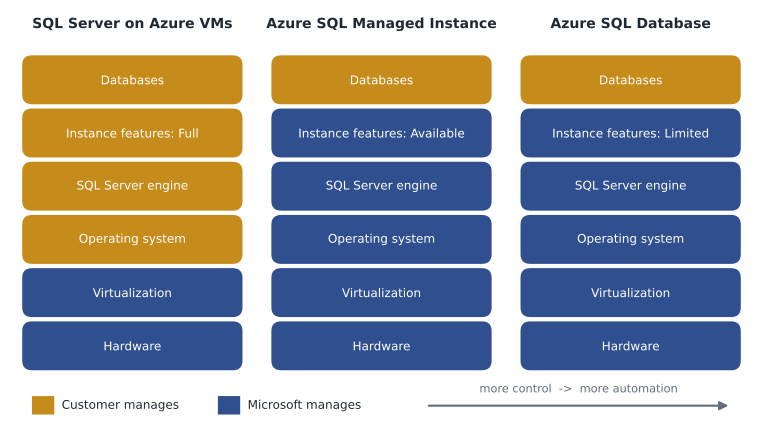
Everything in the Azure SQL family runs the same database engine as SQL Server. The tables, indexes, T-SQL language, query optimizer and transaction log that Walt knows from his on-premises server are the same in every option. What changes from one option to another is who manages the layers underneath the database, which instance-level features are available, how the service is priced and how far it can scale. A DBA who understands that one idea can read any product page calmly: the question is never "is this a different database?" but "how much of the stack do I still look after?"
Three options carry most of the weight on the DP-300 exam and in real migrations. SQL Server on Azure Virtual Machines is infrastructure as a service: Microsoft provides the virtual machine, and the customer installs, patches and backs up SQL Server inside it, or lets an Azure extension help with some of those jobs. Azure SQL Managed Instance is a platform service that gives you a whole managed SQL Server instance, with near-complete compatibility with the on-premises product, including SQL Server Agent, cross-database queries and Database Mail. Azure SQL Database is a platform service that gives you individual managed databases on a logical server, with the most automation and the widest choice of scaling options, including serverless compute, elastic pools and the Hyperscale service tier.
SQL Server on Azure Virtual Machines
A SQL Server virtual machine is the closest thing in Azure to the server Walt runs today. He chooses the virtual machine size, the disks, the Windows or Linux image and the SQL Server version and edition. He has administrator access to the operating system, so he can install other software beside SQL Server, use any feature the edition includes, such as SQL Server Reporting Services or FILESTREAM, and set every server configuration option. Azure marketplace images come with SQL Server already installed, and they can include the licence in the hourly price or let the company bring its own licences.
With control comes work. On a virtual machine the customer patches the operating system and SQL Server, configures backups, designs high availability with Always On availability groups or failover cluster instances, and watches disk space. Azure does provide help. The SQL IaaS Agent extension, which registers the virtual machine with the SQL virtual machines resource provider, unlocks features such as automated patching windows, automated backup to a storage account, licence-type switching in the portal and a best-practices assessment. But the extension assists; it does not take responsibility. If a patch breaks a vendor application, that is still the customer's problem.
The DP-300 study guide expects you to recognise when a virtual machine is the right choice. The common reasons are a vendor that requires operating system access or an unsupported SQL Server version, features that exist only in the boxed product (for example SQL Server Reporting Services on the same server, or certain third-party agents), or a need to match an on-premises build exactly during a lift-and-shift. At Harrow & Finch the warehouse management system is the clear case: its vendor supports the application only on SQL Server that its own support staff can reach at the operating-system level.
Azure SQL Managed Instance
Managed Instance sits in the middle of the picture. Microsoft runs the hardware, the operating system and the SQL Server engine, applies patches and takes backups, but what the customer receives is a whole instance rather than a single database. That matters for older applications. StockLine uses SQL Server Agent to run eleven nightly jobs, sends alert email through Database Mail, and joins to a small Pricing database with three-part names such as Pricing.dbo.PriceList. All of those keep working on Managed Instance, which is why the data team decided in November 2026 that StockLine should move to Managed Instance in 2027.
A managed instance is deployed into a dedicated subnet of an Azure virtual network, so it has a private IP address from the start and behaves like a server on the company network. It uses only the vCore purchasing model and offers the General Purpose and Business Critical service tiers, along with a Next-gen General Purpose option that became generally available in November 2025 and lets you choose storage performance more flexibly. An update policy controls which SQL Server feature set the instance follows: an instance can stay aligned to a SQL Server release such as SQL Server 2022 or SQL Server 2025, which keeps the option of moving databases back to an on-premises server of that version, or follow the Always-up-to-date policy, which receives new engine features as soon as they ship but cannot be restored to on-premises SQL Server.
Managed Instance is not identical to a SQL Server you install yourself. You cannot sign in to the operating system, some server-level settings are fixed, and features that depend on the file system, such as FILESTREAM, are not available. The usual tool for finding out whether a database will fit is a migration assessment, covered in lesson 6, which flags any feature that blocks or complicates the move.
Azure SQL Database
Azure SQL Database is the most managed option and the one Microsoft builds new cloud features into first. Each database is its own resource with its own compute size, service tier and settings, grouped under a logical server that holds the shared name, sign-in settings and firewall rules. Patching, backups, high availability within a region and most maintenance are automatic. In return, some instance-level features are missing: there is no SQL Server Agent (elastic jobs fill the gap), and a query cannot reach another database with a three-part name, although elastic queries and application logic can combine data across databases.
What SQL Database offers in exchange is flexibility. It is the only option with serverless compute, which scales automatically and can pause when idle so that only storage is billed. It supports elastic pools, where many small databases share one budget of compute. Its Hyperscale tier separates compute from storage and can grow to very large sizes. It is also the option with a free offer for small workloads and the one most often chosen by developers for new applications. The new Finch Rewards loyalty API that Hana Sato's team is building will use SQL Database: serverless for the test environment, provisioned General Purpose compute in production.
| Question | SQL Server on Azure VMs | Azure SQL Managed Instance | Azure SQL Database |
|---|---|---|---|
| Service model | IaaS | PaaS | PaaS |
| Scope of what you deploy | A whole server you build | A managed instance with many databases | Individual databases on a logical server |
| Operating system access | Yes | No | No |
| SQL Server Agent | Yes | Yes | No (elastic jobs instead) |
| Cross-database queries with three-part names | Yes | Yes, within the instance | No |
| Who patches the engine | Customer (can be automated) | Microsoft | Microsoft |
| Automatic backups | Optional, through the extension | Yes | Yes |
| Purchasing models | VM price plus SQL licence | vCore | vCore or DTU |
| Serverless and elastic pools | No | No (instance pools are a separate idea) | Yes |
| Typical use | Vendor apps needing OS access, exact lift and shift | Migrating existing SQL Server applications | New cloud applications, SaaS, many small databases |
The rest of the family
Three more names appear in the DP-300 skills outline, and Walt needs to place them on the same picture. Azure Arc-enabled SQL Server is not a place to run databases at all: it is a way to manage SQL Server instances that stay on premises or in another cloud from the Azure portal, with inventory, Microsoft Defender, best-practices assessment and pay-as-you-go licensing. It is covered in lesson 12. SQL database in Microsoft Fabric, which became generally available in November 2025, is a SaaS database built on the same engine and placed inside a Fabric workspace, where its data is replicated automatically into OneLake for analytics. It suits teams that already work in Fabric and want an operational database without managing a server; Keiko Tanabe's planned Finch Data Hub may use one later. Finally, instance pools and elastic pools are not separate products but ways of sharing resources among managed instances and SQL databases respectively.
The skills outline also mentions table partitioning and database sharding. These are design techniques rather than products. Partitioning splits a large table into pieces inside one database, usually by date, so that old data can be compressed, moved or removed quickly. Sharding spreads rows across several databases, each holding a slice of the data, which can make sense when one database can no longer grow or when tenants should be isolated. Lesson 9 returns to both.
Recommending an offering from requirements
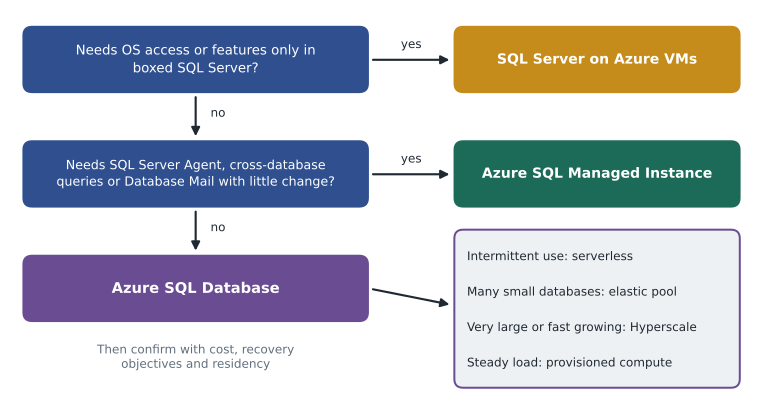
The study guide's first skill is to recommend a database offering based on specific requirements. In practice that means reading a requirement list and noticing which line decides the answer. Elena teaches Walt to work through four filters in order. First, compatibility: does anything force a virtual machine, such as operating system access, an unsupported version or a boxed-only feature? Second, instance features: does the application rely on SQL Server Agent, cross-database queries, Service Broker across databases, CLR assemblies with external access or linked servers in ways that would be costly to rewrite? If so, Managed Instance is the natural fit. Third, shape and scale: is the workload one database or many, steady or intermittent, ordinary size or very large? This decides among SQL Database options. Fourth, constraints: recovery objectives, data residency, network isolation, licences the company already owns and budget.
Data residency is simple for Harrow & Finch because every Azure SQL option is available in its primary region, Canada Central. The company's policy keeps customer and employee personal information in Canadian regions; PIPEDA itself does not forbid storing data abroad, but it holds the company accountable for protecting it wherever it goes. In both countries the residency question is usually settled by choosing the region and its paired region carefully, not by choosing among database options.
Worked problem
Choosing options for the Harrow & Finch estate
Elena gives Walt four databases and asks him to name an option for each. (1) StockLine: 410 GB, SQL Server 2016, eleven SQL Server Agent jobs, a three-part-name query to the Pricing database. (2) The warehouse management system: vendor support requires operating system access. (3) Finch Rewards: a new API, busy in the evening, quiet overnight, about 20 GB in its first year. (4) Twenty-three small store scheduling databases, one per store, each under 2 GB, each busy only around shift changes.
Show solution
- StockLine needs SQL Server Agent and a cross-database query with little change, so the compatibility filter points to Azure SQL Managed Instance.
- The warehouse system fails the first filter: the vendor needs the operating system, so it goes to SQL Server on an Azure VM.
- Finch Rewards is new, single-database and intermittent, so it fits Azure SQL Database; serverless suits the test copy, and provisioned General Purpose suits steady production use.
- The store databases are many, small and busy at different moments, so they fit an elastic pool of Azure SQL databases, which shares one compute budget among them.
Answer: Managed Instance for StockLine, SQL Server on a VM for the warehouse system, SQL Database for Finch Rewards, and an elastic pool of SQL databases for the store scheduling databases.
Who pays, who patches, who gets paged
Renata Kowal, the cloud lead, likes to test every design with three questions: who pays, who patches and who gets paged? Elena applies them to the three options. On a virtual machine the company pays for the virtual machine, its disks and the SQL Server licence; Walt's team patches the operating system and SQL Server; and Walt gets paged when the disk fills or a backup job fails. On Managed Instance and SQL Database the company pays for vCores or DTUs and storage; Microsoft patches; and Walt still gets paged, but for different reasons: a query that suddenly slows, a user who cannot sign in, a database that is approaching its size limit or a cost alert. The pager does not disappear in a platform service. The kinds of problems it reports change.
That is why the DP-300 exam still exists for platform services. Security, performance tuning, automation and recovery planning remain the database administrator's job whichever option is chosen. MSAZ-281 covers security, monitoring and tuning; MSAZ-282 covers automation, high availability and disaster recovery. This course concentrates on the decisions that come first: which option, which purchasing model, which settings, how to move the data in and how to describe the whole thing in code so it can be rebuilt.
Common mistakes
MistakeAzure SQL Database and Managed Instance run a different database engine from SQL Server.
InsteadEvery Azure SQL option runs the SQL Server engine; the options differ in management, features, pricing and scale.
MistakeA platform service means the DBA has nothing left to do.
InsteadMicrosoft takes over patching, backups and hardware, but security, tuning, automation and recovery testing stay with the DBA.
MistakeAzure Arc-enabled SQL Server is another place to host databases in Azure.
InsteadArc manages SQL Server that runs outside Azure; the databases stay where they are.
MistakeAny application that uses SQL Server Agent must run on a virtual machine.
InsteadManaged Instance includes SQL Server Agent; only needs such as operating system access force a virtual machine.
Summary and key terms
- All Azure SQL options run the SQL Server engine; they differ in who manages each layer, which instance features exist, pricing and scale.
- SQL Server on Azure VMs is IaaS with full control and operating system access; the SQL IaaS Agent extension helps with patching, backups and licensing.
- Azure SQL Managed Instance is PaaS with near-complete SQL Server compatibility, runs in a dedicated virtual network subnet and uses the vCore model.
- Azure SQL Database is PaaS for individual databases on a logical server, with serverless, elastic pools and Hyperscale options.
- Arc-enabled SQL Server manages servers outside Azure; SQL database in Fabric is a SaaS database inside Microsoft Fabric.
- Recommend an option by checking compatibility, instance features, workload shape and scale, then constraints such as residency, recovery and cost.
- Azure SQL family
- The Azure services built on the SQL Server engine, including SQL Server on Azure VMs, SQL Managed Instance and SQL Database.
- SQL IaaS Agent extension
- An Azure extension for SQL Server virtual machines that enables automated patching, backups, licence management and assessments.
- Managed instance
- A managed SQL Server instance in a customer virtual network with near-complete compatibility with SQL Server.
- Logical server
- The container for Azure SQL databases that holds the server name, sign-in settings and firewall rules.
- Update policy
- The Managed Instance setting that decides whether the instance follows a SQL Server release or receives new features as they ship.
- Sharding
- Spreading the rows of a data set across several databases, each holding one slice.
Practice problems
Work each problem on paper first, then reveal the answer to check.
Which Azure SQL option gives operating system access?
Show answer
SQL Server on Azure Virtual Machines.
Name two instance-level features that make Managed Instance a good migration target.
Show answer
Any two of: SQL Server Agent, cross-database queries with three-part names, Database Mail, linked servers, Service Broker across databases.
Which option offers serverless compute and elastic pools?
Show answer
Azure SQL Database.
What does Azure Arc-enabled SQL Server do?
Show answer
It projects SQL Server instances that run outside Azure into the Azure portal so they can be inventoried, secured, assessed and licensed from Azure.
Why might an instance follow the SQL Server 2025 update policy instead of Always-up-to-date?
Show answer
To keep the ability to restore its databases to an on-premises SQL Server 2025, at the cost of receiving new engine features later.
Lesson quiz · 5 questions
Score 60% or more to complete this lesson.
Create a free account to save your progress, take quizzes and earn a certificate.