
MSAZ-280 · Lesson 2 of 12 · 24 min
Purchasing models: DTU, vCore and serverless
▶ Video coming soon A video version of this lesson is on the way.
The second DBA clinic starts with a spreadsheet. Dana Whitcombe, the chief financial officer, has asked for a cost range for every Skylight database before the 2027 budget is signed, and Walt has to produce the numbers for the Azure SQL part. On premises, the cost of StockLine is hidden inside a server purchase made in 2019 and a SQL Server licence renewal that arrives every three years. In Azure it will appear every month on an invoice, line by line. Before Walt can estimate anything, Elena tells him, he needs to understand the ways Azure SQL is sold, because the purchasing model decides which knobs he can turn and what each turn costs.
Elena is strict about one rule, and this course follows it too: real Azure prices change often and differ by region, so every price in the clinic is an illustrative number, clearly labelled, used only to practise the arithmetic. Walt will use the Azure pricing calculator and the company's own agreement for the real budget.
Two purchasing models
Azure SQL Database offers two purchasing models. The DTU model sells a bundled measure of performance. The vCore model sells compute, memory and storage as separate, visible quantities. Azure SQL Managed Instance offers only the vCore model, and SQL Server on Azure Virtual Machines is priced differently again: you pay for the virtual machine and its disks, plus a SQL Server licence that is either included in the hourly rate or brought from the company's existing agreements.
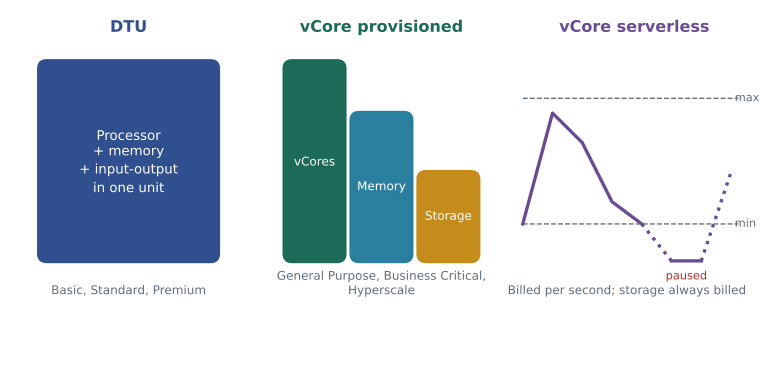
The DTU model is older and simpler. A database transaction unit blends processor, memory, reads and writes into one number, and you buy a service objective that provides a fixed amount: the Basic tier for small, light databases, the Standard tier with sizes from S0 upward, and the Premium tier for heavier input and output. Each size comes with a fixed maximum database size and a fixed level of performance. The model suits small, predictable workloads and people who would rather not think about hardware, but it gives you little control: you cannot add memory without adding processor, and you cannot use existing SQL Server licences to lower the price.
The vCore model is the one Microsoft recommends for most new work, and it is the model the DP-300 exam spends most time on. A vCore is a virtual processor core. You choose a service tier, a hardware configuration and a number of vCores, and storage is billed separately according to how much you allocate. Because compute and storage are separate, you can size each to its own need. Because the licence is visible, you can apply Azure Hybrid Benefit and pay a lower rate for compute if the company owns SQL Server licences with Software Assurance or a qualifying subscription. And because capacity is described in familiar units, it is easier to compare an Azure database with an on-premises server that has, say, eight cores and 64 GB of memory.
Service tiers in the vCore model
Within the vCore model, three service tiers describe the architecture underneath the database. General Purpose separates compute from storage: the database files sit on remote premium storage, and if the compute node fails, a new node attaches to the same files. It is the budget-friendly default and suits most business applications. Business Critical keeps the data on fast local SSD storage and runs several replicas in an Always On availability group behind the scenes, which gives lower input and output latency, faster failover and a free readable secondary replica for reporting. It costs noticeably more. Hyperscale uses a distributed architecture with separate page servers and a log service, which lets a single database grow to very large sizes and scale compute quickly; lesson 10 is devoted to it.
Managed Instance uses the same names with one addition. Its General Purpose and Business Critical tiers work in the same way as in SQL Database, and the Next-gen General Purpose option, generally available since November 2025, keeps the General Purpose design but lets you raise storage performance and the number of databases per instance more flexibly than the original version. Hyperscale is not a Managed Instance tier.
Hardware configurations sit underneath the tiers. Standard-series hardware, sometimes still called Gen5 in older documents, is the common default. Premium-series and memory-optimized options offer newer processors or more memory per vCore at a higher price. For the exam, the point to remember is that the hardware choice changes the ratio of memory to vCores and the maximum size available, and that serverless runs only on standard-series hardware.
| Tier | Storage design | Strengths | Watch for |
|---|---|---|---|
| General Purpose | Remote premium storage, compute separate | Lowest vCore cost, good for most workloads | Higher storage latency than local SSD; failover takes longer than Business Critical |
| Business Critical | Local SSD with several replicas | Low latency, fast failover, a free readable secondary | Highest cost per vCore |
| Hyperscale (SQL Database only) | Page servers and a log service in a distributed design | Very large databases, fast scaling, quick restores of large databases | Different behaviour to learn; some features differ from other tiers |
Provisioned and serverless compute
In the vCore model, Azure SQL Database also offers two compute tiers. Provisioned compute is what most people picture: you choose a number of vCores and pay for them every hour, whether the database is busy or idle, until you change the size. Serverless compute is different. You choose a minimum and a maximum number of vCores, and the database scales automatically between them according to demand. Billing is per second, based on the vCores and memory actually used, but never less than the minimum you set while the database is online.
A serverless database in the General Purpose tier can also pause automatically when it has been idle for a chosen period, called the auto-pause delay. While paused, compute costs nothing and only storage is billed. The next connection wakes the database, and that first connection waits while compute is brought back, often for a minute or so, which is why applications that use serverless should retry their first connection. The auto-pause delay can be as short as 15 minutes in General Purpose; Hyperscale serverless supports pausing only as a preview feature, with a longer minimum delay. Auto-pause can also be turned off entirely, which keeps the per-second scaling but removes the wake-up delay.
Serverless is not always cheaper. Because the price per vCore second is higher than the provisioned rate, a database that is busy all day costs more on serverless than on a provisioned size that matches its load. The model shines for intermittent, unpredictable or development workloads: test databases used during office hours, a new application whose demand is still unknown, or a reporting database queried for a few hours each night.
Worked problem
Is serverless cheaper for the Finch Rewards test database?
The Finch Rewards test database is used by developers from 8:00 to 18:00 on weekdays. During those 10 hours it averages 1.5 vCores of use. Outside those hours it is idle and, with a one-hour auto-pause delay, it pauses one hour after the last activity. The serverless minimum is 0.5 vCores. Use these illustrative prices: provisioned General Purpose with 2 vCores costs 0.50 dollars an hour for compute; serverless compute costs 0.20 dollars per vCore hour. Compare compute cost for a 5-day work week.
Show solution
- Provisioned cost: 2 vCores are billed all week, 24 × 7 = 168 hours, so 168 × 0.50 = 84.00 dollars.
- Serverless busy hours: 10 hours a day × 5 days = 50 hours at 1.5 vCores, so 50 × 1.5 × 0.20 = 15.00 dollars.
- Serverless idle hours before pausing: 1 hour a day × 5 days = 5 hours billed at the 0.5 vCore minimum, so 5 × 0.5 × 0.20 = 0.50 dollars.
- All other hours, including the weekend, the database is paused and compute costs nothing.
- Serverless total: 15.00 + 0.50 = 15.50 dollars, against 84.00 dollars provisioned.
Answer: Serverless compute costs about 15.50 dollars a week against 84.00 dollars for provisioned compute, so serverless is the better fit for the test database. Storage is billed the same way in both cases and is left out.
# Compare provisioned and serverless compute cost for one week (illustrative prices).
prov_rate = 0.50          # dollars per hour for 2 provisioned vCores
sl_rate = 0.20            # dollars per vCore hour for serverless
min_vcores = 0.5
week = []                 # (hours, average vCores used, paused?) blocks
for day in range(7):
    if day < 5:           # Monday to Friday
        week.append((10, 1.5, False))   # busy hours
        week.append((1, 0.0, False))    # idle, waiting to pause
        week.append((13, 0.0, True))    # paused overnight
    else:
        week.append((24, 0.0, True))    # paused all weekend
prov = 24 * 7 * prov_rate
sl = 0.0
for hours, used, paused in week:
    if not paused:
        sl += hours * max(used, min_vcores) * sl_rate
print("Provisioned compute:", round(prov, 2), "dollars")
print("Serverless compute: ", round(sl, 2), "dollars")
print("Serverless costs", round(sl / prov, 2), "times as much as provisioned")Provisioned compute: 84.0 dollars Serverless compute: 15.5 dollars Serverless costs 0.18 times as much as provisioned
What this code does
The program describes one week of use as blocks of hours, marks each block as busy, idle or paused, and adds up what each pricing option would charge. Provisioned compute is billed for every hour of the week at a fixed rate. Serverless compute is billed only while the database is online, at the larger of the vCores actually used and the configured minimum. The last line shows serverless as a fraction of the provisioned cost, so a value below 1 means serverless is cheaper for this pattern.
The same arithmetic shows when serverless loses. If the Finch Rewards production database will be busy from early morning until late at night every day of the week, averaging close to 2 vCores for 18 hours a day, serverless would bill roughly 18 × 7 × 2 × 0.20 = 50.40 dollars of compute a week before counting the quieter hours, and the gap to the provisioned 84.00 dollars closes quickly as usage rises. That is why the team chose provisioned compute for production: steady load is cheaper on a fixed size, and the wake-up delay of a paused database is unacceptable for a customer-facing app.
How serverless counts memory
One detail of serverless billing catches people out. Serverless measures the larger of two things each second: the vCores in use, and the memory in use converted into vCore terms. Memory counts as one vCore for every 3 GB, in the standard-series hardware this course uses. A database that keeps a large cache in memory but uses little processor can therefore be billed for more vCores than its processor use suggests. The engine reclaims cache memory gradually when it is not being used, but a workload that reads a large working set over and over keeps memory high. For estimating, Walt notes simply that the bill follows the busier of processor and memory, and never goes below the minimum vCores configured.
Licences and reservations
Two more levers apply to provisioned vCore compute and to Managed Instance. Azure Hybrid Benefit lets a company that owns SQL Server Enterprise or Standard licences with Software Assurance, or SQL Server subscription licences, pay a reduced compute rate in Azure that excludes the licence cost. On a SQL Server virtual machine the same benefit removes the SQL licence from the hourly rate. Reserved capacity lets a company commit to a quantity of vCores in a region for one or three years in exchange for a lower rate; it suits steady production databases such as StockLine, but not test databases that come and go. Neither lever applies to serverless compute, which is always billed at its own per-second rate.
Licensing also changes the picture for development. The free SQL Server Developer edition can run on a test virtual machine at no licence cost, and Azure SQL Database offers a free monthly allowance for a limited number of small databases, which suits training and experiments. Walt plans to use the free offer for his own DP-300 practice databases, because it lets him repeat the exercises in this course without adding a line to Dana's invoice.
DTU or vCore?
For the exam, recognise the signals. DTU suits a small, simple, predictable database where the team wants a single number to choose and does not have licences to reuse. vCore suits almost everything else: databases that need more memory or storage than processor, any database where Azure Hybrid Benefit or reservations apply, any Managed Instance, and anything that needs serverless, Business Critical features or Hyperscale. Moving from one model to the other is an online scaling operation, so a database that starts on DTU can move to vCore later. A rough guide that Microsoft documents is that about 100 DTUs in the Basic or Standard tiers correspond to about one vCore of General Purpose, and about 125 DTUs in Premium to about one vCore of Business Critical; treat that only as a starting point and confirm with monitoring after the change.
Worked problem
Translating a DTU database into vCores
The old supplier portal database runs on the Standard tier at S4, which provides 200 DTUs. Walt wants a first estimate of the General Purpose vCore size, using the rule of thumb of about 100 Standard DTUs per vCore.
Show solution
- Divide the DTUs by the rule-of-thumb ratio: 200 ÷ 100 = 2.
- Round up to an available size: 2 vCores is available in General Purpose.
- Plan to watch processor, memory and input-output for a week after the change and adjust if needed.
Answer: About 2 vCores of General Purpose, to be confirmed by monitoring after the move.
Common mistakes
MistakeServerless is always cheaper than provisioned compute.
InsteadServerless costs more per vCore second; it saves money only when the database is idle or lightly used for much of the time.
MistakeIn the vCore model, storage is included in the vCore price.
InsteadStorage is billed separately according to the space allocated.
MistakeManaged Instance can be bought with DTUs.
InsteadManaged Instance is sold only in the vCore model.
MistakeAzure Hybrid Benefit can be applied to serverless databases.
InsteadAzure Hybrid Benefit and reserved capacity apply to provisioned vCore compute and Managed Instance, not to serverless.
Summary and key terms
- Azure SQL Database offers the DTU and vCore purchasing models; Managed Instance offers vCore only; SQL Server VMs are priced as a VM plus a licence.
- The DTU model bundles processor, memory and input-output into Basic, Standard and Premium sizes.
- The vCore model separates compute and storage and offers General Purpose, Business Critical and, for SQL Database, Hyperscale.
- Serverless compute scales between a minimum and maximum vCore setting, bills per second and can auto-pause in General Purpose.
- Azure Hybrid Benefit and reserved capacity lower provisioned vCore costs; neither applies to serverless.
- Choose DTU for small, simple databases; choose vCore for control, licence reuse, larger or specialised workloads.
- DTU
- Database transaction unit, a blended measure of processor, memory and input-output used to size databases in the DTU model.
- vCore
- A virtual processor core, the unit used to size compute in the vCore model.
- Service tier
- The architecture and feature level of a database, such as General Purpose, Business Critical or Hyperscale.
- Serverless
- A compute tier of Azure SQL Database that scales automatically within limits and bills per second, with optional auto-pause.
- Auto-pause delay
- The idle time after which a serverless database pauses and stops billing for compute.
- Azure Hybrid Benefit
- A licensing benefit that lowers Azure SQL compute prices for customers who own eligible SQL Server licences.
- Reserved capacity
- A one-year or three-year commitment to vCores in a region in exchange for a lower rate.
Practice problems
Work each problem on paper first, then reveal the answer to check.
Which purchasing model lets you scale memory and storage separately from processor?
Show answer
The vCore model; storage is billed separately and hardware choices change the memory per vCore.
What is billed while a serverless database is paused?
Show answer
Storage only; compute costs nothing until the database resumes.
Why did the Harrow & Finch team choose provisioned compute for Finch Rewards production?
Show answer
Its load is steady for most of the day, which is cheaper on a fixed size, and the app cannot wait for a paused database to wake.
Give one reason to pick Business Critical over General Purpose.
Show answer
Lower storage latency, faster failover, or a free readable secondary replica for reporting.
A database uses little processor but holds a large cache in memory. How might serverless billing treat it?
Show answer
It may be billed for more vCores than its processor use, because memory is converted to vCores and the larger figure is billed.
Lesson quiz · 5 questions
Score 60% or more to complete this lesson.
Create a free account to save your progress, take quizzes and earn a certificate.