
MSAZ-280 · Lesson 7 of 12 · 21 min
Database configuration settings
▶ Video coming soon A video version of this lesson is on the way.
A database that has just been deployed or migrated is not yet configured. The compute size and tier decide how much hardware it gets; the configuration settings decide how the engine uses that hardware: how queries are optimized, how much parallelism is allowed, which isolation behaviour readers see, whether statistics update themselves, and how data is stored on disk. On HF-SQL01 most of these settings were chosen years ago and written in Walt's binder. In Azure, some live at the instance, some at the database and some are fixed by the service. This lesson sorts them out and shows how Walt applies them to StockLine on the non-production managed instance and to the Finch Rewards test database.
Where settings live
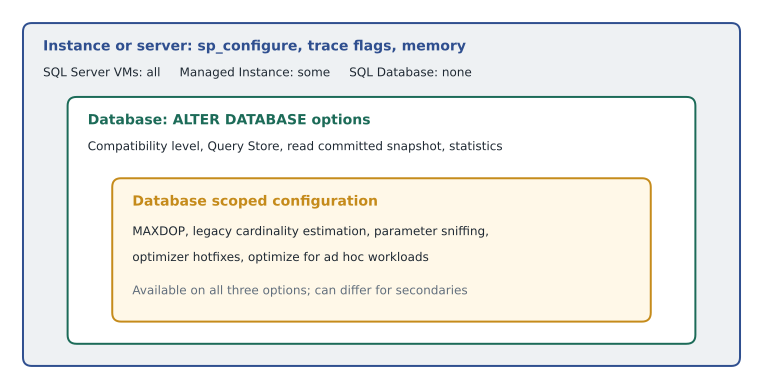
On SQL Server, whether on premises or on a virtual machine, the instance holds server-wide settings changed with sp_configure, such as max server memory, max degree of parallelism and cost threshold for parallelism, and trace flags that change engine behaviour. Each database holds its own options, changed with ALTER DATABASE, such as the compatibility level, recovery model and automatic statistics, and its own database scoped configurations, changed with ALTER DATABASE SCOPED CONFIGURATION.
Platform services move some of those levers. In Azure SQL Database there is no instance to configure: memory is managed by the service and sp_configure is not available, so the settings that matter are database options and database scoped configurations. Managed Instance sits in between: it allows a subset of sp_configure options, such as cost threshold for parallelism and max degree of parallelism, supports some global trace flags, and manages memory itself. On every option the database-level settings work the same way, which is why the DP-300 exam concentrates on them.
Compatibility level
The compatibility level tells the engine which version's behaviour to follow for query processing and some T-SQL features. A database restored from SQL Server 2016 arrives at level 130, even on an engine that supports level 160 or higher. Keeping the old level after migration is a sensible first step: query plans behave as they did before, so any performance difference can be blamed on the new platform rather than on optimizer changes. Raising the level later unlocks newer optimizer features, such as intelligent query processing improvements, but can change plans for better or worse.
Microsoft's recommended way to raise it safely uses Query Store, which records queries, plans and their run-time statistics. Keep the old level for a period of normal business so Query Store captures a baseline; raise the level; compare; and for any query that regresses, force the previous good plan or fix the query. Query Store is enabled by default on new databases in Azure SQL Database and Managed Instance, and Walt checks that it is in read-write mode on StockLine after the restore, because databases restored from older versions keep their old setting.
-- Check the current settings on StockLine after the test restore.
SELECT name, compatibility_level, is_read_committed_snapshot_on,
       is_auto_create_stats_on, is_auto_update_stats_on, is_auto_update_stats_async_on
FROM sys.databases
WHERE name = 'StockLine';

SELECT actual_state_desc, desired_state_desc, max_storage_size_mb
FROM StockLine.sys.database_query_store_options;
Walt's plan for StockLine: keep level 130 for the first four weeks after cutover, with Query Store capturing; then raise it in non-production, run the morning report suite and a recorded replay of a Saturday's till traffic, compare the top fifty queries, and raise production only when the comparison is clean.
ALTER DATABASE StockLine SET QUERY_STORE = ON (OPERATION_MODE = READ_WRITE);
-- Four weeks later, after the baseline is captured:
ALTER DATABASE StockLine SET COMPATIBILITY_LEVEL = 160;
Isolation and versioning
Azure SQL Database turns on the READ_COMMITTED_SNAPSHOT option for new databases by default. With it on, readers under the default read committed isolation level see the last committed version of each row instead of waiting for writers to finish, which removes most blocking between reports and transactions. The cost is version storage, kept in tempdb on a SQL Server without accelerated database recovery and in the database itself where accelerated database recovery is on, as it always is in the platform services, and a small change in behaviour that some applications notice. Databases migrated from SQL Server keep their old setting. StockLine has it off, because a vendor told the company in 2014 that a stock-count procedure relied on blocking. Walt adds a test to the plan: turn it on in non-production, run the stock-count procedure under load, and check the results against the counts from the old server.
Database scoped configurations
Database scoped configurations hold settings that used to need instance-wide trace flags. They can be set for the primary replica and, separately, for readable secondaries, which is useful when the secondary serves reports. The ones most often tested are MAXDOP, which sets the maximum degree of parallelism for queries in this database and overrides the server setting; LEGACY_CARDINALITY_ESTIMATION, which tells the optimizer to use the older cardinality estimator, sometimes needed after an upgrade; PARAMETER_SNIFFING, which can be turned off when one cached plan is bad for most parameter values; QUERY_OPTIMIZER_HOTFIXES, which enables optimizer fixes that are otherwise held back; and OPTIMIZE_FOR_AD_HOC_WORKLOADS, which stores only a small stub for plans used once, saving plan cache memory.
ALTER DATABASE SCOPED CONFIGURATION SET MAXDOP = 4;
ALTER DATABASE SCOPED CONFIGURATION FOR SECONDARY SET MAXDOP = 8;
ALTER DATABASE SCOPED CONFIGURATION SET OPTIMIZE_FOR_AD_HOC_WORKLOADS = ON;

SELECT name, value, value_for_secondary
FROM sys.database_scoped_configurations
WHERE name IN ('MAXDOP', 'OPTIMIZE_FOR_AD_HOC_WORKLOADS', 'LEGACY_CARDINALITY_ESTIMATION');
Why MAXDOP 4 for StockLine? The production instance will have 8 vCores. Microsoft's general guidance is to keep MAXDOP at or below the number of cores in a NUMA node and to avoid letting one query use every core on a busy transactional system. Till lookups are short, and a few long reports should not crowd them out. On the Business Critical secondary replica, which will serve Keiko's morning reports, the reports can use all 8.
| Setting | Scope | StockLine choice | Reason |
|---|---|---|---|
| Compatibility level | Database | 130 at cutover, 160 after testing | Change one thing at a time |
| Query Store | Database | On, read-write | Baseline for comparing plans |
| READ_COMMITTED_SNAPSHOT | Database | Off at cutover, test turning on | Vendor procedure may rely on blocking |
| MAXDOP | Database scoped | 4 primary, 8 secondary | Protect short till queries; let reports use more |
| OPTIMIZE_FOR_AD_HOC_WORKLOADS | Database scoped | On | Many one-off report queries |
| AUTO_UPDATE_STATISTICS_ASYNC | Database | On | Avoid stalls while statistics refresh |
| Recovery model | Database | Full (fixed by the service) | Managed Instance and SQL Database always use full |
Settings the service fixes
Several settings that Walt is used to changing are fixed in platform services, and the exam likes to test them. The recovery model is always FULL in Azure SQL Database and Managed Instance, because the service relies on log backups for point-in-time restore. Backups are automatic, and in SQL Database you cannot run BACKUP DATABASE yourself, although Managed Instance allows copy-only backups to a URL. Accelerated database recovery is always on in SQL Database and Managed Instance, which makes rollback and crash recovery fast regardless of transaction size. Files and filegroups are managed by the service in SQL Database; you choose only the maximum size. On SQL Server virtual machines, all of these remain under the DBA's control, which is both an advantage and a responsibility.
Data compression
The study guide asks you to configure data compression. SQL Server offers row compression, which stores fixed-length types in variable-length form, and page compression, which adds prefix and dictionary compression within each page. Columnstore indexes compress far more, often around ten times, and suit large analytical tables. Compression saves storage and, because more rows fit in each page, it often reduces the amount of input and output a query needs, at the cost of some processor time to compress and decompress. On a platform service, where storage and input-output limits are part of the price, that trade is often worthwhile for large, read-mostly tables.
The right first step is to estimate. The procedure sp_estimate_data_compression_savings samples the table and reports its current size and its estimated size with the chosen compression.
EXEC sp_estimate_data_compression_savings
     @schema_name = 'dbo', @object_name = 'SalesLine',
     @index_id = NULL, @partition_number = NULL,
     @data_compression = 'PAGE';
Worked problem
Is page compression worth it for SalesLine?
The estimate for StockLine's SalesLine table reports a current size of 148 GB and an estimated size with page compression of 52 GB. The table is read by the morning reports and written by tills, mostly as inserts of new rows. On the managed instance, storage is billed per GB per month at an illustrative 0.12 dollars. How much storage does compression save, and what is the monthly saving at that price?
Show solution
- Saving in size: 148 − 52 = 96 GB.
- Compressed size as a fraction of the original: 52 ÷ 148 ≈ 0.35, so the table shrinks to about a third of its size.
- Monthly storage saving: 96 × 0.12 = 11.52 dollars.
- The bigger benefit is input and output: the morning reports read about a third as many pages, which matters more on General Purpose remote storage than the storage bill.
Answer: About 96 GB saved, roughly 11.52 dollars a month at the illustrative price, and the reports read about a third as many pages. Walt plans to apply page compression to SalesLine during a quiet window and measure processor use afterwards.
ALTER TABLE dbo.SalesLine REBUILD WITH (DATA_COMPRESSION = PAGE, ONLINE = ON);Compression is not free for tables that are updated heavily in place, because each update may need to recompress a page, and it gives little on tables already full of compressed data such as images. Walt keeps the till transaction header table uncompressed for now and decides after watching its processor use.
Statistics and tempdb
Two areas that Walt used to tune by hand need a second look in Azure. Statistics describe how values are distributed in a column, and the optimizer relies on them to estimate how many rows each step of a plan will return. The options AUTO_CREATE_STATISTICS and AUTO_UPDATE_STATISTICS are on by default and should normally stay on. AUTO_UPDATE_STATISTICS_ASYNC changes when a refresh happens: with it off, a query that finds stale statistics waits while they are rebuilt; with it on, the query uses the old statistics and the refresh runs in the background. For StockLine, where a till lookup should never wait for a statistics rebuild on a large table, Walt turns the asynchronous option on. His old weekly job that updated statistics with a full scan on the largest tables stays too; on Managed Instance it moves to SQL Server Agent, and on SQL Database it would move to an elastic job.
tempdb is managed differently on each option. On a SQL Server virtual machine the DBA decides its size, location and number of files, as lesson 5 showed. On Managed Instance the service places tempdb on local storage and creates its files, but the DBA can still change the number of tempdb data files and their growth settings, and the files are recreated with those settings after a restart. On Azure SQL Database tempdb is shared by the logical server's databases and fully managed, with its maximum size set by the service objective, so a query that spills large sorts or hash joins to tempdb can hit that limit. Walt adds a check to his configuration baseline: on each option, record where tempdb lives, how big it can grow and who controls it.
Settings for the serverless test database
The Finch Rewards test database needs only a few changes. It is a new database, so it already has the latest compatibility level, Query Store on and READ_COMMITTED_SNAPSHOT on. Walt sets MAXDOP to 2 to match its serverless maximum of 2 vCores and leaves the rest at their defaults. He also records every setting in a short configuration file kept beside the Bicep code in lesson 11, so that a rebuilt database gets exactly the same configuration as the old one.
Common mistakes
Mistakesp_configure works in Azure SQL Database.
InsteadThere is no instance to configure in SQL Database; use database options and database scoped configurations.
MistakeA migrated database automatically moves to the newest compatibility level.
InsteadIt keeps its old level until you change it; raise it deliberately, with Query Store as a safety net.
MistakeYou can switch an Azure SQL database to the simple recovery model to save log space.
InsteadThe recovery model is always FULL in SQL Database and Managed Instance.
MistakePage compression always makes a table faster.
InsteadIt reduces input-output but costs processor time, and helps little on heavily updated tables or already-compressed data.
Summary and key terms
- Settings live at the instance, the database and the database scoped configuration; SQL Database has no instance-level settings.
- Keep the compatibility level at first after migration, capture a Query Store baseline, then raise it and fix regressions.
- READ_COMMITTED_SNAPSHOT is on by default for new SQL databases; migrated databases keep their old setting.
- Database scoped configurations such as MAXDOP, legacy cardinality estimation and parameter sniffing can differ for primary and secondary replicas.
- The recovery model, automatic backups and accelerated database recovery are fixed by the platform services.
- Estimate row and page compression savings with sp_estimate_data_compression_savings before applying them.
- Compatibility level
- A database setting that selects which SQL Server version's query processing behaviour the database follows.
- Query Store
- A database feature that records queries, plans and run-time statistics, used to compare and force plans.
- Database scoped configuration
- A setting that applies to one database and can differ between primary and secondary replicas.
- MAXDOP
- Maximum degree of parallelism, the most processor cores a single query may use.
- Read committed snapshot isolation
- A database option that lets readers see the last committed row version instead of waiting on writers.
- Page compression
- A storage option that compresses data within each page using prefix and dictionary techniques.
- Accelerated database recovery
- An engine feature that makes rollback and crash recovery fast, always on in Azure SQL platform services.
Practice problems
Work each problem on paper first, then reveal the answer to check.
Why keep the old compatibility level right after a migration?
Show answer
So plans behave as before and any change in performance can be traced to the platform rather than the optimizer.
Which statement sets MAXDOP for only one database?
Show answer
ALTER DATABASE SCOPED CONFIGURATION SET MAXDOP = n.
Which recovery model do Azure SQL Database and Managed Instance use?
Show answer
Always FULL.
What does sp_estimate_data_compression_savings report?
Show answer
The current size of an object and its estimated size with the chosen compression type.
Why might a readable secondary have a higher MAXDOP than the primary?
Show answer
It serves reports that benefit from parallelism, without competing with short transactions on the primary.
Lesson quiz · 5 questions
Score 60% or more to complete this lesson.
Create a free account to save your progress, take quizzes and earn a certificate.