
MSAZ-111 · Lesson 9 of 12 · 22 min
Image analysis and image generation
▶ Video coming soon A video version of this lesson is on the way.
Grace Oduya, the store operations director, has a problem with photographs. Store managers send her a photo of every promotional display each Monday, about 23 photos a week, and someone at head office has to look at each one to check that the right products are on the shelves and the price signs are up. Customers send photographs too: a cracked tile, a dented appliance, a receipt. And Marcus Feldt's e-commerce team wants pictures for seasonal banners on harrowfinch.com without paying for a photo shoot every time. This lesson covers both directions of computer vision in Foundry: understanding images and creating them. The AI-901 outline asks you to identify the features of computer vision and image-generation models, to interpret visual input in prompts with a deployed multimodal model, to create new visual outputs with generative models, and to build a lightweight application that includes vision capabilities.
What computer vision does
Computer vision is the field of AI that interprets images and video. A digital image is a grid of pixels, each holding colour values, and a vision model learns to recognize patterns in those values: edges, textures, shapes and, eventually, objects and scenes. The common tasks build on one another.
| Task | What it produces | Example |
|---|---|---|
| Image classification | A label for the whole image | This photo shows a bathroom |
| Object detection | Labels and bounding boxes for each object found | Three paint cans, one ladder, each with a box around it |
| Image captioning | A sentence describing the image | A shelf of paint cans with a yellow sale sign |
| Optical character recognition (OCR) | The printed or handwritten text in the image, with its position | The price on a sign; the total on a receipt |
| Segmentation | Which pixels belong to each object or region | Separating the product from its background |
| People detection and face analysis | Where people or faces appear; Microsoft restricts face identification to approved uses | Counting shoppers near a display, without identifying anyone |
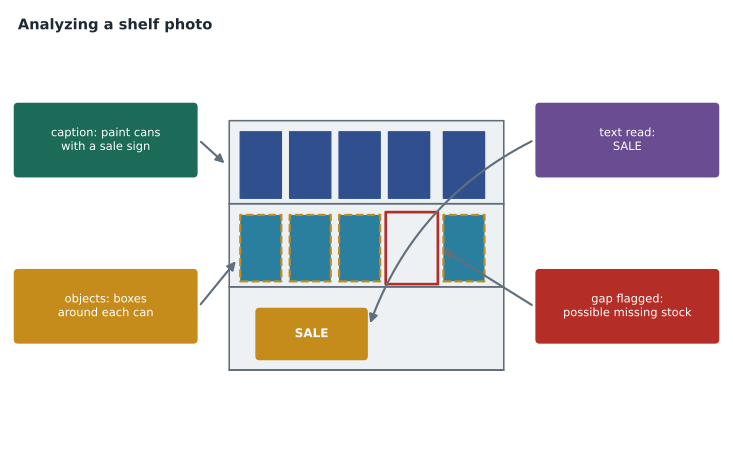
Azure Vision in Foundry Tools
Azure Vision provides prebuilt image analysis that you call with an image, from a web address or uploaded as bytes, and that returns structured results. Its image analysis features include captions, dense captions for regions within the image, tags, object detection, people detection, smart cropping and the Read feature for OCR. As with Azure Language, the advantage of a prebuilt service is consistency: the same image gives the same structured result, which is easy for code to use and cheap at volume. Face recognition and identification are offered under Microsoft's limited access policy and require an application and approval, reflecting the privacy risks of identifying people.
# Read an image analysis result (simplified sample) and check a shelf for gaps.
import json
result = json.loads("""
{"caption": {"text": "a shelf of paint cans with a sale sign", "confidence": 0.86},
 "objects": [
   {"tag": "paint can", "box": {"x": 10,  "y": 40, "w": 60, "h": 80}},
   {"tag": "paint can", "box": {"x": 80,  "y": 40, "w": 60, "h": 80}},
   {"tag": "paint can", "box": {"x": 300, "y": 40, "w": 60, "h": 80}}],
 "read": {"lines": ["SALE", "2 FOR 45"]}}
""")
print("caption:", result["caption"]["text"])
boxes = sorted((o["box"] for o in result["objects"]), key=lambda b: b["x"])
for a, b in zip(boxes, boxes[1:]):
    gap = b["x"] - (a["x"] + a["w"])
    if gap > a["w"]:
        print(f"gap of {gap} pixels after the can at x={a['x']}: possible missing stock")
print("sign text:", " ".join(result["read"]["lines"]))caption: a shelf of paint cans with a sale sign gap of 160 pixels after the can at x=80: possible missing stock sign text: SALE 2 FOR 45
What this code does
Reads a sample image analysis result in JSON: the caption, the detected objects with their boxes, and the text read from a sign. It sorts the paint cans by position and flags any large horizontal gap between them as possible missing stock. This shows how the service's output can drive a practical shelf-checking task.
The sample is simplified, but it shows the pattern of a lightweight vision application: call the service, then apply simple business rules to the structured result. Here a gap wider than a can suggests missing stock, and the sign text can be compared with the price in StockLine.
Visual input to a multimodal model
Many chat models in the catalog are multimodal: they accept images as well as text in a prompt. Instead of returning fixed fields, they answer whatever question you ask about the image, in natural language. That flexibility suits tasks that are hard to express as a list of features. "Does this display follow the spring promotion plan: patio paint on the top shelf, brushes in the middle, sale sign visible?" is a question Azure Vision's tags cannot answer directly, but a multimodal model can, if it is given the plan and the photo together.
response = client.responses.create(
    model="askfinch-chat",
    input=[{
        "role": "user",
        "content": [
            {"type": "input_text", "text": "Does this display show patio paint on the top shelf and a visible sale sign? Answer yes or no for each, then explain briefly."},
            {"type": "input_image", "image_url": "https://example.invalid/display-week46.jpg"},
        ],
    }],
)
print(response.output_text)
For Ask Finch, visual input solves a common customer request. A customer who writes "my new tiles arrived broken" can attach a photo, and the assistant can describe the damage in the case notes and route it as a damaged-delivery claim, while still leaving the decision about a replacement to a person, as the policy requires.
| Azure Vision image analysis | A multimodal chat model | |
|---|---|---|
| Output | Fixed fields: captions, tags, boxes, text | A natural-language answer to any question |
| Consistency | High | Can vary between runs |
| Precise locations | Bounding boxes and coordinates | Usually descriptive rather than exact |
| Best for | Counting, locating, reading text at volume | Judging a scene against instructions, describing damage, answering open questions |
Multimodal models can also be wrong in convincing ways. They may miscount objects, misread small text or describe something that is not there. Arjun's rule is the same as for text: use them where a mistake is cheap or a person reviews the result, and use the prebuilt service where exact counts and positions matter.
Image generation
Image generation models create new images from a text description, called a prompt. Many can also edit an existing image, for example replacing the background or adding an object to a marked area. They work by learning, from very large collections of images and captions, how visual features relate to words, and then producing an image that matches a new description. The catalog includes image generation models from several providers.
Writing a good image prompt is like briefing a photographer: describe the subject, the setting, the composition, the lighting and the style, and say what to avoid. "A spring garden scene" gets something generic. "A wide photograph of a wooden patio with freshly painted blue chairs, morning light, potted herbs, no people, space on the left for text" gets something Marcus's team can use as a banner. Image models usually let you choose the size or shape of the image, the quality level and how many images to produce.
# Build a structured image prompt from a creative brief.
brief = {
    "subject": "a wooden patio with freshly painted blue chairs",
    "setting": "a small back garden with potted herbs",
    "light": "soft morning light",
    "style": "realistic photograph, wide shot",
    "layout": "empty space on the left third for a headline",
    "avoid": "people, brand logos, text in the image",
}
prompt = (f"{brief['style']} of {brief['subject']} in {brief['setting']}, {brief['light']}. "
          f"Leave {brief['layout']}. Do not include {brief['avoid']}.")
print(prompt)
print("words:", len(prompt.split()))realistic photograph, wide shot of a wooden patio with freshly painted blue chairs in a small back garden with potted herbs, soft morning light. Leave empty space on the left third for a headline. Do not include people, brand logos, text in the image. words: 44
What this code does
Assembles a structured image-generation prompt from a creative brief by joining its parts, such as subject, setting, lighting, style and layout, into one clear description. It counts the words to keep the prompt concise. A structured brief makes generated images more consistent and on-brand.
Responsible use of generated images
Generated images raise particular risks, and Carmen Ortiz and Marcus agree on rules before the first banner is made.
- No generated images of real people, and no images that could be mistaken for photographs of a specific Harrow & Finch store or customer.
- No generated images that imitate another company's brand, logo or products, or the style of a named living artist.
- Product photographs on product pages stay real photographs, because customers rely on them to see what they are buying; generated images are for mood and decoration only.
- Generated images are labelled as such in the company's asset library. Microsoft says images from some of its image generation models carry content credentials, metadata recording that AI created them, which supports transparency.
- Guardrails apply to image prompts and outputs too, as lesson 11 explains; harmful requests are blocked.
Image quality matters
Vision results are only as good as the images. Store photos taken in a hurry are often blurred, tilted, too dark or taken from too far away, and a model that reads a price sign perfectly in a sharp, straight photo may misread it in a dim one. Grace's team writes a one-page photo guide for store managers: stand square to the display, include the whole bay, turn on the aisle lights, keep the price signs readable and take a second photo of anything small. The guide costs nothing and improves every result that follows. Arjun also adds a simple check that rejects photos below a minimum size, so managers are asked to retake them at once rather than finding out on Tuesday that Monday's photo was unusable.
Custom image models
Prebuilt analysis recognizes thousands of everyday objects, but it does not know Harrow & Finch's own products by name. When a business needs to recognize its own items, such as particular paint brands or display fixtures, it can train a custom model with labelled example images. Training needs a reasonable number of examples for each item, taken in realistic conditions, and a test set held back to check accuracy. Increasingly, a multimodal model given a reference photo and a description can do the same job without training, which is often the quicker first experiment. Arjun plans to try that first and train a custom model only if the results are not consistent enough across stores.
Video
Video is a sequence of images with sound. The same techniques apply frame by frame, and services can also summarize a video, find the moments where something happens and read on-screen text. Lesson 10 shows how Content Understanding extracts information from video, such as the steps in a product demonstration, so that a long recording becomes searchable.
Worked problem
How many images to review?
Marcus wants banners for 6 seasonal campaigns, each in 3 shapes (wide, square and tall). His team asks the model for 4 variations of each shape and picks one. How many images does the model generate, and how many must a person review?
Show solution
- Banners needed: 6 campaigns × 3 shapes = 18.
- Images generated: 18 × 4 variations = 72.
- Every generated image is reviewed before any is chosen, so 72 reviews.
Answer: Seventy-two images, all reviewed by a person. Generating extra variations is cheap; publishing an unreviewed one is not.
Choosing the right approach
Maya puts the three vision ideas into Arjun's decision pattern. Grace's display checks need consistent results across 23 stores every week, with counts and sign text; Azure Vision's image analysis does the counting and reading, and a multimodal model, given the promotion plan, writes a short note for any display that fails the check. Customer damage photos need flexible description, so they go to the multimodal chat model inside Ask Finch, with a person making the final decision. Marcus's banners need image generation with review. Three problems, three tools.
Common mistakes
MistakeA multimodal model always gives exact counts and positions.
InsteadMultimodal models describe images flexibly but can miscount; use image analysis for precise counts and bounding boxes.
MistakeAny face analysis feature can be used freely for identifying customers.
InsteadMicrosoft restricts face identification under a limited access policy, and identifying people raises serious privacy issues.
MistakeA generated image can stand in for a real product photograph.
InsteadCustomers rely on real photographs to see what they buy; use generated images for decoration and label them.
Summary and key terms
- Computer vision tasks include classification, object detection, captioning, OCR, segmentation and people detection.
- Azure Vision provides prebuilt image analysis: captions, dense captions, tags, objects, people, smart cropping and Read OCR.
- Face identification is offered only under Microsoft's limited access policy.
- Multimodal chat models accept images in prompts and answer open questions about them, less precisely than image analysis.
- Image generation models create or edit images from text prompts; good prompts describe subject, setting, light, style, layout and exclusions.
- Review generated images, label them, avoid real people and others' brands, and keep real photos for products.
- Computer vision
- The field of AI that interprets images and video.
- Object detection
- Finding objects in an image and returning a label and bounding box for each.
- Bounding box
- A rectangle, given by coordinates, that marks where an object appears in an image.
- Optical character recognition (OCR)
- Reading printed or handwritten text from images.
- Multimodal model
- A model that accepts more than one kind of input, such as text and images.
- Image generation model
- A model that creates new images from text descriptions.
- Content credentials
- Metadata attached to an image that records how it was made, including by AI.
Practice problems
Work each problem on paper first, then reveal the answer to check.
Which task returns a label and a box for each object in an image?
Show answer
Object detection.
Which Azure Vision feature reads the text on a price sign?
Show answer
Read, its optical character recognition feature.
When is a multimodal chat model a better choice than image analysis?
Show answer
For open questions, such as judging a display against a plan or describing damage.
Why is face identification restricted?
Show answer
Identifying people raises serious privacy risks, so Microsoft offers it only to approved customers and uses.
Name four things a good image prompt describes.
Show answer
Any four of: subject, setting, lighting, style, layout, things to avoid.
Why keep real photographs on product pages?
Show answer
Customers rely on them to see exactly what they are buying.
Lesson quiz · 5 questions
Score 60% or more to complete this lesson.
Create a free account to save your progress, take quizzes and earn a certificate.