
MSAZ-111 · Lesson 8 of 12 · 21 min
Speech to text and text to speech
▶ Video coming soon A video version of this lesson is on the way.
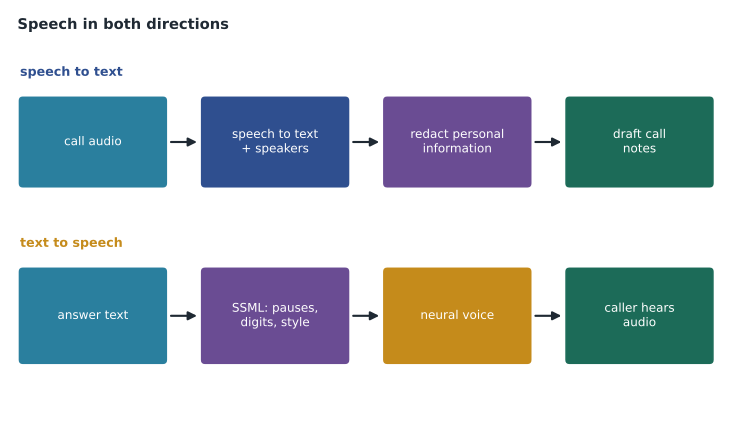
Most of the contact centre's work still happens on the phone. Maya's agents take about 4,000 calls a month, and after each call they spend two or three minutes typing notes. Two ideas on Harrow & Finch's list come from that: transcribe calls automatically and draft the notes, and let customers who phone after hours hear Ask Finch answer simple questions out loud. Both need speech: turning spoken words into text, and turning text into natural-sounding spoken words. The AI-901 outline asks you to identify the features of speech recognition and speech synthesis, to respond to spoken prompts with a deployed multimodal model, and to build a lightweight application with Azure Speech in Foundry Tools.
Speech recognition and speech synthesis
Speech recognition, also called speech to text, converts audio of someone speaking into written text. The model listens to the sound, breaks it into small units, matches those to likely words and uses a language model to choose the most sensible sequence, so that "I'd like to return a drill" is not heard as "I'd like to re-turn a drill" or "I'll like to return a grill". Speech synthesis, also called text to speech, does the opposite: it converts text into audio of a voice speaking it. Modern synthesis uses neural networks trained on recordings of human speech, and the best voices are hard to tell from a person.
Azure Speech in Foundry Tools
Azure Speech provides both directions, along with translation of speech, as one of the Foundry Tools. Its main capabilities are these.
| Capability | What it does | Contact-centre use |
|---|---|---|
| Real-time speech to text | Transcribes audio as it is spoken, returning partial and final results | Live captions for an agent during a call |
| Fast and batch transcription | Transcribes recorded audio files, quickly for single files or in bulk for large sets | Transcribing yesterday's calls overnight |
| Speaker diarization | Labels which speaker said each part of the transcript | Separating the agent from the customer |
| Custom speech | Improves recognition for your vocabulary and audio conditions using your own data | Product names such as cordless impact driver or vinyl plank |
| Text to speech with neural voices | Speaks text in a large choice of natural voices and languages | After-hours phone answers |
| Speech Synthesis Markup Language (SSML) | Controls pronunciation, pauses, speed, pitch and speaking style | Reading an order number digit by digit |
| Speech translation | Recognizes speech in one language and produces text or speech in another | Helping an agent with a French-speaking caller |
Recognition quality depends on the audio as much as on the model. Phone lines carry less of the sound than a good microphone does, background noise in a busy store muddles words, and accents, fast speech and unusual vocabulary all make recognition harder. Custom speech helps with vocabulary, and good audio helps with everything else.
Measuring recognition accuracy
Speech recognition is usually measured by word error rate: the number of word substitutions, deletions and insertions needed to turn the recognized text into the correct transcript, divided by the number of words in the correct transcript. A lower rate is better. Comparing a few minutes of transcripts by hand with what the service produced is a sensible first test before relying on transcripts for anything important.
# Word error rate: (substitutions + deletions + insertions) / words in the reference.
def wer(reference, hypothesis):
    r, h = reference.lower().split(), hypothesis.lower().split()
    d = [[0] * (len(h) + 1) for _ in range(len(r) + 1)]
    for i in range(len(r) + 1): d[i][0] = i
    for j in range(len(h) + 1): d[0][j] = j
    for i in range(1, len(r) + 1):
        for j in range(1, len(h) + 1):
            cost = 0 if r[i - 1] == h[j - 1] else 1
            d[i][j] = min(d[i - 1][j] + 1, d[i][j - 1] + 1, d[i - 1][j - 1] + cost)
    return d[len(r)][len(h)] / len(r)
ref = "i would like to return a cordless impact driver"
hyp = "i would like to return a cordless impact diver"
print("before custom speech:", round(wer(ref, hyp), 3))
print("after custom speech: ", round(wer(ref, ref), 3))before custom speech: 0.111 after custom speech: 0.0
What this code does
Calculates word error rate for a speech transcript by finding the fewest substitutions, deletions and insertions needed to match the correct text, divided by the number of correct words. It compares a standard model's transcript with one from a custom speech model. The custom model's lower rate shows the benefit of training on store-specific words.
One wrong word in nine gives a word error rate of about 0.11. That sounds small, but the wrong word is the product name, the one word the notes most need. That is why Arjun plans a custom speech model trained on Harrow & Finch's product catalogue terms before the transcription pilot.
Calling Azure Speech
Applications call Azure Speech through the Speech SDK, which handles microphones, audio streams and real-time results, or through REST APIs, which suit recorded files and batch jobs. Like the other Foundry Tools, it is reached through the Foundry resource and should authenticate with Microsoft Entra ID. A lightweight transcription application, the kind the exam describes, sets the language, points the recognizer at a file or microphone, and prints the text it gets back.
import azure.cognitiveservices.speech as speechsdk

speech_config = speechsdk.SpeechConfig(endpoint=SPEECH_ENDPOINT, token_credential=CREDENTIAL)
speech_config.speech_recognition_language = "en-CA"
audio = speechsdk.audio.AudioConfig(filename="call-sample.wav")
recognizer = speechsdk.SpeechRecognizer(speech_config=speech_config, audio_config=audio)

result = recognizer.recognize_once()
print(result.text)
The language code matters. Canadian English is en-CA and Canadian French is fr-CA, and choosing the right locale improves recognition of local pronunciation and vocabulary. Azure Speech can also identify the language automatically from a short list of candidates, which helps when callers may use either of two languages.
Text to speech and SSML
For speech synthesis, the application chooses a voice, by name, and sends text or SSML. Plain text is enough for simple sentences. SSML, an XML format, gives control over how things are said: where to pause, how to pronounce a word, how fast to speak and, for some voices, which speaking style to use, such as cheerful or calm. Maya discovers why that matters when the first test reads order 48213 as "forty-eight thousand two hundred thirteen". Customers will repeat order numbers digit by digit, so SSML tells the voice to do the same.
# Build SSML that reads an order number digit by digit and adds a short pause.
order = "48213"
voice = "en-CA-ExampleNeural"      # placeholder voice name
ssml = (
    '<speak version="1.0" xml:lang="en-CA">'
    f'<voice name="{voice}">'
    'Your order number is <say-as interpret-as="characters">' + order + '</say-as>.'
    '<break time="400ms"/> It is ready for pickup.'
    '</voice></speak>'
)
print(ssml)<speak version="1.0" xml:lang="en-CA"><voice name="en-CA-ExampleNeural">Your order number is <say-as interpret-as="characters">48213</say-as>.<break time="400ms"/> It is ready for pickup.</voice></speak>
Natural-sounding synthetic voices raise a responsible AI question that Carmen Ortiz raises immediately: callers should not be misled into thinking they are speaking with a person. Ask Finch's after-hours line will say at the start that the caller is hearing an automated assistant and will offer a way to leave a message for a person. Microsoft also restricts some speech capabilities, such as custom neural voices that imitate a specific person, to approved customers and uses, which is part of its own approach to responsible AI.
Multimodal models and spoken prompts
There is a second way to work with speech. Some models in the catalog are multimodal and accept audio directly. Instead of transcribing speech with Azure Speech and then sending the text to a chat model, an application can send the audio itself to a deployed audio-capable model and receive a text or spoken reply. The AI-901 outline mentions this as responding to spoken prompts by using a deployed multimodal model.
| Azure Speech plus a chat model | An audio-capable multimodal model | |
|---|---|---|
| How it works | Speech to text, then the chat model, then optionally text to speech | Audio goes to one model, which replies in text or audio |
| Strengths | Precise control of each step, custom vocabulary, transcripts for records, many voices | Fewer moving parts, quick responses, can pick up tone of voice |
| Limitations | More components to build and connect | Fewer controls over recognition and voice; transcripts may need a separate step |
| Ask Finch use | Overnight call transcription and notes | A future voice version of Ask Finch |
Foundry also offers real-time voice options for agents, which Microsoft's documentation describes as voice-based prompt agents using a real-time speech capability, in preview when this course was written. Arjun keeps them on the list for later and starts with the simpler, well-established path: transcribe recorded calls, redact personal information, and ask a chat model to draft the notes.
Real-time and batch transcription compared
Real-time recognition and batch transcription use the same underlying models but suit different jobs. Real-time recognition streams audio as it is spoken and returns partial results that are revised as more speech arrives, then a final result for each phrase. It is what live captions and voice assistants need, and it costs more per minute of audio than batch processing in most pricing plans. Batch transcription takes recorded files, often many at once from a storage account, processes them in the background and returns full transcripts with timestamps and speaker labels when they are ready. For the contact centre's call notes, nobody needs the transcript during the call, so overnight batch transcription is cheaper and simpler. Fast transcription sits between the two: a single recorded file returned quickly, useful when an agent wants the notes for a call that has just ended.
Transcripts are not plain text. Each phrase comes with a start time and a duration, a confidence score and, with diarization, a speaker label. Those details let an application jump to the point in the recording where something was said, highlight low-confidence phrases for a reviewer and split the agent's words from the customer's before summarizing.
Choosing and testing a voice
Azure Speech offers a large catalogue of neural voices across many languages and accents, some with several speaking styles. Choosing one is partly a brand decision. Maya and Marcus listen to a shortlist reading the same five sentences, including an order number, a store address and an apology, and pick a voice that sounds warm and clear on a phone line, which is not always the voice that sounds best through good headphones. They choose voices in Canadian English and Canadian French, so that place names and the way prices are read sound local.
Worked problem
Is transcription worth piloting?
Agents spend an average of 2.5 minutes writing notes after each of 4,000 calls a month. Arjun estimates that reviewing and correcting an automatic draft would take 1 minute instead. How many agent hours a month would the change save?
Show solution
- Current time: 4,000 × 2.5 = 10,000 minutes.
- With drafts: 4,000 × 1 = 4,000 minutes.
- Saving: 10,000 − 4,000 = 6,000 minutes, which is 6,000 ÷ 60 = 100 hours.
Answer: About 100 agent hours a month, before counting the cost of transcription and summaries. Maya plans to measure the actual review time during the pilot instead of trusting the estimate.
Privacy and consent
Call audio is personal information, and transcripts can contain payment details, addresses and health information customers mention in passing. Canadian privacy law, and the contact centre's existing call-recording notice, require customers to be told calls may be recorded and why. Carmen asks that the notice be updated to mention automated transcription, that card numbers be redacted from transcripts using the PII feature from lesson 7, and that audio be kept only as long as the existing retention rule allows.
Common mistakes
MistakeText to speech is the same as speech to text.
InsteadSpeech to text recognizes spoken words as text; text to speech synthesizes spoken audio from text.
MistakeA low word error rate means every important word is right.
InsteadOne wrong word can be the most important one; check key terms and use custom speech for specialist vocabulary.
MistakeIt is fine for a natural-sounding voice assistant to let callers assume it is a person.
InsteadTell callers they are hearing an automated assistant and offer a route to a person.
Summary and key terms
- Speech recognition converts spoken audio to text; speech synthesis converts text to spoken audio.
- Azure Speech offers real-time, fast and batch transcription, diarization, custom speech, neural voices, SSML and speech translation.
- Word error rate measures recognition accuracy; audio quality and vocabulary strongly affect it.
- Choose the right locale, and use custom speech for specialist vocabulary.
- SSML controls pauses, pronunciation, speed and style in synthesized speech.
- Audio-capable multimodal models can respond to spoken prompts directly, with fewer controls than a separate speech pipeline.
- Tell users when they hear a synthetic voice, and treat audio and transcripts as personal information.
- Speech recognition
- Converting spoken audio into text; also called speech to text.
- Speech synthesis
- Generating spoken audio from text; also called text to speech.
- Diarization
- Labelling which speaker said each part of a transcript.
- Word error rate
- The share of words that must be substituted, deleted or inserted to correct a transcript.
- Neural voice
- A synthetic voice generated by a neural network trained on human speech.
- SSML
- Speech Synthesis Markup Language, an XML format for controlling how text is spoken.
- Locale
- A language and region code, such as en-CA, that tells a speech service which variety of a language to expect.
Practice problems
Work each problem on paper first, then reveal the answer to check.
What is diarization?
Show answer
Labelling which speaker said each part of a transcript.
What does SSML let you control?
Show answer
Pauses, pronunciation, speed, pitch and speaking style.
How is word error rate calculated?
Show answer
Substitutions plus deletions plus insertions, divided by the number of words in the correct transcript.
Why use custom speech?
Show answer
To improve recognition of specialist vocabulary and particular audio conditions.
What is one advantage of sending audio straight to a multimodal model?
Show answer
Fewer components and quick responses, and it can pick up tone of voice.
What should a voice assistant tell callers?
Show answer
That they are hearing an automated assistant, with a way to reach a person.
Lesson quiz · 5 questions
Score 60% or more to complete this lesson.
Create a free account to save your progress, take quizzes and earn a certificate.