
MSAZ-111 · Lesson 2 of 12 · 21 min
The model catalog and choosing a model
▶ Video coming soon A video version of this lesson is on the way.
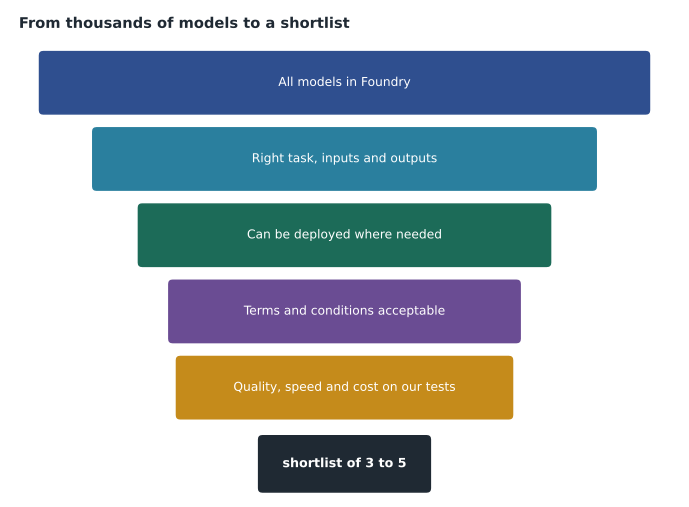
With the Foundry resource and the ask-finch-dev project in place, Maya asks the obvious question: which model should Ask Finch use? Arjun opens the model catalog in the Foundry portal and lets her scroll. The list goes on for a long time. Microsoft's overview of Foundry describes access to more than 10,000 models from Microsoft, OpenAI, Anthropic, Meta and many other providers and open-source communities. "Nobody picks from ten thousand," Arjun says. "You pick from five, and you get to five by asking the right questions."
What the model catalog is
The model catalog is the part of Foundry where you discover, compare and deploy models. Each entry has a model card describing what the model does, who made it, which tasks it suits, its context window, the languages it handles, its licence terms, any known limitations and the ways it can be deployed. Many entries also show benchmark results and let you try the model before committing to it.
The catalog groups models in several useful ways. By task: chat and text generation, reasoning, embeddings for search, image generation, speech, vision and so on. By provider: Microsoft's own models, OpenAI's models, and models from many other companies and open-source projects. And by how they are offered. Some models are sold directly by Microsoft as part of Azure, with Microsoft providing support and service terms; the Azure OpenAI models are the best-known example. Others come from partners and the community, are hosted on Azure, and carry their provider's licence and terms. The distinction matters for support, for billing and for which compliance commitments apply, so check the model card's details before choosing.
For Canadian customers, the catalog's region filter is worth using early. Not every model can be deployed in every region, and a model that is available only in other countries may not meet a data residency requirement.
Kinds of models
Models in the catalog fall into a handful of families, and recognizing them is the first step in choosing.
- Large language models generate text from text. They power chat assistants, summaries, drafting and question answering. Many are also multimodal, accepting images or audio as input.
- Reasoning models are language models that spend extra computation working through a problem in steps before answering. They are slower and usually more expensive per answer, but better at multi-step logic, planning and complex analysis.
- Small language models are compact models that are cheaper and faster to run, suitable for narrow tasks such as classifying an email or extracting a field, and sometimes able to run on modest hardware.
- Embedding models turn text, and sometimes images, into vectors of numbers that capture meaning. They are used for search and for grounding, covered in lesson 5, not for generating answers.
- Image generation models create pictures from text descriptions, and some edit existing images.
- Speech models convert speech to text, text to speech, or work with audio directly as part of a conversation.
Ask Finch needs a chat model for conversation and an embedding model for searching the return policy and manuals. The invoice project might need no large language model at all, because a Foundry Tool designed for extracting information from documents may do the job better, as lesson 10 shows.
What to compare
Arjun's questions for narrowing the catalog follow the AI-901 skill of identifying an appropriate model based on its capabilities. He writes them on the whiteboard in the order he asks them.
| Question | Why it matters for Ask Finch |
|---|---|
| What task must the model do? | Conversation with customers in plain language, sometimes with a photo of a damaged product |
| Which inputs and outputs are needed? | Text in and out, images in; no image generation needed |
| How long are the inputs? | Instructions, chat history and policy passages must fit the context window |
| Which languages? | English and French for some Quebec customers |
| Where can it be deployed? | In a region and deployment type that keep data in Canada |
| How good is it on our examples? | Tested with 50 real, anonymized customer questions |
| How fast and how expensive? | Answers within a few seconds at a cost Dana can approve |
Several of these deserve a closer look. The context window is the maximum amount of text, measured in tokens, that a model can consider at once, including the instructions, the conversation so far, any retrieved documents and the answer it writes. A model with a small window may forget the start of a long chat. A model with a huge window is not automatically better; filling it costs money and can slow the answer.
Quality is best judged on your own examples, not only on public benchmarks. Benchmarks measure general abilities on standard test sets, which is useful for a first cut, but a model that scores well on mathematics puzzles tells you little about how politely it explains a return policy to an annoyed customer. Foundry's catalog shows benchmark comparisons for many models, and the evaluation features in lesson 12 let you test candidates on your own data.
Latency and cost usually move together with model size. Larger and reasoning models give better answers on hard tasks but take longer and cost more per token. For a customer chat, the first words should appear within a second or two, and the whole answer within a few seconds, so Arjun leans toward a capable but not enormous chat model and saves reasoning models for internal analysis work.
Comparing models in the catalog
Foundry offers several ways to compare models before deploying them. The catalog's leaderboards and benchmark views rank models on public tests for quality, safety, cost and throughput. Some model cards include a playground or try-it option so you can type a prompt and see the response. Once you have a shortlist, you can deploy two or three candidates side by side and run the same test prompts through each, which is the most reliable comparison of all.
Arjun and Maya collect fifty real customer questions from the contact centre's chat logs, removing names and order numbers first, and agree in advance what a good answer to each looks like. That set will be reused throughout the course: to compare models now, to check grounding in lesson 5, to test safety settings in lesson 11 and to run formal evaluations in lesson 12.
Worked problem
A weighted scoring matrix
Arjun shortlists three chat models, called A, B and C here. He and Maya score each from 1 to 5 on four criteria and weight the criteria by importance: answer quality on their 50 questions 0.4, latency 0.2, cost 0.25 and deployment fit (region and terms) 0.15. Model A scores 5, 3, 2, 4. Model B scores 4, 4, 4, 5. Model C scores 3, 5, 5, 3. Which model has the highest weighted score?
Show solution
- Model A: 0.4 × 5 + 0.2 × 3 + 0.25 × 2 + 0.15 × 4 = 2.0 + 0.6 + 0.5 + 0.6 = 3.7.
- Model B: 0.4 × 4 + 0.2 × 4 + 0.25 × 4 + 0.15 × 5 = 1.6 + 0.8 + 1.0 + 0.75 = 4.15.
- Model C: 0.4 × 3 + 0.2 × 5 + 0.25 × 5 + 0.15 × 3 = 1.2 + 1.0 + 1.25 + 0.45 = 3.9.
- Model B scores highest, even though model A gives slightly better answers, because B is good on every criterion.
Answer: Model B, with 4.15. The matrix makes the trade-off visible, so the decision can be explained to Dana and to the AI review group.
# Weighted scoring of shortlisted models (illustrative scores, 1 to 5).
weights = {"quality": 0.40, "latency": 0.20, "cost": 0.25, "fit": 0.15}
scores = {
    "Model A": {"quality": 5, "latency": 3, "cost": 2, "fit": 4},
    "Model B": {"quality": 4, "latency": 4, "cost": 4, "fit": 5},
    "Model C": {"quality": 3, "latency": 5, "cost": 5, "fit": 3},
}
assert abs(sum(weights.values()) - 1) < 1e-9
for name, s in scores.items():
    total = sum(weights[k] * s[k] for k in weights)
    print(f"{name}: {total:.2f}")
best = max(scores, key=lambda n: sum(weights[k] * scores[n][k] for k in weights))
print("highest:", best)Model A: 3.70 Model B: 4.15 Model C: 3.90 highest: Model B
What this code does
Scores three shortlisted models from 1 to 5 on quality, latency, cost and fit, multiplies each score by how much that criterion matters, and adds them up. The model with the highest weighted total is recommended. It shows a simple, transparent way to compare models from the model catalog.
The weights are a business decision, not a technical one. If the review group decided that answer quality mattered far more than cost, the weights would change and model A might win. Writing the weights down before scoring keeps the choice honest, because it stops anyone adjusting them afterward to favour a model they already liked.
Licences, terms and responsible use
Every model in the catalog comes with terms. Models sold directly by Azure are covered by Microsoft's product terms. Partner and community models may carry their own licences, some of which restrict commercial use, require attribution or limit use in particular industries. The model card summarizes the terms and links to the full text, and someone with authority, usually the legal or procurement team, should read them before a model goes into production.
The model card also describes what the model is not good at. Carmen Ortiz, Harrow & Finch's privacy officer, asks Maya to note any limitations that affect customers, such as weaker performance in some languages, and to record why the chosen model is acceptable despite them. That record becomes part of the transparency documentation the responsible AI principles call for.
When a language model is the wrong tool
A common mistake is to reach for a large language model for every AI task. Many tasks are done better, faster and more cheaply by a specialized Foundry Tool: detecting the language of a message, translating a product description, transcribing a call or reading the fields of a standard invoice. Those tools are built and tested for one job, give consistent structured output and are priced for high volumes. The rest of this course covers them alongside the generative models, and part of choosing a model is deciding whether you need one at all.
Model versions and retirement
Models change. Providers release new versions with better quality or lower cost, and older versions are eventually retired. Model cards list the version and, for models sold directly by Azure, Microsoft publishes retirement dates. A deployment can be pinned to a specific version, so behaviour does not change unexpectedly, or set to update automatically to the newest default version, which saves maintenance but can change answers without warning. For Ask Finch, Arjun pins the version and puts a reminder in the team's calendar to test the next version before switching. Lesson 12 explains how evaluations make that test quick.
Questions worth asking about any model
Arjun gives Maya a short list she can use long after the pilot, whatever names the models carry by then.
- Is it the right kind of model for the task, or is a Foundry Tool a better fit?
- Does it accept the inputs we have and produce the outputs we need?
- Can it be deployed where our data must stay, under terms we accept?
- How does it perform on our own examples, judged by criteria we wrote down first?
- Is it fast enough and cheap enough at the volume we expect?
- Which version will we use, and how will we test the next one?
Maya notices that only one of the six questions is about how clever the model is. Arjun nods. "The clever part gets the headlines," he says. "The other five decide whether it ships."
Common mistakes
MistakeThe model with the best public benchmark score is always the right choice.
InsteadBenchmarks are a first filter; test the shortlist on your own examples and weigh quality against latency, cost and deployment fit.
MistakeEmbedding models answer customer questions.
InsteadEmbedding models turn text into vectors for search; a chat model writes the answers.
MistakeEvery model in the catalog has the same terms and support.
InsteadModels sold directly by Azure and partner or community models carry different terms; read the model card.
Summary and key terms
- The model catalog is where you discover, compare and deploy models in Foundry.
- Model cards describe a model's tasks, inputs, context window, languages, terms, limitations and deployment options.
- Model families include large and small language models, reasoning models, embedding models, image generation models and speech models.
- Choose by task, inputs and outputs, context window, language support, deployment fit, quality on your own examples, latency and cost.
- Compare candidates with benchmarks, then side by side with your own test prompts.
- Read licences and limitations, pin model versions, and plan for retirement.
- A specialized Foundry Tool is often better than a language model for narrow tasks.
- Model catalog
- The part of Foundry for discovering, comparing and deploying models from many providers.
- Model card
- A model's description page covering tasks, limits, terms, benchmarks and deployment options.
- Context window
- The maximum number of tokens a model can consider at once, including its own answer.
- Reasoning model
- A language model that works through problems in steps before answering, trading speed and cost for accuracy.
- Embedding model
- A model that turns text or images into numeric vectors that capture meaning, used for search.
- Benchmark
- A standard test set used to compare models on general abilities.
- Multimodal model
- A model that accepts more than one kind of input, such as text and images.
Practice problems
Work each problem on paper first, then reveal the answer to check.
What is a context window?
Show answer
The maximum number of tokens a model can take into account at once, including its answer.
Why test models on your own examples as well as benchmarks?
Show answer
Benchmarks measure general skills; your examples show how the model handles your actual task.
What kind of model would you use to search policy documents by meaning?
Show answer
An embedding model.
Name two things a model card tells you.
Show answer
Any two of: tasks, inputs and outputs, context window, languages, terms, limitations, benchmarks, deployment options.
Why pin a model version?
Show answer
So behaviour does not change unexpectedly when the provider releases a new version.
When might you not need a language model at all?
Show answer
When a specialized Foundry Tool, such as translation or document extraction, does the task better.
Lesson quiz · 5 questions
Score 60% or more to complete this lesson.
Create a free account to save your progress, take quizzes and earn a certificate.