
MSAZ-111 · Lesson 6 of 12 · 22 min
Creating an agent with tools
▶ Video coming soon A video version of this lesson is on the way.
Ask Finch can now answer questions about policy accurately, but customers ask for more than policy. "Where is my order?" needs a look-up in StockLine. "Is the Brandon store open on Remembrance Day?" needs the holiday hours. "Book me a call back tomorrow morning" needs an action in the contact centre's scheduling system. A chat model alone can only produce text. An agent can decide to use tools: look something up, run a calculation, call a business system, and then use the result in its reply. The AI-901 outline asks you to create and test a single-agent solution in the Foundry portal and to create a lightweight client application for an agent. This lesson does both.
What makes an agent different
An agent is an AI application that uses a model to reason about a goal, decide which actions to take, take them through tools, and continue until it can give an answer or finish a task. A chat app follows the same path every time: send the prompt, show the reply. An agent chooses its path at run time. Given "Where is my order and can I pick it up today?", it might first call an order-status tool, see that the order is ready at a particular store, then call a store-hours tool for today, and only then write a reply that combines both results.
In Foundry, an agent is defined by three things: a model deployment that does the reasoning, instructions that describe its role and rules, and a set of tools it is allowed to use. Foundry Agent Service runs the agent, manages the conversation, calls the tools and keeps a record of every step. Microsoft's documentation describes two kinds of agent. Prompt agents are declarative: you configure the model, instructions and tools, in the portal or in code, and Foundry runs everything. Hosted agents run your own code packaged in a container, built with a framework such as Microsoft Agent Framework, and are for more complex designs. A fundamentals exam focuses on prompt agents.
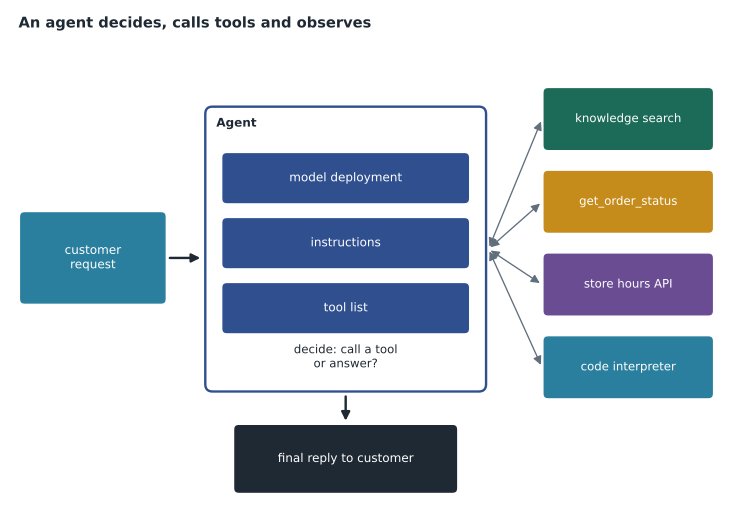
Tools an agent can use
Tools are what turn a model into an agent. Foundry provides built-in tools and lets you add your own. Names and the exact list change, so check the current documentation, but the categories are stable.
| Kind of tool | What it does | Ask Finch example |
|---|---|---|
| Knowledge and search | Searches files, a search index or a Foundry IQ knowledge base and returns passages with citations | Finding the return policy passage about custom-cut items |
| Web search | Searches the public web and returns cited results | Not used: answers must come from company sources |
| Code interpreter | Writes and runs Python in a sandbox to calculate, analyze files or make charts | Working out a return deadline from a purchase date |
| Function calling | Lets the model ask your code to run a named function with arguments it supplies | get_order_status for the verified customer |
| OpenAPI tool | Calls an existing web API described by an OpenAPI specification | The store-hours service run by store operations |
| Model Context Protocol (MCP) tool | Connects to a server that exposes tools through the MCP standard | A future connection to the scheduling system |
Function calling deserves a closer look, because it is the pattern behind most business integrations. You describe a function to the model: its name, what it does and the arguments it takes, written as a small schema. When the model decides the function would help, it does not run anything itself; it returns a request saying, in effect, "call get_order_status with order number 48213". Your code, or Foundry on your behalf, runs the function, and the result is passed back to the model, which then writes its reply. The model never touches StockLine directly. Your code decides what the function is allowed to do and checks every argument, which is where security rules belong.
# Simulate the function-calling loop with a stand-in "model" that picks a tool.
import json
ORDERS = {"48213": {"status": "ready for pickup", "store": "Brandon"}}
HOURS = {"Brandon": "9:00 to 18:00"}

def get_order_status(order_number):
    return ORDERS.get(order_number, {"status": "not found"})
def get_store_hours(store):
    return {"store": store, "today": HOURS.get(store, "unknown")}
TOOLS = {"get_order_status": get_order_status, "get_store_hours": get_store_hours}

def fake_model(step, facts):
    # A real model decides this itself; here the decisions are scripted.
    if step == 0:
        return {"tool": "get_order_status", "args": {"order_number": "48213"}}
    if step == 1:
        return {"tool": "get_store_hours", "args": {"store": facts[0]["store"]}}
    return {"reply": f"Your order is {facts[0]['status']} at the {facts[1]['store']} store, open {facts[1]['today']} today."}

facts = []
for step in range(5):
    decision = fake_model(step, facts)
    if "reply" in decision:
        print("Agent:", decision["reply"])
        break
    result = TOOLS[decision["tool"]](**decision["args"])
    print("tool call:", decision["tool"], json.dumps(decision["args"]), "->", json.dumps(result))
facts.append(result)tool call: get_order_status {"order_number": "48213"} -> {"status": "ready for pickup", "store": "\u00abBrandon||Ames\u00bb"}
tool call: get_store_hours {"store": "\u00abBrandon||Ames\u00bb"} -> {"store": "\u00abBrandon||Ames\u00bb", "today": "9:00 to 18:00"}
Agent: Your order is ready for pickup at the Brandon store, open 9:00 to 18:00 today.The loop is the essence of every agent: decide, call, observe, repeat, answer. In a real agent the model makes the decisions, which is powerful and also the main risk, because a model can choose a wrong tool or invent an argument. That is why Arjun limits the step count, validates every argument and gives each tool only the permissions it needs.
Building the agent in the portal
Maya builds the first Ask Finch agent in the Foundry portal, working in the ask-finch-dev project. The steps are short.
- Create a new agent and give it a name, ask-finch, and choose the model deployment, askfinch-chat.
- Paste in the instructions she refined in the playground, adding rules about tools: use the policy knowledge source for policy questions, use the order-status tool only after the customer has been verified, and never guess an order number.
- Add a knowledge tool pointing at the indexed policy documents from lesson 5.
- Add the order-status function and the store-hours API as tools, using the descriptions Liam Ferreira wrote for StockLine's read-only endpoints.
- Save the agent. Foundry records it as a version, so later changes create new versions and the old ones remain available.
She then tests it in the agent playground. The portal shows each step the agent takes: which tool it called, with which arguments, what came back and how long it took. That trace is the best teacher Maya has had. When she asks about a store that does not exist, she can see the agent call the store-hours tool, receive "unknown", and correctly reply that it cannot find that store, instead of inventing hours.
Instructions added for tools:
- For questions about returns, warranties or policies, search the Harrow & Finch policy knowledge before answering, and cite it.
- Call get_order_status only after the customer has been verified in this session. Never guess or invent an order number.
- For store hours, call get_store_hours with the store name the customer gives. If the store is unknown, say so.
- If a tool fails or returns nothing useful, apologize and offer to connect the customer with a person.
A lightweight client for the agent
An agent built in the portal still needs an application in front of it. The client code is similar to the chat client in lesson 4, with one difference: instead of sending instructions and a model name, the client refers to the agent by name, and Foundry applies the agent's model, instructions and tools. Conversations can be stored by the service, so the client creates a conversation once and adds each new customer message to it.
from azure.identity import DefaultAzureCredential
from azure.ai.projects import AIProjectClient

project = AIProjectClient(endpoint=PROJECT_ENDPOINT, credential=DefaultAzureCredential())
client = project.get_openai_client()

conversation = client.conversations.create()
response = client.responses.create(
    conversation=conversation.id,
    input="Where is my order 48213, and can I pick it up today?",
    extra_body={"agent": {"name": "ask-finch", "type": "agent_reference"}},
)
print(response.output_text)
The terms in older documentation differ. Earlier versions of the agent service used threads, messages, runs and assistants; Microsoft's documentation maps these to conversations, items, responses and agent versions in the current design. If an exam question mentions a thread, read it as a conversation.
When the function tool is your own code, the client also has a job in the loop: when the response says the agent wants to call get_order_status, the client runs the function, checks the customer is allowed to see that order, and sends the result back so the agent can continue. Tools that Foundry runs itself, such as knowledge search and code interpreter, need no client code at all.
Keeping agents safe
An agent that can act is more useful and more dangerous than one that can only talk. Sunil Rao's security review of Ask Finch produces a short list that applies to almost any agent.
- Give each tool the least access it needs. The order-status function can read orders for the verified customer only, and nothing can change an order.
- Validate every argument the model supplies. An order number that does not belong to the customer is refused by the code, whatever the model asks.
- Require confirmation for actions with consequences. Booking a call back is acceptable; anything involving money goes to a person.
- Limit the number of steps and the total time, so a confused agent cannot loop forever and run up costs.
- Treat text returned by tools and documents as data, not instructions. A web page or document that says "ignore your rules" must not change the agent's behaviour; lesson 11 covers the guardrail that detects these indirect attacks.
- Keep the traces. Every tool call is recorded, which supports the accountability principle and makes problems diagnosable.
Describing a function well
The model decides whether to call a function from its name, its description and the descriptions of its arguments, so those words matter as much as the code. Liam's first description for the order tool said only "gets order". The agent sometimes called it for questions about products, because a product can be ordered. His second version said what the function does, when to use it and when not to: "Returns the status and pickup store of one existing customer order. Use only when the customer has given an order number and has been verified. Do not use for product availability or prices." Wrong calls dropped to almost none. Clear names, plain descriptions and a small number of well-chosen arguments make agents far more reliable.
Worked problem
Counting steps and tokens
Arjun caps Ask Finch at 6 model steps per customer message. Each step sends about 1,200 input tokens, because the instructions, history, tool descriptions and earlier results are included every time. A typical order question uses 3 steps. How many input tokens does a typical question use, and how many would the cap allow at most?
Show solution
- Typical: 3 steps × 1,200 = 3,600 input tokens.
- Maximum at the cap: 6 × 1,200 = 7,200 input tokens.
Answer: About 3,600 input tokens typically and at most 7,200. Agents cost more per question than a simple grounded chat, because each tool call means another trip to the model; the step cap keeps the worst case under control.
When not to use an agent
Agents are fashionable, and Arjun is careful not to use one where a simpler design works. If every question follows the same path, such as "search the policy, then answer", a grounded chat app is cheaper, faster and easier to test than an agent that might take a different path each time. Agents earn their complexity when the steps genuinely vary with the request, as they do when Ask Finch must decide between policy, orders, hours and call backs.
Common mistakes
MistakeThe model runs the function itself when it uses function calling.
InsteadThe model returns a request naming the function and arguments; your code or Foundry runs it and returns the result.
MistakeAn agent is just a chat app with a longer system message.
InsteadAn agent chooses which tools to call at run time and can take several steps before answering.
MistakeText returned by a tool can safely change the agent's rules.
InsteadTool and document content is data; instructions inside it must not override the agent's own rules.
Summary and key terms
- An agent uses a model to reason, choose and call tools, read the results and continue until it can answer.
- A Foundry agent combines a model deployment, instructions and tools, and runs in Foundry Agent Service.
- Prompt agents are configured declaratively; hosted agents run your own containerized code.
- Tools include knowledge search, web search, code interpreter, function calling, OpenAPI and MCP tools.
- Build and test agents in the portal, using traces to see every tool call; agents are saved as versions.
- A client refers to the agent by name and keeps a conversation; your code runs any custom function tools.
- Limit tool access, validate arguments, confirm consequential actions, cap steps and keep traces.
- Agent
- An AI application that reasons about a goal and uses tools to act before answering.
- Tool
- A capability an agent can call, such as a search, a code sandbox or a business function.
- Function calling
- A model returning a structured request for your code to run a named function with arguments.
- Code interpreter
- A tool that lets an agent write and run Python code in a sandbox.
- OpenAPI tool
- A tool that calls an existing web API described by an OpenAPI specification.
- Model Context Protocol (MCP)
- An open standard for exposing tools and data to AI applications through servers.
- Trace
- A recorded sequence of an agent's steps, tool calls and results.
Practice problems
Work each problem on paper first, then reveal the answer to check.
What three things define a Foundry prompt agent?
Show answer
A model deployment, instructions and tools.
In function calling, who runs the function?
Show answer
Your code, or Foundry for built-in tools; the model only requests the call.
Which tool would let an agent calculate a return deadline in Python?
Show answer
Code interpreter.
What do conversations, items and responses replace in older agent material?
Show answer
Threads, messages and runs.
Why cap the number of agent steps?
Show answer
To stop loops and keep cost and time under control.
When is a simple grounded chat app better than an agent?
Show answer
When every question follows the same path, such as search then answer.
Lesson quiz · 5 questions
Score 60% or more to complete this lesson.
Create a free account to save your progress, take quizzes and earn a certificate.