
MSAZ-111 · Lesson 4 of 12 · 22 min
Building a simple chat app
▶ Video coming soon A video version of this lesson is on the way.
The playground proved that the deployed model can answer customer questions in the right tone. Customers, though, will never see the Foundry portal. They will type into a chat box on harrowfinch.com or in the Finch Rewards app, and something has to carry their words to the model and the model's reply back. In this lesson Arjun and Maya build the smallest useful version of that something: a short Python program that holds a conversation with the askfinch-chat deployment. The AI-901 outline calls this creating a lightweight chat client application by using the Foundry SDK, and the exam expects you to recognize the pieces rather than write them from memory.
The pieces of a chat client
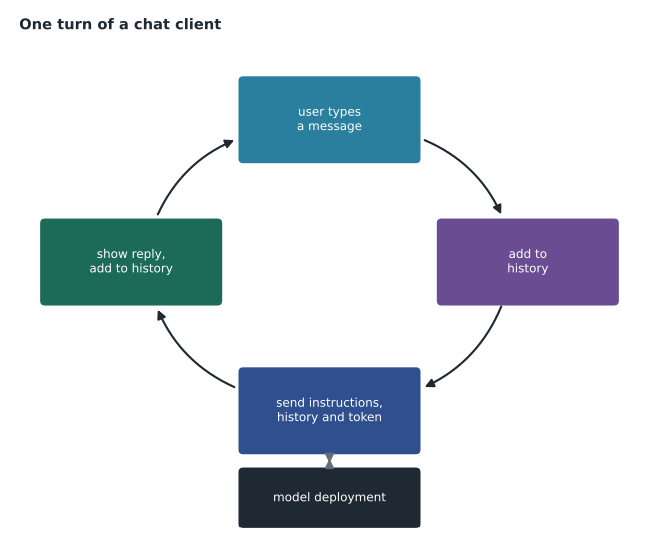
Every chat client, however simple or elaborate, does the same five things. It finds the model, by knowing the project endpoint and the deployment name. It proves who it is, by authenticating. It sends the instructions and the conversation so far. It receives the reply and shows it. And it keeps the conversation going by remembering what has been said, so that the next request includes the history.
The Foundry SDK
Microsoft provides software development kits that wrap the Foundry REST APIs in ordinary functions for several languages. In Python, the project client in the azure-ai-projects package connects to a project endpoint, and it can hand back a client for the OpenAI-style APIs that chat models use. Microsoft's documentation describes this as a consolidation of several older packages into one project client, used together with the OpenAI client library pointed at the project endpoint. You will still see older samples that call other packages directly; they do the same job with different names.
The code below shows the shape of a minimal client. It is illustrative, not something to copy into production unchanged, and package versions move quickly, so check the current quickstart before using it. Look at what is missing: there is no key. The DefaultAzureCredential class tries a sequence of sign-in methods, such as a managed identity when the code runs in Azure or the developer's own Azure sign-in on a laptop, and obtains a Microsoft Entra ID token.
from azure.identity import DefaultAzureCredential
from azure.ai.projects import AIProjectClient

endpoint = "https://hf-foundry-dev.services.ai.azure.com/api/projects/ask-finch-dev"
project = AIProjectClient(endpoint=endpoint, credential=DefaultAzureCredential())
client = project.get_openai_client()

response = client.responses.create(
    model="askfinch-chat",
    instructions="You are Ask Finch, the customer-service assistant for Harrow & Finch Home Supply.",
    input="What time does the store open on Sunday?",
)
print(response.output_text)
Line by line: the first two lines import the credential and project client. The endpoint is the project's address, copied from the project's overview page in the portal. The project client is created with that endpoint and a credential. The OpenAI-style client it returns is then used to create a response, passing the deployment name as the model, the system instructions and the user's input. The reply's text is printed.
The call uses the Responses API, which Microsoft's Foundry documentation now uses for both simple chats and agents. Many existing applications use the older Chat Completions style instead, where the request carries a list of messages with system, user and assistant roles and the reply comes back as a choice containing a message. Both work with chat deployments, and the exam focuses on the ideas they share: a deployment name, instructions, user input and a generated reply.
Keeping a conversation going
A single question and answer is easy. A conversation is harder, because the model itself remembers nothing between calls. Each request is independent, so the client must send enough of the earlier conversation for the model to understand a follow-up such as "and what about the one in Brandon?". There are two broad ways to do that. The client can keep the history itself and send it with every request. Or the service can store the conversation, and the client refers to it by an identifier on each new turn; the Responses API supports this, and Foundry's agents in lesson 6 rely on it.
history = []
while True:
    question = input("Customer: ")
    if not question:
        break
    history.append({"role": "user", "content": question})
    response = client.responses.create(model="askfinch-chat", instructions=INSTRUCTIONS, input=history)
    answer = response.output_text
    print("Ask Finch:", answer)
    history.append({"role": "assistant", "content": answer})
Sending the whole history works for short chats but grows without limit. Every turn adds tokens, the cost rises with each exchange, and eventually the conversation would not fit the context window at all. Real clients trim the history: keep the instructions and the most recent turns, drop or summarize the oldest, and stay within a token budget.
# Trim chat history to a token budget, keeping the newest turns.
# Words are used as a rough stand-in for tokens; real code would use a tokenizer.
def rough_tokens(text):
    return int(len(text.split()) * 1.3) + 4        # small overhead per message

def trim(history, budget):
    kept, used = [], 0
    for msg in reversed(history):                  # newest first
        cost = rough_tokens(msg["content"])
        if used + cost > budget:
            break
        kept.append(msg)
        used += cost
    return list(reversed(kept)), used

history = [
    {"role": "user", "content": "I bought a cordless drill last month and the battery will not charge."},
    {"role": "assistant", "content": "Sorry to hear that. Do you still have the receipt or the order number?"},
    {"role": "user", "content": "Yes, it was an online order. Can I return it to a store instead of shipping it?"},
    {"role": "assistant", "content": "Yes. Online orders can be returned to any store within the return period with the order number."},
    {"role": "user", "content": "Great. What about the one in Brandon, is it open on Sunday?"},
]
kept, used = trim(history, budget=70)
print("kept", len(kept), "of", len(history), "messages, about", used, "tokens")
for m in kept:
print(m["role"], ":", m["content"][:50])kept 2 of 5 messages, about 45 tokens assistant : Yes. Online orders can be returned to any store wi user : Great. What about the one in Brandon, is i
With a budget of 70 rough tokens, the oldest messages are dropped, but the last question still makes sense because the previous answer about returning online orders to a store survives. Arjun's production design will summarize dropped turns into a single line instead of discarding them, so a long chat keeps its thread.
Streaming
Waiting several seconds for a complete answer feels slow in a chat box. Most chat APIs can stream the reply instead, sending it in small pieces as the model generates them, so the first words appear almost at once and the rest follows. The total time is about the same, but the experience is much better. Streaming is a single option in the request, and the client then reads the pieces in a loop and displays each as it arrives. Ask Finch's web chat will stream.
Handling errors and limits
A chat client that works only when everything goes well is a demonstration, not an application. Arjun lists what Maya's code must handle before anyone outside the team uses it.
- Rate limits: if the deployment's tokens-per-minute limit is reached, the service answers with a too-many-requests error. The client should wait and retry, ideally waiting a little longer after each failure, and tell the customer politely if the wait is long.
- Content filtering: if a guardrail blocks the prompt or the answer, the response says so instead of returning text. The client should show a helpful message rather than a blank screen. Lesson 11 covers this.
- Timeouts and network errors: retry a small number of times, then offer the customer another way to get help.
- Empty or truncated answers: if the answer stopped because it reached the maximum output length, the client can ask for a shorter answer or continue.
REST underneath the SDK
Every SDK call becomes an HTTPS request underneath, and it helps to picture it. The client sends a POST request to a path under the project endpoint, with an authorization header carrying the Microsoft Entra ID token and a JSON body holding the model or agent name, the instructions and the input. The service replies with JSON containing the generated output, the reason generation stopped, and a usage section that counts input and output tokens. That usage section is how Arjun's monthly estimate from lesson 1 will be checked against reality: the web service logs the token counts from every reply, and a weekly report adds them up.
Microsoft's Foundry documentation notes that the older pattern of monthly API version parameters has been replaced by stable version 1 routes for the OpenAI-style APIs. You will still see dated version strings in older samples and in some Foundry Tools. When a sample stops working, a changed route or version is one of the first things to check.
Configuration, not constants
Maya's first script had the endpoint and deployment name typed into the code. Arjun asks her to move them into configuration, read from environment variables or an app settings file, before the code goes anywhere. The same script can then run against the development project on her laptop and the production project in Azure without being edited, and changing the deployment behind Ask Finch becomes a settings change rather than a code release. The instructions move too, into a versioned file, so that every change to Ask Finch's behaviour is reviewed and recorded like any other change to the system.
Worked problem
Waiting longer after each failure
Arjun's retry rule waits 1 second after the first too-many-requests error, then doubles the wait after each further failure, up to four retries. If every retry fails, how long has the client waited in total before giving up?
Show solution
- Waits: 1 second, then 2, then 4, then 8.
- Total: 1 + 2 + 4 + 8 = 15 seconds.
Answer: Fifteen seconds. Doubling the wait, called exponential backoff, avoids hammering a busy service and gives it time to recover. After that, the client tells the customer it is busy and offers a human agent.
Where the client runs
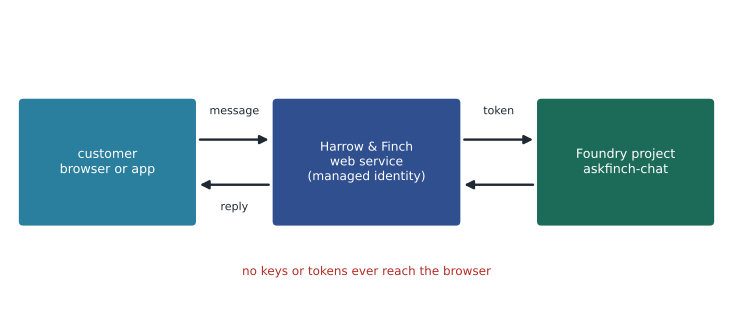
A real Ask Finch will not be a script on Maya's laptop. The chat box in the web browser talks to a small web service run by Harrow & Finch, perhaps in Azure App Service or Azure Container Apps, and that service talks to Foundry. Keeping the call to Foundry on the server matters for security: the browser never holds a token or key, the server can check who the customer is and look up their orders safely, and the server can log and limit usage. The pattern is the same in every language Microsoft supports, and Hana Sato will build the Finch Rewards version in the app's own language using the same project endpoint.
What the exam expects
AI-901 is a fundamentals exam, so you will not be asked to write a program from memory. You should be able to read a short sample like the ones in this lesson and say what each part does: which value is the endpoint, which is the deployment name, where the instructions and user input go, how authentication happens and where the generated text comes back. You should know that the client must resend or reference the conversation history because the model keeps no memory between calls, and that SDKs for several languages wrap the same REST APIs.
Maya finishes the session with a working command-line chat: she types a question, Ask Finch answers in the tone she designed in the playground, and the follow-up questions make sense. It still makes up the return policy when asked something specific, because it has never seen the policy. That is the next lesson.
Common mistakes
MistakeThe model remembers earlier chats on its own.
InsteadEach request is independent; the client must send the history or reference a stored conversation.
MistakeThe chat app should call Foundry directly from the customer's browser with a key.
InsteadKeep calls on the server, authenticate with Microsoft Entra ID, and never send keys to a browser.
MistakeStreaming makes the model generate the answer faster.
InsteadStreaming shows the answer as it is generated, so the first words appear sooner; total generation time is similar.
Summary and key terms
- A chat client finds the model, authenticates, sends instructions and conversation, shows the reply and keeps the history.
- In Python, the azure-ai-projects project client connects to a project endpoint and provides an OpenAI-style client.
- Requests name the deployment, give instructions and user input, and return generated text.
- Use Microsoft Entra ID through credentials such as DefaultAzureCredential rather than keys.
- Models keep no memory between calls; send or reference the history and trim it to a token budget.
- Streaming improves responsiveness; clients must handle rate limits, filtered content, timeouts and truncated answers.
- Run the Foundry call on a server, not in the customer's browser.
- SDK
- A software development kit that wraps an API in functions for a programming language.
- Project endpoint
- The web address of a Foundry project, used by SDKs and REST calls.
- DefaultAzureCredential
- A credential class that tries several sign-in methods, such as a managed identity, to obtain an Entra ID token.
- Responses API
- The OpenAI-style API that Foundry uses for generating replies and running agents.
- Conversation history
- The earlier messages a client sends or references so the model can follow a chat.
- Streaming
- Receiving a reply in small pieces as it is generated.
- Exponential backoff
- A retry strategy that waits longer after each consecutive failure.
Practice problems
Work each problem on paper first, then reveal the answer to check.
What two values does a chat client need to find the model?
Show answer
The project endpoint and the deployment name.
Why does a chat client resend the conversation history?
Show answer
Because each request is independent and the model keeps no memory between calls.
What does DefaultAzureCredential do?
Show answer
It tries several sign-in methods, such as a managed identity, to get a Microsoft Entra ID token.
Why trim the conversation history?
Show answer
To control cost and stay within the model's context window.
What does streaming change for the user?
Show answer
The first words appear almost at once instead of after the whole answer is ready.
Why should the call to Foundry run on a server rather than in the browser?
Show answer
So no tokens or keys reach the customer, and the server can check identity, log and limit usage.
Lesson quiz · 5 questions
Score 60% or more to complete this lesson.
Create a free account to save your progress, take quizzes and earn a certificate.