
LVT-320 · Lesson 1 of 12 · 21 min
Wireless in buildings
Maya Okonkwo starts her eighth term at Cobalt Line Systems on the wireless crew. Over seven terms she has pulled and certified copper, spliced fibre, commissioned switches and access points, installed card readers and cameras, and tuned a school gym. Every one of those systems ended at a jack, a panel or a loudspeaker she could see. Wireless work is different: the product is invisible. A building owner pays for radio signal that fills the right spaces at the right level, and the only way to know it is there is to measure it. Her new lead, Frank Delisle, has designed and tested in-building wireless systems for twenty years, first for a cellular carrier and then for integrators. On her first morning he hands her a spectrum analyzer, a survey tablet and a stack of floor plans, and says that by the end of the term she will be able to look at a drawing and tell where the radio will struggle before anyone has hung an antenna.
This course covers the wireless systems an installer meets inside buildings, the physics that decides how well they work, and the work of designing, surveying, installing and testing them. It builds on the access point mounting and powering in LVT-220 and the fibre and copper skills of LVT-130 and LVT-210, and it leads into the code rules for communication cabling in LVT-330. This first lesson maps the territory: what wireless systems a modern building holds, why buildings are hard on radio, who owns and regulates each system, and how a wireless project runs.
The wireless systems in a building
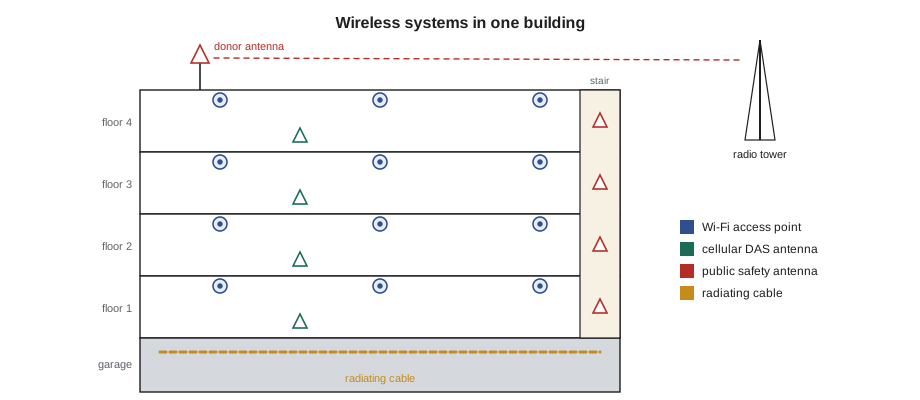
Walk through St. Brendan's Hospital's new east wing, the project that will run through this course, and count the radios. Staff laptops, workstations on wheels and tablets use Wi-Fi. Nurses carry hands-free badges that also use Wi-Fi, so a call that drops in a stairwell is a patient safety issue. Infusion pumps, patient monitors and portable X-ray machines send data over Wi-Fi or over dedicated medical telemetry radios. Real-time location tags on wheelchairs and pumps report their positions. Visitors and patients expect their phones to work, which means cellular coverage from three or four carriers. Security officers and maintenance staff carry two-way radios. And when the fire department arrives, firefighters need their portable radios to reach their dispatch centre and each other from the basement to the roof.
| System | Who uses it | Typical bands | Who owns the spectrum |
|---|---|---|---|
| Wi-Fi | Staff, devices, guests | 2.4, 5 and 6 GHz | Licence-exempt; anyone may use it within the rules |
| Cellular (LTE, 5G) | Phones, tablets, some IoT | 600 MHz to about 4 GHz | Licensed to each carrier |
| Public safety radio | Fire, police, paramedics | VHF, UHF, 700 and 800 MHz | Licensed to the agency or city |
| Two-way business radio | Security, maintenance | VHF, UHF | Licensed to the building owner or a dealer |
| IoT and sensors | Building systems, tags | Sub-GHz, 2.4 GHz | Mostly licence-exempt |
| Medical telemetry | Patient monitors | Dedicated medical bands | Protected for hospital use |
The table matters because the owner of the spectrum decides what an installer may do. Wi-Fi uses bands that anyone may use, as long as the equipment is certified and follows power limits, so the building owner can design and install it freely. Cellular spectrum belongs to the carriers, who paid billions for it; nobody may retransmit a carrier's signal without that carrier's consent. Public safety spectrum belongs to the agency that holds the licence, and in-building systems for it are regulated by fire codes as well as by the radio regulator. In Canada the regulator is Innovation, Science and Economic Development Canada, ISED; in the United States it is the Federal Communications Commission, the FCC. Both certify radio equipment, and both treat an unauthorized amplifier on a licensed band as a serious matter.
Why buildings are hard on radio
Radio signals travel well through air and poorly through dense materials. A signal from a cell tower a kilometre away arrives at the outside of St. Brendan's at a usable level, then loses a few decibels through each window, ten or more through each concrete wall, and much more through floors, elevator shafts and the lead-lined walls around the imaging suite. Modern energy-efficient glass carries a thin metal coating that reflects heat and also reflects radio, so a tower that worked fine through old windows can disappear when the windows are replaced. Basements, parking garages and interior stairwells, which have the thickest walls and no windows, are often the worst spots in a building, and they are exactly where firefighters operate.
Inside, the problem changes. Wi-Fi access points sit a few rooms away from their users, not a kilometre away, so the challenge is less about getting enough signal and more about controlling it: enough signal in every room, not so much that access points interfere with each other, and enough capacity for the number of devices. A hospital floor might have two hundred devices on Wi-Fi at once; Brightwater's insurance office, which Maya commissioned last term, can have four hundred during an all-hands meeting. Lessons 4, 6 and 7 deal with these problems.
Three ways to bring radio indoors
Every in-building wireless system does one of three things. It can put the transmitter indoors: Wi-Fi access points, small cells and private radio repeaters are complete radios placed inside the building, near their users. It can capture a signal from outside and repeat it indoors: a bi-directional amplifier, or BDA, takes the signal from a donor antenna on the roof aimed at a distant tower, amplifies it and sends it through antennas inside, and amplifies the replies on the way back. Or it can bring a signal source into the building by cable: a distributed antenna system, or DAS, takes signals from carrier base station equipment installed in the building, or from a BDA, and spreads them over coax or fibre to many small antennas. Lesson 8 covers DAS and lesson 9 covers public safety BDAs.
The choice is the designer's, but the installer must understand it, because each approach has its own failure modes. An access point that fails affects one area. A BDA that oscillates, feeding its own output back into its input, can jam the radio system it is meant to help across a whole neighbourhood. A DAS with a bad connector can add passive intermodulation, a kind of interference created when strong signals meet a corroded or loose joint, that degrades every carrier on it. Workmanship that is invisible in a cabling job shows up as interference in a radio job.
Who is involved
A wireless project has more parties than a cabling job. The owner, here St. Brendan's, sets the requirements: which systems, which areas, what performance. The RF designer, often a specialist engineer or the integrator's own designer, produces the design: antenna locations, equipment, cable routes and predicted coverage. Cobalt Line's Sanjay Iyer is the designer of record for structured cabling; for the east wing's radio systems, Frank and an outside RF engineer share the design. Carriers must approve any cellular system that carries their signal. The public safety agency, through its radio system manager, must consent before anyone amplifies its channels. The authority having jurisdiction, usually the fire department or building official, enforces the coverage code and witnesses acceptance tests. The general contractor schedules access, and other trades, electricians, ceiling installers and fire alarm contractors, all touch the work.
Maya will spend more time than she expects on paperwork. Before a public safety BDA can be switched on, the agency's written consent and the regulator's registration or licence must be in place. Before a carrier system goes live, the carrier must accept the design and test results. Before a Wi-Fi system is handed over, the owner's network team must accept the survey. The installer's part is to do the work exactly as designed, document every change, and never transmit on a licensed band without authorization.
How a wireless project runs
Most in-building wireless projects follow the same path. First comes a needs assessment and, often, a site survey of the existing signal: the designer measures what the outside networks already deliver inside, floor by floor, so the design adds only what is missing. Next comes the design, usually with predictive modelling in survey software from floor plans and wall types. Then the installation: cable, antennas, equipment, power and grounding. Then optimization, adjusting antenna positions, gains and power levels. Then acceptance testing, measured on a grid and witnessed where the code requires. Finally, documentation and handover, followed by annual tests for public safety systems.
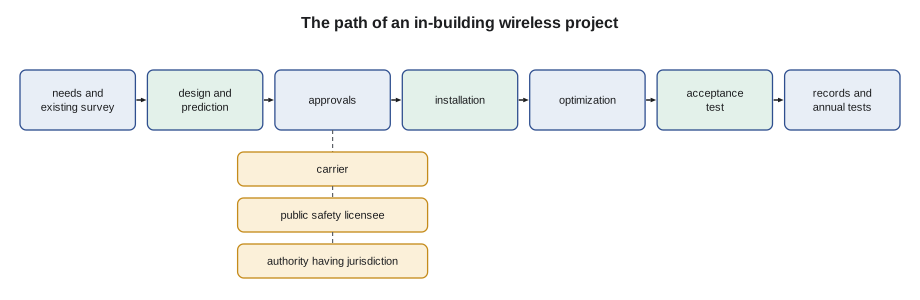
The east wing schedule, which Frank shows Maya on the first day, follows this path over nine months. The existing-signal survey of the shell building happens now, while walls are still open, because once the lead lining, the energy-efficient glass and the drywall are in, the numbers will be worse, and the designer wants to know how much worse. Antenna and cable installation follows the ceiling grid. Acceptance testing waits until the building is finished, because a coverage test in a building with no doors, ceilings or furniture measures a different building.
Safety on wireless jobs
Wireless work adds a few hazards to the ones Maya already manages. Roof work for donor antennas means fall protection and, near other antennas, attention to radio frequency exposure, which lesson 10 covers. Antenna mounting at height uses ladders and lifts, under the same rules as LVT-110. Lithium and lead-acid batteries for public safety systems store a great deal of energy. Spectrum analyzers and signal generators are test transmitters only when used as designed; transmitting a test signal on a licensed band without authorization can disrupt emergency communications, so test transmissions on public safety or carrier bands are made only with the licensee's coordination. Frank's rule is simple: on someone else's frequency, listen freely, transmit only with permission.
# Wireless inventory for a building: which system serves each device, and who must approve it
systems = {
    "Wi-Fi":               {"bands": "2.4/5/6 GHz", "approval": "owner (licence-exempt)"},
    "Cellular DAS":        {"bands": "carrier bands", "approval": "each carrier"},
    "Public safety ERRCS": {"bands": "700/800 MHz", "approval": "agency licensee + fire code official"},
    "Two-way radio":       {"bands": "VHF/UHF", "approval": "owner's licence"},
}
devices = [("staff laptop", "Wi-Fi"), ("nurse badge", "Wi-Fi"), ("visitor phone", "Cellular DAS"),
           ("firefighter portable", "Public safety ERRCS"), ("security radio", "Two-way radio"),
           ("infusion pump", "Wi-Fi"), ("paramedic radio", "Public safety ERRCS")]
by_system = {}
for dev, sys_name in devices:
    by_system.setdefault(sys_name, []).append(dev)
for name, info in systems.items():
    devs = ", ".join(by_system.get(name, [])) or "none"
    print(f"{name:20s} {info['bands']:12s} approval: {info['approval']}")
print(f"{'':20s} serves: {devs}")Wi-Fi 2.4/5/6 GHz approval: owner (licence-exempt)
serves: staff laptop, nurse badge, infusion pump
Cellular DAS carrier bands approval: each carrier
serves: visitor phone
Public safety ERRCS 700/800 MHz approval: agency licensee + fire code official
serves: firefighter portable, paramedic radio
Two-way radio VHF/UHF approval: owner's licence
serves: security radioThe inventory looks simple, but it is the first document Frank asks for on any job. It tells the crew who has to sign off before anything transmits, and it reminds everyone that the nurse badge and the infusion pump share the same Wi-Fi as the laptops, so a Wi-Fi design that is fine for email can still fail the devices that matter most.
Worked problem
Why the new windows broke the signal
Juniper Point's management office calls Cobalt Line: since the tower's windows were replaced last summer, residents on the north side say their phones drop calls indoors, though they work on the balconies. Nothing else in the building changed. What is the likely cause, and what should the first visit do?
Show solution
- The phones work outdoors, so the carrier's outdoor network is fine.
- The only change is the windows. Modern low-emissivity glass has a metallic coating that can reflect radio signals far more than older glass, often by 20 dB or more.
- The north side faces away from the nearest carrier sites, so it depended on signal coming through the glass.
- The first visit measures signal levels from each carrier on the balcony and just inside, in several units, to put numbers on the loss. Those measurements will show whether a cellular DAS or carrier-approved signal booster is justified, and on which floors.
Answer: The coated glass is the likely cause; measurements inside and outside the glass quantify the loss and start the design conversation with the carriers.
Common mistakes
MistakeTreating every wireless system as the building owner's to change.
InsteadCheck who owns the spectrum; carriers and public safety licensees must approve any system that carries their signals.
MistakeTesting coverage in an unfinished building and calling it final.
InsteadSurvey early to learn the building, but do acceptance tests when walls, ceilings, glass and doors are complete.
MistakeAssuming more signal is always better.
InsteadToo much Wi-Fi signal causes interference between access points; design for the right level, not the most.
MistakeTransmitting a test signal on a licensed band to check a cable.
InsteadTransmit on licensed bands only with the licensee's coordination; use a cable tester or analyzer instead.
MistakeIgnoring medical and life-safety devices in a Wi-Fi design.
InsteadAsk which devices must work everywhere, and design and test for the most demanding one.
Summary and key terms
- Large buildings hold Wi-Fi, cellular, public safety radio, two-way radio, IoT and sometimes medical telemetry systems.
- Wi-Fi bands are licence-exempt; cellular and public safety bands are licensed, and their owners must approve any system that carries their signals.
- ISED in Canada and the FCC in the United States certify radio equipment and regulate amplifiers on licensed bands.
- Concrete, coated glass, lead lining, elevator shafts and basements weaken signals from outside.
- Systems either place transmitters inside, repeat outside signals with a BDA, or distribute signals over a DAS.
- Projects run from existing survey and design through approvals, installation, optimization, acceptance testing and documentation.
- On licensed frequencies, an installer listens freely but transmits only with permission.
- Spectrum
- The range of radio frequencies, divided into bands that are licensed or licence-exempt.
- BDA
- Bi-directional amplifier: a booster that repeats a signal from a donor antenna indoors and amplifies replies on the way back.
- DAS
- Distributed antenna system: equipment and cable that spread signals to many antennas through a building.
- Donor antenna
- The outdoor antenna of a BDA, aimed at the network it repeats.
- Licensee
- The organization that holds the right to transmit on a licensed frequency.
- Authority having jurisdiction
- The official body, often the fire department, that enforces a code and accepts the work.
- Low-emissivity glass
- Window glass with a thin metal coating that reflects heat and also weakens radio signals.
Practice problems
Work each problem on paper first, then reveal the answer to check.
Who must consent before a cellular signal is amplified inside a building?
Show answer
The carrier that holds the licence for that spectrum.
Name two places in a building where outdoor signals are usually weakest.
Show answer
Any two of basements, parking garages, interior stairwells, elevator lobbies and rooms behind heavy walls.
What is the difference between a BDA and an access point?
Show answer
A BDA repeats an outside network's signal; an access point is a complete radio that creates its own network.
Why does Frank delay the acceptance test until the building is finished?
Show answer
Walls, ceilings, glass and doors change the signal; a test in an unfinished building measures a different building.
Lesson quiz · 5 questions
Score 60% or more to complete this lesson.
Create a free account to save your progress, take quizzes and earn a certificate.