
JS-130 · Lesson 9 of 12 · 27 min
Modules and declaration files
▶ Video coming soon A video version of this lesson is on the way.
On Tuesday, May 18, 2027, Theo Marchetti joins the first hour of the session. His server is written in PHP, so the front end cannot import his code, but both sides depend on the same description of the API: which endpoints exist, what each one accepts and what it returns. "Right now that description lives in a document and in my head," he says. "If it lived in a TypeScript file in your repository, the compiler would tell you the moment my API and your code disagree." Writing that file is part of today's plan, together with typing the module structure of riverside-data so that other projects can use it.
This lesson covers ES modules in TypeScript, type-only imports and verbatimModuleSyntax, how the module and moduleResolution options affect import paths, declaration files and how tsc generates them, @types packages and libraries that ship their own types, writing declarations for untyped code, and a shared file of API types.
Modules work as in JavaScript
TypeScript uses the same import and export syntax as JavaScript modules, which JavaScript Programming II covered. A .ts file with an import or export is a module, with its own scope. What TypeScript adds is that types can be exported and imported too. An interface or type alias exported from money.ts can be imported into order.ts and used there, and the checker sees one consistent definition across the whole project.
import { subtotal, TAX, type Line } from './money.js';

export function totals(lines: Line[]): { subtotal: number; tax: number } {
  const sub = subtotal(lines);
  return { subtotal: sub, tax: Math.round(sub * TAX) };
}
What this code does
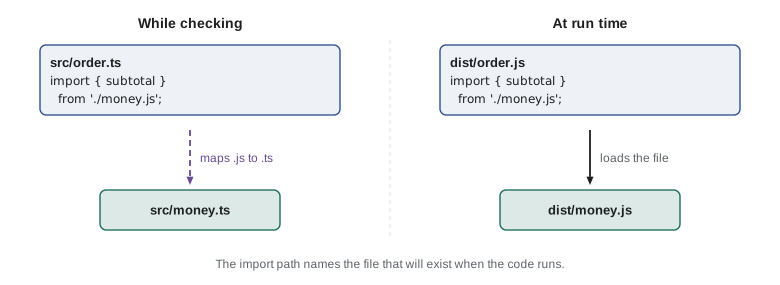
order.ts imports two values and one type from money.ts. The type keyword inside the braces marks Line as a type-only import, which is removed entirely from the emitted JavaScript. The path ends in .js, the name of the file that will exist after compilation, which is what Node.js module resolution requires.
Type-only imports and verbatimModuleSyntax
Some imports bring in only types. When the code is compiled, those imports must disappear, because there is nothing at run time to import. The compiler has always been able to work that out, but a tool that strips types without checking, such as Node.js or a fast bundler, looks at one file at a time and cannot know whether an imported name is a type or a value. The solution is to mark type-only imports explicitly, with import type for a whole import or type before individual names.
The option verbatimModuleSyntax, which the Food Hub and Node.js's recommended settings both use, makes that marking compulsory. Every import without the type keyword is kept exactly as written in the output, so importing a type without marking it is an error.
import { subtotal, Line } from './money.js';

export const lines: Line[] = [{ code: 'SOUP', qty: 2, price: 550 }];
console.log(subtotal(lines));src/order.ts(1,20): error TS1484: 'Line' is a type and must be imported using a type-only import when 'verbatimModuleSyntax' is enabled.
What this code does
Line is an interface, so it does not exist at run time, but the import does not say so. Under verbatimModuleSyntax that is reported as TS1484 with the fix in the message. Writing import { subtotal, type Line } makes the intent explicit for every tool that reads the file.
| Import | Kept in the JavaScript output? | Use it for |
|---|---|---|
| import { subtotal } from './money.js' | Yes | Values: functions, constants, classes |
| import type { Line } from './money.js' | No, the whole statement is removed | Imports that are all types |
| import { subtotal, type Line } from './money.js' | Yes, but only subtotal | Mixed imports |
| export type { Line } from './money.js' | No | Re-exporting types from an index module |
Import paths and module resolution
When the checker sees import ... from './money.js', it has to find the file that the path refers to. How it does that is controlled by moduleResolution, and the right setting depends on what will finally load the code. The two modern settings, which Lesson 2 introduced, differ mainly in how strict they are about paths.
| Setting | Matches | Relative paths | Use for |
|---|---|---|---|
| nodenext | How Node.js resolves imports, including package.json exports and type | Must include the extension, such as './money.js' | Node.js code and libraries |
| bundler | How bundlers such as Vite and esbuild resolve imports | Extension optional | Code that a bundler processes |
Under nodenext, the extension in a relative import is required, because Node.js requires it at run time. The surprise for newcomers is that the extension is .js even though the file on disk is money.ts. The import names the file that will exist when the code runs, and the checker maps money.js back to money.ts while checking.
import { subtotal } from './money';

console.log(subtotal([{ code: 'SOUP', qty: 2, price: 550 }]));src/order.ts(1,26): error TS2835: Relative import paths need explicit file extensions in ECMAScript imports when '--moduleResolution' is 'node16' or 'nodenext'. Did you mean './money.js'?
What this code does
Under nodenext resolution an extensionless relative import is an error, TS2835, and the message suggests the correct path. Without the check, the code would compile and then fail in Node.js with a module-not-found error. The Food Hub's browser pages are loaded as plain ES modules, which also need full paths, so the team writes .js extensions everywhere.
There is now a second way: write the real file name, './money.ts', and set allowImportingTsExtensions, or rewriteRelativeImportExtensions if tsc is producing the output. This suits code run directly by Node.js with type stripping, because Node.js loads the .ts files themselves. Both styles work; what matters is that one project uses one of them consistently.
Declaration files
When a library written in TypeScript is compiled for others to use, its users receive JavaScript, which has no types. To give them the types as well, the compiler can write a declaration file next to each JavaScript file, with the extension .d.ts. A declaration file contains only types: the signatures of functions, the shapes of classes and the interfaces, with no bodies. Editors and the checker read it to understand the JavaScript beside it.
Turning on the declaration option makes tsc write one .d.ts file for each .ts file. For a short module from riverside-data, the declaration file looks like this.
export interface Line { code: string; qty: number; price: number }

export const TAX = 0.13;

/** Adds qty times price for every line. Result in cents. */
export function subtotal(lines: Line[]): number {
  return lines.reduce((sum, l) => sum + l.qty * l.price, 0);
}

export class Tally {
  #counts = new Map<string, number>();
  add(code: string, qty: number): void {
    this.#counts.set(code, (this.#counts.get(code) ?? 0) + qty);
  }
  get total(): number {
    let n = 0;
    for (const q of this.#counts.values()) n += q;
    return n;
  }
}
What this code does
This is the source of money.ts in the riverside-data library, with a value, a function, a class and an interface. It compiles cleanly, and with declaration turned on tsc produces both money.js and money.d.ts from it. The documentation comment on subtotal is carried into the declaration file.
export interface Line {
    code: string;
    qty: number;
    price: number;
}
export declare const TAX = 0.13;
/** Adds qty times price for every line. Result in cents. */
export declare function subtotal(lines: Line[]): number;
export declare class Tally {
    #private;
    add(code: string, qty: number): void;
    get total(): number;
}
What this code does
The declaration file keeps every exported type and signature and drops every body. The keyword declare means that the value exists at run time but is defined elsewhere, in money.js. The private field appears only as #private, so users know the class has private state without seeing it.
Declaration files are how the whole JavaScript ecosystem gets types. The TypeScript installation itself includes declaration files such as lib.dom.d.ts, which describes every browser API, and lib.es2024.d.ts, which describes the built-in objects. When Lesson 2's lib option says ["es2022", "dom"], it is choosing which of those files the checker loads.
Types for packages
A package from npm reaches your project in one of three states. It may be written in TypeScript or ship its own declaration files, in which case its package.json points to them and everything simply works. It may be plain JavaScript whose types are maintained separately in the DefinitelyTyped project and published as a package named @types/ followed by the package name. Or it may have no types anywhere, in which case the checker reports the import.
| Situation | What you see | What to do |
|---|---|---|
| The package ships its own types | Completion and checking work immediately | Nothing |
| Types are on DefinitelyTyped | Error TS7016 suggesting npm i --save-dev @types/name | Install the @types package as a development dependency |
| No types exist | Error TS7016 | Write a declaration file for the parts you use |
| Node.js built-ins such as node:fs | Cannot find module or name errors | Install @types/node and add "node" to types |
import { drawBars } from 'tiny-bars';

drawBars('#sales', [12, 30, 18]);src/chart.ts(1,26): error TS7016: Could not find a declaration file for module 'tiny-bars'. 'node_modules/tiny-bars/index.js' implicitly has an 'any' type. Try `npm i --save-dev @types/tiny-bars` if it exists or add a new declaration (.d.ts) file containing `declare module 'tiny-bars';`
What this code does
tiny-bars is a small charting package written in plain JavaScript with no declaration file, so the checker cannot know what drawBars accepts and reports TS7016. The message suggests an @types package, if one exists, or a declaration of your own. Until one of those is added, the import has the type any.
Writing declarations yourself
For a package with no types, you can write a declaration file that describes just the parts you use. A file such as types/tiny-bars.d.ts containing a declare module block tells the checker what the module exports. It is a promise, like a type assertion: the checker trusts it, so it should match the package's real behaviour, which you can check by reading its documentation or source.
declare module 'tiny-bars' {
  export interface BarOptions {
    max?: number;
    labels?: string[];
  }
  export function drawBars(selector: string, values: number[], options?: BarOptions): number;
}
What this code does
The block declares the module's exports with types and no bodies. Once this file is included in the project, the import in chart.ts compiles, drawBars has completion, and passing a string where the values array belongs would be reported. If the package changes, this file must be updated by hand.
The same declare keyword describes globals: values that exist at run time but are not imported, such as a constant a build tool injects or a property a script adds to window. Declaration merging, from Lesson 5, lets you add a property to the built-in Window interface.
declare const BUILD_DATE: string;

declare global {
  interface Window {
    foodHubConfig: { apiBase: string; refreshSeconds: number };
  }
}

export function apiUrl(path: string): string {
  return window.foodHubConfig.apiBase + path + '?v=' + BUILD_DATE;
}
What this code does
BUILD_DATE is declared as a global string that some other part of the build provides. The declare global block merges a new property into the browser's Window interface, so window.foodHubConfig is typed. Neither declaration produces any JavaScript; they only describe what will exist.
function apiUrl(path) {
  return globalThis.foodHubConfig.apiBase + path + '?v=' + BUILD_DATE;
}

try {
  console.log(apiUrl('/menu'));
} catch (err) {
  console.log('Before setup:', err.name);
}

globalThis.BUILD_DATE = '2027-05-18';
globalThis.foodHubConfig = { apiBase: '/api/v1', refreshSeconds: 60 };
console.log('After setup:', apiUrl('/menu'));Before setup: TypeError After setup: /api/v1/menu?v=2027-05-18
What this code does
A declaration only promises that a global will exist; something else has to create it before the code runs. Called too early, apiUrl fails because foodHubConfig is undefined, which the checker could not see. Once the page's setup script has defined both globals, the same call builds the URL.
A library with types: riverside-data
riverside-data is meant to be used by more than one project, so Mira gives it the settings of a proper library. It is compiled with tsc, which writes JavaScript and declaration files to a dist folder, and its package.json tells other projects where to find both.
{
  "name": "riverside-data",
  "version": "2.0.0",
  "type": "module",
  "exports": {
    ".": {
      "types": "./dist/index.d.ts",
      "default": "./dist/index.js"
    }
  },
  "files": ["dist"],
  "scripts": {
    "build": "tsc",
    "typecheck": "tsc --noEmit"
  },
  "devDependencies": {
    "typescript": "^7.0.0"
  }
}
What this code does
The exports field gives the package one entry point and lists the types file first under the types condition, so TypeScript finds the declarations and JavaScript runtimes find the code. Only the dist folder is published. The major version moves to 2.0.0 because the migration changes how the library is imported.
{
  "compilerOptions": {
    "rootDir": "src",
    "outDir": "dist",
    "target": "es2022",
    "module": "nodenext",
    "strict": true,
    "declaration": true,
    "declarationMap": true,
    "sourceMap": true,
    "verbatimModuleSyntax": true,
    "erasableSyntaxOnly": true
  },
  "include": ["src"]
}
What this code does
The library uses nodenext so that its imports work in Node.js and in browsers that load modules directly. declaration writes the .d.ts files, and declarationMap lets an editor jump from a declaration to the original TypeScript. The strict and erasable settings match the rest of the Food Hub code.
Shared API types
Theo's request from the start of the session becomes a file called api.ts in the front end's src folder. It holds one interface for each resource his API returns and one type for each error, taken from his contract document. Every module that talks to the server imports its types from there, so a change to the API means a change to one file, after which the checker lists every place in the front end that needs to follow.
// Types for the Riverside Food Hub API, version 1 (/api/v1).
// Kept in step with the API contract: change both in the same pull request.

export interface MenuItem { code: string; name: string; price: number; category: 'soup' | 'sandwich' | 'drink' | 'treat' }
export interface Shift { id: number; area: string; start: string; end: string; capacity: number; booked: number }
export interface CounterToday { orders: number; sales: number; tips: number; updatedAt: string }
export interface Page<T> { items: T[]; next: string | null }

/** An error response, in the problem details format of RFC 9457. */
export interface Problem { type: string; title: string; status: number; detail?: string }

export interface Endpoints {
  'GET /menu': Page<MenuItem>;
  'GET /shifts': Page<Shift>;
  'GET /counter/today': CounterToday;
}
What this code does
Each interface mirrors a response in Theo's contract, with money in cents and times as ISO 8601 strings. The Endpoints interface maps each request to its response type, so a helper can be written once and know what every endpoint returns. Lesson 12 builds that helper with a run-time check for each response.
Because Theo's server is PHP, the types cannot be shared as code, so the comment at the top records the agreement instead. Larger teams often go one step further and describe the API in a machine-readable OpenAPI document, then generate the TypeScript types from it with a tool, so the two can never drift apart. For the Food Hub's dozen endpoints, Theo and Mira agree that a hand-written file and a rule about pull requests are enough for now.
Seeing it in the emitted code
Everything in this lesson about types disappears from the output, and only the value imports remain. Running the emitted code of a small module shows what is left once the declarations, the type-only imports and the interfaces have gone.
"use strict";
const TAX = 0.13;
function totals(lines) {
    const subtotal = lines.reduce((sum, l) => sum + l.qty * l.price, 0);
    const tax = Math.round(subtotal * TAX);
    return { subtotal, tax, total: subtotal + tax };
}
console.log(totals([{ code: 'SOUP', qty: 2, price: 550 }, { code: 'EGG', qty: 1, price: 625 }]));{ subtotal: 1725, tax: 224, total: 1949 }What this code does
The interface, the type alias and the declare line produce no JavaScript at all, and the emitted file keeps only the constant, the function and the call. A module would also keep its export keywords, which the runner here does not need. The result is the subtotal of 1725 cents, a tax of 224 and a total of 1949.
// A module's exports, imitated with an object so it runs here.
const money = (() => {
  const TAX = 0.13;
  function subtotal(lines) {
    return lines.reduce((sum, l) => sum + l.qty * l.price, 0);
  }
  return { TAX, subtotal };
})();

const { subtotal, TAX } = money;
const lines = [{ code: 'SOUP', qty: 2, price: 550 }, { code: 'DRINK', qty: 1, price: 200 }];
console.log('Exports:', Object.keys(money));
console.log('Subtotal:', subtotal(lines), 'Tax:', Math.round(subtotal(lines) * TAX));Exports: [ "TAX", "subtotal" ] Subtotal: 1300 Tax: 169
What this code does
The runner here works with single files, so this example imitates a module with a function that returns its exports. Only TAX and subtotal exist at run time; a Line interface exported from the real money.ts would not appear in the list, because types are not values. Destructuring the object plays the part of the import statement.
Try it yourself
Check a declaration against the code
A declaration file says the module exports subtotal, TAX and formatCents, but declarations are promises. Complete missing(declared, actual) so that it returns the names in declared that are not keys of actual, the object of real exports. The program prints what is missing for two modules.
function missing(declared, actual) {
  return [];
}

const moneyExports = { TAX: 0.13, subtotal: lines => 0 };
const viewExports = { render: () => '', mount: () => {} };

console.log(missing(['subtotal', 'TAX', 'formatCents'], moneyExports));
console.log(missing(['render', 'mount'], viewExports));
Try it yourself
Add the extension
Under nodenext, relative imports need a .js extension. Complete fixPath(path) so that a relative path (starting with './' or '../') without an extension gets '.js' added, a path ending in '.ts' has it replaced by '.js', and package names such as 'tiny-bars' are left alone. The program fixes five paths.
function fixPath(path) {
  return path;
}

for (const p of ['./money', '../shared/api.ts', './view.js', 'tiny-bars', './order']) {
  console.log(p, '->', fixPath(p));
}
Common mistakes
MistakeImport a type without the type keyword under verbatimModuleSyntax.
InsteadWrite import type, or type before the name, so every tool knows to remove it.
MistakeWrite './money.ts' in imports under nodenext without the matching option.
InsteadName the emitted file, './money.js', or enable allowImportingTsExtensions or rewriteRelativeImportExtensions.
MistakeLeave out the extension of a relative import in Node.js code.
InsteadNode.js requires it at run time, and nodenext reports it as TS2835.
MistakeSilence TS7016 with a // @ts-ignore comment.
InsteadInstall the @types package or write a declaration file, so the import is actually typed.
MistakeTreat a hand-written declaration file as checked.
InsteadThe checker trusts declarations; keep them in step with the real code.
Summary and key terms
- TypeScript modules use JavaScript's import and export, and types can be exported and imported too.
- Type-only imports, written import type or with type before a name, are removed from the output; verbatimModuleSyntax requires them to be marked so that tools that strip types file by file work correctly. moduleResolution nodenext matches Node.js and requires extensions in relative imports, written as the emitted .js name; bundler matches bundlers and makes extensions optional.
- Declaration files (.d.ts) contain only types, describe JavaScript files beside them and are written by tsc when declaration is on.
- Packages either ship their own types, have types on DefinitelyTyped as @types packages, or have none, which gives TS7016.
- You can write declare module blocks for untyped packages and declare globals, and add to built-in interfaces such as Window with declare global.
- A library's package.json exports field lists its types and its code.
- Shared API types in one file keep the front end in step with the server.
- module
- A file with its own scope that shares values and types through import and export.
- type-only import
- An import marked with type that brings in only types and is removed from the output.
- verbatimModuleSyntax
- An option that keeps every unmarked import in the output, so type imports must be marked.
- module resolution
- The rules that turn an import path into a file, chosen with moduleResolution.
- declaration file
- A .d.ts file containing only types that describe a JavaScript file or module.
- declare
- A keyword saying that a value exists at run time but is defined elsewhere.
- DefinitelyTyped
- A community project that publishes types for JavaScript packages as @types packages.
- @types package
- An npm package containing declaration files for another package, such as @types/node.
- declare module
- A block that describes the exports of a module that has no types of its own.
- exports field
- The part of package.json that lists a package's entry points and their types and code.
- OpenAPI
- A machine-readable format for describing an HTTP API, from which types can be generated.
Practice problems
Work each problem on paper first, then reveal the answer to check.
Why must import { Line } be written import { type Line } under verbatimModuleSyntax?
Show answer
Line is only a type; without the marker the import would be kept in the output and fail at run time.
Under nodenext, how do you import money.ts from order.ts?
Show answer
import ... from './money.js', naming the file that will exist after compilation.
What does a .d.ts file contain?
Show answer
Only type information: declarations of values, functions, classes and types, with no bodies.
What does TS7016 mean and how do you fix it?
Show answer
A package has no types; install its @types package or write a declaration file.
Why does the Food Hub keep its API types in one file?
Show answer
So a change to the API is made in one place and the checker reports every part of the front end that must change.
Lesson quiz · 5 questions
Score 60% or more to complete this lesson.
Create a free account to save your progress, take quizzes and earn a certificate.