
JS-130 · Lesson 11 of 12 · 24 min
Configuring strict mode
▶ Video coming soon A video version of this lesson is on the way.
Every listing in this course has been checked with strict mode on, because that is the default in TypeScript 6 and 7 and the setting the Food Hub uses. On Tuesday, May 25, 2027, the plan is to look at what strict actually means, which extra options are worth adding on top, and how a team keeps the checking strict over time. "Strictness is a dial, not a switch," Gareth says. "Strict mode is a sensible middle. There are a few more notches I want, and a few escape hatches I want used only with a written reason."
This lesson covers the family of options that strict turns on, the additional checks noUncheckedIndexedAccess, exactOptionalPropertyTypes, noImplicitReturns, noFallthroughCasesInSwitch and noImplicitOverride, the comments and operators that switch checking off, and how to make type checking part of the team's routine with automated checks and a linter.
What strict turns on
The strict option is a shorthand for a group of individual options, each of which you can also set separately. When strict is true, all of them are on unless you turn one off explicitly. New members are added to the group from time to time, which is why upgrading TypeScript can occasionally report new errors in a strict project.
| Option | What it checks | Lesson |
|---|---|---|
| noImplicitAny | Values whose type would silently become any, such as unannotated parameters | 3, 4 |
| strictNullChecks | null and undefined are separate types that must be handled | 3, 6 |
| strictFunctionTypes | Function parameters are checked in the safe direction when functions are assigned | 11 |
| strictBindCallApply | Arguments to bind, call and apply are checked | 11 |
| strictPropertyInitialization | Class fields must be given a value | 8 |
| noImplicitThis | this must have a known type wherever it is used | 11 |
| useUnknownInCatchVariables | The variable in catch (err) has type unknown, not any | 6, 11 |
| alwaysStrict | Files are parsed in JavaScript strict mode; turning it off is deprecated | 2 |
| strictBuiltinIteratorReturn | Built-in iterators report undefined as their return value correctly | 11 |
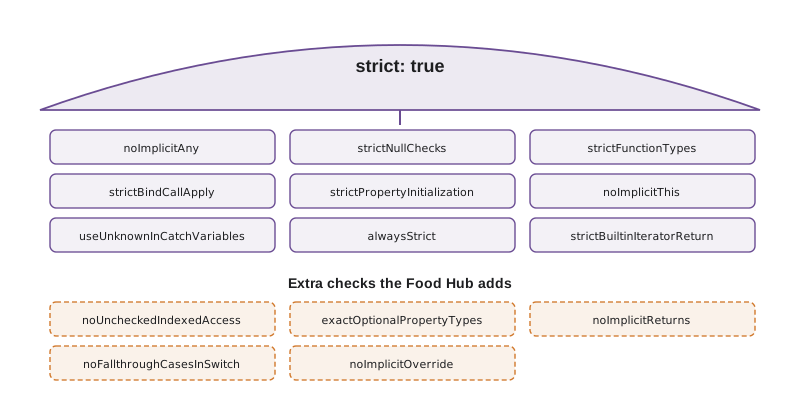
The first two are by far the most important. noImplicitAny means that every value has a real type, so the checker is actually checking. strictNullChecks means that a missing value must be handled before use, which removes the most common run-time error in JavaScript. A project with strict turned off is getting only a fraction of TypeScript's value, which is why older projects migrating to TypeScript 6 are encouraged to turn it on rather than to set strict to false.
Errors in catch blocks
JavaScript lets a program throw any value, not just Error objects: a string, a number, even undefined. A catch block therefore cannot know what it has caught. Under useUnknownInCatchVariables the variable has type unknown, so code that reads err.message without checking is reported. Lesson 6 showed the fix: narrow with instanceof Error first.
async function save(order: { lines: unknown[] }): Promise<string> {
  try {
    const res = await fetch('/api/v1/orders', { method: 'POST', body: JSON.stringify(order) });
    return 'Saved with status ' + res.status;
  } catch (err) {
    return 'Not saved: ' + err.message;
  }
}save.ts(6,28): error TS18046: 'err' is of type 'unknown'.
What this code does
The caught value has type unknown, so reading message is reported as TS18046. A string thrown somewhere deep in a library would make err.message undefined at run time, and the page would show Not saved: undefined. Narrowing with err instanceof Error, and falling back to String(err), handles every case.
function risky(kind) {
  if (kind === 'error') throw new Error('Server unavailable');
  if (kind === 'string') throw 'timeout';
  if (kind === 'object') throw { code: 503 };
}

function message(err) {
  if (err instanceof Error) return err.message;
  if (typeof err === 'string') return err;
  return 'Unexpected problem: ' + JSON.stringify(err);
}

for (const kind of ['error', 'string', 'object']) {
  try {
    risky(kind);
  } catch (err) {
    console.log('err.message =', err.message, '| safe:', message(err));
  }
}err.message = Server unavailable | safe: Server unavailable
err.message = undefined | safe: timeout
err.message = undefined | safe: Unexpected problem: {"code":503}What this code does
Only the first throw produces an Error, so err.message is undefined for the string and the plain object. The message function checks what it has before reading anything and gives a useful text for all three. That is the run-time reason the catch variable is unknown under strict mode.
Function parameter checks
strictFunctionTypes checks function types in the safe direction. A function that accepts only shifts cannot be used where the caller might pass any record, because the caller could then hand it something that is not a shift. That rule sounds abstract but catches real bugs with callbacks. strictBindCallApply makes calls through bind, call and apply as well checked as direct calls, and noImplicitThis reports uses of this whose type the checker cannot determine, which usually means a function that was meant to be a method or an arrow function.
interface Shift { id: number; area: string; booked: number }
interface Room { id: number; name: string }

type Handler = (item: Shift | Room) => string;

const shiftOnly = (s: Shift): string => s.area + ': ' + s.booked;
const handler: Handler = shiftOnly;

function label(this: { name: string }, prefix: string): string {
  return prefix + this.name;
}
label.call({ name: 'Kitchen' }, 42);handlers.ts(7,7): error TS2322: Type '(s: Shift) => string' is not assignable to type 'Handler'.
Types of parameters 's' and 'item' are incompatible.
Type 'Shift | Room' is not assignable to type 'Shift'.
Type 'Room' is missing the following properties from type 'Shift': area, booked
handlers.ts(12,33): error TS2345: Argument of type 'number' is not assignable to parameter of type 'string'.What this code does
A Handler may be called with a Room, but shiftOnly would then read area and booked from it, so the assignment is reported. The call to label through call passes a number where a string is expected, which strictBindCallApply reports. Declaring this as a parameter is how a function states what this must be.
noUncheckedIndexedAccess
Strict mode has one notable gap. Reading arr[0] or prices[code] gives the element type, number, even though the element may not exist and the real value may be undefined. The option noUncheckedIndexedAccess closes the gap by adding undefined to every read through an index, so the code has to handle the missing case. It is the single extra option Gareth considers essential, and tsc --init now turns it on by default.
const orders: { number: number; total: number }[] = [];
const prices: Record<string, number> = { SOUP: 550, EGG: 625 };

const first = orders[0];
console.log(first.total);

const wrap = prices['WRAP'];
console.log(wrap * 2);

for (const o of orders) console.log(o.total);report.ts(5,13): error TS18048: 'first' is possibly 'undefined'. report.ts(8,13): error TS18048: 'wrap' is possibly 'undefined'.
What this code does
With noUncheckedIndexedAccess, orders[0] has type { number: number; total: number } | undefined, so reading total is reported, and so is the arithmetic on a price that may be missing. The for...of loop is not reported, because it only visits elements that exist. This is the empty-day bug from Lesson 1, caught by the checker.
const orders = [];
const prices = { SOUP: 550, EGG: 625 };

console.log('first order:', orders[0]);
console.log('wrap price x 2:', prices['WRAP'] * 2);
try {
  console.log(orders[0].total);
} catch (err) {
  console.log(err.name + ':', err.message);
}
console.log('safe:', orders[0]?.total ?? 0, (prices['WRAP'] ?? 0) * 2);first order: undefined wrap price x 2: NaN TypeError: Cannot read properties of undefined (reading 'total') safe: 0 0
What this code does
An index that does not exist gives undefined in JavaScript, so the missing price turns into NaN and the missing order makes property access throw a TypeError. Optional chaining and ?? give sensible defaults instead. noUncheckedIndexedAccess makes the checker insist on exactly these defences.
exactOptionalPropertyTypes
An optional property, note?: string, normally accepts two things: a missing property and a property set to undefined. Usually that difference does not matter, but sometimes it does. Spreading { note: undefined } over a shift erases its note, and 'note' in shift is true even though the value is undefined. exactOptionalPropertyTypes makes the question mark mean only "may be missing". To allow undefined as a value as well, you write it explicitly: note?: string | undefined.
interface ShiftUpdate { capacity?: number; note?: string }

const ok: ShiftUpdate = { capacity: 5 };
const clear: ShiftUpdate = { note: undefined };

function update(u: ShiftUpdate): void {}
update({ capacity: undefined });update.ts(4,7): error TS2375: Type '{ note: undefined; }' is not assignable to type 'ShiftUpdate' with 'exactOptionalPropertyTypes: true'. Consider adding 'undefined' to the types of the target's properties.
Types of property 'note' are incompatible.
Type 'undefined' is not assignable to type 'string'.
update.ts(7,8): error TS2379: Argument of type '{ capacity: undefined; }' is not assignable to parameter of type 'ShiftUpdate' with 'exactOptionalPropertyTypes: true'. Consider adding 'undefined' to the types of the target's properties.
Types of property 'capacity' are incompatible.
Type 'undefined' is not assignable to type 'number'.What this code does
With exactOptionalPropertyTypes, setting an optional property to undefined is reported, because the type allows the property to be missing but not to hold undefined. The update with capacity: undefined is reported for the same reason, which prevents it from erasing the capacity when spread. Leaving the property out is still fine.
noImplicitReturns and noFallthroughCasesInSwitch
Two smaller options catch control-flow mistakes. noImplicitReturns reports a function in which some paths return a value and others fall off the end, which in JavaScript returns undefined. noFallthroughCasesInSwitch reports a case in a switch that runs on into the next one because it has no break or return, a classic source of bugs. Neither matters when every function has an explicit return type and every case returns, but they are cheap insurance.
function badge(status: 'ready' | 'stale' | 'error') {
  if (status === 'ready') return 'Live';
  if (status === 'stale') return 'Not updated';
}

function points(kind: string): number {
  let n = 0;
  switch (kind) {
    case 'shift':
      n += 10;
    case 'training':
      n += 5;
      break;
  }
  return n;
}checks.ts(1,10): error TS7030: Not all code paths return a value. checks.ts(9,5): error TS7029: Fallthrough case in switch.
What this code does
badge returns a string on two paths and nothing for error, which noImplicitReturns reports. In points, the shift case has no break, so a shift is counted as 15 points instead of 10; noFallthroughCasesInSwitch reports the case that falls through. Both are logic mistakes that JavaScript runs without complaint.
function points(kind) {
  let n = 0;
  switch (kind) {
    case 'shift':
      n += 10;
    case 'training':
      n += 5;
      break;
  }
  return n;
}

console.log('shift:', points('shift'));
console.log('training:', points('training'));
console.log('other:', points('other'));shift: 15 training: 5 other: 0
What this code does
Without a break after the shift case, execution continues into the training case, so a shift earns 15 points instead of 10. Training alone is correctly 5, which is why such a bug can survive a quick test. The checker option reports the missing break before anyone notices the numbers.
Escape hatches
Sometimes the checker is wrong, or right in a way that does not matter yet, as in the middle of a migration. TypeScript provides several ways to override it. Each one is a place where the types can become untrue, so each deserves a comment saying why it is there.
| Escape hatch | What it does | When it is reasonable |
|---|---|---|
| any | Turns off checking for a value | Temporarily, during migration (Lesson 12) |
| as Type | Asserts a type the checker cannot prove | DOM elements known to exist; values just checked by hand |
| value! | Asserts that a value is not null or undefined | Rarely: when a check the checker cannot follow has already been made |
| // @ts-expect-error | Suppresses the error on the next line, and reports if there is none | Known issues, tests of invalid calls |
| // @ts-ignore | Suppresses any error on the next line, silently | Almost never; prefer @ts-expect-error |
The difference between the last two is important. @ts-expect-error says that you expect an error on the next line; if the error is ever fixed, the comment itself becomes an error, so it never outlives its reason. @ts-ignore suppresses whatever is there, forever, including new errors that appear later.
// @ts-expect-error: the old menu format still sends price as a string until the server update
const legacyPrice: number = '550';

// @ts-expect-error: kept from last month, but the line below is now correct
const fixedPrice: number = 550;

// @ts-ignore
const hidden: number = 'anything at all';legacy.ts(4,1): error TS2578: Unused '@ts-expect-error' directive.
What this code does
The first comment suppresses a real error, as intended. The second has outlived its purpose, because the line below it no longer has an error, so TypeScript reports the unused directive as TS2578. The @ts-ignore comment silently hides an error that nobody will ever be told about.
The Food Hub configuration
With all that in mind, the strictness section of the Food Hub's tsconfig.json grows by five lines. Each was chosen because it would have caught a bug on Gareth's list or one like it.
{
  "compilerOptions": {
    "strict": true,
    "noUncheckedIndexedAccess": true,
    "exactOptionalPropertyTypes": true,
    "noImplicitReturns": true,
    "noFallthroughCasesInSwitch": true,
    "noImplicitOverride": true
  }
}
What this code does
strict turns on the whole family, and the five extra options add checks for indexed reads, optional properties, missing returns, fall-through cases and unmarked overrides. The other compiler options from Lesson 2 stay as they were. The file is shortened here to the strictness settings.
Turning on an option in an existing project can produce a long list of errors at once. The practical approach is to turn on one option at a time, fix its errors, commit, and move to the next. For a large codebase, teams sometimes keep a list of files that are not yet fixed, or use @ts-expect-error comments with a common label that can be searched for and removed over time.
Keeping it strict: automated checks and linting
A setting in tsconfig.json only helps if the check is actually run. Gareth sets up three layers. The editor shows errors as Mira types. A git hook can run tsc --noEmit before each commit, catching anything she missed. And the code host runs the same command on every pull request, so that no change with a type error can be merged into the main branch even if someone skips the hook.
name: checks
on: [push, pull_request]
jobs:
  typecheck:
    runs-on: ubuntu-latest
    steps:
      - uses: actions/checkout@v5
      - uses: actions/setup-node@v5
        with:
          node-version: 24
      - run: npm ci
      - run: npm run typecheck
What this code does
This GitHub Actions workflow runs on every push and pull request. It checks out the code, installs Node.js 24 and the exact package versions from the lock file, then runs the typecheck script, which is tsc --noEmit. If the checker reports any error, the job fails and the pull request shows a red mark.
A linter complements the type checker. The checker answers "are the types consistent?"; a linter answers "is this a pattern we have agreed not to use?". The usual linter for TypeScript is ESLint with the typescript-eslint plugin, whose rules can forbid explicit any, require @ts-expect-error to have a description, and report promises that are created but never awaited. Some of its most useful rules read the type information from the compiler, so they need the project's tsconfig.json too.
| Tool | Question it answers | Example finding |
|---|---|---|
| tsc --noEmit | Are the types consistent? | Argument of type 'string' is not assignable to parameter of type 'number' |
| ESLint with typescript-eslint | Does the code follow the team's rules? | Unexpected any; promise returned by save is not handled |
| Tests | Does the code do the right thing? | Total for two soups is 1100, expected 1100 |
Try it yourself
A safe first element
With noUncheckedIndexedAccess, items[0] may be undefined. Complete firstTotal(orders) so that it returns the total of the first order, or 0 if there are no orders. Then complete priceOf(prices, code) so that it returns the price or 0 when the code is missing. The program prints four results.
function firstTotal(orders) {
  return orders[0].total;
}

function priceOf(prices, code) {
  return prices[code];
}

console.log(firstTotal([{ number: 1, total: 1949 }, { number: 2, total: 875 }]));
console.log(firstTotal([{ number: 1, total: 0 }]).toString());
console.log(priceOf({ SOUP: 550 }, 'SOUP'));
console.log(priceOf({ SOUP: 550 }, 'WRAP'));
Try it yourself
A message from anything thrown
Complete toMessage(err) for a catch block. Return err.message for an Error, the string itself for a string, 'Server said ' followed by the status for an object with a numeric status property, and 'Unknown problem' for anything else. The program throws five different values.
function toMessage(err) {
  return String(err?.message);
}

const thrown = [new TypeError('Bad price'), 'timeout', { status: 503 }, 42, null];
for (const value of thrown) {
  try {
    throw value;
  } catch (err) {
    console.log(toMessage(err));
  }
}
Common mistakes
MistakeTurn strict off to make a migration quieter.
InsteadKeep strict on and use temporary any or @ts-expect-error comments in the files that are not finished.
MistakeRead err.message directly in a catch block.
InsteadThe caught value is unknown; narrow it with instanceof Error first.
MistakeTrust arr[0] to be defined because the type says so.
InsteadTurn on noUncheckedIndexedAccess and handle the undefined case.
MistakeUse @ts-ignore to silence an error.
InsteadUse @ts-expect-error with a reason, which reports itself when it is no longer needed.
MistakeRely on developers to remember to run tsc.
InsteadRun tsc --noEmit automatically on every pull request so type errors cannot be merged.
Summary and key terms
- strict turns on a family of checks: noImplicitAny, strictNullChecks, strictFunctionTypes, strictBindCallApply, strictPropertyInitialization, noImplicitThis, useUnknownInCatchVariables, alwaysStrict and strictBuiltinIteratorReturn. noImplicitAny and strictNullChecks give most of the value.
- Caught errors have type unknown because any value can be thrown.
- Useful checks outside strict include noUncheckedIndexedAccess, which adds undefined to indexed reads; exactOptionalPropertyTypes, which stops optional properties holding undefined unless allowed; noImplicitReturns; noFallthroughCasesInSwitch; and noImplicitOverride.
- Escape hatches such as any, as, the ! operator and @ts-expect-error should be rare and explained; @ts-expect-error reports itself when it is no longer needed, unlike @ts-ignore.
- Extra options are best turned on one at a time.
- Type checking should run in the editor, before commits and on every pull request, alongside a linter such as typescript-eslint and tests.
- strict
- A compiler option that turns on the whole family of strict checks.
- noImplicitAny
- A strict check that reports values whose type would silently be any.
- strictNullChecks
- A strict check that makes null and undefined separate types that must be handled.
- useUnknownInCatchVariables
- A strict check that gives the variable in a catch block the type unknown.
- noUncheckedIndexedAccess
- An option that adds undefined to the type of every read through an index.
- exactOptionalPropertyTypes
- An option that stops optional properties from being set to undefined unless allowed.
- noImplicitReturns
- An option that reports functions where some paths return a value and others do not.
- noFallthroughCasesInSwitch
- An option that reports switch cases that run into the next case.
- @ts-expect-error
- A comment that suppresses an error on the next line and reports itself if there is none.
- linter
- A tool that reports code patterns a team has agreed to avoid, such as ESLint with typescript-eslint.
- continuous integration
- Running checks such as tsc --noEmit automatically on every push or pull request.
Practice problems
Work each problem on paper first, then reveal the answer to check.
Name the two strict options that give most of TypeScript's value.
Show answer
noImplicitAny and strictNullChecks.
What is the type of err in catch (err) under strict mode, and why?
Show answer
unknown, because JavaScript can throw any value, not only Error objects.
With noUncheckedIndexedAccess, what is the type of names[0] for names: string[]?
Show answer
string | undefined.
Why is @ts-expect-error safer than @ts-ignore?
Show answer
It reports TS2578 when the error it suppresses no longer exists, so it cannot outlive its reason.
What do a type checker, a linter and tests each answer?
Show answer
Whether types are consistent, whether the code follows agreed rules, and whether it does the right thing.
Lesson quiz · 5 questions
Score 60% or more to complete this lesson.
Create a free account to save your progress, take quizzes and earn a certificate.