
JS-130 · Lesson 3 of 12 · 26 min
Basic types and inference
▶ Video coming soon A video version of this lesson is on the way.
On Tuesday, April 27, 2027, the plan is to start writing real types. Gareth gives Mira a small exercise first: take money.js, the module that formats prices on the counter page, rename it to money.ts and see what the compiler says. "Probably nothing," he says. "TypeScript is good at working out types on its own. Today is about what it works out, what it cannot, and where you have to tell it."
This lesson covers the basic types that describe JavaScript values, the way TypeScript infers types without annotations, literal types and how they widen, arrays, tuples and simple object types, and the special types any, unknown, never, void, null and undefined.
The primitive types
JavaScript has seven kinds of primitive value, and TypeScript has a type for each, written in lower case. Five of them come up constantly in the Food Hub's code; bigint and symbol are rare in everyday web code.
| Type | Values | Food Hub example |
|---|---|---|
| string | Text of any length | The dish code 'SOUP' or a volunteer's area |
| number | All numbers, whole or fractional, including NaN and Infinity | A price in cents, 550, or a tip rate, 0.15 |
| boolean | true and false | Whether a shift is full |
| null | Only null: deliberately no value | No note on an order |
| undefined | Only undefined: not set | An optional property that was left out |
| bigint | Whole numbers of any size, written 10n | Rarely needed |
| symbol | Unique identifiers created with Symbol() | Rarely needed |
The names are lower case for a reason. String, Number and Boolean with capital letters are the wrapper objects that JavaScript creates behind the scenes, and using them as types is almost always a mistake. Write string, never String.
Inference: types without annotations
In most of a TypeScript program you write no types at all. When a variable is initialized, the checker infers its type from the value. When a function returns an expression, the checker infers the return type from the expression. The result is the same as if you had written the annotation, and the checker enforces it from then on.
let total = 550;          // inferred as number
const area = 'Kitchen';   // inferred as the literal type 'Kitchen'
let full = false;         // inferred as boolean

total = total + 625;      // fine: still a number
total = 'free';           // not fine
full = 'no'; // not fineinfer.ts(6,1): error TS2322: Type 'string' is not assignable to type 'number'. infer.ts(7,1): error TS2322: Type 'string' is not assignable to type 'boolean'.
What this code does
No line has an annotation, yet the checker knows that total is a number and full is a boolean, because of their starting values. Assigning a string to either is reported as TS2322 on the line and column of the variable. Inference gives the same protection as writing the types by hand.
Hovering over a variable in the editor shows what was inferred, and that is the quickest way to learn how inference works. Gareth's rule is to let inference do its job inside functions and to write annotations where they help a reader or where the checker cannot know the answer.
| Where | Annotate? | Why |
|---|---|---|
| A variable with a starting value | Usually not | The value already shows the type |
| A variable declared now and set later | Yes | With no starting value there is nothing to infer from |
| Function parameters | Yes | The checker cannot guess what callers will pass |
| Function return types | Often, for exported functions | It documents the contract and catches a wrong return early |
| Data from JSON, forms or servers | Yes, after checking it | The checker cannot see outside data (Lesson 6) |
Parameters are the main place where annotations are required. When strict mode is on, a parameter with no type and no way to infer one is an error, TS7006, because otherwise the checker would quietly treat it as any, the type that switches checking off. Lesson 4 covers functions in depth.
function formatCents(cents) {
  return (cents / 100).toFixed(2);
}money.ts(1,22): error TS7006: Parameter 'cents' implicitly has an 'any' type.
What this code does
The parameter cents has no annotation, so the checker has no way to know what it is. Under strict mode that is reported as TS7006, an implicit any. Writing cents: number fixes it and lets the checker confirm that toFixed exists on the result.
Literal types and widening
A literal type is a type with exactly one value, such as the string 'SOUP', the number 550 or true. On its own that seems odd, but combined with the | symbol, which means "or", literal types describe a fixed set of allowed values. That is how TypeScript describes the counter page's tip rates and dish categories.
type Tip = 0 | 0.1 | 0.15 | 0.2;
type Category = 'soup' | 'sandwich' | 'drink' | 'treat';

let tip: Tip = 0.15;
tip = 0.25;

let tab: Category = 'drink';
tab = 'Drinks';menu.ts(5,1): error TS2322: Type '0.25' is not assignable to type 'Tip'. menu.ts(8,1): error TS2820: Type '"Drinks"' is not assignable to type 'Category'. Did you mean '"drink"'?
What this code does
Tip allows exactly four numbers and Category exactly four strings. Assigning 0.25 or 'Drinks' with a capital letter is reported, and for the string the checker even suggests the nearest allowed value. A union of literals gives the same safety as an enum and strips away cleanly, which is why the Food Hub uses them.
The type keyword gives a name to a type, called a type alias. Lesson 5 covers aliases and interfaces properly; for now, type Tip = ... simply means that Tip can be used wherever that union could be written.
When the checker infers a type from a literal, it has to decide how specific to be. A const can never change, so const area = 'Kitchen' gets the literal type 'Kitchen'. A let can be reassigned, so let area = 'Kitchen' is widened to string, on the assumption that you will want to assign other strings later. Object properties widen the same way, because properties can be changed even when the variable holding the object is a const.
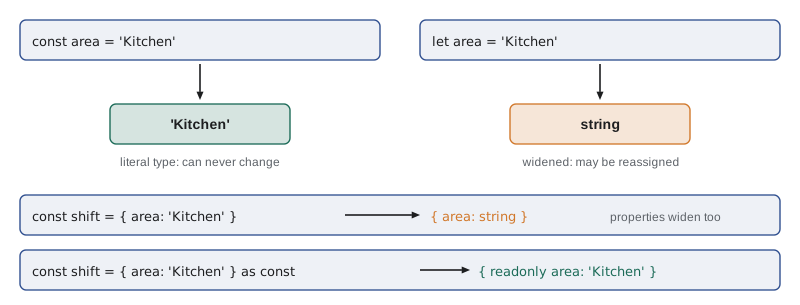
Adding as const after an object or array literal tells the checker not to widen anything: every property keeps its literal type and becomes readonly, and an array becomes a fixed, readonly tuple. That is useful for tables of fixed data such as the menu's tabs, because a type can then be derived from the data instead of written out twice.
const TABS = ['soup', 'sandwich', 'drink', 'treat'] as const;

type Category = (typeof TABS)[number];   // 'soup' | 'sandwich' | 'drink' | 'treat'

function tabLabel(tab: Category): string {
  return tab.charAt(0).toUpperCase() + tab.slice(1) + 's';
}

console.log(TABS.map(tabLabel).join(', '));
What this code does
Because of as const, TABS has the type of a readonly tuple of four literal strings. The expression (typeof TABS)[number] means the type of any element of TABS, which is the union of the four strings. Adding a fifth tab to the array adds it to the type automatically.
"use strict";
const TABS = ['soup', 'sandwich', 'drink', 'treat'];
function tabLabel(tab) {
    return tab.charAt(0).toUpperCase() + tab.slice(1) + 's';
}
console.log(TABS.map(tabLabel).join(', '));Soups, Sandwichs, Drinks, Treats
What this code does
The emitted JavaScript keeps the array and the function but loses the as const and the type alias, which existed only for the checker. That is why as const does not freeze the array at run time; it only tells the checker to treat it as read-only. Use Object.freeze as well if the values must be protected while the program runs.
'use strict';
const TABS = Object.freeze(['soup', 'sandwich', 'drink', 'treat']);

console.log('Frozen:', Object.isFrozen(TABS));
try {
  TABS.push('special');
} catch (err) {
  console.log('push failed:', err.name);
}
try {
  TABS[0] = 'soups';
} catch (err) {
  console.log('assignment failed:', err.name);
}
console.log(TABS.join(', '));Frozen: true push failed: TypeError assignment failed: TypeError soup, sandwich, drink, treat
What this code does
Object.freeze protects the array while the program runs: in strict mode, adding an element or changing one throws a TypeError. That is the run-time counterpart of as const, which only stops the checker from accepting such changes. Using both gives a list that is protected before and during the run.
Arrays and tuples
An array type is written with square brackets after the element type, as in number[] or string[]. The longer form Array<number> means the same thing and appears in some code and in error messages. An array type says that every element has that type and that the array can have any length.
const quantities: number[] = [2, 1, 3];
quantities.push(4);
quantities.push('5');

const codes = ['SOUP', 'EGG'];   // inferred as string[]
const first: number = codes[0];arrays.ts(3,17): error TS2345: Argument of type 'string' is not assignable to parameter of type 'number'. arrays.ts(6,7): error TS2322: Type 'string' is not assignable to type 'number'.
What this code does
The array of numbers accepts push(4) but rejects push('5'), and an inferred array of strings cannot have an element assigned to a number. Both are reported with the exact argument or assignment that is wrong. Arrays are checked element by element, every time an element goes in or comes out.
A tuple is an array with a fixed length where each position has its own type. The counter page's quick-add buttons store pairs of a dish code and a quantity, which is a natural tuple: [string, number]. Tuples are common for functions that return two values, such as a parsed line and an error, and for entries from Object.entries and Map.
type Line = [code: string, qty: number];

const a: Line = ['SOUP', 2];
const b: Line = ['EGG', '1'];
const c: Line = ['DRINK'];

const [code, qty] = a;
console.log(code.toLowerCase(), qty * 2);lines.ts(4,25): error TS2322: Type 'string' is not assignable to type 'number'. lines.ts(5,7): error TS2322: Type '[string]' is not assignable to type 'Line'. Source has 1 element(s) but target requires 2.
What this code does
The labels code and qty in the tuple type are only documentation, but they appear in the editor and in messages. The second tuple has a string in the number position and the third is missing an element, and both are reported. Destructuring a valid tuple gives each variable the type of its position.
Object types
An object type lists properties and their types inside braces, separated by semicolons or commas. A question mark after a property name makes it optional, which means it may be missing; its type then includes undefined. Lesson 5 shows how to name object types with interfaces; small ones are often written inline.
function shiftCard(shift: { area: string; start: string; spacesLeft: number; note?: string }): string {
  const extra = shift.note ? ' (' + shift.note + ')' : '';
  return shift.area + ' at ' + shift.start + ': ' + shift.spacesLeft + ' spaces' + extra;
}

shiftCard({ area: 'Kitchen', start: '09:00', spacesLeft: 2 });
shiftCard({ area: 'Kitchen', start: '09:00', spaces_left: 2 });shifts.ts(7,46): error TS2561: Object literal may only specify known properties, but 'spaces_left' does not exist in type '{ area: string; start: string; spacesLeft: number; note?: string | undefined; }'. Did you mean to write 'spacesLeft'?What this code does
The first call matches the type exactly; note is optional, so leaving it out is fine. The second call misspells a property, and because it is a fresh object literal the checker reports the unknown property by name and suggests the right one. This is the spacesLeft bug from Gareth's list, caught as it is typed.
That kind of report, an unknown property in an object literal, is called an excess property check. It applies only to object literals written directly where a type is expected, because that is where a misspelling is almost certainly a mistake. An object stored in a variable first and passed later is checked only for the properties the type needs, a rule Lesson 5 explains as structural typing.
null, undefined and strict null checks
With strict mode on, which includes the option strictNullChecks, null and undefined are not part of other types. A variable of type string cannot hold null, and a function that might return undefined must say so in its return type. That one rule prevents a whole family of "cannot read properties of undefined" crashes, because the checker insists that you handle the missing case before using the value.
const prices = new Map<string, number>([['SOUP', 550], ['EGG', 625]]);

const soup = prices.get('SOUP');   // number | undefined
console.log(soup * 2);

const drink = prices.get('DRINK');
console.log((drink ?? 0) * 2);prices.ts(4,13): error TS18048: 'soup' is possibly 'undefined'.
What this code does
Map's get method returns number | undefined, because the key might not be there. Multiplying that value directly is reported as TS18048, possibly undefined. Supplying a default with the ?? operator removes undefined from the type, so the second calculation compiles.
const prices = new Map([['SOUP', 550], ['EGG', 625]]);

console.log('SOUP x 2 =', prices.get('SOUP') * 2);
console.log('DRINK x 2 =', prices.get('DRINK') * 2);
console.log('DRINK x 2 with default =', (prices.get('DRINK') ?? 0) * 2);SOUP x 2 = 1100 DRINK x 2 = NaN DRINK x 2 with default = 0
What this code does
In plain JavaScript, a missing key gives undefined, and undefined times 2 is NaN rather than an error. The program carries on with a meaningless number, which is the run-time behaviour the TypeScript error in the previous listing protects against. The ?? operator replaces null or undefined with a default.
any, unknown, never and void
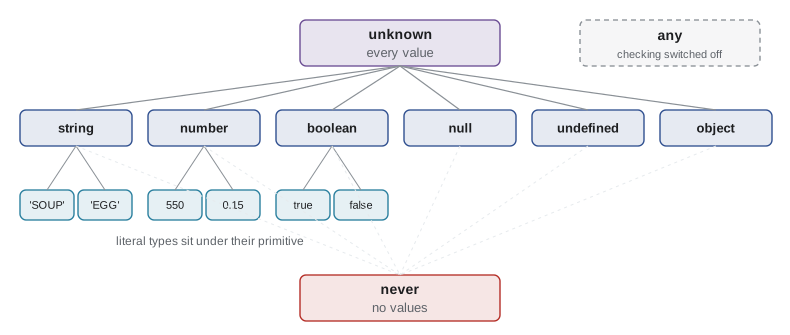
Four special types describe situations rather than kinds of value. Two of them, any and unknown, are for values whose type is not known; the difference between them is the most important idea in this section.
| Type | Meaning | What you can do with a value of this type |
|---|---|---|
| any | Checking is switched off for this value | Anything; the checker allows every operation and assignment |
| unknown | Could be anything; not yet checked | Nothing until you narrow it with a test such as typeof (Lesson 6) |
| never | No value can have this type | Used for functions that never return and for impossible cases |
| void | A function returns no useful value | Ignore it; the usual return type of event handlers and loggers |
A value of type any is not checked at all. You can call it, read any property of it and pass it anywhere, and none of it is reported. It is an escape hatch for code that is being migrated, and Lesson 12 uses it that way, but in finished code it hides exactly the bugs TypeScript is meant to find. A value of type unknown is the safe alternative: it says that the value could be anything, and the checker refuses to let you use it until you have checked what it is.
const fromServer: any = JSON.parse('{"total": "1175"}');
const parsed: unknown = JSON.parse('{"total": "1175"}');

console.log(fromServer.total.toFixed(2));   // no error, crashes at run time
console.log(parsed.total); // error: must check firstparse.ts(5,13): error TS18046: 'parsed' is of type 'unknown'.
What this code does
Both lines read a property of a parsed value, but only the unknown one is reported, as TS18046. The any value passes the checker even though total is a string and toFixed will fail when the code runs. Choosing unknown for outside data forces the check that any lets you skip.
JSON.parse itself returns any, for historical reasons. A good habit, and a rule in the Food Hub code from this lesson on, is to store its result as unknown and check it before use. Lesson 6 shows how.
The never type has no values. A function that always throws has the return type never, and the checker gives a variable the type never when every possible case has already been handled, which Lesson 6 uses to make sure a switch covers every case. The void type is the return type of a function that does not return a value, such as a click handler or a function that only logs.
Type assertions
Occasionally you know more than the checker. The classic case is document.querySelector('#total'), which returns Element | null because the checker cannot see the page's HTML. If you are certain the element exists and is a particular kind, a type assertion with the keyword as tells the checker to treat the value as that type.
const totalBox = document.querySelector('#total') as HTMLOutputElement;
totalBox.value = '11.75';

const tipButtons = document.querySelectorAll<HTMLButtonElement>('button.tip');
tipButtons.forEach(b => { b.disabled = false; });
What this code does
The assertion tells the checker that the element is an output element, so its value property is allowed. The second line uses querySelectorAll's type parameter instead of an assertion, which is a cleaner way to say the same thing. Neither changes the JavaScript: if the element is missing, the code will still fail when it runs.
An assertion is a promise you make to the checker, not a check it makes. If the promise is wrong, the program fails at run time just as JavaScript would. Use assertions sparingly, mostly for the DOM, and prefer a real check such as if (!totalBox) throw new Error(...) where a missing element is possible.
Try it yourself
Is it a tip rate?
The type Tip allows only 0, 0.1, 0.15 and 0.2, but values from a form arrive unchecked. Complete isTip(value) so that it returns true only when value is one of those four numbers. Strings such as '0.15' must return false. The program prints the result for each test value.
const TIPS = [0, 0.1, 0.15, 0.2];

function isTip(value) {
  return false;
}

for (const v of [0.15, '0.15', 0.25, 0, null, 0.2]) {
  console.log(String(v), isTip(v));
}
Try it yourself
Split a quick-add line
A quick-add button stores text such as 'SOUP x2'. Complete toLine(text) so that it returns a tuple-style array [code, qty], where code is the text before ' x' and qty is the number after it. If there is no ' x', the quantity is 1. The program prints each tuple.
function toLine(text) {
  return [text, 0];
}

for (const t of ['SOUP x2', 'EGG', 'DRINK x3']) {
  const [code, qty] = toLine(t);
  console.log(code, qty, typeof qty);
}
Common mistakes
MistakeWrite String and Number as types.
InsteadUse the lower-case primitive types string and number; the capitalized names are wrapper objects.
MistakeAnnotate every variable.
InsteadLet inference work for initialized variables, and annotate parameters, exported return types and outside data.
MistakeUse any for values you are not sure about.
InsteadUse unknown, which forces a check before use; any switches checking off.
MistakeExpect as const to freeze an array at run time.
Insteadas const only affects the checker; use Object.freeze to protect values while the program runs.
MistakeTreat a type assertion as a check.
InsteadAn assertion is your promise to the checker; it adds no run-time test.
Summary and key terms
- TypeScript has a type for each primitive: string, number, boolean, null, undefined, bigint and symbol, all in lower case.
- The checker infers types from initial values and returned expressions, so most variables need no annotation; parameters, uninitialized variables, exported return types and outside data do.
- Literal types such as 'SOUP' or 0.15 have one value each, and unions of literals describe fixed sets such as tip rates. const keeps literal types while let and object properties widen them; as const prevents widening and makes values readonly for the checker.
- Arrays are written number[], tuples [string, number], and object types list properties, with ? for optional ones.
- Fresh object literals get excess property checks.
- With strictNullChecks, null and undefined must be handled before a value is used. any switches checking off, unknown requires a check first, never has no values and void means no useful return value.
- A type assertion with as is a promise to the checker, not a run-time check.
- primitive type
- One of the basic value types: string, number, boolean, null, undefined, bigint or symbol.
- type inference
- The checker working out a type from a value or expression without an annotation.
- literal type
- A type with exactly one value, such as the string 'SOUP' or the number 0.15.
- union type
- A type written with | that allows a value of any of its members.
- widening
- Inferring a general type such as string instead of a literal type for a value that may change.
- as const
- An instruction to infer literal, readonly types for an object or array literal.
- tuple
- A fixed-length array type with a type for each position, such as [string, number].
- optional property
- A property marked with ? that may be missing; its type includes undefined.
- excess property check
- An error for an unknown property in an object literal written where a type is expected.
- any
- A type that switches type checking off for a value.
- unknown
- A type for a value that could be anything and must be checked before use.
- type assertion
- Telling the checker to treat a value as a given type with the keyword as.
Practice problems
Work each problem on paper first, then reveal the answer to check.
What type does let qty = 2 have? What about const qty = 2?
Show answer
let gives number, because it may change; const gives the literal type 2.
Why must parameters usually be annotated?
Show answer
The checker cannot infer them from the function body alone, and an untyped parameter would be an implicit any.
What does prices.get('SOUP') return for a Map<string, number>?
Show answer
number | undefined, because the key may be missing.
What is the difference between any and unknown?
Show answer
any allows every operation unchecked; unknown allows none until the value has been checked.
Write a type for a pair of a dish code and a quantity.
Show answer
[string, number], optionally labelled as [code: string, qty: number].
Lesson quiz · 5 questions
Score 60% or more to complete this lesson.
Create a free account to save your progress, take quizzes and earn a certificate.