
JS-130 · Lesson 10 of 12 · 25 min
Utility types
▶ Video coming soon A video version of this lesson is on the way.
By the tenth session, planned for Thursday, May 20, 2027, the shared api.ts file has one interface per resource, and Mira keeps needing variations of them. The sign-up form needs a shift without its id and booking count, because the server assigns those. Lucy's edit screen sends only the fields that changed. The dashboard shows only three properties of each shift. Writing a new interface for each variation would mean the same properties written out four times, ready to drift apart. "You never copy a type," Gareth says. "You derive it."
This lesson covers TypeScript's built-in utility types, which build new types from existing ones: Partial, Required, Readonly, Pick, Omit, Record, Exclude, Extract, NonNullable, ReturnType, Parameters and Awaited. It also introduces the mapped and conditional types they are made from, template literal types, the satisfies operator and branded types.
Partial and Required
Partial<T> is the type T with every property made optional. It is exactly the type of an update that may change any subset of fields, such as the body of a PATCH request, or a form that is filled in step by step. Required<T> does the opposite: every optional property becomes required, which suits a value after defaults have been applied.
interface Shift { id: number; area: string; start: string; end: string; capacity: number; booked: number; note?: string }

type ShiftUpdate = Partial<Shift>;

function applyUpdate(shift: Shift, update: ShiftUpdate): Shift {
  return { ...shift, ...update };
}

const kitchen: Shift = { id: 41, area: 'Kitchen', start: '09:00', end: '12:00', capacity: 4, booked: 3 };
applyUpdate(kitchen, { capacity: 5 });
applyUpdate(kitchen, { note: 'Bring closed-toe shoes', end: '12:30' });
applyUpdate(kitchen, { capacity: '5' });shifts.ts(12,24): error TS2322: Type 'string' is not assignable to type 'number'.
What this code does
ShiftUpdate allows any combination of Shift's properties, including none, so the first two updates are accepted. Each property keeps its type, so a capacity given as a string is still reported. Spreading the update over the shift produces a complete Shift again.
Partial has a subtlety worth knowing. Because every property is optional, the type also accepts { capacity: undefined }, and spreading that would wipe out the shift's capacity. The strict option exactOptionalPropertyTypes, from Lesson 11, makes optional mean "may be missing" without also meaning "may be undefined", which closes that gap.
Pick and Omit
Pick<T, K> makes a type with only the listed properties of T, and Omit<T, K> makes one with all of T's properties except the listed ones. K is a union of property names, so the listed names are checked against keyof T, as in Lesson 7's pluck. Between them they cover most of the variations a project needs.
interface Shift { id: number; area: string; start: string; end: string; capacity: number; booked: number; note?: string }

type NewShift = Omit<Shift, 'id' | 'booked'>;         // what the sign-up form sends
type ShiftCard = Pick<Shift, 'area' | 'start' | 'booked' | 'capacity'>;  // what the dashboard shows

const draft: NewShift = { area: 'Garden', start: '10:00', end: '13:00', capacity: 6 };
const card: ShiftCard = { area: 'Garden', start: '10:00', booked: 2, capacity: 6 };

console.log(draft.id);
const wrong: Pick<Shift, 'area' | 'room'> = { area: 'Kitchen' };shifts.ts(9,19): error TS2339: Property 'id' does not exist on type 'NewShift'.
shifts.ts(10,7): error TS2741: Property 'room' is missing in type '{ area: string; }' but required in type 'Pick<Shift, "area" | "room">'.
shifts.ts(10,26): error TS2344: Type '"area" | "room"' does not satisfy the constraint 'keyof Shift'.
Type '"room"' is not assignable to type 'keyof Shift'.What this code does
NewShift has every property except id and booked, and ShiftCard has just four. Reading id from a NewShift is reported, because Omit removed it. Picking a property that Shift does not have is reported too, since Pick's keys must be real keys of Shift.
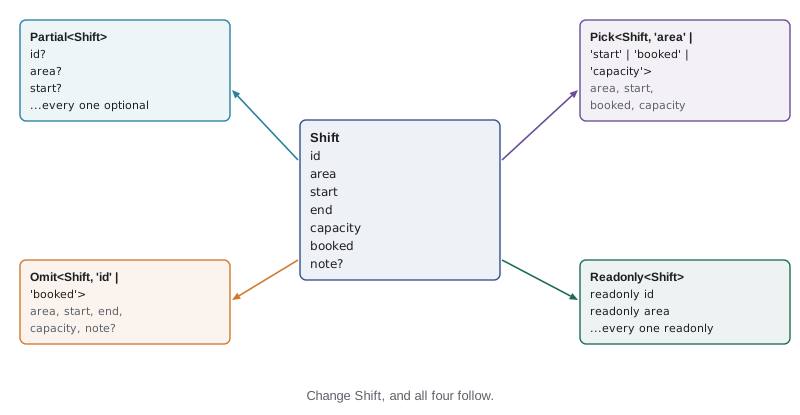
The payoff comes when Theo adds a property. Suppose shifts gain a leader field. NewShift and Partial<Shift> pick it up automatically, so the sign-up form's type now requires a leader and the checker reports the form code that does not send one. With four hand-written copies, three of them would have been silently out of date.
function pick(obj, keys) {
  return Object.fromEntries(keys.filter(k => k in obj).map(k => [k, obj[k]]));
}

function omit(obj, keys) {
  return Object.fromEntries(Object.entries(obj).filter(([k]) => !keys.includes(k)));
}

const shift = { id: 41, area: 'Kitchen', start: '09:00', end: '12:00', capacity: 4, booked: 3 };

console.log(pick(shift, ['area', 'start', 'booked', 'capacity']));
console.log(omit(shift, ['id', 'booked']));{ area: "Kitchen", start: "09:00", booked: 3, capacity: 4 }
{ area: "Kitchen", start: "09:00", end: "12:00", capacity: 4 }What this code does
Pick and Omit exist only as types, so code that actually builds the smaller objects needs functions like these. pick keeps the listed keys that the object has, and omit keeps every key that is not listed, both using Object.fromEntries to build the new object. In TypeScript their return types would be Pick<T, K> and Omit<T, K>.
Readonly and Record
Readonly<T> marks every property of T as readonly. It is useful for values that a function promises not to change, such as the menu it receives, and for state objects that should only ever be replaced, never modified. Like the readonly modifier, it is shallow. Record<K, V>, met in Lesson 5, belongs to the same family: it maps every key in K to a V.
interface MenuItem { code: string; name: string; price: number }

function cheapest(menu: Readonly<Record<string, MenuItem>>): MenuItem | undefined {
  menu['SOUP'] = { code: 'SOUP', name: 'Soup', price: 0 };
  return Object.values(menu).sort((a, b) => a.price - b.price)[0];
}menu.ts(4,3): error TS2542: Index signature in type 'Readonly<Record<string, MenuItem>>' only permits reading.
What this code does
The parameter promises that cheapest will not change the menu, so assigning to one of its entries is reported. Callers can pass their menu without worrying that it will come back altered. Object.values and sort work on a new array, so they are allowed.
Working with unions: Exclude, Extract and NonNullable
Three utility types operate on union types rather than object types. Exclude<U, X> removes the members of U that are assignable to X, Extract<U, X> keeps only those members, and NonNullable<T> removes null and undefined.
type Status = 'loading' | 'ready' | 'stale' | 'error';

type HasData = Exclude<Status, 'loading' | 'error'>;   // 'ready' | 'stale'
type Problems = Extract<Status, 'stale' | 'error'>;     // 'stale' | 'error'

type MaybeNote = string | null | undefined;
type Note = NonNullable<MaybeNote>;                      // string

function badge(status: HasData): string {
  return status === 'ready' ? 'Live' : 'Not updated';
}
What this code does
Exclude and Extract filter the members of the Status union, and NonNullable strips null and undefined from a type. badge accepts only the two statuses that have data, so passing 'loading' to it would be reported. Each derived type stays in step with Status if a new state is added.
Types from functions: ReturnType, Parameters and Awaited
Sometimes the source of truth for a type is a function rather than an interface. ReturnType<F> is the type a function returns, Parameters<F> is a tuple of its parameter types, and Awaited<T> unwraps a promise to the type it resolves to. With the typeof operator, which gives the type of a value, they let other code follow a function's signature automatically.
function totals(lines: { qty: number; price: number }[], tip = 0) {
  const subtotal = lines.reduce((s, l) => s + l.qty * l.price, 0);
  const tipCents = Math.round(subtotal * tip);
  const tax = Math.round(subtotal * 0.13);
  return { subtotal, tip: tipCents, tax, total: subtotal + tipCents + tax };
}

async function loadMenu() {
  const res = await fetch('/api/v1/menu');
  return (await res.json()) as { items: { code: string; price: number }[] };
}

type Totals = ReturnType<typeof totals>;                  // { subtotal: number; tip: number; tax: number; total: number }
type TotalsArgs = Parameters<typeof totals>;              // [lines: { qty: number; price: number }[], tip?: number]
type Menu = Awaited<ReturnType<typeof loadMenu>>;         // { items: { code: string; price: number }[] }

function receipt(t: Totals): string {
  return 'Total ' + (t.total / 100).toFixed(2);
}
What this code does
totals has no declared return type, but ReturnType<typeof totals> captures the inferred one, so receipt stays correct if totals gains a field. Parameters gives the argument list as a labelled tuple. For the async function, ReturnType is a promise, and Awaited unwraps it to the menu's shape.
These are especially handy with code you do not control, such as a library function whose return type is not exported under a name. They are also easy to overuse: an exported interface is clearer to read than ReturnType<typeof somethingDeep>. Gareth's rule is to name the important types and derive the incidental ones.
How utility types are built
The utility types are not magic. They are ordinary type aliases in TypeScript's lib.es5.d.ts, written with two features you can also use: mapped types and conditional types. You do not need to write these often, but recognizing them makes library types and error messages much easier to read.
A mapped type builds an object type by looping over a union of keys, written { [K in Keys]: Type }. Partial is a mapped type over keyof T that adds a question mark to each property. A conditional type chooses between two types with T extends U ? X : Y, and when T is a union it is applied to each member separately, which is how Exclude filters a union.
// Simplified versions of the built-in definitions:
type MyPartial<T> = { [K in keyof T]?: T[K] };
type MyReadonly<T> = { readonly [K in keyof T]: T[K] };
type MyPick<T, K extends keyof T> = { [P in K]: T[P] };
type MyExclude<U, X> = U extends X ? never : U;

// A mapped type of our own: every property becomes a validation message or null.
type Errors<T> = { [K in keyof T]: string | null };

interface SignUp { name: string; email: string; areas: string[] }
const errors: Errors<SignUp> = { name: null, email: 'Enter an email address', areas: null };
What this code does
Each built-in is a few characters long once you can read the syntax: keyof T lists the keys, T[K] is each property's type, and ? or readonly changes the modifier. MyExclude maps each member of U to never if it matches X, and never vanishes from a union. Errors<SignUp> is a custom mapped type that gives the sign-up form one message slot per field.
Template literal types
A template literal type builds string literal types by combining other ones, using the same backtick syntax as JavaScript template strings. It is how a type can describe strings with a known pattern, such as the endpoint keys in api.ts, which combine a method and a path.
type Method = 'GET' | 'POST' | 'PATCH';
type Resource = 'menu' | 'shifts' | 'orders';
type Endpoint = `${Method} /${Resource}`;   // 'GET /menu' | 'GET /shifts' | ... (9 strings)

type EventName = `order:${'added' | 'removed' | 'confirmed'}`;

function on(event: EventName, handler: () => void): void {}

const e: Endpoint = 'GET /shifts';
on('order:added', () => {});
on('order:deleted', () => {});events.ts(11,4): error TS2345: Argument of type '"order:deleted"' is not assignable to parameter of type '"order:removed" | "order:added" | "order:confirmed"'.
What this code does
Endpoint is the union of every method combined with every path, nine strings in all, and EventName has three. Using a string outside the pattern, such as order:deleted, is reported with the allowed type. The dollar-brace placeholders work as in JavaScript template strings, but on types instead of values.
satisfies: checking without widening
Annotating a variable has a cost that Lesson 3 hinted at: the variable takes the annotated type, and any more specific information from the value is lost. The satisfies operator, added in TypeScript 4.9, checks a value against a type without changing the value's own inferred type. You get the error checking of the annotation and the precision of inference.
type Category = 'soup' | 'sandwich' | 'drink' | 'treat';
interface TabConfig { label: string; order: number }

const annotated: Record<Category, TabConfig> = {
  soup: { label: 'Soups', order: 1 },
  sandwich: { label: 'Sandwiches', order: 2 },
  drink: { label: 'Drinks', order: 3 },
  treat: { label: 'Treats', order: 4 },
};

const tabs = {
  soup: { label: 'Soups', order: 1 },
  sandwich: { label: 'Sandwiches', order: 2 },
  drink: { label: 'Drinks', order: 3 },
  treat: { label: 'Treats', order: 4 },
} satisfies Record<Category, TabConfig>;

const missing = {
  soup: { label: 'Soups', order: 1 },
  drinks: { label: 'Drinks', order: 3 },
} satisfies Record<Category, TabConfig>;tabs.ts(20,3): error TS2561: Object literal may only specify known properties, but 'drinks' does not exist in type 'Record<Category, TabConfig>'. Did you mean to write 'drink'?
What this code does
Both annotated and tabs are checked against the record type, but tabs keeps its own precise type, so the editor knows its keys exactly. The third object is reported because satisfies still enforces the type: drinks is not a Category, and the checker suggests drink. Once that is fixed, the missing keys would be reported next. satisfies is ideal for configuration objects like this.
"use strict";
const tabs = {
    soup: { label: 'Soups', order: 1 },
    sandwich: { label: 'Sandwiches', order: 2 },
    drink: { label: 'Drinks', order: 3 },
    treat: { label: 'Treats', order: 4 },
};
const ordered = Object.keys(tabs).sort((a, b) => tabs[a].order - tabs[b].order);
console.log(ordered.map(c => tabs[c].label).join(' | '));Soups | Sandwiches | Drinks | Treats
What this code does
In the emitted JavaScript, satisfies has disappeared along with the types, leaving a plain object. The tabs are sorted by their order number and their labels printed. The Object.keys cast is needed because Object.keys always returns string[], even for an object whose keys are known.
Branded types
Lesson 5 noted that type Cents = number is only a second name for number, so nothing stops a price in dollars being passed where cents are expected. A branded type fixes that by intersecting number with an object type that holds a unique marker property. No real number has that property, so a plain number is no longer accepted; the only way to get a Cents value is through a function that creates one, which can also check it.
type Cents = number & { readonly __brand: 'Cents' };

function cents(n: number): Cents {
  if (!Number.isInteger(n)) throw new Error('Cents must be whole: ' + n);
  return n as Cents;
}

function formatCents(c: Cents): string {
  return (c / 100).toFixed(2);
}

const price = cents(550);
formatCents(price);
formatCents(5.5);money.ts(14,13): error TS2345: Argument of type 'number' is not assignable to parameter of type 'Cents'.
Type 'number' is not assignable to type '{ readonly __brand: "Cents"; }'.What this code does
Cents is a number with an imaginary __brand property, so the literal 5.5 is reported: a plain number does not have the brand. The cents function is the only way in, and it checks that the value is whole before asserting the brand. At run time a Cents value is an ordinary number, so arithmetic on it costs nothing.
"use strict";
function cents(n) {
    if (!Number.isInteger(n))
        throw new Error('Cents must be whole: ' + n);
    return n;
}
function formatCents(c) {
    return (c / 100).toFixed(2);
}
const soup = cents(550);
const egg = cents(625);
console.log(formatCents(cents(soup + egg)));
try {
    cents(5.5);
}
catch (err) {
    console.log(err.message);
}11.75 Cents must be whole: 5.5
What this code does
After compilation the brand is gone and Cents values are plain numbers, so adding them is ordinary arithmetic. The cents function is the one place that checks, and it rejects 5.5 because a price in cents must be whole. In TypeScript, the sum soup + egg is a plain number, so it has to go back through cents before it can be formatted.
Branding is a technique, not a built-in feature, and it adds friction: every value has to pass through a constructor function. It is worth it for units that are easy to confuse and costly to get wrong, such as cents and dollars, or ids of different resources. For the Food Hub, Gareth limits it to money.
| Utility type | Makes | Food Hub use |
|---|---|---|
| Partial<T> | Every property optional | PATCH bodies, form drafts |
| Required<T> | Every property required | Settings after defaults are applied |
| Readonly<T> | Every property readonly | Menus and state passed to functions |
| Pick<T, K> | Only the listed properties | Dashboard shift cards |
| Omit<T, K> | All but the listed properties | New shifts without id or booked |
| Record<K, V> | An object with K keys and V values | Tab labels for every category |
| Exclude<U, X>, Extract<U, X> | A union with members removed or kept | Statuses that have data |
| NonNullable<T> | T without null and undefined | A note after checking |
| ReturnType<F>, Parameters<F> | A function's result or argument types | Totals from the totals function |
| Awaited<T> | The type a promise resolves to | The menu from loadMenu |
Try it yourself
Pick some properties
Complete pick(obj, keys) so that it returns a new object containing only the listed keys that obj actually has, in the order given. The program picks three dashboard properties and then a key that does not exist.
function pick(obj, keys) {
  return obj;
}

const shift = { id: 41, area: 'Kitchen', start: '09:00', end: '12:00', capacity: 4, booked: 3 };
console.log(pick(shift, ['area', 'booked', 'capacity']));
console.log(pick(shift, ['area', 'room']));
Try it yourself
Apply a partial update
Complete applyUpdate(shift, update) so that it returns a new shift with the update's properties copied over, but ignores any property in the update whose value is undefined. The original shift must not change. The program applies two updates.
function applyUpdate(shift, update) {
  return { ...shift, ...update };
}

const shift = { id: 41, area: 'Kitchen', capacity: 4, booked: 3 };
console.log(applyUpdate(shift, { capacity: 5 }));
console.log(applyUpdate(shift, { capacity: undefined, booked: 4 }));
console.log('original capacity', shift.capacity);
Common mistakes
MistakeCopy an interface and edit it for each variation.
InsteadDerive variations with Partial, Pick, Omit and the other utility types, so they follow the source.
MistakeAssume Partial<T> forbids undefined values.
InsteadOptional properties accept undefined unless exactOptionalPropertyTypes is on; filter them before spreading.
MistakeAnnotate a configuration object and lose its precise keys.
InsteadUse satisfies to check it while keeping its inferred type.
MistakeExpect type Cents = number to stop dollar amounts.
InsteadUse a branded type with a constructor function if the units must really be kept apart.
MistakeBuild every type from ReturnType<typeof ...>.
InsteadName the important types with interfaces and derive only the incidental ones.
Summary and key terms
- Utility types derive new types from existing ones, so variations stay in step with their source.
- Partial<T> makes every property optional and Required<T> every property required; Readonly<T> makes every property readonly, shallowly.
- Pick<T, K> keeps only the listed keys and Omit<T, K> removes them, with keys checked against keyof T.
- Record<K, V> maps keys to values.
- Exclude, Extract and NonNullable filter union types.
- ReturnType, Parameters and Awaited derive types from functions and promises, usually with typeof.
- The utility types are built from mapped types, { [K in keyof T]: ... }, and conditional types, T extends U ? X : Y, which distribute over unions.
- Template literal types combine string literal types into patterns. satisfies checks a value against a type while keeping the value's inferred type.
- Branded types such as number & { __brand: 'Cents' } make otherwise identical types incompatible, at the cost of a constructor function.
- utility type
- A built-in generic type, such as Partial or Pick, that transforms another type.
- Partial<T>
- T with every property optional.
- Pick<T, K>
- A type with only the properties of T named in K.
- Omit<T, K>
- A type with all the properties of T except those named in K.
- Readonly<T>
- T with every property readonly.
- ReturnType<F>
- The type returned by function type F.
- Awaited<T>
- The type a promise type T resolves to.
- mapped type
- A type that builds properties by looping over keys, as in { [K in keyof T]: T[K] }.
- conditional type
- A type that chooses between two types, written T extends U ? X : Y.
- template literal type
- A string literal type built from other literal types with template syntax.
- satisfies
- An operator that checks a value against a type without changing its inferred type.
- branded type
- A type made distinct by intersecting it with an imaginary marker property.
Practice problems
Work each problem on paper first, then reveal the answer to check.
Write the type of the body of a request that may change any field of a Shift.
Show answer
Partial<Shift>.
Write the type of a shift as the sign-up form sends it, without id and booked.
Show answer
Omit<Shift, 'id' | 'booked'>.
What is Exclude<'loading' | 'ready' | 'error', 'loading'>?
Show answer
'ready' | 'error'.
How do you get the type returned by a function called totals?
Show answer
ReturnType<typeof totals>.
What is the difference between const x: T = value and const x = value satisfies T?
Show answer
Both check the value against T; the annotation gives x the type T, while satisfies keeps x's more precise inferred type.
Lesson quiz · 5 questions
Score 60% or more to complete this lesson.
Create a free account to save your progress, take quizzes and earn a certificate.