
JS-130 · Lesson 6 of 12 · 26 min
Union types and narrowing
▶ Video coming soon A video version of this lesson is on the way.
Lucy's office dashboard spends its day in one of several states: loading for the first time, showing fresh data, showing data that is getting old because the last refresh failed, or showing an error because it has never managed to load at all. In JavaScript, Mira tracked that with a handful of variables, loading, data, error and lastUpdated, and a few of the dashboard's bugs came from combinations that should have been impossible, such as loading being false while data was still null. On Thursday, May 6, 2027, the plan is to replace those variables with one value whose type allows only the states that make sense.
This lesson covers union types, the ways TypeScript narrows a union to one of its members inside a check, discriminated unions for values that can be in one of several states, exhaustive checks with never, type guard and assertion functions, and checking outside data at the boundary so that the types inside the program can be trusted.
Unions describe values of more than one kind
A union type, written with |, describes a value that may be any one of several types. Lesson 3 used unions of literals such as 'soup' | 'drink'. Unions of different kinds of type are just as common: string | number for an input that might arrive either way, Shift | undefined for the result of a search, Error | null for the last error. A union is honest about what a value might be, and the checker will not let you treat it as only one of those types until you have checked which one it is.
function formatQty(qty: string | number): string {
  return qty.toFixed(0);
}

function shiftLabel(shift: { area: string } | undefined): string {
  return shift.area;
}format.ts(2,14): error TS2339: Property 'toFixed' does not exist on type 'string | number'. Property 'toFixed' does not exist on type 'string'. format.ts(6,10): error TS18048: 'shift' is possibly 'undefined'.
What this code does
toFixed exists on numbers but not on strings, so it cannot be called on a value that might be either. In the second function, the value might be undefined, so reading area is reported. The checker allows only the operations that every member of the union supports.
Narrowing with typeof, truthiness and equality
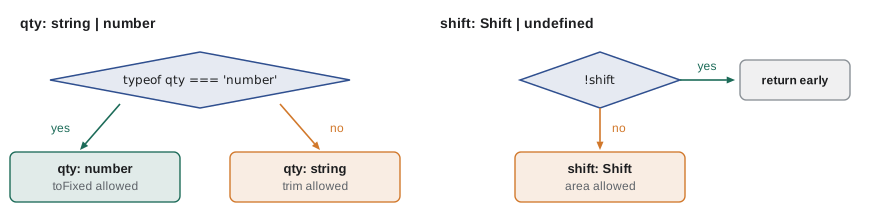
The cure is to check. Inside an if statement that tests typeof qty === 'number', the checker knows that qty is a number, so number methods are allowed. In the else branch, it knows qty is a string. This is narrowing: the checker follows the program's control flow and works out the most specific type at each point, a process called control flow analysis.
function formatQty(qty: string | number): string {
  if (typeof qty === 'number') {
    return qty.toFixed(0);        // qty: number
  }
  return qty.trim();              // qty: string
}

function shiftLabel(shift: { area: string } | undefined): string {
  if (!shift) return 'No shift selected';
  return shift.area;              // shift: { area: string }
}

function noteText(note: string | null): string {
  return note === null ? '' : note.toUpperCase();
}
What this code does
Each check narrows the union: typeof separates numbers from strings, the truthiness check removes undefined, and the comparison with null removes null. After an early return, the rest of the function sees only the remaining type. The comments show the type the checker has worked out on each line.
| Check | Narrows | Example |
|---|---|---|
| typeof x === 'string' | Primitive types: string, number, boolean, bigint, symbol, undefined, function | typeof qty === 'number' |
| Truthiness: if (x) | Removes null and undefined (and also empty strings and 0, which can be a trap) | if (shift) |
| Equality: x === null | Literal types and null or undefined | note === null, status === 'ready' |
| 'prop' in x | Object types by whether they have a property | 'error' in result |
| x instanceof C | Class instances | err instanceof TypeError |
| Array.isArray(x) | Arrays | Array.isArray(arg) |
The truthiness check deserves a warning. if (qty) removes undefined, but it also treats 0 as missing, so a quantity of zero would take the wrong branch. When 0 or an empty string is a valid value, compare with undefined or null explicitly.
function label(qty) {
  if (qty) return qty + ' in the order';
  return 'not set';
}

function labelFixed(qty) {
  if (qty !== undefined) return qty + ' in the order';
  return 'not set';
}

for (const q of [2, 0, undefined]) {
  console.log(String(q).padEnd(9), label(q).padEnd(14), labelFixed(q));
}2 2 in the order 2 in the order 0 not set 0 in the order undefined not set not set
What this code does
Both functions agree for 2 and for undefined, but the truthiness version calls 0 not set, because 0 is falsy. Comparing with undefined treats 0 as the real quantity it is. TypeScript narrows correctly in both cases; choosing the right check is still up to you.
Discriminated unions
The most useful pattern in this lesson is the discriminated union, also called a tagged union. Each member is an object type with a common property, the discriminant, whose type is a different literal in each member. Checking that one property narrows the whole object, so each state can carry exactly the data that belongs to it.
interface Summary { openShifts: number; orders: number; sales: number }

type DashboardState =
  | { status: 'loading' }
  | { status: 'ready'; data: Summary; updatedAt: number }
  | { status: 'stale'; data: Summary; updatedAt: number; lastError: string }
  | { status: 'error'; message: string };

function headline(state: DashboardState): string {
  switch (state.status) {
    case 'loading': return 'Loading today\'s numbers...';
    case 'ready':   return state.data.orders + ' orders so far';
    case 'stale':   return state.data.orders + ' orders (not updated: ' + state.lastError + ')';
    case 'error':   return 'Could not load: ' + state.message;
  }
}
What this code does
The status property is the discriminant: its value is a different literal in each member. Inside each case, the checker knows which member it is, so state.data is allowed only for ready and stale, and state.message only for error. The impossible combinations Mira's old variables allowed, such as loading with an error message, cannot even be written.
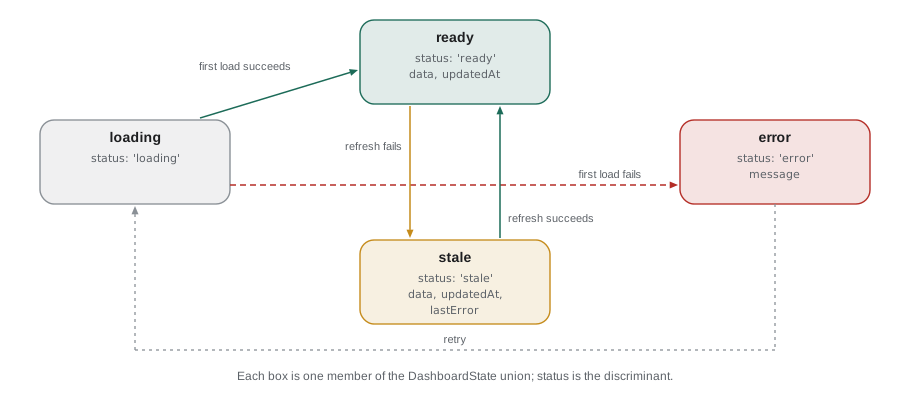
Compare that with the old version, where each state was a mix of separate variables. The union has four members, so there are exactly four states. The separate variables had sixteen combinations of true, false and null between them, most of which should never happen but all of which the code had to survive. Making illegal states impossible to represent is one of the strongest arguments for TypeScript in user interface code.
type DashboardState =
  | { status: 'loading' }
  | { status: 'ready'; data: { orders: number }; updatedAt: number }
  | { status: 'error'; message: string };

function headline(state: DashboardState): string {
  if (state.status === 'error') return state.message;
  return state.data.orders + ' orders so far';
}dashboard.ts(8,16): error TS2339: Property 'data' does not exist on type '{ status: "loading"; } | { status: "ready"; data: { orders: number; }; updatedAt: number; }'.
Property 'data' does not exist on type '{ status: "loading"; }'.What this code does
After the error case returns, state could still be loading or ready, and the loading member has no data. The checker reports the property access, naming the member that lacks it. The fix is to handle loading too, which is exactly the case the old code forgot on the first refresh.
Exhaustive checks with never
When a switch handles every member of a union, the type of the value after the last case is never: no value can get there. You can use that to make the checker tell you when a new member is added to the union but a switch somewhere has not been updated. Pass the value to a function that accepts only never; if a case is missing, the value is not never and the call is reported.
type OrderEvent =
  | { kind: 'added'; code: string; qty: number }
  | { kind: 'removed'; code: string }
  | { kind: 'cleared' }
  | { kind: 'confirmed'; number: number };

function assertNever(x: never): never {
  throw new Error('Unhandled case: ' + JSON.stringify(x));
}

function describe(e: OrderEvent): string {
  switch (e.kind) {
    case 'added':   return 'Added ' + e.qty + ' x ' + e.code;
    case 'removed': return 'Removed ' + e.code;
    case 'cleared': return 'Order cleared';
    default:        return assertNever(e);
  }
}events.ts(16,40): error TS2345: Argument of type '{ kind: "confirmed"; number: number; }' is not assignable to parameter of type 'never'.What this code does
The confirmed event was added to the union, but describe was not updated. In the default branch e is still the confirmed member, which is not never, so the call to assertNever is reported with the member's full type. Adding a case for confirmed makes the error disappear.
The assertNever function also does something at run time: if a value from outside the program, such as an unexpected event kind from a server, reaches the default branch, it throws a clear error instead of returning undefined. The same helper therefore protects the code both before and while it runs.
"use strict";
function assertNever(x) {
    throw new Error('Unhandled case: ' + JSON.stringify(x));
}
function describe(e) {
    switch (e.kind) {
        case 'added': return 'Added ' + e.qty + ' x ' + e.code;
        case 'removed': return 'Removed ' + e.code;
        case 'cleared': return 'Order cleared';
        default: return assertNever(e);
    }
}
console.log(describe({ kind: 'added', code: 'SOUP', qty: 2 }));
console.log(describe({ kind: 'cleared' }));
const fromServer = JSON.parse('{"kind":"refunded","number":31}');
try {
    console.log(describe(fromServer));
}
catch (err) {
    console.log(err.message);
}Added 2 x SOUP
Order cleared
Unhandled case: {"kind":"refunded","number":31}What this code does
This is the emitted JavaScript for a complete version of describe. The known events are described normally, but an event kind the code has never heard of, arriving from outside, reaches the default branch and assertNever throws an error that names it. Without that helper the function would have returned undefined.
The in operator and instanceof
Not every union has a discriminant. When members differ by which properties they have, the in operator narrows by checking whether a property exists. When members are classes, instanceof narrows by checking the object's class. Both are common in error handling.
type Saved = { number: number; placedAt: string };
type Problem = { title: string; status: number; detail?: string };

function resultText(r: Saved | Problem): string {
  if ('number' in r) return 'Order ' + r.number + ' saved';
  return r.title + (r.detail ? ': ' + r.detail : '');
}

function errorText(err: unknown): string {
  if (err instanceof DOMException && err.name === 'AbortError') return 'Request aborted';
  if (err instanceof Error) return err.message;
  return String(err);
}
What this code does
In resultText, a value with a number property must be Saved, so the other branch is Problem. errorText takes unknown, the honest type of a caught error, and narrows it with instanceof before reading message. This is the safe way to handle the error in a catch block, whose variable is unknown under strict mode.
Type guards you write yourself
The built-in checks narrow to built-in types. To narrow to your own types, write a type guard: a function that returns a boolean and has a return type of the form x is Type, called a type predicate. When it returns true, the checker narrows its argument to Type wherever it is called. It is exactly the isShift function from Lesson 5's exercise, with a type that tells the checker what it proves.
interface Shift { id: number; area: string; start: string; capacity: number; booked: number }

function isRecord(x: unknown): x is Record<string, unknown> {
  return typeof x === 'object' && x !== null;
}

function isShift(x: unknown): x is Shift {
  return isRecord(x) &&
    typeof x.id === 'number' && typeof x.area === 'string' && typeof x.start === 'string' &&
    typeof x.capacity === 'number' && typeof x.booked === 'number';
}

function openShifts(data: unknown): Shift[] {
  if (!Array.isArray(data)) throw new Error('Expected a list of shifts');
  return data.filter(isShift).filter(s => s.booked < s.capacity);
}
What this code does
isRecord narrows unknown to an object whose properties can be read, and isShift builds on it to check every property a Shift needs. Because of the predicate x is Shift, data.filter(isShift) has the type Shift[], so the second filter can use booked and capacity safely. The checker trusts the predicate, so the guard's body must really check what it claims.
That last point is important: the checker does not verify that a type guard's body matches its predicate. A guard that returns true too often makes the types lie. Keep guards small, test them, and build them from other guards as isShift builds on isRecord.
Since TypeScript 5.5, the checker can also infer simple type predicates by itself. A callback such as p => p !== undefined is recognized as a guard, so an array of number | undefined filtered with it becomes a number[] without any annotation.
const prices = new Map<string, number>([['SOUP', 550], ['EGG', 625]]);
const codes = ['SOUP', 'WRAP', 'EGG'];

const found = codes.map(c => prices.get(c)).filter(p => p !== undefined);
const total: number = found.reduce((a, b) => a + b, 0);
What this code does
prices.get returns number | undefined, so the mapped array has that element type. The filter callback is inferred to be a type guard, so found is number[], and the reduce that adds the prices compiles without a single assertion. Before TypeScript 5.5 this needed an explicit predicate.
Assertion functions
A type guard returns a boolean for an if statement. An assertion function throws instead, and narrows the value for all the code after the call. Its return type is written asserts x is Type, or just asserts condition. It suits places where bad data should stop the program rather than be filtered out.
interface Summary { openShifts: number; orders: number; sales: number }

function assertSummary(x: unknown): asserts x is Summary {
  if (typeof x !== 'object' || x === null) throw new Error('Summary is not an object');
  const s = x as Record<string, unknown>;
  for (const key of ['openShifts', 'orders', 'sales']) {
    if (typeof s[key] !== 'number') throw new Error('Summary.' + key + ' is not a number');
  }
}

async function loadSummary(): Promise<Summary> {
  const res = await fetch('/api/v1/counter/today');
  const data: unknown = await res.json();
  assertSummary(data);
  return data;   // data: Summary from here on
}
What this code does
After assertSummary(data) returns, the checker treats data as a Summary for the rest of the function, so returning it needs no cast. If the server sends something else, the function throws with a message naming the bad property. This replaces the shortcut as MenuItem[] from Lesson 4 with a real check.
Trusting the types: check at the boundary
Narrowing and guards lead to the most important design rule in a TypeScript program. The checker can only vouch for values created by code it has read. Values that come from outside, such as JSON from a server, the contents of localStorage, form fields and URL parameters, have whatever shape they actually have. So the rule is: give outside data the type unknown, check it once where it enters the program, and from then on use the narrowed type. Inside that boundary, the types can be trusted; at the boundary, the checks do the work.
function isShift(x) {
  return typeof x === 'object' && x !== null &&
    typeof x.id === 'number' && typeof x.area === 'string' &&
    typeof x.capacity === 'number' && typeof x.booked === 'number';
}

const body = '[{"id":41,"area":"Kitchen","capacity":4,"booked":3},' +
             '{"id":42,"area":"Lunch counter","capacity":"3","booked":1},' +
             '{"id":43,"area":"Garden","capacity":6,"booked":6}]';

const data = JSON.parse(body);
const good = data.filter(isShift);
const rejected = data.filter(x => !isShift(x)).map(x => x.id);

console.log('Accepted:', good.map(s => s.area));
console.log('Rejected ids:', rejected);
console.log('Open:', good.filter(s => s.booked < s.capacity).map(s => s.area));Accepted: [ "Kitchen", "Garden" ] Rejected ids: [ 42 ] Open: [ "Kitchen" ]
What this code does
This is the guard as it runs, with the types removed. Shift 42 has its capacity as a string, so the guard rejects it at the boundary instead of letting a string reach the arithmetic. The rest of the code then works only with shifts that really have the expected shape.
Writing guards by hand for every server response becomes tedious in a large project. Schema libraries such as Zod and Valibot let you describe the shape once as a JavaScript value and derive both the run-time check and the TypeScript type from it. Theo is considering one for the shared API types in Lesson 9; for the Food Hub's handful of responses, small hand-written guards are enough.
Try it yourself
Describe a dashboard state
Complete headline(state) for the four dashboard states. loading gives 'Loading...'; ready gives the number of orders followed by ' orders'; stale gives the same followed by ' (not updated)'; error gives 'Error: ' followed by the message. Use a switch on state.status.
function headline(state) {
  return '';
}

const states = [
  { status: 'loading' },
  { status: 'ready', data: { orders: 30 } },
  { status: 'stale', data: { orders: 30 }, lastError: 'timeout' },
  { status: 'error', message: 'Server unavailable' },
];
for (const s of states) console.log(headline(s));
Try it yourself
A result instead of an exception
Complete parseQty(text) so that it returns { ok: true, value } with the quantity as a number when text is a whole number from 1 to 20, and { ok: false, error } otherwise: 'not a number' if Number(text) is NaN, 'not a whole number' if it is not an integer, and 'out of range' if it is below 1 or above 20. The program prints each result.
function parseQty(text) {
  return { ok: false, error: 'not written yet' };
}

for (const t of ['2', 'two', '1.5', '25', '20']) {
  const r = parseQty(t);
  console.log(t, r.ok ? 'ok ' + r.value : 'error: ' + r.error);
}
Common mistakes
MistakeUse if (qty) to check that a number is present.
InsteadTruthiness treats 0 as missing; compare with undefined or null when 0 is valid.
MistakeKeep separate loading, data and error variables for a component's state.
InsteadUse a discriminated union, so that only the states that make sense can exist.
MistakeRely on a default branch that returns a fallback.
InsteadUse assertNever in the default branch so the checker reports any case you forgot.
MistakeTrust a type guard because it compiles.
InsteadThe checker believes the predicate without checking the body; test guards carefully.
MistakeCast JSON to its expected type with as.
InsteadStore it as unknown and narrow it with a guard or assertion function at the boundary.
Summary and key terms
- A union type such as string | number allows any of its members, and the checker allows only operations every member supports.
- Narrowing uses checks such as typeof, truthiness, equality, in, instanceof and Array.isArray; control flow analysis gives each branch the most specific type.
- Truthiness also treats 0 and empty strings as missing.
- A discriminated union has a common literal property, the discriminant, whose value tells the checker which member an object is; it makes impossible states unrepresentable.
- A switch that passes the remaining value to a function taking never reports any case that was forgotten.
- Type guards with predicates such as x is Shift narrow to your own types, and assertion functions with asserts x is Summary throw instead of returning false.
- Since TypeScript 5.5 simple predicates such as p => p !== undefined are inferred.
- Outside data should be typed unknown and checked once at the boundary; inside, the types can then be trusted.
- union type
- A type such as string | number whose values may be any of its members.
- narrowing
- Refining a union to a more specific type inside a check.
- control flow analysis
- The checker following ifs, returns and switches to work out each value's type at each point.
- discriminated union
- A union of object types that share a literal property identifying each member.
- discriminant
- The shared property, such as status, whose literal value tells the members of a discriminated union apart.
- exhaustive check
- Making the checker confirm that every member of a union has been handled, using never.
- type guard
- A function returning boolean whose return type is a predicate such as x is Shift.
- type predicate
- A return type of the form x is Type that tells the checker what a true result proves.
- assertion function
- A function with a return type such as asserts x is Type that throws if the check fails.
- boundary
- The point where outside data enters the program and must be checked before it is trusted.
Practice problems
Work each problem on paper first, then reveal the answer to check.
Inside if (typeof qty === 'number') { ... }, what is qty's type if it was string | number?
Show answer
number.
What makes a union discriminated?
Show answer
Each member has a common property whose type is a different literal, such as status: 'ready'.
How do you make the checker report a forgotten case in a switch?
Show answer
Pass the value to a function that takes never in the default branch.
What is the difference between a type guard and an assertion function?
Show answer
A guard returns a boolean and narrows inside an if; an assertion function throws on failure and narrows everything after the call.
What type should JSON from a server have when it first enters the program?
Show answer
unknown, until it has been checked.
Lesson quiz · 5 questions
Score 60% or more to complete this lesson.
Create a free account to save your progress, take quizzes and earn a certificate.