
JS-130 · Lesson 7 of 12 · 24 min
Generics
▶ Video coming soon A video version of this lesson is on the way.
The riverside-data library from JavaScript Programming II is full of small helpers that work on any kind of list: group records by a key, find one by its id, take the first element or a default, sum a numeric property. On Tuesday, May 11, 2027, the plan is to type them. Mira's first attempt gives every helper parameters of type any[], and Gareth points out the problem at once: the result of a lookup in a list of shifts is any, so everything the caller does with it is unchecked. "You don't want any," he says. "You want 'the same type that went in'. That's what generics are for."
This lesson covers generic functions and type parameters, inference of type arguments, constraints with extends, the keyof operator and indexed access types, generic interfaces and type aliases such as a page of API results, the generic types built into TypeScript, and how to tell when a generic is worth it.
The problem generics solve
Consider a helper that returns the first element of an array, or a fallback if the array is empty. It works on arrays of anything, so its parameter cannot be number[] or Shift[]. Typed with any, it compiles, but the result has lost its type. Typed with unknown, the result is safe but useless until the caller narrows it again. Neither says what is really true: the result has the same type as the elements of the array that went in.
function firstOrAny(items: any[], fallback: any): any {
  return items.length > 0 ? items[0] : fallback;
}

const shifts = [{ area: 'Kitchen', booked: 3 }, { area: 'Garden', booked: 6 }];
const s = firstOrAny(shifts, null);
console.log(s.aera.toUpperCase());   // misspelt, but not reported

function firstOrUnknown(items: unknown[], fallback: unknown): unknown {
  return items.length > 0 ? items[0] : fallback;
}
console.log(firstOrUnknown(shifts, null).area);first.ts(12,13): error TS2571: Object is of type 'unknown'.
What this code does
With any, the misspelt property aera passes the checker and would crash at run time. With unknown, the checker refuses to read area at all, even though the value really is a shift. Neither version describes the link between the input and the output, which is what a generic expresses.
Type parameters
A generic function has one or more type parameters, written in angle brackets before its parameter list. A type parameter is a placeholder for a type, the way an ordinary parameter is a placeholder for a value. By convention single type parameters are called T, and others are given short meaningful names such as K for a key or Item for an element. The function can then use T in its parameter and return types, linking them.
function firstOr<T>(items: T[], fallback: T): T {
  return items.length > 0 ? items[0] : fallback;
}

const shifts = [{ area: 'Kitchen', booked: 3 }, { area: 'Garden', booked: 6 }];
const s = firstOr(shifts, { area: 'None', booked: 0 });   // T is { area: string; booked: number }
console.log(s.area.toUpperCase());

const n = firstOr([550, 625], 0);         // T is number
const c = firstOr<string>([], 'EMPTY');   // T given explicitly
What this code does
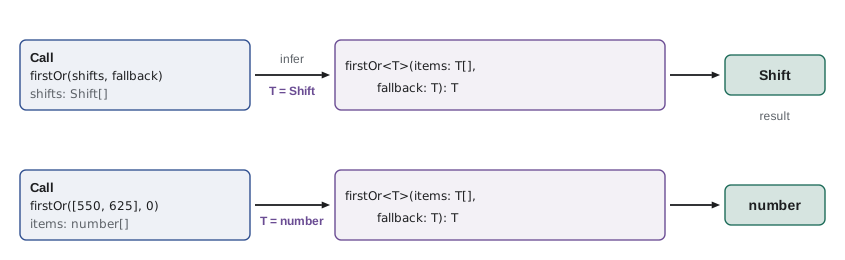
The angle brackets declare T, and the signature says that the array holds T values, the fallback is a T and the result is a T. At each call the checker works out what T is from the arguments, so s is a shift, n is a number and c is a string. Completion now works on s, and a misspelt property would be reported.
At most calls you do not write the type argument. The checker infers it from the arguments, just as it infers the type of a variable from its value. You can still write it explicitly, as in firstOr<string>([], 'EMPTY'), which is useful when the arguments do not give enough information, such as an empty array.
"use strict";
function firstOr(items, fallback) {
    return items.length > 0 ? items[0] : fallback;
}
const shifts = [{ area: 'Kitchen', booked: 3 }, { area: 'Garden', booked: 6 }];
console.log(firstOr(shifts, { area: 'None', booked: 0 }).area);
console.log(firstOr([], { area: 'None', booked: 0 }).area);
console.log(firstOr([550, 625], 0) + 1);
console.log(firstOr([], 'EMPTY'));Kitchen None 551 EMPTY
What this code does
Once compiled, firstOr is an ordinary function with no trace of T, and the explicit type argument in the last call has disappeared too. The empty array returns the fallback, and the price list returns its first element, 550, so adding 1 gives 551. The generic existed only to tell the checker how the output relates to the input.
Generics are checked as well as inferred. If the fallback does not match the elements of the array, the checker tries to find a T that fits both and reports the argument that does not fit.
function firstOr<T>(items: T[], fallback: T): T {
  return items.length > 0 ? items[0] : fallback;
}

const price = firstOr([550, 625], 'none');first.ts(5,35): error TS2345: Argument of type 'string' is not assignable to parameter of type 'number'.
What this code does
The array tells the checker that T is number, so the string fallback does not fit and is reported. The fix is to decide what the fallback should really be: 0, or a wider type such as number | undefined written explicitly as the type argument.
Constraints
Inside a generic function, the checker knows nothing about T, because T could be anything. Reading a property of a T value is therefore an error. When a function needs its type parameter to have certain properties, you add a constraint with extends: <T extends { id: number }> means T can be any type that has at least a numeric id. Because typing is structural, any object type with an id qualifies.
function byIdLoose<T>(items: T[], id: number): T | undefined {
  return items.find(item => item.id === id);
}

function byId<T extends { id: number }>(items: T[], id: number): T | undefined {
  return items.find(item => item.id === id);
}

const shifts = [{ id: 41, area: 'Kitchen' }, { id: 42, area: 'Lunch counter' }];
const found = byId(shifts, 42);       // { id: number; area: string } | undefined
const bad = byId(['SOUP', 'EGG'], 1);lookup.ts(2,34): error TS2339: Property 'id' does not exist on type 'T'.
lookup.ts(11,19): error TS2322: Type 'string' is not assignable to type '{ id: number; }'.
lookup.ts(11,27): error TS2322: Type 'string' is not assignable to type '{ id: number; }'.What this code does
In byIdLoose, T has no constraint, so item.id is reported: T might not have an id. The constrained version can read id, and still returns the caller's full type, area and all. Calling it with an array of strings is reported, because a string has no id property.
The constraint is what the function may assume; the type argument is still the caller's actual type. That is the difference between a constraint and a plain parameter type. If byId took items: { id: number }[], its result would be { id: number }, and the caller would lose the area property. With the constraint, nothing is lost.
keyof and indexed access
Two type operators make generics much more expressive. keyof T is the union of the property names of T: for a shift with area, start and booked, keyof is 'area' | 'start' | 'booked'. An indexed access type, T[K], is the type of property K of T, so Shift['booked'] is number. Together they let a function take a property name as an argument and still know the type of that property.
interface Shift { id: number; area: string; start: string; booked: number }

function pluck<T, K extends keyof T>(items: T[], key: K): T[K][] {
  return items.map(item => item[key]);
}

const shifts: Shift[] = [
  { id: 41, area: 'Kitchen', start: '09:00', booked: 3 },
  { id: 42, area: 'Garden', start: '10:00', booked: 6 },
];

const areas = pluck(shifts, 'area');     // string[]
const booked = pluck(shifts, 'booked');  // number[]
const wrong = pluck(shifts, 'spaces');pluck.ts(14,29): error TS2345: Argument of type '"spaces"' is not assignable to parameter of type 'keyof Shift'.
What this code does
K is constrained to the keys of T, so only real property names are accepted, and the editor offers them as completions. The return type T[K][] is an array of that property's type, so areas is string[] and booked is number[]. The misspelt key is reported because it is not assignable to keyof Shift, the union of the allowed names.
function pluck(items, key) {
  return items.map(item => item[key]);
}

const shifts = [
  { id: 41, area: 'Kitchen', start: '09:00', booked: 3 },
  { id: 42, area: 'Garden', start: '10:00', booked: 6 },
];

console.log(pluck(shifts, 'area'));
console.log(pluck(shifts, 'booked').reduce((a, b) => a + b, 0));
console.log(pluck(shifts, 'spaces'));[ "Kitchen", "Garden" ] 9 [ undefined, undefined ]
What this code does
The run-time code is a one-line map, the same for every key. Real keys give the property values, so the bookings add up to 9. The misspelt key gives an array of undefined, which TypeScript's keyof constraint would have rejected before the code ran.
More than one type parameter
A function can have several type parameters, each inferred from a different argument. A grouping helper, for example, needs the element type and the type of the key it groups by. The riverside-data version groups records into a Map, so that the keys keep their types.
function groupBy<T, K>(items: T[], keyOf: (item: T) => K): Map<K, T[]> {
  const groups = new Map<K, T[]>();
  for (const item of items) {
    const key = keyOf(item);
    const list = groups.get(key);
    if (list) list.push(item);
    else groups.set(key, [item]);
  }
  return groups;
}

interface Line { code: string; category: 'soup' | 'sandwich' | 'drink'; qty: number }
const lines: Line[] = [
  { code: 'SOUP', category: 'soup', qty: 2 },
  { code: 'EGG', category: 'sandwich', qty: 1 },
  { code: 'DRINK', category: 'drink', qty: 3 },
  { code: 'WRAP', category: 'sandwich', qty: 1 },
];
const byCategory = groupBy(lines, l => l.category);   // Map<'soup' | 'sandwich' | 'drink', Line[]>
What this code does
T is inferred from the array and K from what the callback returns, so the result is a Map from the three category names to arrays of lines. The callback's parameter l gets the type Line by contextual typing. A later lookup such as byCategory.get('treat') would be reported, because treat is not a possible key.
"use strict";
function groupBy(items, keyOf) {
    const groups = new Map();
    for (const item of items) {
        const key = keyOf(item);
        const list = groups.get(key);
        if (list)
            list.push(item);
        else
            groups.set(key, [item]);
    }
    return groups;
}
const lines = [
    { code: 'SOUP', category: 'soup', qty: 2 },
    { code: 'EGG', category: 'sandwich', qty: 1 },
    { code: 'DRINK', category: 'drink', qty: 3 },
    { code: 'WRAP', category: 'sandwich', qty: 1 },
];
for (const [category, group] of groupBy(lines, l => l.category)) {
    console.log(category + ':', group.map(l => l.code).join(', '));
}soup: SOUP sandwich: EGG, WRAP drink: DRINK
What this code does
The emitted JavaScript drops the type parameters, including the ones in new Map<K, T[]>(), and keeps the algorithm. Each line is added to the list for its category, creating the list the first time a category appears. A Map keeps keys in the order they were first added, so soup comes first.
JavaScript now has a built-in Map.groupBy and Object.groupBy that do the same job, available in all current browsers and in Node.js since version 21, and TypeScript types them generically too. The riverside-data helper predates them; Mira notes it as something to replace in Lesson 12.
Generic interfaces and type aliases
Types can have type parameters as well as functions. This is how the checker describes containers and wrappers whose contents vary. Theo's API, from Asynchronous JavaScript and APIs, returns lists one page at a time with a cursor for the next page, and every list endpoint has the same wrapper. A generic interface describes the wrapper once.
interface Page<T> {
  items: T[];
  next: string | null;   // cursor for the next page, or null on the last page
}

interface Shift { id: number; area: string; booked: number; capacity: number }
interface Volunteer { id: number; name: string; areas: string[] }

type ApiResult<T> =
  | { ok: true; value: T }
  | { ok: false; status: number; title: string };

function totalBooked(page: Page<Shift>): number {
  return page.items.reduce((n, s) => n + s.booked, 0);
}

function names(result: ApiResult<Page<Volunteer>>): string[] {
  return result.ok ? result.value.items.map(v => v.name) : [];
}
What this code does
Page<T> describes the paging wrapper for any kind of item, so Page<Shift> and Page<Volunteer> share one definition. ApiResult<T> is a generic discriminated union for a call that either succeeds with a T or fails with a problem description. Generic types nest naturally: ApiResult<Page<Volunteer>> is a result whose value is a page of volunteers.
Generic types are everywhere in the code you already use. Array<T>, Promise<T>, Map<K, V>, Set<T> and Record<K, V> are all generic, and so are many DOM methods: querySelector<E>, which Lesson 3 used, is a generic function whose type parameter defaults to Element.
| Built-in generic | Describes | Example |
|---|---|---|
| Array<T>, or T[] | A list of T | Shift[] |
| ReadonlyArray<T> | A list of T that cannot be changed | ReadonlyArray<string> |
| Promise<T> | A future T | Promise<MenuItem[]> |
| Map<K, V> | A map from K keys to V values | Map<string, number> |
| Set<T> | A collection of unique T values | Set<number> |
| Record<K, V> | An object with K keys and V values | Record<Category, string> |
A type parameter can also have a default, written with an equals sign, which is used when the type argument is not given and cannot be inferred. For example, interface Page<T = unknown> lets code mention Page on its own and get Page<unknown>.
A typed fetch helper
One generic that appears in almost every TypeScript front end is a helper for JSON requests. It is a good example of both the power and the danger of generics.
async function getJson<T>(url: string): Promise<T> {
  const res = await fetch(url);
  if (!res.ok) throw new Error(url + ' failed with ' + res.status);
  return (await res.json()) as T;
}

interface Shift { id: number; area: string; booked: number; capacity: number }
interface Page<T> { items: T[]; next: string | null }

async function openShiftCount(): Promise<number> {
  const page = await getJson<Page<Shift>>('/api/v1/shifts?date=2027-05-11');
  return page.items.filter(s => s.booked < s.capacity).length;
}
What this code does
The caller chooses T, so page is a Page<Shift> with full completion. But look at the as T: the helper does not check anything, it simply asserts that the server sent what the caller asked for. It is convenient and common, and it moves the risk of a wrong shape from the compiler to run time.
Gareth's comment on that helper is that the type parameter makes a promise nobody keeps. A safer design takes a guard or assertion function, such as isShift from Lesson 6, as a second argument, so that the type comes from a real check. Lesson 12 builds that version for the dashboard.
When not to use generics
Generics are powerful, and it is easy to use them where a simple type would do. The test is whether the type parameter links two or more places. If T appears only once in a signature, it is doing nothing that unknown or a plain type would not do, and it makes the code harder to read.
| Signature | Is the generic earning its place? |
|---|---|
| firstOr<T>(items: T[], fallback: T): T | Yes: T links the array, the fallback and the result |
| byId<T extends { id: number }>(items: T[], id: number): T | undefined | Yes: the caller keeps its full element type |
| logValue<T>(value: T): void | No: T appears once; use unknown |
| count<T>(items: T[]): number | Arguably not: readonly unknown[] says the same thing |
| getJson<T>(url: string): Promise<T> | Risky: T is not linked to any argument, so it is an unchecked assertion |
Try it yourself
Index by a key
Complete indexBy(items, key) so that it returns a Map from the value of item[key] to the item, for every item. If two items share a key, the later one wins. The program looks up two shifts by id and one by area.
function indexBy(items, key) {
  return new Map();
}

const shifts = [
  { id: 41, area: 'Kitchen', booked: 3 },
  { id: 42, area: 'Lunch counter', booked: 1 },
  { id: 43, area: 'Garden', booked: 6 },
];
const byId = indexBy(shifts, 'id');
const byArea = indexBy(shifts, 'area');
console.log(byId.get(42)?.area);
console.log(byId.get(99)?.area ?? 'no shift 99');
console.log(byArea.get('Garden')?.booked);
Try it yourself
Sum a property
Complete sumBy(items, key) so that it returns the sum of item[key] over all items, or 0 for an empty array. The program sums bookings, capacities and an empty list.
function sumBy(items, key) {
  return items.length;
}

const shifts = [
  { area: 'Kitchen', booked: 3, capacity: 4 },
  { area: 'Lunch counter', booked: 1, capacity: 3 },
  { area: 'Garden', booked: 6, capacity: 6 },
];
console.log('Booked:', sumBy(shifts, 'booked'));
console.log('Capacity:', sumBy(shifts, 'capacity'));
console.log('Empty:', sumBy([], 'booked'));
Common mistakes
MistakeUse any[] for helpers that work on any list.
InsteadUse a type parameter, so the caller's element type flows through to the result.
MistakeRead properties of T in a generic function without a constraint.
InsteadAdd a constraint such as T extends { id: number } so the checker knows the property exists.
MistakeWrite a constraint as a plain parameter type instead.
InsteadA parameter type loses the caller's extra properties; a constraint keeps the full type.
MistakeAdd a type parameter that appears only once in a signature.
InsteadA type parameter should link at least two places; otherwise use unknown or a plain type.
MistakeTrust getJson<T>() to check the server's data.
InsteadIt only asserts the type; pass a guard or assertion function to check it.
Summary and key terms
- A generic function declares type parameters in angle brackets, such as firstOr<T>, and uses them to link its parameter and return types.
- The checker usually infers the type argument from the arguments, and it can also be written explicitly.
- Inside a generic function nothing is known about T, so properties can be used only after a constraint such as T extends { id: number }; the caller's full type is still preserved. keyof T is the union of T's property names, and T[K] is the type of property K, which together let a function take a property name safely.
- Functions may have several type parameters, each inferred from a different argument.
- Interfaces and type aliases can be generic too, such as Page<T> or ApiResult<T>, and many built-in types are generic: Array<T>, Promise<T>, Map<K, V>, Set<T> and Record<K, V>.
- Type parameters can have defaults.
- A type parameter should connect at least two places in a signature; one that does not is noise, and one that is not linked to any argument is an unchecked assertion.
- generic
- A function or type with type parameters, so it can work with many types while keeping them linked.
- type parameter
- A placeholder for a type, declared in angle brackets such as <T>.
- type argument
- The actual type used for a type parameter, inferred or written as in firstOr<string>.
- constraint
- A requirement on a type parameter, written T extends SomeType.
- keyof
- An operator giving the union of an object type's property names.
- indexed access type
- A type such as T[K] or Shift['booked'] giving the type of a property.
- generic interface
- An interface with type parameters, such as Page<T>.
- default type parameter
- A type used for a type parameter when none is given or inferred, as in <T = unknown>.
- Map.groupBy
- A built-in function that groups items into a Map by a key returned from a callback.
Practice problems
Work each problem on paper first, then reveal the answer to check.
What is the type of firstOr(['SOUP'], 'NONE') if firstOr<T>(items: T[], fallback: T): T?
Show answer
string.
Why does item.id fail inside function f<T>(item: T) but work with <T extends { id: number }>?
Show answer
Without a constraint T could be anything, so id might not exist; the constraint guarantees it.
For interface Shift { area: string; booked: number }, what is keyof Shift? What is Shift['booked']?
Show answer
'area' | 'booked', and number.
Write a type for a page of menu items using Page<T>.
Show answer
Page<MenuItem>.
Why is getJson<T>(url: string): Promise<T> risky?
Show answer
T is not linked to any argument, so the function simply asserts that the response has that type without checking.
Lesson quiz · 5 questions
Score 60% or more to complete this lesson.
Create a free account to save your progress, take quizzes and earn a certificate.