
JAVA-260 · Lesson 7 of 12 · 26 min
Securing services with Spring Security
▶ Video coming soon A video version of this lesson is on the way.
Reading week was over, and on Wednesday, March 1, Leif stayed for the whole session. The booking service would soon be reachable from the internet, and he had brought a printed copy of the OWASP API Security Top 10, the 2023 edition, with three items circled. "Every one of these has happened to a shop our size," he said. This lesson covers who may call which endpoint, how the service stores the staff's passwords, what CSRF and CORS mean for an API that a website will call, and the API risks that a framework cannot remove for you.
Who may do what
Security for a web service starts with two questions. Authentication asks who the caller is: a staff member signed in from the counter computer, or an anonymous visitor to the booking website. Authorization asks what that caller may do. Hamza and Leif wrote the answers down before any code, as a table, because a rule that is not written down is a rule nobody can test.
| Endpoint | Who | Rule |
|---|---|---|
| GET /api/v1/parts/{code}/availability | Anyone | Public: in stock, low or out; never the count or the cost |
| GET /api/v1/repair-slots | Anyone | Public |
| POST /api/v1/repair-bookings | Anyone | Public, but limited to a few requests a minute per address |
| GET /api/v1/repair-bookings/{id} | The customer with the booking reference, or staff | The reference must match that booking |
| GET /api/v1/repair-bookings?date=... | Staff | Role STAFF |
| PATCH /api/v1/repair-bookings/{id} | Staff | Role STAFF |
| GET /api/v1/parts (with counts and costs) | Staff | Role STAFF |
| /actuator/health | Anyone | Public, status only |
| Other /actuator endpoints | Leif | Role ADMIN, and only from the shop network |
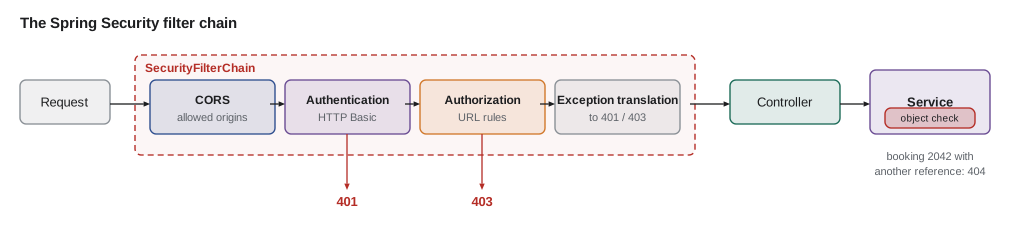
Adding spring-boot-starter-security changes the application's behaviour at once: every endpoint requires authentication, a generated password is printed at start-up for a single user named user, and the usual security headers are added to every response. That secure by default start is deliberate. The job is then to open exactly what the table says and no more, in a SecurityFilterChain bean.
package org.secondgear.api.security;

import org.springframework.context.annotation.*;
import org.springframework.http.HttpMethod;
import org.springframework.security.config.Customizer;
import org.springframework.security.config.annotation.method.configuration.EnableMethodSecurity;
import org.springframework.security.config.annotation.web.builders.HttpSecurity;
import org.springframework.security.config.http.SessionCreationPolicy;
import org.springframework.security.web.SecurityFilterChain;

@Configuration
@EnableMethodSecurity
class SecurityConfig {

    @Bean
    SecurityFilterChain api(HttpSecurity http) throws Exception {
        http
            .authorizeHttpRequests(auth -> auth
                .requestMatchers(HttpMethod.GET, "/api/v1/parts/*/availability", "/api/v1/repair-slots").permitAll()
                .requestMatchers(HttpMethod.POST, "/api/v1/repair-bookings").permitAll()
                .requestMatchers(HttpMethod.GET, "/api/v1/repair-bookings/*").permitAll()   // checked in the service
                .requestMatchers("/actuator/health").permitAll()
                .requestMatchers("/actuator/**").hasRole("ADMIN")
                .requestMatchers("/api/v1/**").hasRole("STAFF")
                .anyRequest().denyAll())
            .httpBasic(Customizer.withDefaults())
            .sessionManagement(s -> s.sessionCreationPolicy(SessionCreationPolicy.STATELESS))
            .csrf(csrf -> csrf.disable())          // no cookies or sessions: see the CSRF section
            .cors(Customizer.withDefaults());
        return http.build();
    }
}
What this code does
Rules are checked from top to bottom and the first match wins, so the public exceptions come before the broad STAFF rule, and anything not listed is denied. HTTP Basic sends the counter computer's credentials with each request over HTTPS, and the STATELESS policy means no server session or cookie is created. CSRF protection is turned off only because nothing here relies on cookies; the reasoning is in the section on CSRF below.
Authentication with HTTP Basic
With HTTP Basic, the client sends an Authorization header containing the word Basic and the user name and password joined by a colon and encoded in Base64. Base64 is an encoding, not encryption, so Basic is safe only over HTTPS, which Leif's server enforces. It suits a small set of staff clients such as the counter app. A larger system would use OAuth 2.0 with short-lived JWT access tokens issued by an identity provider, which Spring Security supports through its resource-server starter. The example decodes a Basic header and checks the user's role against a rule, which is what Spring Security's filters do before your controller runs.
import java.nio.charset.StandardCharsets;
import java.util.*;

public class Main {
    record User(String name, Set<String> roles) {}

    static final Map<String, User> USERS = Map.of(
            "kofi", new User("kofi", Set.of("STAFF")),
            "leif", new User("leif", Set.of("STAFF", "ADMIN")));

    static Optional<String> userFromBasic(String header) {
        if (header == null || !header.startsWith("Basic ")) return Optional.empty();
        String decoded = new String(Base64.getDecoder().decode(header.substring(6)), StandardCharsets.UTF_8);
        int colon = decoded.indexOf(':');
        return colon < 0 ? Optional.empty() : Optional.of(decoded.substring(0, colon));
    }

    static int check(String header, String requiredRole) {
        Optional<String> name = userFromBasic(header);
        if (name.isEmpty() || !USERS.containsKey(name.get())) return 401;
        return USERS.get(name.get()).roles().contains(requiredRole) ? 200 : 403;
    }

    public static void main(String[] args) {
        String kofi = "Basic " + Base64.getEncoder().encodeToString("kofi:not-a-real-password".getBytes(StandardCharsets.UTF_8));
        String leif = "Basic " + Base64.getEncoder().encodeToString("leif:not-a-real-password".getBytes(StandardCharsets.UTF_8));
        System.out.println("Header sent: " + kofi);
        System.out.println("Decoded user: " + userFromBasic(kofi).orElse("?"));
        System.out.println("no header,  STAFF -> " + check(null, "STAFF"));
        System.out.println("kofi,       STAFF -> " + check(kofi, "STAFF"));
        System.out.println("kofi,       ADMIN -> " + check(kofi, "ADMIN"));
        System.out.println("leif,       ADMIN -> " + check(leif, "ADMIN"));
    }
}Header sent: Basic a29maTpub3QtYS1yZWFsLXBhc3N3b3Jk Decoded user: kofi no header, STAFF -> 401 kofi, STAFF -> 200 kofi, ADMIN -> 403 leif, ADMIN -> 200
What this code does
The header is the word Basic followed by Base64 text, and decoding it gives back the user name and password in plain text, which is why Basic must only travel over HTTPS. The check answers 401 when there is no known user and 403 when the user is known but lacks the role, the same distinction Spring Security makes. A real check would also verify the password against its stored hash, which the next section covers; this example only shows the decoding and the role rule.
Storing passwords
The service stores the staff's passwords, so it must store them in a form that is useless to a thief. The rule is: never store the password itself, and never a fast hash of it such as SHA-256 alone, because a graphics card can try billions of guesses a second against a fast hash. Store the output of a password hashing function that is deliberately slow and uses a random salt per user, so that identical passwords give different hashes and precomputed tables do not help. OWASP's Password Storage Cheat Sheet recommends Argon2id first, then scrypt, then bcrypt for older systems, and PBKDF2 where a standards-approved algorithm is required, with 600,000 iterations of HMAC-SHA-256.
The JDK includes PBKDF2, so the next example uses it. The salt in the example is fixed so that the printed hash is the same on every run; in real use the salt comes from SecureRandom, a new one for every password, and is stored next to the hash. The comparison uses MessageDigest.isEqual, which takes the same time whether the first byte or the last one differs, so an attacker cannot learn the hash a byte at a time by timing responses.
import java.security.MessageDigest;
import java.util.HexFormat;
import javax.crypto.SecretKeyFactory;
import javax.crypto.spec.PBEKeySpec;

public class Main {
    static final int ITERATIONS = 600_000;

    static byte[] pbkdf2(char[] password, byte[] salt) throws Exception {
        PBEKeySpec spec = new PBEKeySpec(password, salt, ITERATIONS, 256);
        try {
            return SecretKeyFactory.getInstance("PBKDF2WithHmacSHA256").generateSecret(spec).getEncoded();
        } finally {
            spec.clearPassword();
        }
    }

    public static void main(String[] args) throws Exception {
        // DEMO ONLY: a fixed salt makes the output repeatable. Real code uses a new SecureRandom salt per password.
        byte[] salt = HexFormat.of().parseHex("5365636f6e64476561722d64656d6f21");
        byte[] stored = pbkdf2("correct horse battery staple".toCharArray(), salt);

        System.out.println("salt   " + HexFormat.of().formatHex(salt));
        System.out.println("stored " + HexFormat.of().formatHex(stored));
        for (String attempt : new String[] {"correct horse battery staple", "Correct horse battery staple"}) {
            boolean ok = MessageDigest.isEqual(stored, pbkdf2(attempt.toCharArray(), salt));
            System.out.println("\"" + attempt + "\" -> " + (ok ? "accepted" : "rejected"));
        }
    }
}salt 5365636f6e64476561722d64656d6f21 stored 86eb205bdbe3254d251855379a504d7e947399749d76f601b8169822e1940f05 "correct horse battery staple" -> accepted "Correct horse battery staple" -> rejected
What this code does
pbkdf2 runs HMAC-SHA-256 600,000 times over the password and salt and returns a 256-bit result, which is what gets stored, never the password. Checking a login repeats the work with the stored salt and compares the two results with MessageDigest.isEqual, a constant-time comparison. A single changed letter gives a completely different result, so the second attempt is rejected.
In Spring Security you never write this code. A PasswordEncoder bean does it, and the default DelegatingPasswordEncoder writes the algorithm's name in braces at the front of each stored hash, such as {bcrypt} or {argon2}, so the service can move to a stronger algorithm later and still check old hashes. The staff's password hashes live in the users table, and a UserDetailsService loads them.
@Bean
PasswordEncoder passwordEncoder() {
    return PasswordEncoderFactories.createDelegatingPasswordEncoder();   // bcrypt for new hashes
}

@Bean
UserDetailsService staff(StaffRepository repo) {
    return name -> repo.findByLogin(name)
            .map(s -> User.withUsername(s.login()).password(s.passwordHash()).roles(s.roles()).build())
            .orElseThrow(() -> new UsernameNotFoundException(name));
}
What this code does
The delegating encoder hashes new passwords with bcrypt and recognizes older formats by their prefix, which makes upgrading the algorithm painless. The UserDetailsService loads a staff member's stored hash and roles from the database, and Spring Security compares the submitted password against that hash. No password or hash ever appears in code or configuration files.
Object-level authorization
The first item on Leif's printout, API1:2023 Broken Object Level Authorization, is the most common serious flaw in real APIs. It happens when an endpoint checks that the caller is allowed to use the endpoint but not that they may see *this particular object*. Booking numbers are sequential, so if GET /api/v1/repair-bookings/2041 returned the booking to anyone, a visitor could read 2042, 2043 and so on, with names and phone numbers. Spring Security's URL rules cannot help, because the URL pattern is the same for every booking. The check belongs in the service, where the booking is loaded.
The shop's answer: each booking gets a random booking reference when it is created, sent to the customer in the confirmation text, and a public request for a booking must include it. Staff can read any booking. The example shows the check, with the references written out so that the output is repeatable.
import java.security.MessageDigest;
import java.nio.charset.StandardCharsets;
import java.util.*;

public class Main {
    record Booking(long id, String customer, String reference) {}
    record Caller(String name, boolean staff) {}

    static final Map<Long, Booking> BOOKINGS = Map.of(
            2041L, new Booking(2041, "Ana Ferreira", "K7QF-29XM"),
            2042L, new Booking(2042, "Dev Okafor", "P3LD-81RC"));

    static String find(long id, Caller caller, String reference) {
        Booking b = BOOKINGS.get(id);
        if (b == null) return "404 Not Found";
        boolean refOk = reference != null && MessageDigest.isEqual(
                b.reference().getBytes(StandardCharsets.UTF_8), reference.getBytes(StandardCharsets.UTF_8));
        if (caller.staff() || refOk) return "200 OK " + b.customer();
        return "404 Not Found";
    }

    public static void main(String[] args) {
        Caller visitor = new Caller("anonymous", false), kofi = new Caller("kofi", true);
        System.out.println("Ana with her reference:      " + find(2041, visitor, "K7QF-29XM"));
        System.out.println("Ana guessing the next id:    " + find(2042, visitor, "K7QF-29XM"));
        System.out.println("No reference at all:         " + find(2042, visitor, null));
        System.out.println("Staff at the counter:        " + find(2042, kofi, null));
        System.out.println("A booking that is not there: " + find(9999, visitor, "K7QF-29XM"));
    }
}Ana with her reference: 200 OK Ana Ferreira Ana guessing the next id: 404 Not Found No reference at all: 404 Not Found Staff at the counter: 200 OK Dev Okafor A booking that is not there: 404 Not Found
What this code does
find loads the booking and then decides whether this caller may see this object: staff may, and a visitor may only with the reference that belongs to that booking. A visitor who guesses another booking's number gets 404, the same answer as for a booking that does not exist, so the response does not even confirm that booking 2042 is real. The references are compared in constant time, like the password hashes.
@PreAuthorize("hasRole('STAFF')")
public List<BookingView> forDay(LocalDate day) { ... }

public BookingView find(long id, String reference, Authentication caller) {
    Booking b = bookings.findById(id).orElseThrow(() -> new BookingNotFound(id));
    boolean staff = caller != null && caller.getAuthorities().stream()
            .anyMatch(a -> a.getAuthority().equals("ROLE_STAFF"));
    if (!staff && !b.referenceMatches(reference)) throw new BookingNotFound(id);
    return BookingView.from(b);
}
What this code does
@PreAuthorize, enabled by @EnableMethodSecurity, checks a role at the method itself, which protects the method even if a URL rule is later changed by mistake. The find method does the object-level check in code, because only it knows which booking was loaded. Throwing BookingNotFound for a wrong reference gives the same 404 as a missing booking.
CSRF and CORS
Cross-site request forgery (CSRF) tricks a signed-in user's browser into sending a request to a site that trusts the browser's cookies. If the counter app signed in with a session cookie, a malicious page opened on the counter computer could make the browser post to the booking service, and the cookie would go along automatically. Spring Security's CSRF protection blocks that by requiring a token that a foreign page cannot read. The booking service creates no sessions and sends no cookies, and its staff credentials travel in an Authorization header that the browser never adds by itself, so CSRF protection can be turned off there. If the service ever moves to cookie sessions, the protection must go back on.
CORS, cross-origin resource sharing, is the opposite kind of rule. Browsers stop a script on one origin (scheme, host and port) from reading responses from another origin unless the server says it may. The booking website will be served from https://book.secondgear.org and the API from https://api.secondgear.org, so the API must name the website's origin as allowed. CORS is not a defence for the server, because only browsers enforce it and curl ignores it; it protects users' browsers. The allowed list must be exact: allowing every origin with credentials would let any site act on behalf of a signed-in user.
@Bean
CorsConfigurationSource corsConfigurationSource(@Value("${shop.web.origin}") String origin) {
    CorsConfiguration cors = new CorsConfiguration();
    cors.setAllowedOrigins(List.of(origin));                 // https://book.secondgear.org
    cors.setAllowedMethods(List.of("GET", "POST"));
    cors.setAllowedHeaders(List.of("Content-Type"));
    cors.setMaxAge(Duration.ofHours(1));
    UrlBasedCorsConfigurationSource source = new UrlBasedCorsConfigurationSource();
    source.registerCorsConfiguration("/api/v1/**", cors);
    return source;
}
What this code does
The allowed origin comes from configuration, so the dev profile can allow the website's local development address while production allows only the real site. Only the methods and headers the website needs are allowed. A browser that sends a preflight OPTIONS request from any other origin receives no CORS headers back, so its script cannot read the response.
The OWASP API Security Top 10 (2023)
OWASP publishes its list of the most serious API risks from real incidents. Spring Security helps with several, but most are design and coding mistakes that no framework can remove. Leif's printout, with the shop's answer to each, became a page of the service's documentation.
| Risk | What it means | The booking service's answer |
|---|---|---|
| API1 Broken Object Level Authorization | Reading or changing another user's object by changing an ID | Booking reference checked in the service; 404 for a mismatch |
| API2 Broken Authentication | Weak login, credential stuffing, tokens that never expire | Hashed passwords, HTTPS only, limited login attempts |
| API3 Broken Object Property Level Authorization | Reading or setting fields the caller should not | View records per audience; request records without status or price fields |
| API4 Unrestricted Resource Consumption | No limits on size, rate or page size | Size limits on fields, page size cap, rate limit on bookings |
| API5 Broken Function Level Authorization | Ordinary users calling admin functions | URL rules plus @PreAuthorize on staff methods |
| API6 Unrestricted Access to Sensitive Business Flows | Automating a flow in a way that hurts the business | Limit bookings per phone number per day |
| API7 Server Side Request Forgery | Making the server fetch a URL chosen by the caller | No caller-supplied URLs; see lesson 8 |
| API8 Security Misconfiguration | Defaults left open, verbose errors, missing headers | Problem Details without internals; Actuator locked down |
| API9 Improper Inventory Management | Forgotten old versions and test endpoints | OpenAPI document as the inventory; v1 only |
| API10 Unsafe Consumption of APIs | Trusting data from third-party APIs | Validate supplier responses; timeouts; see lesson 8 |
API3 deserves a second look, because Jackson makes it easy to get wrong. If the booking endpoint accepted a whole Booking entity as its request body, a visitor could add "status":"FINISHED" or "priceCents":0 to the JSON and Jackson would set those fields too, which is called mass assignment. The NewBooking record from lesson 4 has no such components, so there is nothing for an attacker to set. Separate request and view records are a security control as well as good design.
Try it yourself
Check the origin
Complete corsHeaders so that for an allowed origin it returns Access-Control-Allow-Origin: <origin> and for any other origin, including null, it returns (no CORS headers).
Only exact matches count: https://book.secondgear.org.evil.example is not allowed.
import java.util.*;

public class Main {
    static final Set<String> ALLOWED = Set.of("https://book.secondgear.org", "http://localhost:5173");

    static String corsHeaders(String origin) {
        return "(no CORS headers)";
    }

    public static void main(String[] args) {
        for (String o : new String[] {"https://book.secondgear.org", "http://localhost:5173",
                "https://book.secondgear.org.evil.example", "http://book.secondgear.org", null}) {
            System.out.println(o + " -> " + corsHeaders(o));
        }
    }
}
Try it yourself
Limit login attempts
Complete attempt so that each user may fail at most 5 times; from the sixth attempt on, it returns locked without checking the password.
A correct password returns ok and resets that user's failure count; a wrong one returns wrong.
import java.util.*;

public class Main {
    static final Map<String, Integer> failures = new HashMap<>();

    static String attempt(String user, boolean passwordCorrect) {
        return passwordCorrect ? "ok" : "wrong";
    }

    public static void main(String[] args) {
        StringBuilder sb = new StringBuilder();
        for (int i = 1; i <= 7; i++) sb.append(attempt("kofi", false)).append(' ');
        System.out.println("kofi: " + sb.toString().trim());
        System.out.println("kofi, right password now: " + attempt("kofi", true));
        System.out.println("leif: " + attempt("leif", false) + " " + attempt("leif", true) + " " + attempt("leif", false));
    }
}
Before he left, Leif tried the oldest trick on his list: he asked for booking 2042 with Ana's reference. The service answered 404. He crossed API1 off the printout and wrote "tested" beside it.
Common mistakes
MistakeStoring passwords with a fast hash such as SHA-256.
InsteadUse a slow, salted password hash: Argon2id, scrypt, bcrypt, or PBKDF2 with 600,000 iterations.
MistakeChecking only that the caller may use an endpoint.
InsteadAlso check, in the service, that the caller may see or change this particular object.
MistakeTurning off CSRF protection in an application that uses session cookies.
InsteadKeep it on wherever the browser sends credentials automatically.
MistakeAllowing every origin in CORS to make the website work.
InsteadList the exact origins the website is served from.
MistakeBinding request JSON straight onto entities.
InsteadUse request records that contain only the fields a caller may set.
Summary and key terms
- Authentication establishes who is calling; authorization decides what they may do.
- Spring Security protects every endpoint by default; a SecurityFilterChain bean opens what the access table allows, with the first matching rule winning, and @PreAuthorize adds checks at methods.
- HTTP Basic sends Base64 credentials and is safe only over HTTPS; larger systems use OAuth 2.0 and JWT.
- Passwords are stored as slow, salted hashes (Argon2id, scrypt, bcrypt or PBKDF2) through a DelegatingPasswordEncoder and compared in constant time.
- Object-level authorization, the top OWASP API risk, must be checked in the service.
- CSRF matters when browsers send credentials automatically, as with cookies; CORS lets named origins' scripts read responses.
- The OWASP API Security Top 10 (2023) lists the risks that design and code must address.
- Authentication
- Establishing who the caller is.
- Authorization
- Deciding what an authenticated caller may do.
- SecurityFilterChain
- The bean that defines Spring Security's rules for a set of requests.
- HTTP Basic
- Sending a user name and password, Base64-encoded, in the Authorization header.
- Salt
- Random data stored with a password hash so identical passwords hash differently.
- Password hashing function
- A deliberately slow hash for passwords, such as Argon2id or bcrypt.
- BOLA
- Broken Object Level Authorization: reaching another user's object by changing its ID.
- CSRF
- Cross-site request forgery: a foreign page making the browser send a request with its cookies.
- CORS
- Cross-origin resource sharing: a server telling browsers which other origins may read its responses.
- Mass assignment
- Letting a client set fields it should not by adding them to the request body.
Practice problems
Work each problem on paper first, then reveal the answer to check.
What is the difference between 401 and 403?
Show answer
401 means not authenticated; 403 means authenticated but not allowed.
Why is HTTP Basic acceptable only over HTTPS?
Show answer
Base64 is an encoding, so the password can be read by anyone who sees the request.
Which password hashing function does OWASP recommend first?
Show answer
Argon2id.
Where must the check that a visitor may read booking 2042 happen?
Show answer
In the service, after the booking is loaded.
Why could the booking service turn CSRF protection off?
Show answer
It uses no cookies or sessions; credentials go in a header the browser never adds by itself.
Lesson quiz · 5 questions
Score 60% or more to complete this lesson.
Create a free account to save your progress, take quizzes and earn a certificate.