
JAVA-260 · Lesson 6 of 12 · 23 min
Configuration and profiles
▶ Video coming soon A video version of this lesson is on the way.
On Wednesday, February 16, the last session before reading week, Leif sat in. He ran the shop's small server, the one that would run the booking service, and he had found the database password in Hamza's application.yml, pushed to the secondgear repository the week before. "It is in the history now," he said, "so the password has to change, and from today it lives on the server, not in Git." This lesson is about externalized configuration: keeping settings out of the code, choosing them per environment with profiles, binding them to typed records and keeping secrets where they belong.
One build, many environments
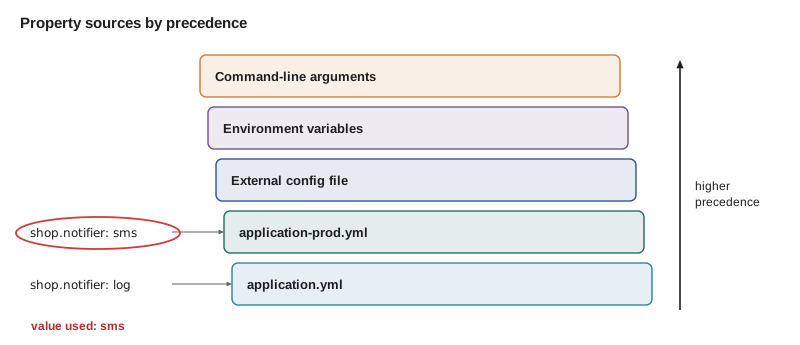
The same JAR has to run in three places: on Hamza's laptop with a local database and the log-only notifier, in the test suite with a throwaway database, and on Leif's server with the real database and the real text-message provider. Rebuilding the JAR for each would mean the thing tested is not the thing deployed. Instead, the code reads properties, named settings such as spring.datasource.url or shop.booking.slots-per-hour, and each environment supplies its own values. Spring Boot collects them from many property sources and combines them in a fixed order, so that a value set closer to the running environment overrides one set further away.
| Source (later wins) | Example | Typical use |
|---|---|---|
| Defaults in code | @ConfigurationProperties record defaults | Safe fallbacks |
| application.yml in the JAR | shop.booking.slots-per-hour: 2 | Settings shared by all environments |
| application-{profile}.yml in the JAR | application-dev.yml | Per-environment settings that are not secret |
| A config file outside the JAR | /etc/secondgear/application.yml on the server | Server-specific settings |
| Operating system environment variables | STOCKSTORE_DB_PASSWORD | Secrets and container settings |
| Java system properties | -Dshop.booking.slots-per-hour=3 | One-off overrides |
| Command-line arguments | --server.port=8081 | One-off overrides |
| Test properties | @SpringBootTest(properties = ...) | Values for one test |
Merging property sources
The rule "later sources win, key by key" is easy to state and worth seeing. The example loads three sources into java.util.Properties maps: the packaged defaults, a profile file and the environment. It merges them in order, and for each key it records which source supplied the winning value. That record is what Spring Boot's /actuator/env endpoint shows, and it is the first thing to look at when a setting is not the value you expected.
import java.util.*;

public class Main {
    record Source(String name, Properties props) {}

    static Properties props(String... kv) {
        Properties p = new Properties();
        for (int i = 0; i < kv.length; i += 2) p.setProperty(kv[i], kv[i + 1]);
        return p;
    }

    public static void main(String[] args) {
        List<Source> sources = List.of(
                new Source("application.yml", props(
                        "server.port", "8080",
                        "shop.booking.slots-per-hour", "2",
                        "shop.notifier", "log",
                        "spring.datasource.url", "jdbc:postgresql://localhost:5432/stockstore")),
                new Source("application-prod.yml", props(
                        "shop.notifier", "sms",
                        "spring.datasource.url", "jdbc:postgresql://db.internal:5432/stockstore")),
                new Source("environment", props(
                        "spring.datasource.password", "(from STOCKSTORE_DB_PASSWORD)",
                        "server.port", "8443")));

        Map<String, String> value = new TreeMap<>(), from = new HashMap<>();
        for (Source s : sources) {
            for (String key : s.props().stringPropertyNames()) {
                value.put(key, s.props().getProperty(key));
                from.put(key, s.name());
            }
        }
        value.forEach((k, v) -> System.out.printf("%-30s %-46s <- %s%n", k, v, from.get(k)));
    }
}server.port 8443 <- environment shop.booking.slots-per-hour 2 <- application.yml shop.notifier sms <- application-prod.yml spring.datasource.password (from STOCKSTORE_DB_PASSWORD) <- environment spring.datasource.url jdbc:postgresql://db.internal:5432/stockstore <- application-prod.yml
What this code does
Each source is a Properties map, and the merge visits them from lowest to highest precedence, so a later source simply overwrites the earlier value for the same key. Keys set only once, such as the slots per hour, keep their packaged default. The TreeMap sorts the result by key, and the last column names the source that won, much like the Actuator env endpoint.
In this course's examples the password's value is never printed. The same rule applies to real logs and to Actuator, which by default shows the names of properties but masks their values.
Profiles
A profile is a named group of settings and beans that is switched on for one environment. Setting spring.profiles.active=prod, usually through the SPRING_PROFILES_ACTIVE environment variable on the server, makes Spring Boot load application-prod.yml on top of application.yml and create any bean marked @Profile("prod"). Beans marked for another profile do not exist at all. That is the cleanest answer to the two-notifier problem from lesson 2: the SMS notifier is a prod bean and the log notifier a dev bean, so exactly one exists wherever the application runs.
# application.yml: shared by every environment
shop:
  booking:
    slots-per-hour: 2
    first-start: "09:00"
    last-start: "15:00"
    open-days: [TUESDAY, WEDNESDAY, THURSDAY, FRIDAY, SATURDAY]
  notifier: log
spring:
  application:
    name: booking-api
---
spring:
  config:
    activate:
      on-profile: dev
  datasource:
    url: jdbc:postgresql://localhost:5432/stockstore
    username: hamza
    password: ${DEV_DB_PASSWORD:dev-only}
---
spring:
  config:
    activate:
      on-profile: prod
  datasource:
    url: jdbc:postgresql://db.internal:5432/stockstore
    username: booking_app
    password: ${STOCKSTORE_DB_PASSWORD}
shop:
  notifier: sms
What this code does
The three dashes split one YAML file into documents, and spring.config.activate.on-profile makes a document apply only when that profile is active. The prod password has no default after the placeholder, so the application refuses to start if the environment variable is missing. The dev document's placeholder has a fallback after the colon, which is acceptable only because that database exists on Hamza's laptop alone.
@Configuration
class NotifierConfig {
    @Bean
    @Profile("prod")
    Notifier smsNotifier(SmsProperties sms, RestClient.Builder http) {
        return new SmsNotifier(sms, http.build());
    }

    @Bean
    @Profile("!prod")
    Notifier logNotifier() {
        return new LogNotifier();
    }
}
What this code does
Only one of the two @Bean methods runs in any environment: smsNotifier when prod is active, and logNotifier in every other case, including tests. The exclamation mark negates a profile. No constructor needs a qualifier, because only one Notifier bean ever exists.
Keep profiles few and named for environments, such as dev, test and prod. A profile per feature, such as with-sms or fast-start, multiplies the combinations that nobody has tested. For an optional feature, a property with @ConditionalOnProperty is clearer.
Relaxed binding and environment variables
Environment variable names cannot contain dots or dashes on most systems, so Spring Boot uses relaxed binding: the property shop.booking.slots-per-hour can be set by the environment variable SHOP_BOOKING_SLOTSPERHOUR. The rule for environment variables is to replace dots with underscores, remove dashes and use upper case. In YAML and properties files the canonical form is lower case with dashes, the kebab case used throughout this course. The example converts in both directions and shows which variable Leif must set for each setting.
import java.util.*;

public class Main {
    static String toEnvVar(String property) {
        return property.replace("-", "").replace(".", "_").replace("[", "_").replace("]", "").toUpperCase();
    }

    static Optional<String> lookup(Map<String, String> env, String property) {
        return Optional.ofNullable(env.get(toEnvVar(property)));
    }

    public static void main(String[] args) {
        for (String p : List.of("spring.datasource.password", "shop.booking.slots-per-hour",
                "spring.profiles.active", "shop.booking.open-days[0]")) {
            System.out.printf("%-30s -> %s%n", p, toEnvVar(p));
        }
        Map<String, String> env = Map.of("SPRING_PROFILES_ACTIVE", "prod", "SHOP_BOOKING_SLOTSPERHOUR", "3");
        System.out.println("slots per hour = " + lookup(env, "shop.booking.slots-per-hour").orElse("(default 2)"));
        System.out.println("first start    = " + lookup(env, "shop.booking.first-start").orElse("(default 09:00)"));
    }
}spring.datasource.password -> SPRING_DATASOURCE_PASSWORD shop.booking.slots-per-hour -> SHOP_BOOKING_SLOTSPERHOUR spring.profiles.active -> SPRING_PROFILES_ACTIVE shop.booking.open-days[0] -> SHOP_BOOKING_OPENDAYS_0 slots per hour = 3 first start = (default 09:00)
What this code does
toEnvVar applies Spring Boot's documented rule for environment variables: dashes go, dots and list brackets become underscores and everything is upper case. lookup then finds the property in a map that stands in for the real environment, which keeps the output the same on every machine. The slots per hour come from the environment, and the first start time falls back to its default because no variable sets it.
Typed settings with @ConfigurationProperties
Reading properties one at a time with @Value and a placeholder string works, but it scatters setting names across the code and checks nothing. A @ConfigurationProperties record binds a whole prefix to typed components at start-up, converting text to numbers, times, lists and enums, and with @Validated it applies Bean Validation constraints too, so a nonsense value stops the application before it serves a single request.
package org.secondgear.api.config;

import jakarta.validation.constraints.*;
import java.time.*;
import java.util.Set;
import org.springframework.boot.context.properties.ConfigurationProperties;
import org.springframework.boot.context.properties.bind.DefaultValue;
import org.springframework.validation.annotation.Validated;

@Validated
@ConfigurationProperties("shop.booking")
public record BookingProperties(
        @DefaultValue("2") @Min(1) @Max(4) int slotsPerHour,
        @DefaultValue("09:00") LocalTime firstStart,
        @DefaultValue("15:00") LocalTime lastStart,
        @NotEmpty Set<DayOfWeek> openDays,
        @DefaultValue("America/Toronto") ZoneId zone) {
}
What this code does
Every component maps to a property under shop.booking, with the dashes of slots-per-hour matched to the camel case slotsPerHour. Spring converts the text in the YAML to LocalTime, DayOfWeek and ZoneId values, and @DefaultValue supplies a value when none is set. With @Validated, setting slots-per-hour to 0 makes start-up fail with a message naming the property.
The record is registered with @ConfigurationPropertiesScan on the application class, and any bean can then receive BookingProperties through its constructor, like any other dependency. The next example does the binding by hand from a Properties map, including the conversions and the range check, to show what Spring does at start-up.
import java.time.*;
import java.util.*;

public class Main {
    record BookingProperties(int slotsPerHour, LocalTime firstStart, LocalTime lastStart, Set<DayOfWeek> openDays) {
        BookingProperties {
            if (slotsPerHour < 1 || slotsPerHour > 4)
                throw new IllegalArgumentException("shop.booking.slots-per-hour must be between 1 and 4, but was " + slotsPerHour);
            if (!lastStart.isAfter(firstStart))
                throw new IllegalArgumentException("shop.booking.last-start must be after first-start");
        }
    }

    static BookingProperties bind(Properties p) {
        String days = p.getProperty("shop.booking.open-days", "TUESDAY,WEDNESDAY,THURSDAY,FRIDAY,SATURDAY");
        Set<DayOfWeek> open = EnumSet.noneOf(DayOfWeek.class);
        for (String d : days.split(",")) open.add(DayOfWeek.valueOf(d.trim().toUpperCase()));
        return new BookingProperties(
                Integer.parseInt(p.getProperty("shop.booking.slots-per-hour", "2")),
                LocalTime.parse(p.getProperty("shop.booking.first-start", "09:00")),
                LocalTime.parse(p.getProperty("shop.booking.last-start", "15:00")),
                open);
    }

    public static void main(String[] args) {
        Properties defaults = new Properties();
        System.out.println(bind(defaults));

        Properties summer = new Properties();
        summer.setProperty("shop.booking.open-days", "monday, tuesday, wednesday, thursday, friday, saturday");
        summer.setProperty("shop.booking.last-start", "16:00");
        System.out.println(bind(summer).openDays().size() + " open days, last start " + bind(summer).lastStart());

        Properties typo = new Properties();
        typo.setProperty("shop.booking.slots-per-hour", "20");
        try {
            bind(typo);
        } catch (IllegalArgumentException e) {
            System.out.println("Start-up fails: " + e.getMessage());
        }
    }
}BookingProperties[slotsPerHour=2, firstStart=09:00, lastStart=15:00, openDays=[TUESDAY, WEDNESDAY, THURSDAY, FRIDAY, SATURDAY]] 6 open days, last start 16:00 Start-up fails: shop.booking.slots-per-hour must be between 1 and 4, but was 20
What this code does
bind reads each key with a default, converts the text into an int, two LocalTime values and an EnumSet of days, and builds the record. The compact constructor checks the ranges, standing in for @Min, @Max and a cross-field rule, so a typo of 20 for 2 stops the program with a message naming the property. The summer settings show that case and spacing in the list of days do not matter, as with Spring's relaxed conversion of enums.
Secrets
A secret is any value that grants access: database passwords, API keys for the text-message provider, signing keys. Secrets never go in source code, in application.yml in the repository, in the JAR, in logs or in error messages. A secret pushed to Git must be treated as leaked even if the commit is removed, because clones, forks and backups keep it, so the only fix is to rotate it: issue a new value and revoke the old. That is what Leif did on February 16.
| Where | Secrets? | Why |
|---|---|---|
| Java source and application.yml in Git | Never | Everyone with repository access, and every clone, has them forever |
| Environment variables on the server | Yes | Set by the person who runs the server; not in the build |
| A secrets file readable only by the service user | Yes | For example /etc/secondgear/booking.env with mode 600 |
| A secrets manager or vault | Yes, for larger setups | Central rotation and audit |
| Logs, error responses, Actuator output | Never | Spring Boot masks values in Actuator by default; keep it that way |
Two habits stop most leaks. First, a .gitignore entry for local files such as .env and application-local.yml, so a developer's own values cannot be committed by accident. Second, a secret scanner in the pull-request checks, which Leif added to the secondgear build that week, so a password-shaped string in a diff fails the build before review.
# On the shop's server, in the service's environment file (not in Git)
SPRING_PROFILES_ACTIVE=prod
STOCKSTORE_DB_PASSWORD=<set by Leif, rotated 2028-02-16>
SMS_API_KEY=<set by Leif>

# Starting by hand for a check
java -jar booking-api.jar --debug
What this code does
The environment file is read by the service manager when it starts the application, so the values exist only in the running process's environment. The angle-bracket placeholders stand for values that are never written into any document. The --debug flag prints the condition evaluation report, which also lists the active profiles.
SPRING_PROFILES_ACTIVE=prod java -jar booking-api.jarAPPLICATION FAILED TO START
Description:
Could not resolve placeholder 'STOCKSTORE_DB_PASSWORD' in value "${STOCKSTORE_DB_PASSWORD}"
Action:
Set the STOCKSTORE_DB_PASSWORD environment variable or define the property in an external configuration source.What this code does
Without STOCKSTORE_DB_PASSWORD the placeholder cannot be resolved. The application stops at start-up instead of trying to connect with an empty password.
Try it yourself
Resolve placeholders
Complete resolve so that it replaces each placeholder in a value, written as a dollar sign and braces around NAME or NAME:default, with the entry for NAME in env, or with the default when NAME is missing.
If NAME is missing and there is no default, throw an IllegalStateException with the message Could not resolve placeholder 'NAME'; main prints it.
import java.util.*;
import java.util.regex.*;

public class Main {
    static String resolve(String value, Map<String, String> env) {
        return value;
    }

    public static void main(String[] args) {
        Map<String, String> env = Map.of("DB_HOST", "db.internal", "DB_NAME", "stockstore");
        System.out.println(resolve("jdbc:postgresql://${DB_HOST}:${DB_PORT:5432}/${DB_NAME}", env));
        System.out.println(resolve("${SMS_SENDER:Second Gear}", env));
        try {
            System.out.println(resolve("${STOCKSTORE_DB_PASSWORD}", env));
        } catch (IllegalStateException e) {
            System.out.println(e.getMessage());
        }
    }
}
Try it yourself
Activate a profile
Complete effective so that it starts from base, then applies the overrides of each profile in active, in order, and returns the merged map.
Profiles that do not exist in profiles are ignored.
import java.util.*;

public class Main {
    static Map<String, String> effective(Map<String, String> base, Map<String, Map<String, String>> profiles, List<String> active) {
        return new TreeMap<>(base);
    }

    public static void main(String[] args) {
        Map<String, String> base = Map.of("shop.notifier", "log", "server.port", "8080", "shop.booking.slots-per-hour", "2");
        Map<String, Map<String, String>> profiles = Map.of(
                "prod", Map.of("shop.notifier", "sms"),
                "summer", Map.of("shop.booking.slots-per-hour", "3"));
        System.out.println(effective(base, profiles, List.of()));
        System.out.println(effective(base, profiles, List.of("prod")));
        System.out.println(effective(base, profiles, List.of("prod", "summer", "staging")));
    }
}
Leif rotated the database password that evening and wrote the new one only into the server's environment file. Hamza added application-local.yml and .env to .gitignore and opened a pull request for the secret scanner. Then reading week began.
Common mistakes
MistakeCommitting a password and deleting it in the next commit.
InsteadTreat any secret that reached Git as leaked and rotate it.
MistakeBuilding a different JAR for each environment.
InsteadBuild once and supply per-environment values through profiles and property sources.
MistakeReading settings with @Value strings all over the code.
InsteadBind a prefix to a validated @ConfigurationProperties record and inject it.
MistakeCreating a profile for every feature.
InsteadKeep profiles for environments and use @ConditionalOnProperty for optional features.
MistakeGiving a production secret a default value in the placeholder.
InsteadLeave production secrets without defaults so a missing value stops start-up.
Summary and key terms
- Externalized configuration lets one JAR run in every environment.
- Spring Boot reads properties from many sources in a fixed order, and later sources such as environment variables and command-line arguments override earlier ones key by key.
- Profiles, activated with spring.profiles.active, add application-{profile}.yml or profile documents and switch on @Profile beans, so exactly one implementation exists per environment.
- Relaxed binding maps environment variables such as SHOP_BOOKING_SLOTSPERHOUR to kebab-case properties. @ConfigurationProperties records bind a prefix to typed, validated components at start-up.
- Placeholders that name STOCKSTORE_DB_PASSWORD pull secrets from the environment; secrets never go in Git, logs or responses, and a leaked one is rotated.
- Externalized configuration
- Settings supplied from outside the code, so one build can run anywhere.
- Property source
- A place properties come from, such as a YAML file or the environment.
- Profile
- A named set of settings and beans activated for one environment.
- spring.profiles.active
- The property that chooses which profiles are active.
- Relaxed binding
- Matching property names written in different styles, such as kebab case and environment-variable form.
- @ConfigurationProperties
- Binds all properties under a prefix to a typed class or record.
- Placeholder
- A dollar-brace reference to another property or environment variable, optionally with a default.
- Secret
- A value that grants access, such as a password or API key.
- Rotation
- Replacing a secret with a new value and revoking the old one.
- Kebab case
- Lower-case words joined by dashes, such as slots-per-hour.
Practice problems
Work each problem on paper first, then reveal the answer to check.
Which wins: a value in application.yml or the same key in an environment variable?
Show answer
The environment variable.
What environment variable sets shop.booking.slots-per-hour?
Show answer
SHOP_BOOKING_SLOTSPERHOUR.
How do you make a bean exist only in production?
Show answer
Mark its class or @Bean method with @Profile("prod").
Why leave the production password placeholder without a default?
Show answer
So that start-up fails if the variable is missing.
A password reached the Git history. What must happen?
Show answer
Rotate it: issue a new password and revoke the old one.
Lesson quiz · 5 questions
Score 60% or more to complete this lesson.
Create a free account to save your progress, take quizzes and earn a certificate.