
JAVA-260 · Lesson 5 of 12 · 24 min
Spring Data JPA repositories
▶ Video coming soon A video version of this lesson is on the way.
On Wednesday, February 9, the bookings in Hamza's service still lived in an ArrayList and disappeared at every restart, which was exactly how StockRoom had lost eleven changes in August 2027. The parts already had a proper home: StockStore, the database Hamza had built in the Friday parts-room sessions in the autumn, with its Flyway migrations V1 to V4 and its plain JDBC data access objects. The January decision record said that StockStore would move from SQLite to PostgreSQL when the web service arrived, and that ShopBook's newer tables would use JPA. This lesson connects the booking service to that database through Spring Data JPA.
What Spring Data adds to JPA
Hamza had met JPA, the Jakarta Persistence API, and Hibernate, its most used implementation, in the persistence course: entities are classes mapped to tables, and an EntityManager loads, saves and queries them, tracking changes inside a transaction. Spring Data JPA sits on top. You declare a repository interface that extends one of its base interfaces, and at start-up Spring generates a class that implements it. The generated class provides the usual operations, such as save, findById, findAll, count and delete, and it also implements extra methods you declare, either from their names or from a query you write in an annotation.
| Layer | What it does | Where Hamza met it |
|---|---|---|
| JDBC | Sends SQL over a connection and reads rows | StockStore DAOs, JAVA-250 |
| JPA and Hibernate 7 | Maps entities to tables; tracks changes; writes the SQL | ShopBook trial, JAVA-250 |
| Spring Data JPA | Generates repository classes from interfaces | This lesson |
| Spring Boot | Configures the data source, the pool, Hibernate and transactions | This lesson |
A repository in plain Java
Before letting Spring generate one, it helps to write the shape by hand. The example is a generic in-memory repository: one class that can store any record type with an ID, offering the core operations of Spring Data's CrudRepository. It keeps rows in a TreeMap so that findAll comes back in ID order, and it is the same class that lesson 9 uses as a fake in tests.
import java.util.*;
import java.util.function.Function;

public class Main {
    interface CrudRepository<T, ID> {
        T save(T entity);
        Optional<T> findById(ID id);
        List<T> findAll();
        long count();
        void deleteById(ID id);
    }

    static class MemoryRepository<T, ID extends Comparable<ID>> implements CrudRepository<T, ID> {
        private final Map<ID, T> rows = new TreeMap<>();
        private final Function<T, ID> idOf;
        MemoryRepository(Function<T, ID> idOf) { this.idOf = idOf; }
        public T save(T e) { rows.put(idOf.apply(e), e); return e; }
        public Optional<T> findById(ID id) { return Optional.ofNullable(rows.get(id)); }
        public List<T> findAll() { return List.copyOf(rows.values()); }
        public long count() { return rows.size(); }
        public void deleteById(ID id) { rows.remove(id); }
    }

    record Part(String code, String name, String shelf, int quantity, int reorderLevel) {}

    public static void main(String[] args) {
        CrudRepository<Part, String> parts = new MemoryRepository<>(Part::code);
        parts.save(new Part("TUBE-700", "Inner tube 700x25", "B1", 40, 12));
        parts.save(new Part("BELL", "Brass bell", "A3", 14, 4));
        parts.save(new Part("CHAIN-11", "11-speed chain", "C2", 3, 5));
        parts.save(new Part("BELL", "Brass bell", "A3", 13, 4));

        System.out.println("count = " + parts.count());
        parts.findAll().forEach(p -> System.out.println("  " + p.code() + " qty " + p.quantity()));
        System.out.println("HORN? " + parts.findById("HORN").map(Part::name).orElse("not found"));
        parts.deleteById("CHAIN-11");
        System.out.println("after delete: " + parts.findAll().stream().map(Part::code).toList());
    }
}count = 3 BELL qty 13 CHAIN-11 qty 3 TUBE-700 qty 40 HORN? not found after delete: [BELL, TUBE-700]
What this code does
The repository is generic in both the stored type and the ID type, and it learns how to get an ID from a record through the function passed to its constructor. Saving a part with an existing code replaces the old row, which is how JPA's save behaves for an existing entity, so the count stays at three and BELL ends with 13. findById returns an Optional so that the caller must decide what a missing part means.
Entities and repository interfaces
StockStore's parts table, as migrated by V1 to V4 and renamed in October, has the columns code, name, shelf, quantity, reorder_level, pack_size, price_cents and supplier_id. The entity below maps it. Field names are written in camel case, and Spring Boot's default naming strategy turns reorderLevel into reorder_level, so no @Column annotation is needed for those.
package org.secondgear.api.stock;

import jakarta.persistence.*;

@Entity
@Table(name = "parts")
public class Part {
    @Id
    private String code;
    private String name;
    private String shelf;
    private int quantity;
    private int reorderLevel;
    private int packSize;
    private int priceCents;
    private long supplierId;

    @Version
    private long version;

    protected Part() { }   // for JPA

    public String code() { return code; }
    public int quantity() { return quantity; }
    public int reorderLevel() { return reorderLevel; }

    public void take(int n) {
        if (n > quantity) throw new IllegalStateException("only " + quantity + " " + code + " in stock");
        quantity -= n;
    }
}
What this code does
@Entity and @Table map the class to the parts table, and @Id marks the part code as the primary key. The @Version column gives **optimistic locking**: Hibernate checks the version when it writes, so if two requests change the same part at once, the second fails instead of silently overwriting the first. JPA needs a no-argument constructor, which can be protected so that application code cannot call it.
package org.secondgear.api.stock;

import java.util.List;
import org.springframework.data.domain.*;
import org.springframework.data.jpa.repository.*;
import org.springframework.data.repository.query.Param;

public interface PartRepository extends JpaRepository<Part, String> {

    List<Part> findByShelfOrderByCode(String shelf);

    Page<Part> findByNameContainingIgnoreCase(String text, Pageable page);

    @Query("select p from Part p where p.quantity <= p.reorderLevel order by p.code")
    List<Part> findLowStock();

    @Query(value = "select count(*) from parts where supplier_id = :supplier", nativeQuery = true)
    long countForSupplier(@Param("supplier") long supplierId);
}
What this code does
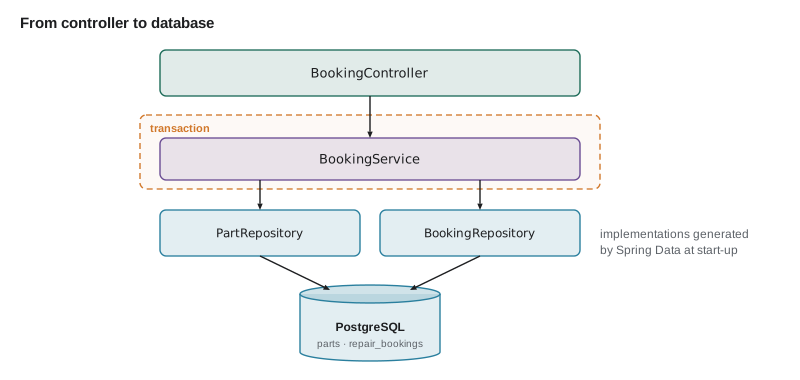
There is no implementation class anywhere: Spring Data generates one at start-up. The first two methods are **derived queries**, built from the method name, and the second also takes a Pageable and returns a Page of results. The last two carry their query in @Query, the first in JPQL, which talks about entities and fields, and the second in native SQL against the real table.
Derived queries
A derived query method's name is a small language. It starts with find, read, get, count, exists or delete, then By, then property names joined by And or Or, each optionally followed by a keyword such as LessThan, GreaterThanEqual, Containing, IgnoreCase, IsNull or In, and it can end with OrderBy and a property and direction. Spring Data parses the name at start-up and fails the start if a property does not exist, so a typo in findByShelff is caught before any request. The next example parses a few such names in the same way.
import java.util.*;

public class Main {
    static final Set<String> PROPERTIES = Set.of("code", "name", "shelf", "quantity", "reorderLevel", "supplierId");
    static final Map<String, String> KEYWORDS = new LinkedHashMap<>();
    static {
        KEYWORDS.put("LessThanEqual", "<= ?");
        KEYWORDS.put("LessThan", "< ?");
        KEYWORDS.put("GreaterThan", "> ?");
        KEYWORDS.put("Containing", "like %?%");
        KEYWORDS.put("IsNull", "is null");
    }

    static String toColumn(String prop) {
        return prop.replaceAll("([a-z])([A-Z])", "$1_$2").toLowerCase();
    }

    static String toSql(String method) {
        if (!method.startsWith("findBy")) throw new IllegalArgumentException("must start with findBy: " + method);
        String rest = method.substring(6), order = "";
        int ob = rest.indexOf("OrderBy");
        if (ob >= 0) {
            String o = rest.substring(ob + 7);
            boolean desc = o.endsWith("Desc");
            o = o.replaceAll("(Asc|Desc)$", "");
            order = " order by " + toColumn(Character.toLowerCase(o.charAt(0)) + o.substring(1)) + (desc ? " desc" : "");
            rest = rest.substring(0, ob);
        }
        List<String> where = new ArrayList<>();
        for (String part : rest.split("And")) {
            String op = "= ?";
            for (var k : KEYWORDS.entrySet()) {
                if (part.endsWith(k.getKey())) { op = k.getValue(); part = part.substring(0, part.length() - k.getKey().length()); break; }
            }
            String prop = Character.toLowerCase(part.charAt(0)) + part.substring(1);
            if (!PROPERTIES.contains(prop)) throw new IllegalArgumentException("No property '" + prop + "' found for type 'Part'");
            where.add(toColumn(prop) + " " + op);
        }
        return "select * from parts where " + String.join(" and ", where) + order;
    }

    public static void main(String[] args) {
        for (String m : List.of("findByShelfOrderByCode", "findByQuantityLessThanEqualAndSupplierId",
                "findByNameContainingOrderByQuantityDesc", "findByShelff")) {
            try {
                System.out.println(m + "\n  " + toSql(m));
            } catch (IllegalArgumentException e) {
                System.out.println("  start-up fails: " + e.getMessage());
            }
        }
    }
}findByShelfOrderByCode select * from parts where shelf = ? order by code findByQuantityLessThanEqualAndSupplierId select * from parts where quantity <= ? and supplier_id = ? findByNameContainingOrderByQuantityDesc select * from parts where name like %?% order by quantity desc start-up fails: No property 'shelff' found for type 'Part'
What this code does
toSql removes the findBy prefix and any OrderBy clause, splits what is left on And, and strips a known keyword from the end of each piece to choose the comparison. Each remaining property name is checked against the entity's properties and converted from camel case to the column's snake case. The misspelt findByShelff fails with a message much like the one Spring Data prints at start-up.
Derived queries are perfect for short lookups. When the name grows past two or three conditions, such as findByShelfAndQuantityLessThanAndSupplierIdAndNameContainingIgnoreCase, it stops being readable, and a @Query with a short, honest method name such as findLowStockForShelf is better.
Paging and sorting
A GET that returns a whole table is fine for twelve parts and a disaster for Kofi's six hundred and twelve. Spring Data's Pageable parameter carries a page number, a page size and a sort, and a method that takes one returns a Page: the rows for that page plus the total number of rows and pages. Spring MVC can build the Pageable from query parameters, so a request like ?page=2&size=20&sort=code arrives ready to use. Page numbers start at 0.
import java.util.*;
import java.util.stream.*;

public class Main {
    record Page<T>(List<T> content, int number, int size, long totalElements) {
        int totalPages() { return (int) ((totalElements + size - 1) / size); }
        boolean hasNext() { return number + 1 < totalPages(); }
    }

    static <T> Page<T> page(List<T> all, int number, int size) {
        List<T> slice = all.stream().skip((long) number * size).limit(size).toList();
        return new Page<>(slice, number, size, all.size());
    }

    public static void main(String[] args) {
        List<String> codes = IntStream.rangeClosed(1, 23).mapToObj(i -> String.format("P-%03d", i)).toList();
        for (int n = 0; n < 4; n++) {
            Page<String> p = page(codes, n, 10);
            System.out.println("page " + p.number() + " of " + p.totalPages() + ": " + p.content().size()
                    + " rows, first " + (p.content().isEmpty() ? "-" : p.content().get(0)) + ", next? " + p.hasNext());
        }
    }
}page 0 of 3: 10 rows, first P-001, next? true page 1 of 3: 10 rows, first P-011, next? true page 2 of 3: 3 rows, first P-021, next? false page 3 of 3: 0 rows, first -, next? false
What this code does
The page method skips the rows of earlier pages and keeps at most size rows, which is what Spring Data does with SQL offset and limit. With 23 rows and pages of 10, there are three pages, the last holding only three rows. Asking for page 3 returns an empty page rather than an error, and hasNext is false from page 2 on, so a client can stop when it sees false.
@GetMapping("/api/v1/parts")
PageView<PartView> search(@RequestParam(defaultValue = "") String q,
                          @PageableDefault(size = 20, sort = "code") Pageable pageable) {
    Page<Part> page = parts.findByNameContainingIgnoreCase(q, pageable);
    return PageView.of(page.map(PartView::from));
}
What this code does
Spring MVC fills the Pageable from page, size and sort query parameters, with the defaults given in @PageableDefault. The method maps each entity to a view record before returning, and PageView is a small record of the content and the totals, so the JSON shape is the API's own choice rather than Spring's internal Page class. Spring Data also caps the page size, by default at 2,000, so a client cannot ask for a million rows.
Transactions
A booking that uses a part must do two things together: insert the booking and reduce the part's quantity. If the second fails, the first must not stay. @Transactional on a service method makes Spring start a transaction before the method and commit it after, or roll it back if the method throws an unchecked exception. Repository methods are already transactional on their own, but a service method that calls several of them needs its own annotation so that they share one transaction. Inside it, Hibernate also tracks changes to loaded entities and writes them at commit, so part.take(1) needs no explicit save.
@Service
public class BookingService {
    private final BookingRepository bookings;
    private final PartRepository parts;

    BookingService(BookingRepository bookings, PartRepository parts) {
        this.bookings = bookings;
        this.parts = parts;
    }

    @Transactional
    public Booking bookWithPart(NewBooking request, String partCode) {
        Part part = parts.findById(partCode).orElseThrow(() -> new PartNotFound(partCode));
        part.take(1);                       // written at commit
        return bookings.save(Booking.from(request, partCode));
    }

    @Transactional(readOnly = true)
    public List<Part> lowStock() {
        return parts.findLowStock();
    }
}
What this code does
Both repository calls in bookWithPart run in one transaction, so a failure in either leaves the database as it was. The change made by part.take is noticed by Hibernate's change tracking and written when the transaction commits. readOnly = true on a reading method lets Hibernate skip change tracking and tells the driver it may use a read-only connection.
@Transactional works through a proxy: Spring wraps the bean in an object that starts and ends the transaction around each call that comes from outside. A call from one method of the same class to another goes straight to the object and skips the proxy, so an annotation on the inner method has no effect. Keep transactional methods public and call them from other beans.
PostgreSQL and Flyway
Moving StockStore from SQLite to PostgreSQL meant a running database, a JDBC driver and settings. Spring Boot creates the HikariCP pool from the spring.datasource properties and runs Flyway migrations at start-up when Flyway is on the class path. The existing V1 to V4 scripts needed only small changes for PostgreSQL's types, and the booking tables arrived as a new migration, V5. The password does not appear in the file: it comes from an environment variable, a rule lesson 6 explains.
spring:
  datasource:
    url: jdbc:postgresql://localhost:5432/stockstore
    username: booking_app
    password: ${STOCKSTORE_DB_PASSWORD}
    hikari:
      maximum-pool-size: 10
  jpa:
    open-in-view: false
    hibernate:
      ddl-auto: validate
  flyway:
    locations: classpath:db/migration
What this code does
ddl-auto: validate makes Hibernate check at start-up that the entities match the tables Flyway created, and never change the schema itself; Flyway owns the schema. open-in-view: false keeps database access inside the service layer instead of letting it leak into the JSON writing step. The password placeholder is filled from the environment when the application starts.
-- V5__repair_bookings.sql
CREATE TABLE repair_bookings (
    id          BIGSERIAL PRIMARY KEY,
    customer    VARCHAR(80)  NOT NULL,
    phone       VARCHAR(20)  NOT NULL,
    email       VARCHAR(120),
    start_at    TIMESTAMP    NOT NULL,
    bike        VARCHAR(40)  NOT NULL,
    problem     VARCHAR(500),
    part_code   VARCHAR(20)  REFERENCES parts(code),
    status      VARCHAR(20)  NOT NULL DEFAULT 'BOOKED',
    version     BIGINT       NOT NULL DEFAULT 0
);
CREATE INDEX repair_bookings_start ON repair_bookings (start_at);
What this code does
BIGSERIAL gives each booking the next number from a sequence, and the column lengths match the @Size limits on the request record, so validation and the database agree. The index on start_at makes the free-slot query for a day fast. part_code references the parts table, so a booking cannot name a part that does not exist.
./gradlew bootRunINFO com.zaxxer.hikari.HikariDataSource : HikariPool-1 - Starting... INFO com.zaxxer.hikari.HikariDataSource : HikariPool-1 - Start completed. INFO o.f.core.internal.command.DbMigrate : Current version of schema "public": 4 INFO o.f.core.internal.command.DbMigrate : Migrating schema "public" to version "5 - repair bookings" INFO o.f.core.internal.command.DbMigrate : Successfully applied 1 migration to schema "public", now at version v5 INFO o.h.e.t.j.p.i.JtaPlatformInitiator : HHH000489: No JTA platform available INFO o.s.api.BookingApiApplication : Started BookingApiApplication in 3.104 seconds
What this code does
With Flyway and the PostgreSQL driver on the class path, start-up now includes the pool, the migrations and Hibernate's schema check. Flyway sees that the database is at version 4 and applies only V5.
One trap from the ShopBook trial came back immediately. Hamza's first bookings list loaded each booking's bike with a separate query, the N+1 problem that had turned one screen into sixty-one queries at the Columbus desk in November. The fix is the same as then: a fetch join in the @Query, or an @EntityGraph on the repository method, so the bookings and their bikes come back in one query.
Try it yourself
Count the low-stock parts
Complete findLowStock so that it returns the parts whose quantity is at or below their reorder level, ordered by code, as a repository's @Query would.
Print each code with its quantity and reorder level.
import java.util.*;

public class Main {
    record Part(String code, int quantity, int reorderLevel) {}

    static List<Part> findLowStock(Collection<Part> parts) {
        return List.of();
    }

    public static void main(String[] args) {
        List<Part> parts = List.of(new Part("TUBE-700", 40, 12), new Part("CHAIN-11", 3, 5),
                new Part("BELL", 4, 4), new Part("GRIPS", 9, 6), new Part("BRAKE-PADS", 0, 8));
        for (Part p : findLowStock(parts))
            System.out.println(p.code() + " " + p.quantity() + "/" + p.reorderLevel());
    }
}
Try it yourself
Page through the parts
Complete describe so that for a list of total rows, a page number (starting at 0) and a page size, it returns a line such as page 1: rows 11-20 of 23.
A page past the end prints page 3: empty.
public class Main {
    static String describe(int total, int number, int size) {
        return "";
    }

    public static void main(String[] args) {
        System.out.println(describe(23, 0, 10));
        System.out.println(describe(23, 1, 10));
        System.out.println(describe(23, 2, 10));
        System.out.println(describe(23, 3, 10));
        System.out.println(describe(612, 30, 20));
    }
}
The next morning Kofi restarted the development server on purpose, twice, and the test bookings were still there. "StockRoom never managed that," he said.
Common mistakes
MistakeLetting Hibernate create or update the schema in production with ddl-auto.
InsteadLet Flyway own the schema and set ddl-auto to validate.
MistakeCalling a @Transactional method from another method of the same class.
InsteadCall it from another bean so the call goes through Spring's proxy.
MistakeReturning every row from a list endpoint.
InsteadTake a Pageable, return a Page and keep a sensible default and maximum size.
MistakeWriting ever-longer derived query names.
InsteadSwitch to @Query with a short name that says what the query means.
MistakeLoading related entities one query at a time in a loop.
InsteadUse a fetch join or @EntityGraph to avoid the N+1 problem.
Summary and key terms
- Spring Data JPA generates repository classes from interfaces that extend JpaRepository, giving save, findById, findAll, count and delete for an entity type.
- Extra methods come from their names (derived queries such as findByShelfOrderByCode, checked at start-up) or from @Query in JPQL or native SQL.
- Pageable and Page add paging and sorting, filled from page, size and sort query parameters. @Transactional on service methods groups several repository calls into one transaction that rolls back on an unchecked exception, works through a proxy and so not on calls within the same class.
- Spring Boot configures the HikariCP pool from spring.datasource, runs Flyway migrations at start-up and, with ddl-auto set to validate, checks entities against the schema. @Version gives optimistic locking, and fetch joins or entity graphs avoid N+1 queries.
- Repository interface
- An interface extending a Spring Data base interface; Spring generates its implementation.
- JpaRepository
- The Spring Data JPA base interface with CRUD, paging and batch operations.
- Derived query
- A query built from a repository method name such as findByShelf.
- @Query
- An annotation that gives a repository method an explicit JPQL or native SQL query.
- JPQL
- The Jakarta Persistence query language, written in terms of entities and fields.
- Pageable
- A request for one page of results: page number, size and sort.
- @Transactional
- Runs a method inside a database transaction, committing or rolling back at the end.
- Optimistic locking
- Detecting conflicting updates with a version column instead of holding locks.
- ddl-auto
- Hibernate's schema setting; validate checks the schema without changing it.
- N+1 problem
- Running one query for a list and then one more for each row in it.
Practice problems
Work each problem on paper first, then reveal the answer to check.
Who writes the implementation of PartRepository?
Show answer
Spring Data, at start-up.
What happens if a derived query names a property that does not exist?
Show answer
The application fails to start with a message naming the property.
Which query parameters fill a Pageable?
Show answer
page, size and sort.
Why does a @Transactional method called from the same class not start a transaction?
Show answer
The call does not pass through Spring's proxy.
Which tool owns the schema in the booking service?
Show answer
Flyway; Hibernate only validates it.
Lesson quiz · 5 questions
Score 60% or more to complete this lesson.
Create a free account to save your progress, take quizzes and earn a certificate.