
JAVA-260 · Lesson 10 of 12 · 24 min
API documentation with OpenAPI
▶ Video coming soon A video version of this lesson is on the way.
On Wednesday, March 22, Tamsin came to the session. She had agreed to build the booking website's pages over the summer, and she had one request: "Tell me what the API does without making me read Java." Hamza started typing a page of examples into a document, and Ingrid stopped him. "That page will be wrong within a month. Let the service describe itself." This lesson covers the OpenAPI Specification, a standard machine-readable description of an HTTP API, how springdoc-openapi generates one from the controllers, how to improve it with annotations, and how a team uses the description as a contract.
What an OpenAPI document contains
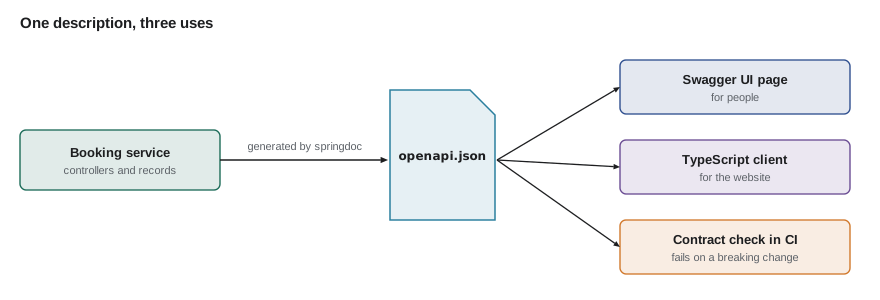
An OpenAPI document is a JSON or YAML file that lists an API's paths, the operations on each (GET, POST and so on), their parameters, request bodies and possible responses, and a section of reusable schemas that describe the JSON shapes. It began as Swagger in 2011 and became the OpenAPI Specification under the Linux Foundation in 2016. Versions 3.0 and 3.1 are the ones most tools produce today, and version 3.2 was published in September 2025. Because the description is data, tools can turn it into a documentation page, generate client code in TypeScript for the website, run mock servers and check that the real service still matches.
| Section | Holds | Example from the booking API |
|---|---|---|
| info | Title, version, contact | Second Gear booking API, 1.0.0 |
| servers | Base URLs | https://api.secondgear.org |
| paths | Each path with its operations | /api/v1/repair-bookings: post, get |
| parameters | Path, query and header inputs of an operation | date (query, string, format date) |
| requestBody | The body an operation accepts | NewBooking as application/json |
| responses | Each status code with its body | 201 BookingView, 400 and 409 ProblemDetail |
| components.schemas | Reusable JSON shapes | NewBooking, BookingView, ProblemDetail |
| components.securitySchemes | How callers authenticate | HTTP Basic for staff |
Schemas from records
Most of an OpenAPI document can be worked out from the code. A record's components give the property names and Java types, and the types map to JSON Schema types: String to string, int and long to integer, boolean to boolean, LocalDate to a string with format date, and a List to an array. Constraint annotations add detail, such as a maximum length or a required property. The example does that mapping with reflection, which is exactly how springdoc builds the components.schemas section.
import java.lang.reflect.*;
import java.time.*;
import java.util.*;

public class Main {
    record NewBooking(String customer, String phone, String email, LocalDateTime start, String bike, String problem) {}
    record BookingView(long id, String customer, LocalDateTime start, String status, List<String> parts) {}
    record PartAvailability(String code, String name, String availability, LocalDate expected) {}

    static String jsonType(Type t) {
        if (t == String.class) return "{type: string}";
        if (t == int.class || t == long.class || t == Integer.class || t == Long.class) return "{type: integer}";
        if (t == boolean.class) return "{type: boolean}";
        if (t == LocalDate.class) return "{type: string, format: date}";
        if (t == LocalDateTime.class) return "{type: string, format: date-time}";
        if (t instanceof ParameterizedType p && p.getRawType() == List.class)
            return "{type: array, items: " + jsonType(p.getActualTypeArguments()[0]) + "}";
        return "{$ref: '#/components/schemas/" + ((Class<?>) t).getSimpleName() + "'}";
    }

    static void schema(Class<?> record) {
        System.out.println("    " + record.getSimpleName() + ":");
        System.out.println("      type: object");
        System.out.println("      properties:");
        for (RecordComponent c : record.getRecordComponents())
            System.out.println("        " + c.getName() + ": " + jsonType(c.getGenericType()));
    }

    public static void main(String[] args) {
        System.out.println("components:");
        System.out.println("  schemas:");
        for (Class<?> c : List.of(NewBooking.class, BookingView.class, PartAvailability.class)) schema(c);
    }
}components:
schemas:
NewBooking:
type: object
properties:
customer: {type: string}
phone: {type: string}
email: {type: string}
start: {type: string, format: date-time}
bike: {type: string}
problem: {type: string}
BookingView:
type: object
properties:
id: {type: integer}
customer: {type: string}
start: {type: string, format: date-time}
status: {type: string}
parts: {type: array, items: {type: string}}
PartAvailability:
type: object
properties:
code: {type: string}
name: {type: string}
availability: {type: string}
expected: {type: string, format: date}What this code does
getRecordComponents returns a record's components in declaration order, each with its name and generic type, so the schema lists properties in the same order as the record. jsonType maps each Java type to its JSON Schema form, and for a List it reads the element type from the ParameterizedType and maps that too. Any other class becomes a reference to its own schema, which is how OpenAPI shares shapes between operations.
springdoc-openapi
springdoc-openapi is the library most Spring Boot projects use to generate the document. Its 3.0 line supports Spring Boot 4. Add the starter and the application serves the document at /v3/api-docs (and /v3/api-docs.yaml) and an interactive Swagger UI page at /swagger-ui.html, where a developer can read every operation and try it. springdoc reads the mappings, parameter types, request and response types, Bean Validation annotations and Spring Security configuration, so a great deal is right with no extra work.
dependencies {
    implementation("org.springframework.boot:spring-boot-starter-webmvc")
    implementation("org.springframework.boot:spring-boot-starter-validation")
    implementation("org.springdoc:springdoc-openapi-starter-webmvc-ui:3.0.3")
}
What this code does
One dependency adds both the document endpoint and the Swagger UI page. Check the springdoc website for the current 3.0.x release when you start; the major version must match Spring Boot 4. The validation starter matters here too, because springdoc turns @NotBlank and @Size into required and maxLength in the schemas.
Generated descriptions are accurate about shapes but thin on meaning. Annotations from the io.swagger.v3.oas.annotations package add summaries, descriptions, examples and the error responses that the code does not declare. Keep them short: the aim is to say what a developer cannot guess, such as what a 409 means for this operation.
@Tag(name = "Repair bookings", description = "Book, read and cancel workshop repairs")
@RestController
@RequestMapping("/api/v1/repair-bookings")
class RepairBookingController {

    @Operation(summary = "Book a repair",
               description = "Books one slot. Slots start on the hour or half hour, 09:00 to 15:00, Tuesday to Saturday.")
    @ApiResponse(responseCode = "201", description = "Booked; the Location header gives the booking's URL")
    @ApiResponse(responseCode = "400", description = "Invalid fields",
                 content = @Content(mediaType = "application/problem+json", schema = @Schema(implementation = ProblemDetail.class)))
    @ApiResponse(responseCode = "409", description = "Someone else booked the slot first",
                 content = @Content(mediaType = "application/problem+json", schema = @Schema(implementation = ProblemDetail.class)))
    @PostMapping
    ResponseEntity<BookingView> create(@Valid @RequestBody NewBooking request, UriComponentsBuilder uris) { ... }
}

public record NewBooking(
        @Schema(example = "Ana Ferreira") @NotBlank @Size(max = 80) String customer,
        @Schema(example = "555-555-0142") @NotBlank String phone,
        @Schema(example = "2028-05-06T10:30") @NotNull @Future LocalDateTime start,
        @Schema(example = "Trek FX 2") @NotBlank @Size(max = 40) String bike,
        @Schema(description = "What is wrong, in the customer's words") @Size(max = 500) String problem) { }
What this code does
@Tag groups the operations under a heading in Swagger UI, and @Operation adds a summary and the rules a developer needs to know. Each @ApiResponse documents a status the code can return, including the problem documents from the advice class, which springdoc cannot discover on its own. @Schema examples fill the Try it out form with realistic values.
@Bean
OpenAPI bookingApi() {
    return new OpenAPI()
            .info(new Info().title("Second Gear booking API").version("1.0.0")
                    .description("Repair slots, bookings and part availability for Second Gear Cycles."))
            .components(new Components().addSecuritySchemes("staff",
                    new SecurityScheme().type(SecurityScheme.Type.HTTP).scheme("basic")));
}
What this code does
An OpenAPI bean supplies the parts of the document that cannot come from controllers: the title, the version and the description. It also declares the staff security scheme, HTTP Basic, which operations can then reference. springdoc merges this bean with what it generates from the code.
springdoc:
  api-docs:
    enabled: true
  swagger-ui:
    enabled: true
---
spring:
  config:
    activate:
      on-profile: prod
springdoc:
  swagger-ui:
    enabled: false
What this code does
In production the document stays available for tools, while the interactive page is turned off. Whether to publish the document at all is a choice: the booking API's public operations are no secret, and the document doubles as the inventory OWASP asks for. Staff-only operations are still protected by the security rules whether or not they are documented.
Describing the routes
The paths section is built from the controller mappings. The next example plays the part of springdoc's scan: it reads a small route table, the kind of information Spring MVC keeps for every @GetMapping and @PostMapping, and prints the paths section with each operation's summary, parameters and responses. The routes are sorted by path so that the output is stable.
import java.util.*;

public class Main {
    record Param(String name, String in, String type, boolean required) {}
    record Route(String method, String path, String summary, List<Param> params, String body, Map<Integer, String> responses) {}

    public static void main(String[] args) {
        List<Route> routes = new ArrayList<>(List.of(
            new Route("post", "/api/v1/repair-bookings", "Book a repair", List.of(), "NewBooking",
                    Map.of(201, "BookingView", 400, "ProblemDetail", 409, "ProblemDetail")),
            new Route("get", "/api/v1/repair-slots", "Free slots for a day",
                    List.of(new Param("date", "query", "string, format: date", true)), null,
                    Map.of(200, "array of SlotView", 400, "ProblemDetail")),
            new Route("get", "/api/v1/parts/{code}/availability", "Is a part in stock?",
                    List.of(new Param("code", "path", "string", true)), null,
                    Map.of(200, "PartAvailability", 404, "ProblemDetail")),
            new Route("get", "/api/v1/repair-bookings/{id}", "Read one booking",
                    List.of(new Param("id", "path", "integer", true), new Param("reference", "query", "string", false)), null,
                    Map.of(200, "BookingView", 404, "ProblemDetail"))));
        routes.sort(Comparator.comparing(Route::path).thenComparing(Route::method));

        System.out.println("paths:");
        String lastPath = "";
        for (Route r : routes) {
            if (!r.path().equals(lastPath)) { System.out.println("  " + r.path() + ":"); lastPath = r.path(); }
            System.out.println("    " + r.method() + ":");
            System.out.println("      summary: " + r.summary());
            for (Param p : r.params())
                System.out.println("      - parameter " + p.name() + " in " + p.in() + " (" + p.type() + ")" + (p.required() ? " required" : ""));
            if (r.body() != null) System.out.println("      requestBody: " + r.body());
            new TreeMap<>(r.responses()).forEach((code, schema) -> System.out.println("      " + code + ": " + schema));
        }
    }
}paths:
/api/v1/parts/{code}/availability:
get:
summary: Is a part in stock?
- parameter code in path (string) required
200: PartAvailability
404: ProblemDetail
/api/v1/repair-bookings:
post:
summary: Book a repair
requestBody: NewBooking
201: BookingView
400: ProblemDetail
409: ProblemDetail
/api/v1/repair-bookings/{id}:
get:
summary: Read one booking
- parameter id in path (integer) required
- parameter reference in query (string)
200: BookingView
404: ProblemDetail
/api/v1/repair-slots:
get:
summary: Free slots for a day
- parameter date in query (string, format: date) required
200: array of SlotView
400: ProblemDetailWhat this code does
Each route carries what OpenAPI needs about an operation: method, path, summary, parameters, request body and the schema for each status. Sorting by path and method, and printing the responses through a TreeMap, keeps the output in a fixed order even though the input maps have none. The document lists the public operations together, which is what Tamsin needed to start on the website.
The document as a contract
Once the website depends on the API, the OpenAPI document becomes a contract: a promise about what the service accepts and returns. Some changes keep the promise and some break it. Adding an optional request field, a new response field or a new endpoint is backward compatible. Removing or renaming a field, making an optional field required, changing a type, or removing an endpoint is a breaking change, and needs a new version path such as /api/v2. The team saved the generated document in the repository and added a check to the build that compared the new document with the saved one and failed on breaking changes.
import java.util.*;

public class Main {
    record Field(String type, boolean required) {}

    static List<String> breakingChanges(String schema, Map<String, Field> before, Map<String, Field> after, boolean isRequest) {
        List<String> problems = new ArrayList<>();
        for (var e : new TreeMap<>(before).entrySet()) {
            Field now = after.get(e.getKey());
            if (now == null) problems.add(schema + "." + e.getKey() + " was removed");
            else if (!now.type().equals(e.getValue().type()))
                problems.add(schema + "." + e.getKey() + " changed type from " + e.getValue().type() + " to " + now.type());
            else if (isRequest && now.required() && !e.getValue().required())
                problems.add(schema + "." + e.getKey() + " became required");
        }
        for (var e : new TreeMap<>(after).entrySet())
            if (isRequest && !before.containsKey(e.getKey()) && e.getValue().required())
                problems.add(schema + "." + e.getKey() + " is a new required field");
        return problems;
    }

    public static void main(String[] args) {
        Map<String, Field> v1 = Map.of("customer", new Field("string", true), "phone", new Field("string", true),
                "start", new Field("date-time", true), "bike", new Field("string", true), "problem", new Field("string", false));

        Map<String, Field> safe = new HashMap<>(v1);
        safe.put("email", new Field("string", false));

        Map<String, Field> risky = new HashMap<>(v1);
        risky.remove("customer");
        risky.put("firstName", new Field("string", true));
        risky.put("lastName", new Field("string", true));
        risky.put("problem", new Field("string", true));

        System.out.println("Add optional email: " + breakingChanges("NewBooking", v1, safe, true));
        System.out.println("Split the name:");
        breakingChanges("NewBooking", v1, risky, true).forEach(p -> System.out.println("  " + p));
    }
}Add optional email: [] Split the name: NewBooking.customer was removed NewBooking.problem became required NewBooking.firstName is a new required field NewBooking.lastName is a new required field
What this code does
The check compares each property of the old request schema with the new one and reports removals, type changes and fields that became required, then reports new fields that are required. Adding an optional email breaks nothing, so the first list is empty. Splitting the customer name into two required fields and making problem required gives four problems, which is the signal to keep v1 as it is and publish the change as v2.
Response schemas follow the opposite rule: adding a required field to a response is safe, because old clients ignore what they do not read, but removing one breaks clients that read it. Tools such as openapi-diff and oasdiff make these comparisons on full documents. Whatever tool is used, the habit that matters is running the check on every pull request.
curl -s http://localhost:8080/v3/api-docs.yaml | head -20openapi: 3.1.0
info:
title: Second Gear booking API
description: "Repair slots, bookings and part availability for Second Gear Cycles."
version: 1.0.0
servers:
- url: http://localhost:8080
description: Generated server url
paths:
/api/v1/repair-bookings:
post:
tags:
- Repair bookings
summary: Book a repair
description: "Books one slot. Slots start on the hour or half hour, 09:00 to 15:00, Tuesday to Saturday."
operationId: create
requestBody:
content:
application/json:
schema:
$ref: "#/components/schemas/NewBooking"What this code does
The document is served by the running application. The first lines show the info section from the OpenAPI bean and the start of the paths generated from the controllers.
Try it yourself
Mark the required properties
The records use a home-made @Required annotation. Complete required so that it returns the names of the components marked @Required, in declaration order, by reading the annotation with reflection.
Print the list for both records.
import java.lang.annotation.*;
import java.lang.reflect.*;
import java.util.*;

public class Main {
    @Retention(RetentionPolicy.RUNTIME)
    @Target({ElementType.RECORD_COMPONENT, ElementType.FIELD, ElementType.METHOD, ElementType.PARAMETER})
    @interface Required {}

    record NewBooking(@Required String customer, @Required String phone, String email, @Required String start, String problem) {}
    record SlotQuery(@Required String date, String mechanic) {}

    static List<String> required(Class<?> record) {
        return List.of();
    }

    public static void main(String[] args) {
        System.out.println("NewBooking required: " + required(NewBooking.class));
        System.out.println("SlotQuery required: " + required(SlotQuery.class));
    }
}
Try it yourself
Check a response against its schema
Complete missing so that it returns, in schema order, the property names in schema that do not appear as keys in the flat JSON object json.
A key appears when the JSON contains the name in quotation marks followed by a colon.
import java.util.*;

public class Main {
    static List<String> missing(List<String> schema, String json) {
        return List.of();
    }

    public static void main(String[] args) {
        List<String> bookingView = List.of("id", "customer", "start", "status");
        System.out.println(missing(bookingView, "{\"id\":2041,\"customer\":\"Ana Ferreira\",\"start\":\"2028-05-06T10:30:00\",\"status\":\"BOOKED\"}"));
        System.out.println(missing(bookingView, "{\"id\":2042,\"name\":\"Dev Okafor\",\"start\":\"2028-05-06T11:00:00\"}"));
    }
}
Tamsin left with a link to the Swagger UI page on the development server and a TypeScript client generated from the document. "If you change it," she said, "the build tells you before I find out." Hamza agreed that was the deal.
Common mistakes
MistakeWriting API documentation by hand in a separate document.
InsteadGenerate the OpenAPI document from the code and add annotations only for meaning.
MistakeLeaving error responses undocumented.
InsteadDocument each status an operation can return, including the problem documents.
MistakeRenaming a request field in v1 because the new name is nicer.
InsteadTreat it as a breaking change: keep v1 and add the new shape in v2.
MistakeHiding staff endpoints from the document and calling them secure.
InsteadProtect them with security rules; documentation is not access control.
MistakeChecking compatibility by eye before a release.
InsteadCompare the new document with the saved one automatically on every pull request.
Summary and key terms
- The OpenAPI Specification describes an HTTP API as JSON or YAML: info, servers, paths with their operations, parameters, request bodies and responses, and reusable schemas in components.
- Versions 3.0 and 3.1 are common and 3.2 is the newest. springdoc-openapi 3.0 generates the document for Spring Boot 4 at /v3/api-docs and an interactive Swagger UI page, reading mappings, types, validation annotations and security; @Tag, @Operation, @ApiResponse and @Schema add meaning, and an OpenAPI bean supplies the info and security schemes.
- Schemas are derived from records by reflection over their components.
- The document is a contract: optional additions are compatible, while removals, renames, type changes and new required request fields are breaking and need a new version.
- An automated comparison on every pull request enforces it.
- OpenAPI Specification
- A standard format for describing HTTP APIs, formerly called Swagger.
- Path item
- An entry in the paths section holding the operations for one URL template.
- Operation
- One HTTP method on one path, with its parameters and responses.
- Schema
- A JSON Schema description of the shape of a request or response body.
- springdoc-openapi
- The library that generates OpenAPI documents from Spring controllers.
- Swagger UI
- An interactive web page that displays an OpenAPI document and can send requests.
- /v3/api-docs
- The default path of springdoc's generated document.
- API contract
- The promise a published API description makes to its clients.
- Backward compatible
- A change that existing clients can accept without being changed.
- Breaking change
- A change that can make existing clients fail.
Practice problems
Work each problem on paper first, then reveal the answer to check.
Where does springdoc serve the generated document by default?
Show answer
At /v3/api-docs, with a YAML version at /v3/api-docs.yaml.
Which annotation documents an error status an operation can return?
Show answer
@ApiResponse.
Is adding an optional email field to the request a breaking change?
Show answer
No; existing clients can keep sending requests without it.
Is renaming customer to fullName in the request a breaking change?
Show answer
Yes; old clients send a field the service no longer reads, and omit the new one.
Does leaving an endpoint out of the document secure it?
Show answer
No; only the security rules control access.
Lesson quiz · 5 questions
Score 60% or more to complete this lesson.
Create a free account to save your progress, take quizzes and earn a certificate.