
JAVA-260 · Lesson 3 of 12 · 27 min
Building REST controllers
▶ Video coming soon A video version of this lesson is on the way.
On Wednesday, January 26, Ingrid wrote the four questions from the first evening on the whiteboard again and asked Hamza to turn each one into a line of the form *method, path, status, body*. That one exercise is most of REST design. This lesson covers what a resource-oriented API looks like, how Spring MVC's @RestController methods map to requests, how path variables, query parameters and request bodies reach your code, how records become JSON, and how a controller chooses the status code and headers of its response.
Resources, methods and status codes
REST is a style for HTTP APIs in which the URLs name *things*, called resources, and the HTTP method says what to do with them. The shop's resources are parts, repair slots and repair bookings. A collection has a plural path, such as /api/v1/repair-bookings, and one member of it adds an identifier, such as /api/v1/repair-bookings/2041. GET reads, POST creates a new member of a collection, PUT replaces a member, PATCH changes part of it and DELETE removes it. GET, PUT and DELETE are idempotent: doing them twice has the same effect as doing them once, which matters when a client retries after a timeout. POST is not, which is why a retried booking can create two bookings unless the API guards against it.
| Request | Meaning | Success status |
|---|---|---|
| GET /api/v1/parts/BELL | Read one part | 200 OK, or 404 Not Found |
| GET /api/v1/parts?shelf=A3 | Search the collection | 200 OK with a list, possibly empty |
| GET /api/v1/repair-slots?date=2028-05-06 | Read the free slots for a day | 200 OK |
| POST /api/v1/repair-bookings | Create a booking | 201 Created with a Location header |
| PATCH /api/v1/repair-bookings/2041 | Change part of a booking, such as the time | 200 OK |
| DELETE /api/v1/repair-bookings/2041 | Cancel a booking | 204 No Content |
Status codes come in families. Codes in the 200s mean success, 300s mean the client should look elsewhere, 400s mean the client sent something wrong and 500s mean the server failed. The ones a REST service uses most are 200 OK, 201 Created, 204 No Content, 400 Bad Request, 401 Unauthorized (not signed in), 403 Forbidden (signed in but not allowed), 404 Not Found, 409 Conflict (the request clashes with the current state, such as a slot already taken), 422 Unprocessable Content (well-formed but invalid) and 500 Internal Server Error. Choosing them carefully is a kindness to whoever writes the client, which in this course will be Hamza himself when the website comes.
The /api/v1 at the start of every path is a version. When the shop one day needs an incompatible change, such as splitting a customer's name into two fields, it can publish /api/v2 alongside v1 so that the counter app and the website can move across at their own pace. Spring Framework 7 added first-class support for API versioning, which can read the version from the path, a header, a query parameter or the media type; the course keeps the simplest choice, the path.
Routing by hand
Spring's DispatcherServlet receives every request and finds the controller method whose mapping matches the method and path. The example below does the same job in miniature on the JDK's HttpServer: a list of routes, each with a method and a path pattern in which {code} marks a variable part. The router tries each route, extracts the variables and calls the handler. Parts are kept in a map, and the handler writes JSON by hand.
import com.sun.net.httpserver.*;
import java.net.*;
import java.net.http.*;
import java.nio.charset.StandardCharsets;
import java.util.*;
import java.util.function.Function;

public class Main {
    record Part(String code, String name, String shelf, int quantity) {
        String json() {
            return "{\"code\":\"" + code + "\",\"name\":\"" + name + "\",\"shelf\":\"" + shelf + "\",\"quantity\":" + quantity + "}";
        }
    }
    record Reply(int status, String body) {}
    record Route(String method, String pattern, Function<Map<String, String>, Reply> handler) {}

    static Map<String, String> match(String pattern, String path) {
        String[] p = pattern.split("/"), a = path.split("/");
        if (p.length != a.length) return null;
        Map<String, String> vars = new LinkedHashMap<>();
        for (int i = 0; i < p.length; i++) {
            if (p[i].startsWith("{")) vars.put(p[i].substring(1, p[i].length() - 1), a[i]);
            else if (!p[i].equals(a[i])) return null;
        }
        return vars;
    }

    public static void main(String[] args) throws Exception {
        Map<String, Part> parts = new TreeMap<>(Map.of(
                "BELL", new Part("BELL", "Brass bell", "A3", 14),
                "TUBE-700", new Part("TUBE-700", "Inner tube 700x25", "B1", 40)));
        List<Route> routes = List.of(
                new Route("GET", "/api/v1/parts", v -> new Reply(200,
                        "[" + String.join(",", parts.values().stream().map(Part::json).toList()) + "]")),
                new Route("GET", "/api/v1/parts/{code}", v -> {
                    Part p = parts.get(v.get("code"));
                    return p == null ? new Reply(404, "{\"error\":\"no such part\"}") : new Reply(200, p.json());
                }));

        HttpServer server = HttpServer.create(new InetSocketAddress("127.0.0.1", 0), 0);
        server.createContext("/", ex -> {
            Reply reply = new Reply(404, "{\"error\":\"no route\"}");
            for (Route r : routes) {
                Map<String, String> vars = match(r.pattern(), ex.getRequestURI().getPath());
                if (vars != null && r.method().equals(ex.getRequestMethod())) { reply = r.handler().apply(vars); break; }
            }
            byte[] body = reply.body().getBytes(StandardCharsets.UTF_8);
            ex.getResponseHeaders().add("Content-Type", "application/json");
            ex.sendResponseHeaders(reply.status(), body.length);
            try (var out = ex.getResponseBody()) { out.write(body); }
        });
        server.start();
        try {
            HttpClient client = HttpClient.newHttpClient();
            String base = "http://127.0.0.1:" + server.getAddress().getPort();
            for (String path : List.of("/api/v1/parts", "/api/v1/parts/BELL", "/api/v1/parts/HORN")) {
                HttpResponse<String> res = client.send(HttpRequest.newBuilder(URI.create(base + path)).build(),
                        HttpResponse.BodyHandlers.ofString());
                System.out.println("GET " + path + " -> " + res.statusCode() + " " + res.body());
            }
        } finally {
            server.stop(0);
        }
    }
}GET /api/v1/parts -> 200 [{"code":"BELL","name":"Brass bell","shelf":"A3","quantity":14},{"code":"TUBE-700","name":"Inner tube 700x25","shelf":"B1","quantity":40}]
GET /api/v1/parts/BELL -> 200 {"code":"BELL","name":"Brass bell","shelf":"A3","quantity":14}
GET /api/v1/parts/HORN -> 404 {"error":"no such part"}What this code does
The match method compares a pattern and a path segment by segment, copying the segment under each braced name into the map of variables, which is exactly what a path variable is. The single context on / sends every request to the router, which picks the first route whose method and pattern fit. A known code gets 200 and its JSON, and an unknown code gets 404 with a short error body instead of an empty page.
The same API in Spring MVC
In Spring, the route table is written as annotations on controller methods. @RestController marks a class whose methods return data to be written as the response body, rather than the names of web pages. @RequestMapping on the class sets a path prefix, and @GetMapping, @PostMapping, @PutMapping, @PatchMapping and @DeleteMapping map individual methods. Parameters marked @PathVariable receive pieces of the path, @RequestParam receives query parameters, and @RequestBody receives the request body converted from JSON into a record.
package org.secondgear.api.parts;

import java.util.List;
import org.springframework.http.ResponseEntity;
import org.springframework.web.bind.annotation.*;

@RestController
@RequestMapping("/api/v1/parts")
class PartController {
    private final PartCatalog catalog;

    PartController(PartCatalog catalog) {
        this.catalog = catalog;
    }

    @GetMapping
    List<PartView> search(@RequestParam(required = false) String shelf) {
        return shelf == null ? catalog.all() : catalog.onShelf(shelf);
    }

    @GetMapping("/{code}")
    ResponseEntity<PartView> one(@PathVariable String code) {
        return catalog.find(code)
                .map(ResponseEntity::ok)
                .orElseGet(() -> ResponseEntity.notFound().build());
    }
}

record PartView(String code, String name, String shelf, int quantity, String availability) {}
What this code does
The class-level mapping gives both methods the /api/v1/parts prefix. The search method returns a list, which Spring writes as a JSON array with status 200, and its shelf parameter is optional so that a plain GET lists everything. The one method returns a ResponseEntity so that it can choose between 200 with a body and 404 with none, depending on whether the part exists.
The controller does no work of its own. It translates between HTTP and a call on PartCatalog, a service, and translates the answer back. That is the rule Hamza had learned in the design course on Tuesdays as a driving adapter: the controller is the web adapter for the application's booking and stock ports, and business rules live behind those ports where tests can reach them without HTTP.
Path variables and query parameters
A path variable identifies *which* resource: the part code, the booking number. A query parameter refines a request for a collection: which shelf, which date, which page. Both arrive as text, and the framework converts them to the parameter's type. A parameter declared as LocalDate receives a date parsed from 2028-05-06, and a request with 2028-13-06 fails with 400 Bad Request before your method runs. Query strings are URL-encoded, so a space travels as a plus sign or an escape code and an ampersand inside a value is escaped too, and the framework decodes them for you. The next example does that decoding and conversion by hand.
import java.net.URI;
import java.net.URLDecoder;
import java.nio.charset.StandardCharsets;
import java.time.LocalDate;
import java.time.format.DateTimeParseException;
import java.util.*;

public class Main {
    static Map<String, String> query(URI uri) {
        Map<String, String> params = new LinkedHashMap<>();
        String raw = uri.getRawQuery();
        if (raw == null) return params;
        for (String pair : raw.split("&")) {
            int eq = pair.indexOf('=');
            String key = URLDecoder.decode(eq < 0 ? pair : pair.substring(0, eq), StandardCharsets.UTF_8);
            String value = eq < 0 ? "" : URLDecoder.decode(pair.substring(eq + 1), StandardCharsets.UTF_8);
            params.put(key, value);
        }
        return params;
    }

    static String slotsRequest(String url) {
        Map<String, String> q = query(URI.create(url));
        String date = q.get("date");
        if (date == null) return "400 Bad Request: date is required";
        try {
            LocalDate d = LocalDate.parse(date);
            return "200 OK: slots for " + d.getDayOfWeek() + " " + d + ", mechanic=" + q.getOrDefault("mechanic", "any");
        } catch (DateTimeParseException e) {
            return "400 Bad Request: date must look like 2028-05-06";
        }
    }

    public static void main(String[] args) {
        System.out.println(query(URI.create("/api/v1/parts?shelf=A3&name=brass+bell&maker=Vale%26Sons")));
        System.out.println(slotsRequest("/api/v1/repair-slots?date=2028-05-06"));
        System.out.println(slotsRequest("/api/v1/repair-slots?date=2028-05-06&mechanic=Leif"));
        System.out.println(slotsRequest("/api/v1/repair-slots?date=2028-13-06"));
        System.out.println(slotsRequest("/api/v1/repair-slots"));
    }
}{shelf=A3, name=brass bell, maker=Vale&Sons}
200 OK: slots for SATURDAY 2028-05-06, mechanic=any
200 OK: slots for SATURDAY 2028-05-06, mechanic=Leif
400 Bad Request: date must look like 2028-05-06
400 Bad Request: date is requiredWhat this code does
URLDecoder turns the plus sign back into a space and the escaped ampersand back into a real one, so the map holds the values the client meant. slotsRequest then converts the date text into a LocalDate, which rejects month 13, and answers 400 with a helpful message when the date is missing or malformed. Spring MVC performs the same steps for a @RequestParam LocalDate parameter before calling the controller.
Records and JSON
Spring Boot writes and reads JSON with Jackson; Boot 4 moved to Jackson 3, whose packages begin with tools.jackson. Jackson maps a record's components to JSON properties of the same name, so a record is the natural shape for request and response bodies. Keep these data transfer objects separate from your database entities. If a controller returned the Part entity directly, every new column, including ones such as the supplier's cost price, would silently appear in the public API. A small PartView record decides exactly what leaves the service.
| Java | JSON written by Jackson |
|---|---|
| String name = "Brass bell" | "name": "Brass bell" |
| int quantity = 14 | "quantity": 14 |
| boolean open = true | "open": true |
| LocalDate date = 2028-05-06 | "date": "2028-05-06" |
| List<String> tags | "tags": ["road", "commuter"] |
| A nested record | A nested JSON object |
| null | null, or left out if the mapper is configured to omit nulls |
Money deserves a word. The shop stores prices as whole cents, an int or long, never as a double, because binary floating point cannot represent most decimal fractions exactly. The API sends cents as well, with a field name that says so, such as priceCents, and the website formats the amount for display. Dates go out as ISO-8601 text, like 2028-05-06, which every language can parse.
Creating a resource
A POST that creates something should answer 201 Created with a Location header giving the path of the new resource, and usually the new resource itself as the body. The client then knows the booking's number and where to read it again. The example accepts a small JSON body, gives the booking the next number and answers with 201, the Location header and the stored booking. The JSON is read with a deliberately small parser that only understands flat objects of strings, which is enough to show what Jackson does for you.
import com.sun.net.httpserver.*;
import java.net.*;
import java.net.http.*;
import java.nio.charset.StandardCharsets;
import java.util.*;
import java.util.regex.*;

public class Main {
    static Map<String, String> flatJson(String json) {
        Map<String, String> m = new LinkedHashMap<>();
        Matcher mt = Pattern.compile("\"(\\w+)\"\\s*:\\s*\"([^\"]*)\"").matcher(json);
        while (mt.find()) m.put(mt.group(1), mt.group(2));
        return m;
    }

    public static void main(String[] args) throws Exception {
        Map<Integer, String> bookings = new TreeMap<>();
        int[] next = {2041};
        HttpServer server = HttpServer.create(new InetSocketAddress("127.0.0.1", 0), 0);
        server.createContext("/api/v1/repair-bookings", ex -> {
            String in = new String(ex.getRequestBody().readAllBytes(), StandardCharsets.UTF_8);
            Map<String, String> f = flatJson(in);
            int id = next[0]++;
            String json = "{\"id\":" + id + ",\"customer\":\"" + f.get("customer") + "\",\"start\":\"" + f.get("start") + "\"}";
            bookings.put(id, json);
            byte[] body = json.getBytes(StandardCharsets.UTF_8);
            ex.getResponseHeaders().add("Location", "/api/v1/repair-bookings/" + id);
            ex.getResponseHeaders().add("Content-Type", "application/json");
            ex.sendResponseHeaders(201, body.length);
            try (var out = ex.getResponseBody()) { out.write(body); }
        });
        server.start();
        try {
            HttpClient client = HttpClient.newHttpClient();
            URI uri = URI.create("http://127.0.0.1:" + server.getAddress().getPort() + "/api/v1/repair-bookings");
            for (String who : List.of("Ana Ferreira", "Dev Okafor")) {
                String body = "{\"customer\":\"" + who + "\",\"start\":\"2028-05-06T10:30\"}";
                HttpRequest req = HttpRequest.newBuilder(uri)
                        .header("Content-Type", "application/json")
                        .POST(HttpRequest.BodyPublishers.ofString(body)).build();
                HttpResponse<String> res = client.send(req, HttpResponse.BodyHandlers.ofString());
                System.out.println(res.statusCode() + " Location: " + res.headers().firstValue("Location").orElse("-"));
                System.out.println("  " + res.body());
            }
            System.out.println("Stored: " + bookings.keySet());
        } finally {
            server.stop(0);
        }
    }
}201 Location: /api/v1/repair-bookings/2041
{"id":2041,"customer":"Ana Ferreira","start":"2028-05-06T10:30"}
201 Location: /api/v1/repair-bookings/2042
{"id":2042,"customer":"Dev Okafor","start":"2028-05-06T10:30"}
Stored: [2041, 2042]What this code does
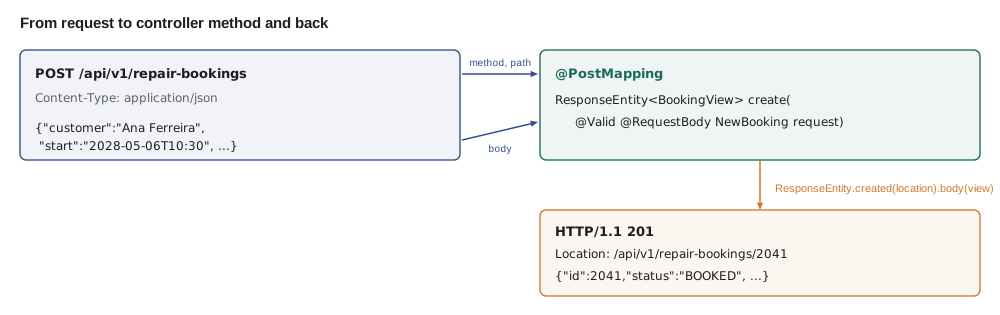
The client sends each booking as a JSON body with a Content-Type header, and the server reads the body bytes, picks out the two fields and assigns the next booking number. The response carries 201, a Location header naming the new booking's path and the stored booking as JSON. The two bookings get numbers 2041 and 2042, which the final line confirms from the server's own map.
@RestController
@RequestMapping("/api/v1/repair-bookings")
class RepairBookingController {
    private final BookingService bookings;

    RepairBookingController(BookingService bookings) {
        this.bookings = bookings;
    }

    @PostMapping
    ResponseEntity<BookingView> create(@RequestBody NewBooking request, UriComponentsBuilder uris) {
        BookingView created = bookings.book(request);
        URI location = uris.path("/api/v1/repair-bookings/{id}").build(created.id());
        return ResponseEntity.created(location).body(created);
    }

    @GetMapping("/{id}")
    BookingView one(@PathVariable long id) {
        return bookings.find(id);
    }

    @DeleteMapping("/{id}")
    @ResponseStatus(HttpStatus.NO_CONTENT)
    void cancel(@PathVariable long id) {
        bookings.cancel(id);
    }
}

record NewBooking(String customer, String phone, LocalDateTime start, String bike, String problem) {}
record BookingView(long id, String customer, LocalDateTime start, String status) {}
What this code does
@RequestBody tells Spring to convert the JSON body into a NewBooking record with Jackson. ResponseEntity.created sets status 201 and the Location header in one call, and UriComponentsBuilder builds the path from the current request, so the link is right behind a proxy too. The cancel method returns nothing and declares 204 No Content with @ResponseStatus.
curl -i -X POST http://localhost:8080/api/v1/repair-bookings \
  -H 'Content-Type: application/json' \
-d '{"customer":"Ana Ferreira","start":"2028-05-06T10:30","bike":"Trek FX 2","problem":"Rear brake rubs"}'HTTP/1.1 201
Location: http://localhost:8080/api/v1/repair-bookings/2041
Content-Type: application/json
{"id":2041,"customer":"Ana Ferreira","start":"2028-05-06T10:30:00","status":"BOOKED"}What this code does
The -X POST option sets the method and -d sends the body. The response shows the status, the Location of the new booking and the booking as JSON.
Content types and status choices
A client says what it sends with the Content-Type header and what it would like back with Accept. A REST controller produces application/json by default. If a client posts a body with another content type, Spring answers 415 Unsupported Media Type, and if it asks for a type the controller cannot produce, 406 Not Acceptable. Hamza's counter app and the future website will both speak JSON, so the defaults are fine, but the errors are worth recognizing when a curl command forgets its -H option.
For each method, decide the status codes before writing the code. Ingrid's rule of thumb for the booking API: reads return 200 or 404; creates return 201 with Location; deletes return 204; requests that are well-formed but break a rule, such as a start time on a Monday when the shop is closed, return 422; and requests that clash with current state, such as a slot already taken, return 409. Lesson 4 turns those decisions into a consistent error format.
Try it yourself
Search by shelf
Complete search so that a query string such as shelf=A3 keeps only parts on that shelf, and an empty or missing query returns every part.
Each line must be printed as code shelf, in code order.
import java.util.*;

public class Main {
    record Part(String code, String shelf) {}

    static List<Part> search(List<Part> parts, String rawQuery) {
        return parts;
    }

    public static void main(String[] args) {
        List<Part> parts = List.of(new Part("BELL", "A3"), new Part("CHAIN-11", "C2"),
                new Part("GRIPS", "A3"), new Part("TUBE-700", "B1"));
        for (String q : new String[] {"shelf=A3", "shelf=B1", ""}) {
            System.out.println("?" + q);
            for (Part p : search(parts, q)) System.out.println("  " + p.code() + " " + p.shelf());
        }
    }
}
Try it yourself
Choose the status
Complete statusFor so that it returns the right status code for each situation in the list, using the rules in this lesson: 200, 201, 204, 404, 409 or 422.
The program prints each situation with its code.
public class Main {
    static int statusFor(String situation) {
        return 200;
    }

    public static void main(String[] args) {
        String[] cases = {
            "read an existing booking",
            "create a booking",
            "cancel a booking",
            "read a booking that does not exist",
            "book a slot someone else already took",
            "book a start time on a Monday, when the shop is closed"
        };
        for (String c : cases) System.out.println(statusFor(c) + " " + c);
    }
}
By the end of the evening, Hamza's PartController answered GET requests against an in-memory catalog, and his RepairBookingController accepted bookings into a list that vanished every time he restarted the application. Making them last was the job for February.
Common mistakes
MistakePutting verbs in paths, such as /api/v1/createBooking.
InsteadName resources with nouns and let the HTTP method say what happens: POST /api/v1/repair-bookings.
MistakeAnswering 200 to every request and putting an error flag in the body.
InsteadUse the status code; clients, proxies and monitoring all rely on it.
MistakeReturning JPA entities straight from controllers.
InsteadReturn small view records so the public API changes only when you mean it to.
MistakeSending prices as floating-point numbers.
InsteadSend whole cents in an integer field whose name says so, such as priceCents.
MistakeWriting business rules inside controller methods.
InsteadKeep controllers thin; they translate HTTP to a service call and back.
Summary and key terms
- A REST API names resources with URLs and uses HTTP methods to act on them: GET reads, POST creates, PUT replaces, PATCH changes part, DELETE removes.
- Status codes report the result: 200, 201 with Location, 204, 400, 404, 409 and 422 are the core set.
- Spring's DispatcherServlet routes each request to a @RestController method chosen by @GetMapping, @PostMapping and the others. @PathVariable takes a piece of the path, @RequestParam a query parameter and @RequestBody the JSON body, all converted to the declared types.
- Jackson writes records as JSON; use view records rather than entities, cents rather than doubles and ISO-8601 dates.
- ResponseEntity lets a method choose status, headers and body.
- Versioning the path with /api/v1 leaves room for incompatible changes later.
- Resource
- A thing an API exposes, named by a URL, such as a repair booking.
- Idempotent
- Having the same effect whether a request is made once or several times.
- @RestController
- Marks a class whose methods return data written as the response body.
- Path variable
- A part of the URL path that identifies a resource, received with @PathVariable.
- Query parameter
- A name and value after the ? in a URL, received with @RequestParam.
- @RequestBody
- Converts the request body, usually JSON, into a Java object.
- ResponseEntity
- A return type that carries a status code, headers and body.
- Location header
- A response header that gives the URL of a newly created resource.
- Data transfer object
- A simple object, often a record, shaped for the API rather than the database.
- URL encoding
- Writing special characters in a URL as escape codes made of a marker sign and two hexadecimal digits.
Practice problems
Work each problem on paper first, then reveal the answer to check.
Which status and header should a successful create return?
Show answer
201 Created with a Location header naming the new resource.
Is POST idempotent?
Show answer
No; repeating it can create a second resource.
How should the API ask for the free slots on May 6, 2028?
Show answer
GET /api/v1/repair-slots?date=2028-05-06
Why not return the Part entity from a controller?
Show answer
New database fields would leak into the public API without anyone deciding to publish them.
A slot is already taken. Which status fits?
Show answer
409 Conflict.
Lesson quiz · 5 questions
Score 60% or more to complete this lesson.
Create a free account to save your progress, take quizzes and earn a certificate.