
JAVA-120 · Lesson 9 of 12 · 19 min
Code style and formatting
▶ Video coming soon A video version of this lesson is on the way.
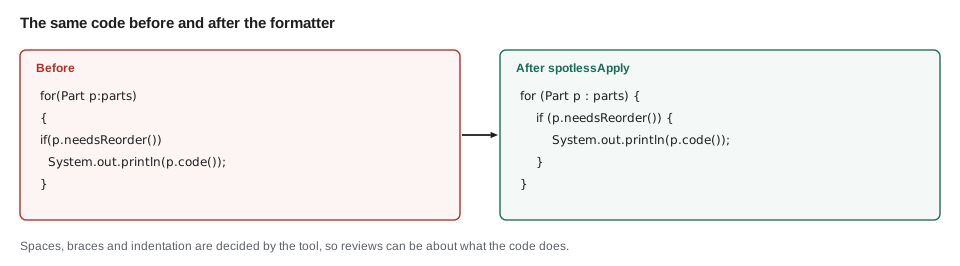
Ingrid had started reviewing Hamza's ShopBook code on Wednesdays, and on Monday, March 15, 2027 Hamza brought Leif a complaint: half her comments were about spaces, braces and names rather than about whether the code worked. Leif's answer surprised him. Those comments, he said, are the ones a machine should be making, and once it does, reviews can be about what matters. Tonight's job is to agree on a style, write it down where tools can read it, and let the tools enforce it.
Why style matters
Code is read far more often than it is written: by reviewers, by teammates fixing bugs and by its own author six months later. A consistent style, the same names, layout and habits everywhere, lets a reader stop noticing the form and see the logic. It also keeps version-control history clean. If two developers' editors format the same file differently, every commit is full of meaningless whitespace changes that hide the real ones. The particular rules matter less than having one set and applying it everywhere.
Java naming conventions
Java's naming conventions are nearly universal, set by the original Java code conventions and repeated in every major style guide. Following them is not optional in practice: a class called stock_item or a method called GetTotal marks code as written by someone new to Java.
| Kind of name | Convention | Examples |
|---|---|---|
| Package | all lower case, reversed domain | org.secondgear.parts |
| Class, interface, record, enum | UpperCamelCase, usually a noun | PartsDesk, BookingService, Money |
| Method | lowerCamelCase, usually a verb | needsReorder, orderQuantity, toString |
| Variable, parameter, field | lowerCamelCase | onHand, reorderAt, totalCents |
| Constant (static final, deeply immutable) | UPPER_SNAKE_CASE | MAX_RENTAL_DAYS, TAX_RATE |
| Enum constant | UPPER_SNAKE_CASE | REQUESTED, PICKED_UP |
| Type parameter | one capital letter | T, E, K, V |
Beyond the casing, a good name says what something means, not what type it is or how it is computed. reorderAt beats level2, and onHandCount beats n except in a short loop. Booleans read best as questions, such as needsReorder or isSnapshot. Abbreviations save typing once and cost reading every time; Leif's rule is to abbreviate only what everyone in the shop abbreviates already, such as qty.
public class Main {
    public static void main(String[] args) {
        int[] a = {4, 22, 3};
        int[] b = {10, 8, 4};
        int c = 0;
        for (int i = 0; i < a.length; i++) {
            if (a[i] <= b[i]) c++;
        }
        System.out.println(c);

        int[] onHand = {4, 22, 3};
        int[] reorderAt = {10, 8, 4};
        int partsToReorder = 0;
        for (int i = 0; i < onHand.length; i++) {
            boolean needsReorder = onHand[i] <= reorderAt[i];
            if (needsReorder) partsToReorder++;
        }
        System.out.println("Parts to reorder: " + partsToReorder);
    }
}2 Parts to reorder: 2
What this code does
Both halves of main compute the same thing and print 2. The first half uses one-letter names, so a reader has to work out what a, b and c mean from how they are used. The second half names every value for what it represents, and even names the condition, so it reads almost as a sentence.
Layout
Layout rules decide how code sits on the page: indentation, where braces go, line length, spaces around operators and how long lines are wrapped. Java code overwhelmingly puts the opening brace at the end of the line, not on a line of its own, and always uses braces around if and loop bodies, even one-line ones, because adding a second line to an unbraced body is a classic bug. The two most common style guides differ mainly in numbers.
| Rule | Oracle conventions and IntelliJ defaults | Google Java Style |
|---|---|---|
| Indentation | 4 spaces | 2 spaces |
| Continuation indent | 8 spaces | 4 spaces |
| Line length | 120 characters (IntelliJ default) | 100 characters |
| Wildcard imports | Allowed after several imports from one package | Never |
| Braces | Opening brace at end of line | Opening brace at end of line; always used |
Second Gear's projects use four-space indentation and a 120-character limit, IntelliJ's defaults, because that is what Hamza's college uses. What matters is that the choice is written down.
public class Main {
    static final int MAX_RENTAL_DAYS = 14;
    static final int FREE_DAY_EVERY = 7;

    static int chargedDays(int days) {
        if (days < 1 || days > MAX_RENTAL_DAYS) {
            throw new IllegalArgumentException("Rental must be 1 to " + MAX_RENTAL_DAYS + " days");
        }
        return days - days / FREE_DAY_EVERY;
    }

    public static void main(String[] args) {
        for (int days : new int[] {3, 7, 14}) {
            System.out.println(days + " days rented, " + chargedDays(days) + " charged");
        }
    }
}3 days rented, 3 charged 7 days rented, 6 charged 14 days rented, 12 charged
What this code does
The rule that every seventh rental day is free, from JAVA-102's ShopBook, is written with named constants instead of the bare numbers 7 and 14. A reader sees what each number means, and a change to the policy happens in one place. The guard at the top of chargedDays uses braces even though its body is one statement.
A number written straight into code, such as 7 or 0.13, is a magic number: its meaning is in the programmer's head, not the code. Named constants fix that. The exceptions are numbers whose meaning is obvious, such as 0, 1 or 100 when converting dollars to cents.
Let a formatter do it
No one should format code by hand. Every IDE has a reformat command (Ctrl+Alt+L in IntelliJ, Shift+Alt+F in VS Code) that applies a configured style to a file. For a team, two further steps make the style automatic. An .editorconfig file at the project root records basic settings, such as indentation and line endings, in a format almost every editor reads. A formatter run by the build, such as google-java-format or Palantir Java Format, applied through the Spotless plugin for Gradle or Maven, formats every file identically on every computer, and can fail the build if anyone commits unformatted code.
root = true

[*]
charset = utf-8
end_of_line = lf
insert_final_newline = true
trim_trailing_whitespace = true

[*.java]
indent_style = space
indent_size = 4
max_line_length = 120

[*.{kts,xml,yml,toml}]
indent_size = 2
What this code does
root = true stops editors looking for further .editorconfig files in parent folders. The first section applies to every file and fixes the character encoding and line endings, a common source of noise when Windows and macOS users share a project. The Java section sets four-space indentation and the line limit, and build files use two spaces.
plugins {
    application
    id("com.diffplug.spotless") version "7.2.1"
}

spotless {
    java {
        palantirJavaFormat()
        removeUnusedImports()
        trimTrailingWhitespace()
        endWithNewline()
    }
}
What this code does
The Spotless plugin adds two tasks: spotlessApply, which reformats every Java file, and spotlessCheck, which fails if any file is not formatted. Here it uses Palantir Java Format, a formatter that follows the four-space style, and also removes unused imports. spotlessCheck runs as part of gradle check, so an unformatted file fails the build.
$ ./gradlew spotlessCheck> Task :app:spotlessJavaCheck FAILED
FAILURE: Build failed with an exception.
* What went wrong:
Execution failed for task ':app:spotlessJavaCheck'.
> The following files had format violations:
src/main/java/org/secondgear/parts/PartsDesk.java
@@ -9,8 +9,7 @@
·····for·(Part·p·:·parts)·{
-········if(p.needsReorder())
-········{
+········if·(p.needsReorder())·{
············System.out.println(p.code());
········}
Run './gradlew :app:spotlessApply' to fix these violations.What this code does
spotlessCheck reports each file that would change and shows the difference, here a missing space and a brace on its own line. Running spotlessApply fixes them all at once. Teams often run the check on the build server, so formatting is enforced without anyone having to comment on it.
Leif's advice for adopting a formatter on existing code: reformat the whole project in one commit that contains nothing else, so the history shows the style change as a single, ignorable step, and then turn on the check.
Comments that help
The best comment explains why: a business rule, a workaround, a reason a simpler approach was rejected. A comment that repeats what the code says goes out of date the first time the code changes and then actively misleads. If code needs a comment to explain what it does, try first to make the code say it, with better names or an extracted method. Javadoc comments, the documentation for public classes and methods, are a separate kind, and lesson 11 covers them.
public class Main {
    // Bad: repeats the code
    // add one to count
    // Good: explains a rule the code cannot show
    // Kofi counts a part as low at its reorder level, not only below it (Nov 2026).
    static boolean needsReorder(int onHand, int reorderAt) {
        return onHand <= reorderAt;
    }

    static String label(int onHand, int reorderAt) {
        if (!needsReorder(onHand, reorderAt)) {
            return "ok";
        }
        if (onHand == 0) {
            return "OUT OF STOCK";
        }
        return "reorder";
    }

    public static void main(String[] args) {
        int[][] stock = {{4, 10}, {22, 8}, {0, 6}, {8, 8}};
        for (int[] s : stock) {
            System.out.println(s[0] + " on hand, reorder at " + s[1] + ": " + label(s[0], s[1]));
        }
    }
}4 on hand, reorder at 10: reorder 22 on hand, reorder at 8: ok 0 on hand, reorder at 6: OUT OF STOCK 8 on hand, reorder at 8: reorder
What this code does
The useful comment records why the test is less than or equal: it is Kofi's rule, which nobody could guess from the code alone. label uses early returns, so each case is handled and finished before the next, instead of nesting if statements inside each other. The last row shows the rule in action, a part exactly at its level counted as needing a reorder.
Imports and ordering
Style guides also settle smaller questions that otherwise cause endless small diffs. Imports are listed one class per line, without wildcards in Google's style, in a fixed order, with static imports in their own group, and any import the code no longer uses is removed; IntelliJ's Optimize Imports command (Ctrl+Alt+O) and Spotless's removeUnusedImports do this automatically. Inside a class, a common order is constants first, then fields, constructors and methods, with public methods before the private helpers they call. None of these rules makes code run differently. They make every file in a project look as if one careful person wrote it, which is what lets a reader find things without searching.
import static java.util.Objects.requireNonNull;

import java.math.BigDecimal;
import java.util.List;
import java.util.Map;

import org.secondgear.core.Money;
What this code does
Static imports come first in their own group, then the JDK's java packages, then the project's own packages, each group sorted and separated by a blank line. Every import names a single class, so a reader can see exactly where each name comes from. An IDE or formatter keeps this order automatically each time imports change.
Habits beyond formatting
- Keep methods short enough to see at once; when a method needs a comment to separate its sections, extract the sections.
- Return early from guard conditions instead of nesting the main work inside if blocks.
- Declare variables close to where they are used, with the narrowest scope that works.
- Prefer immutable values: final fields, records and unmodifiable collections.
- Delete commented-out code; version control remembers it.
Style guides cover these too, but they are judgement calls a formatter cannot make, which is exactly what code review is for. With formatting automated, Ingrid's comments on ShopBook can move to these.
Try it yourself
Constant names
Complete constantName so it converts a lowerCamelCase name into the UPPER_SNAKE_CASE used for constants: an underscore goes before each capital letter, and everything is upper case.
The program should print MAX_RENTAL_DAYS, TAX_RATE and DEPOSIT.
public class Main {
    static String constantName(String camel) {
        return camel;
    }

    public static void main(String[] args) {
        System.out.println(constantName("maxRentalDays"));
        System.out.println(constantName("taxRate"));
        System.out.println(constantName("deposit"));
    }
}
Try it yourself
Is it a class name?
Complete isClassName so it returns true for a name in UpperCamelCase: it starts with an upper-case letter, contains only letters and digits, and has no underscores.
The program should print true, false, false and true.
public class Main {
    static boolean isClassName(String name) {
        return true;
    }

    public static void main(String[] args) {
        System.out.println(isClassName("PartsDesk"));
        System.out.println(isClassName("stockItem"));
        System.out.println(isClassName("Stock_Item"));
        System.out.println(isClassName("Http2Client"));
    }
}
Common mistakes
MistakeFormatting code by hand, a little differently each time.
InsteadUse the IDE's reformat command and a build formatter such as Spotless.
MistakeMixing a big reformat with real changes in one commit.
InsteadReformat in a separate commit so the history stays readable.
MistakeWriting comments that repeat what the code does.
InsteadExplain why; make the code itself say what.
MistakeLeaving out braces around one-line if bodies.
InsteadAlways use braces, so adding a line cannot change the logic.
MistakeKeeping commented-out code just in case.
InsteadDelete it; version control keeps the history.
Summary and key terms
- A consistent style lets readers see logic instead of form and keeps version-control history clean.
- Java names follow firm conventions: lower-case packages, UpperCamelCase types, lowerCamelCase methods and variables, UPPER_SNAKE_CASE constants, and names that say what things mean.
- Layout rules, such as indentation, braces and line length, differ between the Oracle and Google styles; a team picks one and writes it down.
- Named constants replace magic numbers.
- Formatting is automated with the IDE's reformat command, an .editorconfig file and a build formatter such as google-java-format or Palantir Java Format through Spotless, whose check can fail the build.
- Comments should explain why, not what, and judgement calls such as short methods and early returns are left to code review.
- Code style
- The agreed rules for names, layout and habits in a project's code.
- UpperCamelCase
- Names with each word capitalized and no separators, used for types.
- lowerCamelCase
- Like UpperCamelCase but starting lower case, used for methods and variables.
- UPPER_SNAKE_CASE
- Upper-case words joined by underscores, used for constants.
- Magic number
- A literal number in code whose meaning is not stated.
- Formatter
- A tool that rewrites code into a fixed layout, such as google-java-format.
- Spotless
- A Gradle and Maven plugin that applies formatters and checks formatting.
- .editorconfig
- A file of basic editor settings, such as indentation, read by most editors.
- Early return
- Returning from a method as soon as a case is handled, instead of nesting.
- Code review
- Another developer reading a change before it is merged.
Practice problems
Work each problem on paper first, then reveal the answer to check.
How should a constant for the maximum rental length be named?
Show answer
MAX_RENTAL_DAYS.
What is a magic number?
Show answer
A literal number in the code whose meaning is not stated, such as 7 for the free-day rule.
What does Spotless's spotlessCheck task do?
Show answer
Fails the build if any file is not formatted as configured.
What should a good comment explain?
Show answer
Why the code does something, such as a business rule or a workaround.
Why reformat a whole project in a commit of its own?
Show answer
So the history shows one formatting change instead of hiding it among real changes.
Lesson quiz · 5 questions
Score 60% or more to complete this lesson.
Create a free account to save your progress, take quizzes and earn a certificate.