
JAVA-120 · Lesson 1 of 12 · 23 min
The Java toolchain: javac, java and jar
▶ Video coming soon A video version of this lesson is on the way.
Hamza's PartsDesk worked on his laptop, but when Kofi asked for a copy to try at the shop's counter computer in November, Hamza had to admit he did not know how to give it to him. He had always pressed a Run button. Ingrid knew someone who could help: Leif Quarmby, a build and release engineer at a logistics software company, whose job is making sure code that works on one laptop works everywhere else. Leif agreed to meet Hamza on Monday evenings in the shop's back office through the winter term, starting Monday, January 11, 2027. His first rule was blunt: before using any tool that does the work for you, learn what it is doing. That means the three commands every Java build is made of.
What is in a JDK
A JDK, the Java Development Kit, is the set of programs you need to write Java, not only to run it. The two you use most are javac, the compiler, which turns .java source files into .class files of bytecode, and java, the launcher, which starts a Java Virtual Machine (JVM) and runs that bytecode. Next to them sit tools for packaging (jar), documentation (javadoc), inspecting class files (javap), finding which modules a program needs (jdeps), building a custom runtime (jlink), debugging (jdb) and trying code interactively (jshell). Everything else this course covers, from IntelliJ IDEA to Maven and Gradle, calls these same tools for you.
Several organizations build the JDK from the same open-source code, OpenJDK. Eclipse Temurin, Microsoft Build of OpenJDK, Amazon Corretto, Oracle's OpenJDK builds and Oracle JDK are all Java; they differ in support and licence terms rather than in what your programs can do. Hamza uses Eclipse Temurin 25, the current long-term-support release. The terminal sessions in this course were recorded on a machine with JDK 21, so their version lines show 21; everything in them works the same on 25.
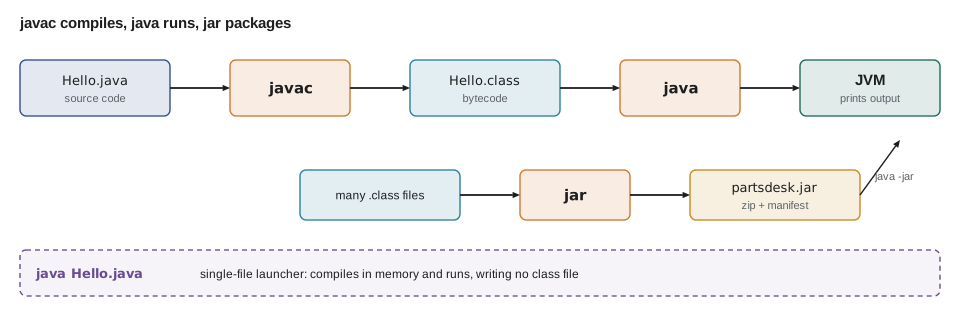
Compiling and running one file
Leif's first exercise was the smallest possible program, typed in a plain text editor and built by hand. The session below is real: javac checks the source and writes Hello.class next to it, and java loads that class and calls its main method. Note that you give javac a file name, with .java, but give java a class name, without .class.
$ javac -version
javac 21.0.12.1
$ java -version
openjdk version "21.0.12.1" 2026-08-18
OpenJDK Runtime Environment (build 21.0.12.1+1-1-24.04.4-Ubuntu)
OpenJDK 64-Bit Server VM (build 21.0.12.1+1-1-24.04.4-Ubuntu, mixed mode, sharing)
$ javac Hello.java
$ ls
Hello.class
Hello.java
src
$ java Hello
Second Gear Cycles: build tools course
Java 21.0.12.1
$ rm Hello.class
$ java Hello.java
Second Gear Cycles: build tools course
Java 21.0.12.1
What this code does
javac -version and java -version show which JDK the terminal is using, which is the first thing to check when a build behaves oddly. javac Hello.java writes Hello.class, and java Hello runs it. The last two commands show the single-file launcher: java Hello.java compiles the source in memory and runs it without writing a class file.
The single-file source launcher, java Hello.java, is handy for quick programs and scripts, and it is how many examples in this course are meant to be tried. It is not how real projects are built, because it compiles one file at a time, keeps nothing and cannot use the other classes of a larger project unless they are already compiled. Since Java 22 it can also launch a program spread over several source files in one folder, but builds of any size still use javac or a build tool.
public class Main {
    public static void main(String[] args) {
        System.out.println("Arguments given: " + args.length);
        for (int i = 0; i < args.length; i++) {
            System.out.println("  args[" + i + "] = " + args[i]);
        }
        String mode = args.length > 0 ? args[0] : "report";
        System.out.println("Mode: " + mode);
        System.out.println("JDK is 21 or later: " + (Runtime.version().feature() >= 21));
    }
}Arguments given: 0 Mode: report JDK is 21 or later: true
What this code does
Everything typed after the class name on the java command line arrives in the args array, so java Main restock would set args[0] to restock. Run with no arguments, the program falls back to report mode. Runtime.version() reports the running JVM's version, which a program can check before it uses newer features.
Command-line arguments are how build tools and scripts pass settings to a Java program. When Leif later wraps PartsDesk in a start script, the script will simply pass its own arguments through to main.
Class files and bytecode
A .class file holds bytecode, a compact set of instructions for the JVM rather than for any particular processor. That is why the same class file runs on Windows, macOS and Linux: each has its own JVM, and the JVM translates bytecode into machine code as the program runs, compiling the busiest parts with its just-in-time (JIT) compiler. The JDK's javap tool shows what a class file contains. Below, javap lists the members of the Part record from PartsDesk, including the methods the compiler generated for it.
$ javap -cp out org.secondgear.parts.Part
Compiled from "Part.java"
public final class org.secondgear.parts.Part extends java.lang.Record {
  public org.secondgear.parts.Part(java.lang.String, java.lang.String, int, int);
  public boolean needsReorder();
  public final java.lang.String toString();
  public final int hashCode();
  public final boolean equals(java.lang.Object);
  public java.lang.String code();
  public java.lang.String name();
  public int onHand();
  public int reorderAt();
}
What this code does
javap reads the compiled Part.class and lists its members without needing the source. The compiler generated the constructor, the accessors, toString, hashCode and equals for the record, and made the class final. Adding -c would also print each method's bytecode instructions.
import java.lang.reflect.RecordComponent;
import java.util.Arrays;

public class Main {
    record Part(String code, String name, int onHand, int reorderAt) { }

    public static void main(String[] args) {
        Class<Part> c = Part.class;
        System.out.println("Class: " + c.getName());
        System.out.println("Is a record: " + c.isRecord());
        System.out.print("Components:");
        for (RecordComponent rc : c.getRecordComponents()) {
            System.out.print(" " + rc.getName() + ":" + rc.getType().getSimpleName());
        }
        System.out.println();
        String[] names = Arrays.stream(c.getDeclaredMethods())
            .map(m -> m.getName()).sorted().toArray(String[]::new);
        System.out.println("Methods: " + String.join(", ", names));
    }
}Class: Main$Part Is a record: true Components: code:String name:String onHand:int reorderAt:int Methods: code, equals, hashCode, name, onHand, reorderAt, toString
What this code does
A running program can ask the JVM about any loaded class through reflection, which is roughly what javap does from outside. The nested record's binary name joins the outer and inner class names with a dollar sign, and each component has an accessor method. Build tools, test frameworks and IDEs all rely on reading class files and classes in this way.
That dollar-sign name also explains something you will see in build folders: every nested class gets its own .class file, named after both classes, so compiling Main.java above produces two class files, not one.
Packages, -d and the class path
PartsDesk has two classes in the package org.secondgear.parts, stored, as JAVA-102 explains, in folders that match the package name. To compile a project like this, pass all the source files to javac and use -d to name an output folder; javac creates the package folders under it. To run it, java needs the class path, the list of folders and JAR files to search for classes, given with -cp, and the fully qualified name of the class with main.
$ javac -d out src/org/secondgear/parts/*.java
$ find out -name "*.class"
out/org/secondgear/parts/Part.class
out/org/secondgear/parts/PartsDesk.class
$ java -cp out org.secondgear.parts.PartsDesk
TUBE-700x25  4  REORDER
PAD-RIM  22
CHAIN-8  3  REORDER
$ jar --create --file partsdesk.jar --main-class org.secondgear.parts.PartsDesk -C out .
$ jar --list --file partsdesk.jar
META-INF/
META-INF/MANIFEST.MF
org/
org/secondgear/
org/secondgear/parts/
org/secondgear/parts/Part.class
org/secondgear/parts/PartsDesk.class
$ java -jar partsdesk.jar
TUBE-700x25  4  REORDER
PAD-RIM  22
CHAIN-8  3  REORDER
What this code does
javac -d out compiles both source files and writes their class files into out, in folders that mirror the package. java -cp out tells the JVM to look for classes in out and to start org.secondgear.parts.PartsDesk. The jar command then packs the classes into one file whose manifest names the main class, so java -jar can run it with no class path at all.
The class path is the single most common source of confusion with Java tools. When java says Error: Could not find or load main class, the cause is almost always one of three things: the class path does not include the folder or JAR that holds the class, the class name is missing its package, or the command is being run from a different folder than you think. When a build tool reports that a class cannot be found, it is the same problem underneath.
public class Main {
    public static void main(String[] args) {
        String[] entries = {"out", "lib/core-1.1.0.jar", "lib/report-2.0.jar"};
        String sep = ":";                    // Windows uses ";"
        String classPath = String.join(sep, entries);
        System.out.println("java -cp " + classPath + " org.secondgear.parts.PartsDesk");

        String fqcn = "org.secondgear.parts.PartsDesk";
        String path = fqcn.replace('.', '/') + ".class";
        System.out.println("The JVM looks for: " + path);
        for (String e : entries) {
            String where = e.endsWith(".jar") ? "inside " + e : e + "/";
            System.out.println("  in " + where + (e.endsWith(".jar") ? " at " + path : path));
        }
    }
}java -cp out:lib/core-1.1.0.jar:lib/report-2.0.jar org.secondgear.parts.PartsDesk The JVM looks for: org/secondgear/parts/PartsDesk.class in out/org/secondgear/parts/PartsDesk.class in inside lib/core-1.1.0.jar at org/secondgear/parts/PartsDesk.class in inside lib/report-2.0.jar at org/secondgear/parts/PartsDesk.class
What this code does
A class path is a list of folders and JAR files joined by a separator, a colon on Linux and macOS and a semicolon on Windows. To find a class, the JVM turns its fully qualified name into a relative path ending in .class and looks in each entry in order. The first match wins, which is why two different versions of the same class on one class path cause confusing bugs.
jar: one file to hand over
A JAR, Java archive, is a zip file of class files plus a folder named META-INF holding a manifest, a small text file of settings. When the manifest names a Main-Class, java -jar can run the archive directly, which is what Kofi needs at the counter: one file to copy and one command to run it. The jar tool's long options, such as --create, --file and --main-class, are clearer than the old single-letter ones (jar cfe), though you will meet both in documentation. Lesson 7 returns to JAR files, manifests and building a small runtime for them.
| Tool | What it does | Typical command |
|---|---|---|
| javac | Compiles .java source files into .class bytecode | javac -d out src/org/secondgear/parts/*.java |
| java | Starts a JVM and runs a class or a JAR | java -cp out org.secondgear.parts.PartsDesk |
| jar | Creates, lists and updates JAR archives | jar --create --file app.jar --main-class Main -C out . |
| javap | Shows the contents of class files | javap -cp out org.secondgear.parts.Part |
| jshell | Tries Java statements interactively | jshell |
| javadoc | Generates HTML documentation from comments | javadoc -d docs -sourcepath src -subpackages org |
| jdeps, jlink | Find a program's modules and build a small runtime | jdeps --print-module-deps app.jar |
Why build tools exist
Typing javac and jar by hand works for two classes. It does not work for the program Hamza is heading towards: dozens of source files, tests that must run before anything is packaged, libraries downloaded from the internet in exactly the right versions, and the same steps run identically on his laptop, Ingrid's machine and a build server. A build tool records those steps in a file kept with the code. Maven and Gradle, the two that dominate Java, are lessons 4 and 5. An IDE, an integrated development environment such as IntelliJ IDEA or VS Code with Java extensions, then reads the build file so that its Run button does exactly what the build does. Leif's point in starting here was that when either tool fails, its error messages are about javac, java and the class path, and now Hamza can read them.
import java.util.List;

public class Main {
    record Step(String tool, String input, String output) { }

    public static void main(String[] args) {
        List<Step> build = List.of(
            new Step("javac", "src/**/*.java", "out/**/*.class"),
            new Step("jar", "out/**/*.class + manifest", "partsdesk.jar"),
            new Step("java -jar", "partsdesk.jar", "a running program"));
        int n = 1;
        for (Step s : build) {
            System.out.printf("%d. %-9s %-26s -> %s%n", n++, s.tool(), s.input(), s.output());
        }
        System.out.println("A build tool records these steps so anyone can repeat them.");
    }
}1. javac src/**/*.java -> out/**/*.class 2. jar out/**/*.class + manifest -> partsdesk.jar 3. java -jar partsdesk.jar -> a running program A build tool records these steps so anyone can repeat them.
What this code does
The three steps of every Java build are modelled as records and printed as a numbered list. Each step's output is the next step's input, which is exactly the chain a build tool automates and checks. The printf format pads each tool name to nine characters so the columns line up.
Try it yourself
Build the class path
Complete classPath so it joins the entries with the separator and returns, for the given entries and ":", the text out:lib/core.jar:lib/json.jar.
Then complete classFile, which turns a fully qualified class name into the path the JVM searches for, such as org/secondgear/parts/Part.class.
public class Main {
    static String classPath(String[] entries, String sep) {
        return "";
    }

    static String classFile(String fqcn) {
        return fqcn;
    }

    public static void main(String[] args) {
        String[] entries = {"out", "lib/core.jar", "lib/json.jar"};
        System.out.println(classPath(entries, ":"));
        System.out.println(classFile("org.secondgear.parts.Part"));
    }
}
Try it yourself
Commands for a package
Complete runCommand so it returns the java command that runs a main class from a class path, for example java -cp out org.secondgear.parts.PartsDesk.
Complete jarCommand so it returns jar --create --file partsdesk.jar --main-class org.secondgear.parts.PartsDesk -C out . for the same inputs and the JAR name.
public class Main {
    static String runCommand(String classPath, String mainClass) {
        return "java " + mainClass;
    }

    static String jarCommand(String jarName, String mainClass, String classesDir) {
        return "jar";
    }

    public static void main(String[] args) {
        System.out.println(runCommand("out", "org.secondgear.parts.PartsDesk"));
        System.out.println(jarCommand("partsdesk.jar", "org.secondgear.parts.PartsDesk", "out"));
    }
}
Common mistakes
MistakeRunning java PartsDesk.class or java out/org/secondgear/parts/PartsDesk.
InsteadGive java a class path with -cp and the fully qualified class name: java -cp out org.secondgear.parts.PartsDesk.
MistakeCompiling a package without -d, so class files land next to the sources.
InsteadUse javac -d out so compiled classes go into a separate output folder that can be deleted and rebuilt.
MistakeAssuming the terminal uses the JDK you installed.
InsteadCheck javac -version and java -version first; several JDKs can be installed at once.
MistakeUsing a colon as the class path separator on Windows.
InsteadWindows uses a semicolon; Linux and macOS use a colon.
MistakeTreating java File.java as a project build.
InsteadThe single-file launcher is for quick programs; real projects use javac or a build tool.
Summary and key terms
- A JDK contains javac, which compiles source into class files of bytecode, java, which runs bytecode on a JVM, and tools such as jar, javap, javadoc, jdeps, jlink, jdb and jshell. javac takes file names and java takes class names. javac -d writes classes into package folders under an output folder, and java -cp gives the class path, the folders and JAR files searched for classes.
- The single-file launcher, java File.java, compiles in memory for quick programs.
- A JAR is a zip of class files with a manifest, and java -jar runs one whose manifest names a Main-Class.
- Build tools and IDEs automate these same steps.
- JDK
- The Java Development Kit: the compiler, launcher and other tools needed to build Java programs.
- javac
- The Java compiler, which turns .java files into .class files.
- Bytecode
- The JVM instructions stored in a class file, independent of any processor.
- JVM
- The Java Virtual Machine, which loads and runs bytecode.
- Class path
- The list of folders and JAR files the JVM and javac search for classes.
- JAR file
- A zip archive of class files with a manifest in META-INF.
- Manifest
- A text file in a JAR, META-INF/MANIFEST.MF, holding settings such as Main-Class.
- Single-file source launcher
- java File.java, which compiles a source file in memory and runs it.
- JIT compiler
- The part of the JVM that compiles frequently run bytecode into machine code while the program runs.
- Build tool
- A program, such as Maven or Gradle, that records and runs the steps of a build.
Practice problems
Work each problem on paper first, then reveal the answer to check.
Why does javac take Hello.java but java take Hello?
Show answer
javac reads source files by name; java loads a class by its class name, which it looks up on the class path.
What does javac -d out do?
Show answer
Writes the compiled class files into the folder out, creating subfolders that match the packages.
What is wrong with java -cp out PartsDesk when PartsDesk is in org.secondgear.parts?
Show answer
The class name must be fully qualified: org.secondgear.parts.PartsDesk.
What must a JAR's manifest contain for java -jar to work?
Show answer
A Main-Class entry naming the class with main.
Why can the same class file run on Windows and Linux?
Show answer
It holds bytecode, which each platform's JVM translates into its own machine code.
Lesson quiz · 5 questions
Score 60% or more to complete this lesson.
Create a free account to save your progress, take quizzes and earn a certificate.