
JAVA-120 · Lesson 10 of 12 · 21 min
Static analysis with SpotBugs and Checkstyle
▶ Video coming soon A video version of this lesson is on the way.
Formatters decide how code looks. On Monday, March 22, 2027 Leif moved one step further: tools that read code and report likely bugs before it runs. Static analysis will not replace testing or thinking, but it is tireless, it never skims, and it knows hundreds of mistakes that experienced Java programmers have made before. Leif's team runs it on every change, and he wanted Hamza's projects to start the same way, while they are still small enough for every warning to be fixed.
What static analysis is
Static analysis examines a program without running it: its source code, its compiled bytecode or both. Dynamic checks, such as tests and the debugger, observe the program as it runs and see only the paths that run; static analysis can reason about every path, but only about patterns it has been taught, so it reports possible problems rather than certain ones. The tools range from the compiler's own warnings to dedicated analyzers, and they divide roughly into two kinds: bug finders, which look for code that is probably wrong, and style checkers, which look for code that breaks a team's rules.
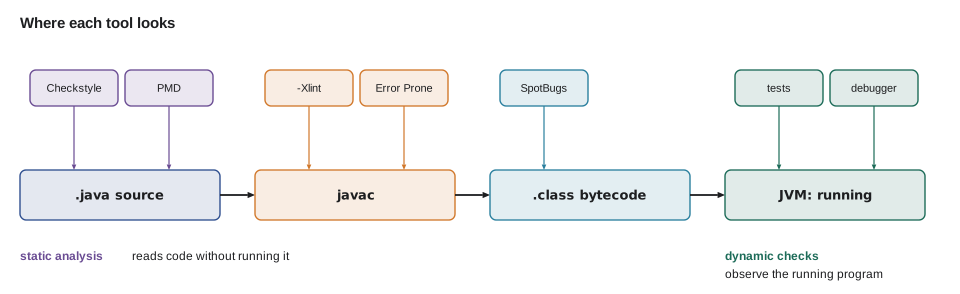
| Tool | Reads | Finds | Runs as |
|---|---|---|---|
| javac -Xlint | Source, during compiling | Unchecked operations, deprecated APIs, fall-through, and more | Compiler option |
| Error Prone | Source, during compiling | Known bug patterns, reported as compile errors or warnings | javac plugin |
| SpotBugs | Compiled bytecode | Probable bugs: null risks, bad equals, ignored results | Gradle or Maven plugin |
| PMD | Source | Bug-prone and wasteful code; copy-paste detection (CPD) | Gradle or Maven plugin |
| Checkstyle | Source | Breaks of style rules: names, imports, Javadoc, layout | Gradle or Maven plugin |
| IDE inspections | Source, as you type | A wide mix of all of the above | Built into the IDE |
Start with the compiler
The cheapest analyzer is already installed. javac reports a few warnings by default and many more when asked with -Xlint:all. The file below collects some of the warnings it knows: a raw List without a type, a redundant cast, a switch case that falls through into the next, and a constructor that the JDK has deprecated and marked for removal. It compiles, and it runs, which is exactly why these problems survive without a tool to point them out.
import java.util.ArrayList;
import java.util.List;

public class Stock {
    @SuppressWarnings("unused")
    private static final int UNUSED = 0;

    public static void main(String[] args) {
        List names = new ArrayList();          // raw type
        names.add("Inner tube 700x25c");
        String first = (String) (Object) names.get(0);
        int bins = 7;
        switch (bins % 3) {
            case 1:
                System.out.println("odd bin");  // falls through
            case 2:
                System.out.println("even bin");
                break;
            default:
                System.out.println("no bin");
        }
        Integer count = new Integer(5);         // deprecated constructor
        System.out.println(first + " " + count);
    }
}
What this code does
The raw types List and ArrayList switch off generic type checking for that list, and the cast through Object is pointless. The case 1 branch has no break, so it falls through and also runs the case 2 code, which may or may not be intended. new Integer(5) uses a constructor deprecated since Java 9 and marked for removal; Integer.valueOf(5) is the replacement.
$ javac Stock.java
Stock.java:22: warning: [removal] Integer(int) in Integer has been deprecated and marked for removal
        Integer count = new Integer(5);         // deprecated constructor
                        ^
Note: Stock.java uses unchecked or unsafe operations.
Note: Recompile with -Xlint:unchecked for details.
1 warning
$ javac -Xlint:all Stock.java
Stock.java:9: warning: [rawtypes] found raw type: List
        List names = new ArrayList();          // raw type
        ^
  missing type arguments for generic class List<E>
  where E is a type-variable:
    E extends Object declared in interface List
Stock.java:9: warning: [rawtypes] found raw type: ArrayList
        List names = new ArrayList();          // raw type
                         ^
  missing type arguments for generic class ArrayList<E>
  where E is a type-variable:
    E extends Object declared in class ArrayList
Stock.java:10: warning: [unchecked] unchecked call to add(E) as a member of the raw type List
        names.add("Inner tube 700x25c");
                 ^
  where E is a type-variable:
    E extends Object declared in interface List
Stock.java:11: warning: [cast] redundant cast to Object
        String first = (String) (Object) names.get(0);
                                ^
Stock.java:22: warning: [removal] Integer(int) in Integer has been deprecated and marked for removal
        Integer count = new Integer(5);         // deprecated constructor
                        ^
Stock.java:16: warning: [fallthrough] possible fall-through into case
            case 2:
            ^
6 warnings
What this code does
By default javac reports only the removal warning and a note that unchecked operations exist. With -Xlint:all it explains each problem with the line, a caret under the exact spot and a category in square brackets, such as rawtypes or fallthrough. A category name can be used to switch individual warnings on or off, as in -Xlint:all,-fallthrough.
Warnings that nobody looks at are useless, so the usual practice is to fix every warning and then make new ones fail the build with -Werror, which turns warnings into errors. In Gradle, options.compilerArgs.addAll(listOf("-Xlint:all", "-Werror")) in a tasks.withType<JavaCompile> block does it for every compile task; Maven's compiler plugin takes the same arguments. With -Werror, javac writes no class files at all while warnings remain.
$ javac -Xlint:all -Werror Stock.java
(the same warnings as above, then:)
error: warnings found and -Werror specified
1 error
5 warnings
What this code does
With -Werror the same warnings are printed and then counted as one error, so the compile fails and the build stops. Nothing has been changed in the code; only the policy has. This is how a team keeps a codebase at zero warnings once it gets there.
Bug patterns analyzers catch
SpotBugs, Error Prone and PMD each recognize hundreds of bug patterns, pieces of code that are legal Java but almost always a mistake. A few of the most common in student and professional code alike are worth knowing by heart, because the analyzers will report them and you should understand why.
public class Main {
    public static void main(String[] args) {
        String typed = new String("PAD-RIM");     // as if read from the keyboard
        String code = "PAD-RIM";
        System.out.println("== says equal: " + (typed == code));
        System.out.println("equals says equal: " + typed.equals(code));

        String label = "  chain  ";
        label.trim();                              // result ignored: label is unchanged
        System.out.println("Ignored result: [" + label + "]");
        label = label.trim();
        System.out.println("Used result: [" + label + "]");
    }
}== says equal: false equals says equal: true Ignored result: [ chain ] Used result: [chain]
What this code does
Comparing strings with == checks whether two variables refer to the same object, not whether the text is the same, so a string built at run time compares unequal to the same text; SpotBugs reports this as a string comparison using ==. Strings are immutable, so trim returns a new string and leaves the original alone, and calling it without using the result does nothing; SpotBugs and Error Prone both flag the ignored return value. The fixes are equals and assigning the result.
public class Main {
    public static void main(String[] args) {
        int[] dailySales = {7, 4, 6};
        int total = 0;
        for (int s : dailySales) total += s;

        double wrong = total / dailySales.length;            // integer division first
        double right = (double) total / dailySales.length;
        System.out.println("Average (int division): " + wrong);
        System.out.println("Average: " + right);

        long minutesPerYear = 365 * 24 * 60 * 60 * 1000 / 60_000;   // int overflow
        long correct = 365L * 24 * 60 * 60 * 1000 / 60_000;
        System.out.println("Minutes per year (overflowed): " + minutesPerYear);
        System.out.println("Minutes per year: " + correct);
    }
}Average (int division): 5.0 Average: 5.666666666666667 Minutes per year (overflowed): 24520 Minutes per year: 525600
What this code does
Dividing two ints gives an int, so the average 17 / 3 is truncated to 5 before it is stored in a double. Multiplying ints that exceed about 2.1 billion overflows silently, giving a wrong but plausible-looking number; making the first value a long with 365L makes the whole calculation use long. SpotBugs reports both patterns, as an integer division result cast to double and as an integer multiplication result converted to long.
import java.util.HashSet;
import java.util.Objects;
import java.util.Set;

public class Main {
    static final class BinNoHash {
        final String label;
        BinNoHash(String label) { this.label = label; }
        @Override public boolean equals(Object o) {
            return o instanceof BinNoHash b && b.label.equals(label);
        }
    }

    static final class Bin {
        final String label;
        Bin(String label) { this.label = label; }
        @Override public boolean equals(Object o) {
            return o instanceof Bin b && b.label.equals(label);
        }
        @Override public int hashCode() { return Objects.hash(label); }
    }

    public static void main(String[] args) {
        Set<BinNoHash> broken = new HashSet<>();
        broken.add(new BinNoHash("A3"));
        broken.add(new BinNoHash("A3"));
        Set<Bin> fixed = new HashSet<>();
        fixed.add(new Bin("A3"));
        fixed.add(new Bin("A3"));
        System.out.println("Without hashCode: " + (broken.size() > 1 ? "duplicates kept" : "one bin"));
        System.out.println("With hashCode: " + fixed.size() + " bin");
    }
}Without hashCode: duplicates kept With hashCode: 1 bin
What this code does
BinNoHash overrides equals but not hashCode, so two equal bins almost always land in different buckets of the HashSet and both are kept. Bin overrides both consistently, and the set keeps one. SpotBugs reports a class that defines equals but not hashCode, the bug JAVA-102 warned about, and a record avoids it entirely.
SpotBugs and Checkstyle in the build
Both tools are applied as plugins, and both run in Gradle's check task, so gradle build runs them automatically. Checkstyle is built into Gradle; SpotBugs uses a community plugin. Each needs a version, and each produces an HTML report under build/reports.
plugins {
    application
    checkstyle
    id("com.github.spotbugs") version "6.4.4"
}

checkstyle {
    toolVersion = "13.4.2"
    configFile = file("config/checkstyle/checkstyle.xml")
    maxWarnings = 0
}

spotbugs {
    effort = com.github.spotbugs.snom.Effort.MAX
    reportLevel = com.github.spotbugs.snom.Confidence.MEDIUM
}
What this code does
The checkstyle plugin is part of Gradle, and toolVersion chooses the Checkstyle release; maxWarnings = 0 makes any violation fail the build. The SpotBugs plugin adds a spotbugsMain task that analyzes the compiled classes, here with maximum effort and reporting bugs of medium confidence or higher. The version numbers are examples; check the Gradle Plugin Portal and each tool's release notes for current ones.
<?xml version="1.0"?>
<!DOCTYPE module PUBLIC "-//Checkstyle//DTD Checkstyle Configuration 1.3//EN"
    "https://checkstyle.org/dtds/configuration_1_3.dtd">
<module name="Checker">
  <module name="LineLength">
    <property name="max" value="120"/>
  </module>
  <module name="TreeWalker">
    <module name="ConstantName"/>
    <module name="MethodName"/>
    <module name="AvoidStarImport"/>
    <module name="UnusedImports"/>
    <module name="NeedBraces"/>
    <module name="MissingSwitchDefault"/>
  </module>
</module>
What this code does
A Checkstyle configuration is a tree of modules, each one a rule, and modules inside TreeWalker inspect the parsed source. This small configuration enforces the naming and import rules from lesson 9, braces on every if and loop, and a default in every switch. Real projects usually start from Checkstyle's ready-made google_checks.xml or sun_checks.xml and adjust it.
$ ./gradlew check> Task :app:checkstyleMain FAILED
[ant:checkstyle] [WARN] src/main/java/org/secondgear/parts/PartsDesk.java:14:20: Constant name 'tax_rate' must match pattern '^[A-Z][A-Z0-9]*(_[A-Z0-9]+)*$'. [ConstantName]
[ant:checkstyle] [WARN] src/main/java/org/secondgear/parts/PartsDesk.java:31:9: 'if' construct must use '{}'s. [NeedBraces]
> Task :app:spotbugsMain FAILED
M B ES: Comparison of String objects using == or != in org.secondgear.parts.Lookup.find(String) At Lookup.java:[line 22] ES_COMPARING_STRINGS_WITH_EQ
FAILURE: Build completed with 2 failures.What this code does
Checkstyle reports each violation with the file, line, column and the rule's name in square brackets, and fails because maxWarnings is 0. SpotBugs reports a probable bug with its pattern code, here ES_COMPARING_STRINGS_WITH_EQ, and the line, and writes a full HTML report. Fixing the code and rerunning the check is the whole workflow.
False positives and suppression
Analyzers report patterns, not proof, so sometimes a warning is wrong for your code: a false positive. The right response is first to check, honestly, whether the tool has spotted something you missed; usually it has. When it really is wrong, suppress that one warning as narrowly as possible, with @SuppressWarnings("rawtypes") on the one method for a javac warning, or SpotBugs' @SuppressFBWarnings with a justification, and write the reason next to it. Never switch a rule off for the whole project because it fired once.
When adding analysis to a large existing project, the first run can report thousands of problems. Teams then record a baseline, the list of existing problems, and fail the build only on new ones, while fixing the old ones over time. Hamza's projects are small enough to fix everything at once, which Leif strongly recommends: zero is the only number that stays easy to keep.
Other tools work the same way at larger scale. SonarQube and its IDE companion analyze code for bugs, security problems and maintainability across a whole organization, and GitHub's code scanning runs CodeQL analysis on every pull request. JAVA-220 adds test coverage, the dynamic counterpart: a measure of which code the tests actually run.
Try it yourself
Fix the integer division
The average repair time comes out as 2.0 instead of 2.5. A static analyzer would flag the division. Fix average so it divides as a double.
The program should print Average hours: 2.5.
public class Main {
    static double average(int[] hours) {
        int total = 0;
        for (int h : hours) total += h;
        return total / hours.length;
    }

    public static void main(String[] args) {
        System.out.println("Average hours: " + average(new int[] {2, 3, 1, 4}));
    }
}
Try it yourself
Use the result
normalize is meant to return a part code trimmed and in upper case, but it ignores the results of trim and toUpperCase, which an analyzer reports. Fix it.
The program should print [PAD-RIM] and [TUBE-700X25].
public class Main {
    static String normalize(String code) {
        code.trim();
        code.toUpperCase();
        return code;
    }

    public static void main(String[] args) {
        System.out.println("[" + normalize("  pad-rim ") + "]");
        System.out.println("[" + normalize("tube-700x25") + "]");
    }
}
Common mistakes
MistakeIgnoring compiler warnings because the code still runs.
InsteadCompile with -Xlint:all, fix the warnings, then add -Werror.
MistakeSwitching a rule off for the whole project after one false positive.
InsteadSuppress the single warning narrowly, with a written reason.
MistakeComparing strings with ==.
InsteadUse equals, which compares the text.
MistakeCalling a method that returns a new value and ignoring the result.
InsteadAssign or use the result; strings and many other types are immutable.
MistakeAdding analysis to a big project and fixing nothing because there are too many warnings.
InsteadRecord a baseline, fail only on new problems and work the old ones down.
Summary and key terms
- Static analysis examines code without running it and reports likely problems; tests and debugging are its dynamic counterpart. javac's -Xlint:all reports warnings such as raw types, unchecked calls, fall-through and deprecated APIs, and -Werror makes them fail the build.
- Error Prone extends the compiler with bug patterns; SpotBugs analyzes bytecode for probable bugs; PMD analyzes source and detects copy-paste; Checkstyle enforces style rules.
- Common bug patterns include comparing strings with ==, ignoring the result of methods on immutable types, integer division and overflow, and equals without hashCode.
- In Gradle, the checkstyle and SpotBugs plugins run as part of check.
- False positives are suppressed narrowly with a reason, and large existing projects use a baseline.
- Static analysis
- Examining a program's source or bytecode without running it.
- Dynamic analysis
- Checking a program by running it, as tests and debuggers do.
- Lint warning
- A compiler warning about suspicious but legal code, enabled with -Xlint.
- -Werror
- A javac option that turns warnings into errors.
- Bug pattern
- A piece of legal code that is almost always a mistake.
- SpotBugs
- A bytecode analyzer that finds probable bugs, successor to FindBugs.
- Checkstyle
- A source checker that enforces style rules.
- PMD
- A source analyzer for bug-prone code, with a copy-paste detector.
- Error Prone
- A javac plugin that reports bug patterns during compilation.
- False positive
- A warning about code that is in fact correct.
- Baseline
- A recorded list of existing problems, so only new ones fail the build.
Practice problems
Work each problem on paper first, then reveal the answer to check.
What is the difference between static and dynamic analysis?
Show answer
Static analysis reads code without running it; dynamic analysis observes it running.
Why does typed == code print false for two strings with the same text?
Show answer
== compares whether they are the same object; use equals to compare text.
What does -Werror do?
Show answer
Makes javac treat warnings as errors, so the compile fails while warnings remain.
Which tool reads bytecode rather than source?
Show answer
SpotBugs.
How should a genuine false positive be handled?
Show answer
Suppress that single warning as narrowly as possible, with a written reason.
Lesson quiz · 5 questions
Score 60% or more to complete this lesson.
Create a free account to save your progress, take quizzes and earn a certificate.