
JAVA-120 · Lesson 5 of 12 · 23 min
Gradle builds and the Gradle wrapper
▶ Video coming soon A video version of this lesson is on the way.
A week after Maven, on Monday, February 8, 2027, Leif turned to the other printout. Gradle is the build tool Android uses, the one many newer Java projects choose, and the one Leif suggests for Second Gear's programs because its build files are short and its builds are fast. Where Maven is a fixed life cycle you configure, Gradle is a set of tasks you can arrange and extend in code. That makes it more flexible and, if you are not careful, more surprising, so Leif's plan for the evening is to stay close to the conventions and read every line of output.
What Gradle is
Gradle is a build tool whose build files are short programs. They are written in a DSL, a domain-specific language, either the Kotlin DSL, in files ending .gradle.kts, or the older Groovy DSL, in files ending .gradle. New projects default to Kotlin, which IDEs can check and complete as you type, and this course uses it. Gradle reads the same standard directory layout as Maven, downloads libraries from the same repositories, such as Maven Central, and produces the same kind of JAR. The current line is Gradle 9, whose 9.9.1 release came out on November 10, 2026; Gradle 9 itself needs Java 17 or later to run, though it can build projects for other Java versions.
The two build files
A Gradle build has a settings file, settings.gradle.kts, at the root, which names the build and lists its subprojects, and a build script, build.gradle.kts, for each project. Leif and Hamza set PartsDesk up as a root with one subproject called app, the shape Gradle's own project generator uses, which makes it easy to add the core module later.
rootProject.name = "partsdesk"
include("app")
What this code does
The settings file names the whole build partsdesk and includes one subproject, app, whose files are in the app folder. Each included name becomes a project path, written :app. Lesson 12 adds core and shopbook to this list.
plugins {
    application
}

group = "org.secondgear"
version = "1.0.0"

java {
    toolchain {
        languageVersion = JavaLanguageVersion.of(21)
    }
}

application {
    mainClass = "org.secondgear.parts.PartsDesk"
}
What this code does
The plugins block applies the application plugin, which brings in the java plugin for compiling and packaging and adds a run task. group and version play the same role as Maven's groupId and version, and the JAR is named from the project name and version. The toolchain block pins the Java version, and application names the class with main.
Compare this with the POM in lesson 4. Both say the same things, coordinates, Java version and main class, but the Gradle file is a handful of lines. The java plugin supplies the conventions that Maven's super POM supplies.
Tasks and the task graph
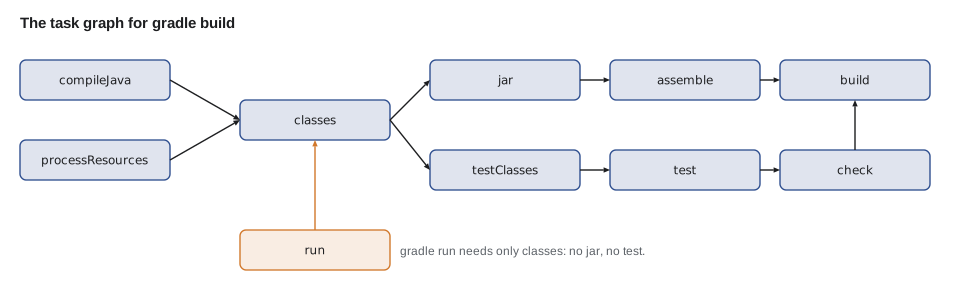
Everything Gradle does is a task: compileJava, processResources, classes, jar, test, build. Tasks declare which other tasks they depend on, and when you ask for a task, Gradle works out the task graph, every task needed, in an order that respects the dependencies, and runs each task once. There is no fixed life cycle; build is just a task that depends on assemble and check, which depend on others in turn. gradle tasks lists what a project offers.
$ gradle --offline tasks --console=plain

> Task :tasks

------------------------------------------------------------
Tasks runnable from root project 'partsdesk'
------------------------------------------------------------

Application tasks
-----------------
run - Runs this project as a JVM application

Build tasks
-----------
assemble - Assembles the outputs of this project.
build - Assembles and tests this project.
buildDependents - Assembles and tests this project and all projects that depend on it.
buildNeeded - Assembles and tests this project and all projects it depends on.
classes - Assembles main classes.
clean - Deletes the build directory.
jar - Assembles a jar archive containing the classes of the 'main' feature.
testClasses - Assembles test classes.

Build Setup tasks
-----------------
init - Initializes a new Gradle build.
updateDaemonJvm - Generates or updates the Gradle Daemon JVM criteria.
wrapper - Generates Gradle wrapper files.

Distribution tasks
------------------
assembleDist - Assembles the main distributions
distTar - Bundles the project as a distribution.
distZip - Bundles the project as a distribution.
installDist - Installs the project as a distribution as-is.

Documentation tasks
-------------------
javadoc - Generates Javadoc API documentation for the 'main' feature.
What this code does
gradle tasks lists the tasks the applied plugins contribute, grouped by purpose. The application plugin added run and the distribution tasks, and the java plugin added the build and documentation tasks. The listing goes on with help and verification tasks, left out here.
import java.util.*;

public class Main {
    static final Map<String, List<String>> DEPENDS = new LinkedHashMap<>();
    static {
        DEPENDS.put("compileJava", List.of());
        DEPENDS.put("processResources", List.of());
        DEPENDS.put("classes", List.of("compileJava", "processResources"));
        DEPENDS.put("jar", List.of("classes"));
        DEPENDS.put("assemble", List.of("jar"));
        DEPENDS.put("test", List.of("classes"));
        DEPENDS.put("check", List.of("test"));
        DEPENDS.put("build", List.of("assemble", "check"));
        DEPENDS.put("run", List.of("classes"));
    }

    static void visit(String task, Set<String> done, List<String> order) {
        if (done.contains(task)) return;
        for (String d : DEPENDS.get(task)) visit(d, done, order);
        done.add(task);
        order.add(task);
    }

    public static void main(String[] args) {
        for (String goal : List.of("build", "run")) {
            List<String> order = new ArrayList<>();
            visit(goal, new HashSet<>(), order);
            System.out.println("gradle " + goal + ": " + String.join(" -> ", order));
        }
    }
}gradle build: compileJava -> processResources -> classes -> jar -> assemble -> test -> check -> build gradle run: compileJava -> processResources -> classes -> run
What this code does
Each task lists the tasks it depends on, and visit runs a task's dependencies before the task itself, skipping any task already done. The result is a valid order in which every task runs once, which is what Gradle computes before it starts. Asking for run needs only the compiling tasks, not jar or test.
This is the key difference from Maven in practice. Maven's mvn package always walks the whole life cycle up to package. Gradle's gradle run does only what run needs, and nothing else.
Running a build
The session below is real. It was recorded with Gradle 8.14, installed on the machine that recorded this course, which prints the same task lines as Gradle 9. The --offline flag tells Gradle not to check the network; this build needs nothing from the internet, so it works offline and online alike, and --console=plain prints one line per task instead of Gradle's animated progress bar.
$ gradle --offline build --console=plain
> Task :app:compileJava
> Task :app:processResources NO-SOURCE
> Task :app:classes
> Task :app:jar
> Task :app:startScripts
> Task :app:distTar
> Task :app:distZip
> Task :app:assemble
> Task :app:compileTestJava NO-SOURCE
> Task :app:processTestResources NO-SOURCE
> Task :app:testClasses UP-TO-DATE
> Task :app:test NO-SOURCE
> Task :app:check UP-TO-DATE
> Task :app:build

BUILD SUCCESSFUL in 973ms
5 actionable tasks: 5 executed
$ find app/build -name "*.jar"
app/build/libs/app-1.0.0.jar
$ gradle --offline run -q --console=plain
TUBE-700x25  4  REORDER
PAD-RIM  22
CHAIN-8  3  REORDER
$ gradle --offline build --console=plain
> Task :app:compileJava UP-TO-DATE
> Task :app:processResources NO-SOURCE
> Task :app:classes UP-TO-DATE
> Task :app:jar UP-TO-DATE
> Task :app:startScripts UP-TO-DATE
> Task :app:distTar UP-TO-DATE
> Task :app:distZip UP-TO-DATE
> Task :app:assemble UP-TO-DATE
> Task :app:compileTestJava NO-SOURCE
> Task :app:processTestResources NO-SOURCE
> Task :app:testClasses UP-TO-DATE
> Task :app:test NO-SOURCE
> Task :app:check UP-TO-DATE
> Task :app:build UP-TO-DATE

BUILD SUCCESSFUL in 824ms
5 actionable tasks: 5 up-to-date
What this code does
The first build runs each task in dependency order and reports how many were executed. find shows the JAR it produced, named from the project and version, and gradle run starts the program. The second build does nothing, because every task's inputs and outputs are unchanged, so each one is reported UP-TO-DATE.
Up-to-date checks and the build cache
That last build is Gradle's most useful habit. Every task declares its inputs, such as source files and settings, and its outputs, such as class files. Before running a task, Gradle compares a fingerprint of the current inputs and outputs with the ones from last time; if nothing changed, the task is UP-TO-DATE and is skipped. Change one source file and only the tasks downstream of it run. The build cache goes further: it stores task outputs by the fingerprint of their inputs, so if another branch, or another developer through a shared cache, has already built exactly those inputs, the output is copied instead of rebuilt, and the task is reported FROM-CACHE.
import java.util.*;

public class Main {
    static String fingerprint(Map<String, String> files) {
        StringBuilder all = new StringBuilder();
        new TreeMap<>(files).forEach((name, text) -> all.append(name).append('=').append(text).append(';'));
        return Integer.toHexString(all.toString().hashCode());
    }

    public static void main(String[] args) {
        Map<String, String> sources = new HashMap<>();
        sources.put("Part.java", "record Part(...)");
        sources.put("PartsDesk.java", "class PartsDesk {...}");
        String last = fingerprint(sources);

        System.out.println("Build 2: " + (fingerprint(sources).equals(last) ? "UP-TO-DATE" : "runs"));
        sources.put("PartsDesk.java", "class PartsDesk { /* new report */ }");
        String now = fingerprint(sources);
        System.out.println("Build 3: " + (now.equals(last) ? "UP-TO-DATE" : "runs"));
        System.out.println("Fingerprints differ: " + !now.equals(last));
    }
}Build 2: UP-TO-DATE Build 3: runs Fingerprints differ: true
What this code does
The fingerprint combines every input file's name and contents, in sorted order so the result does not depend on the map's order, and reduces them to a short code. When nothing changes, the fingerprint matches the last build's and the task can be skipped. Editing one file changes the fingerprint, so the task must run; Gradle uses a much stronger hash, but the idea is the same.
The up-to-date check is why Gradle builds of large projects are fast, and also why you should never make a task depend on something it does not declare, such as the current time. A task whose output changes even when its inputs do not can never be up to date, and it breaks the cache for everyone.
Gradle also keeps a background daemon, a JVM that stays running between builds so the next build does not pay the cost of starting Java and loading the build again. The first build of the day is slower than the rest because the daemon is starting. gradle --stop stops it, which is occasionally needed after changing JDKs.
The Gradle wrapper
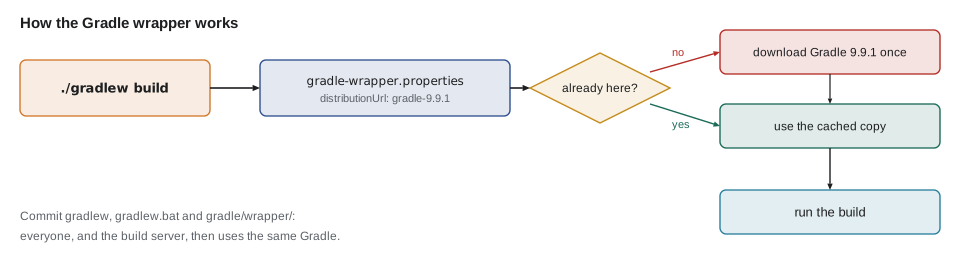
A build file written for Gradle 9 may not work with Gradle 7, so, as with Maven, the version of the tool should be part of the project. Gradle's answer, which inspired the Maven Wrapper, is the Gradle wrapper: two scripts, gradlew for Linux and macOS and gradlew.bat for Windows, a small JAR, and a properties file naming the exact Gradle version. Anyone who clones the project runs ./gradlew build instead of gradle build, and the wrapper downloads that Gradle version the first time and reuses it afterwards. Nobody needs Gradle installed, and everybody, including the build server, uses the same version.
$ gradle --offline wrapper --gradle-version 9.9.1 --console=plain
> Task :wrapper

BUILD SUCCESSFUL in 704ms
1 actionable task: 1 executed
$ find gradle -type f
gradle/wrapper/gradle-wrapper.jar
gradle/wrapper/gradle-wrapper.properties
$ cat gradle/wrapper/gradle-wrapper.properties
distributionBase=GRADLE_USER_HOME
distributionPath=wrapper/dists
distributionUrl=https\://services.gradle.org/distributions/gradle-9.9.1-bin.zip
networkTimeout=10000
validateDistributionUrl=true
zipStoreBase=GRADLE_USER_HOME
zipStorePath=wrapper/dists
$ ls
app
gradle
gradlew
gradlew.bat
settings.gradle.kts
What this code does
The wrapper task writes the wrapper files for the version requested, here Gradle 9.9.1. The properties file's distributionUrl is the exact Gradle download the scripts will use. All of these files, gradlew, gradlew.bat and the gradle/wrapper folder, are committed to version control.
Because the wrapper downloads and runs code, two precautions are worth taking. Add a distributionSha256Sum line to gradle-wrapper.properties, with the checksum Gradle publishes for that version, so the download is verified; and treat a change to gradle-wrapper.jar in a pull request with suspicion, since the JAR runs on every developer's computer. Gradle provides a wrapper validation action for GitHub that checks the JAR automatically.
import java.io.IOException;
import java.io.StringReader;
import java.util.Properties;

public class Main {
    public static void main(String[] args) throws IOException {
        String text = """
            distributionBase=GRADLE_USER_HOME
            distributionPath=wrapper/dists
            distributionUrl=https\\://services.gradle.org/distributions/gradle-9.9.1-bin.zip
            networkTimeout=10000
            validateDistributionUrl=true
            """;
        Properties p = new Properties();
        p.load(new StringReader(text));
        String url = p.getProperty("distributionUrl");
        System.out.println("URL: " + url);
        String file = url.substring(url.lastIndexOf('/') + 1);
        String version = file.replace("gradle-", "").replace("-bin.zip", "").replace("-all.zip", "");
        System.out.println("File: " + file);
        System.out.println("Gradle version: " + version);
        System.out.println("Major version: " + version.split("\\.")[0]);
    }
}URL: https://services.gradle.org/distributions/gradle-9.9.1-bin.zip File: gradle-9.9.1-bin.zip Gradle version: 9.9.1 Major version: 9
What this code does
The wrapper's settings are an ordinary .properties file, in which a colon must be escaped with a backslash, and Properties.load removes the escape when it reads the value. The Gradle version is the part of the download file name between gradle- and -bin.zip. Reading the file like this is how a script or a build server can check which Gradle version a project expects.
Toolchains
The java toolchain block in the build script answers the question lesson 2 raised: which JDK compiles the project? With languageVersion set to 21, Gradle compiles and runs the code with a JDK 21, whichever JDK is running Gradle itself and whichever one the IDE prefers. If no matching JDK is installed, Gradle can download one automatically when the settings file applies a toolchain resolver plugin, such as the Foojay resolver. Toolchains are the single most effective fix for builds that work on one computer and not another.
| Maven | Gradle | |
|---|---|---|
| Build file | pom.xml (XML) | build.gradle.kts (Kotlin) or build.gradle (Groovy) |
| Model | Fixed life cycle of phases | Graph of tasks |
| Output folder | target | build |
| Build a JAR | mvn package | gradle build or gradle jar |
| Run the program | Plugin such as exec:java | gradle run (application plugin) |
| Skips unchanged work | Partly (compiler) | Every task, plus a build cache |
| Pins the tool version | Maven Wrapper (mvnw) | Gradle wrapper (gradlew) |
| Pins the JDK | maven.compiler.release, toolchains plugin | java toolchain block |
Neither tool is better in general. Maven's rigidity makes every Maven project look alike, which helps teams and newcomers; Gradle's flexibility and speed help large or unusual builds. Hamza will meet both in his career, and Leif's advice is to use whichever a project already uses, and for Second Gear, where he chooses, Gradle.
Try it yourself
Read the wrapper version
Complete gradleVersion so it takes a wrapper distributionUrl and returns the Gradle version in it, such as 9.9.1 from https://services.gradle.org/distributions/gradle-9.9.1-bin.zip. It must also work for the -all.zip distribution.
public class Main {
    static String gradleVersion(String url) {
        return url;
    }

    public static void main(String[] args) {
        System.out.println(gradleVersion("https://services.gradle.org/distributions/gradle-9.9.1-bin.zip"));
        System.out.println(gradleVersion("https://services.gradle.org/distributions/gradle-8.14.3-all.zip"));
    }
}
Try it yourself
Up to date or not?
Gradle skips a task when its inputs are unchanged and its outputs still exist. Complete status so it returns UP-TO-DATE when the old and new input fingerprints are equal and outputsExist is true, and EXECUTED otherwise.
The program should print UP-TO-DATE, EXECUTED and EXECUTED.
public class Main {
    static String status(String oldInputs, String newInputs, boolean outputsExist) {
        return "EXECUTED";
    }

    public static void main(String[] args) {
        System.out.println(status("a1f3", "a1f3", true));
        System.out.println(status("a1f3", "b207", true));
        System.out.println(status("a1f3", "a1f3", false));
    }
}
Common mistakes
MistakeRunning an installed gradle in a project that has a wrapper.
InsteadUse ./gradlew (gradlew.bat on Windows) so the project's own Gradle version is used.
MistakeNot committing the wrapper files.
InsteadCommit gradlew, gradlew.bat and the gradle/wrapper folder with the project.
MistakeRelying on whatever JDK happens to run Gradle.
InsteadSet a java toolchain languageVersion in the build script.
MistakeWriting tasks that read undeclared inputs such as the time.
InsteadDeclare every input so up-to-date checks and the build cache work.
MistakeAccepting an unexplained change to gradle-wrapper.jar.
InsteadVerify the wrapper JAR and the distribution checksum.
Summary and key terms
- Gradle builds are described by a settings file, settings.gradle.kts, which names the build and its subprojects, and a build script per project, build.gradle.kts, written in the Kotlin DSL.
- Plugins such as java and application add tasks and conventions.
- Gradle works out a task graph and runs each needed task once, in dependency order; there is no fixed life cycle.
- Tasks with unchanged inputs and outputs are UP-TO-DATE and skipped, the build cache reuses outputs, and a daemon keeps builds fast.
- The Gradle wrapper, gradlew with its properties file, pins the Gradle version for everyone and should be committed and verified.
- A java toolchain pins the JDK used to compile and run.
- Gradle
- A build tool whose build files are short programs in a Kotlin or Groovy DSL.
- Settings file
- settings.gradle.kts: names the build and lists its subprojects.
- Build script
- build.gradle.kts: configures one project's plugins, dependencies and tasks.
- Task
- A unit of work in a Gradle build, such as compileJava or jar.
- Task graph
- The set of tasks needed for a request, ordered by their dependencies.
- UP-TO-DATE
- Gradle's report that a task was skipped because its inputs and outputs had not changed.
- Build cache
- A store of task outputs keyed by their inputs, reused across builds.
- Daemon
- A background JVM that Gradle keeps running to make later builds faster.
- Gradle wrapper
- gradlew scripts and properties that download and run a fixed Gradle version.
- Toolchain
- A build setting that chooses the JDK version used to compile and run a project.
Practice problems
Work each problem on paper first, then reveal the answer to check.
Which file lists a Gradle build's subprojects?
Show answer
settings.gradle.kts.
Why does gradle run not build the JAR?
Show answer
run depends only on the compiled classes, and Gradle runs only the tasks a request needs.
What does UP-TO-DATE mean in Gradle's output?
Show answer
The task was skipped because its inputs and outputs had not changed since the last run.
Why use ./gradlew instead of gradle?
Show answer
The wrapper uses the exact Gradle version the project was written for.
How do you make Gradle compile with Java 21 on every computer?
Show answer
Set java { toolchain { languageVersion = JavaLanguageVersion.of(21) } } in the build script.
Lesson quiz · 5 questions
Score 60% or more to complete this lesson.
Create a free account to save your progress, take quizzes and earn a certificate.