
JAVA-120 · Lesson 3 of 12 · 21 min
Project layout and packages
▶ Video coming soon A video version of this lesson is on the way.
Leif opened Monday, January 25, 2027 by showing Hamza a folder from his own work: hundreds of files, but every one of them where he expected it. The source was in src/main/java, the tests in src/test/java, the settings files in src/main/resources, and everything the build produced in one folder that could be deleted at any moment. That layout is not an accident or a personal preference; it is the standard directory layout that Maven made common twenty years ago and Gradle adopted, and almost every Java project now follows it. Learning it means any Java project you open, at college or at a job, will be laid out the way you expect.
The standard directory layout
The layout separates four kinds of files. Main source is the program itself. Main resources are files the program reads at run time that are not Java code: configuration, templates, data and messages. Test source is code that checks the program, and test resources are files only the tests need. The build writes everything it produces into one output folder, target for Maven and build for Gradle, which never goes into version control and can always be rebuilt.
| Folder | Holds | Ends up |
|---|---|---|
| src/main/java | The program's Java source, in package folders | Compiled into the JAR |
| src/main/resources | Files the program reads: .properties, templates, data | Copied into the JAR |
| src/test/java | Test classes, in the same packages as the code they test | Compiled and run, never shipped |
| src/test/resources | Files only the tests read | Available to tests only |
| target or build | Everything the build produces | Deleted and rebuilt; never committed |
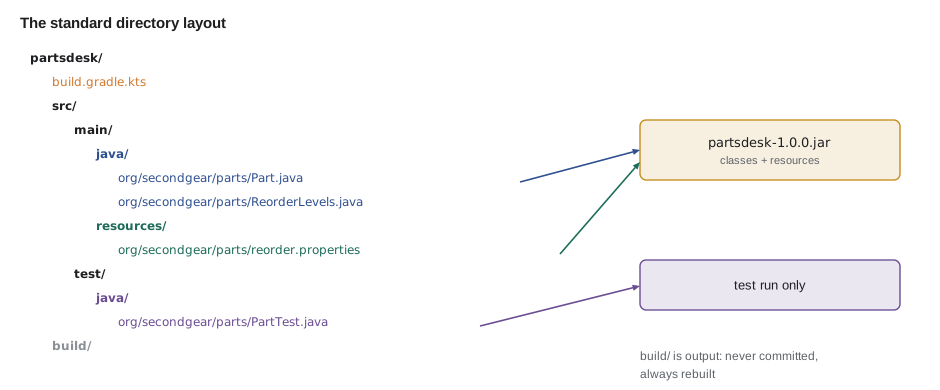
Hamza reorganized PartsDesk into this layout that evening. The listing is from the real folder after the move, with one added class, ReorderLevels, that reads each part's reorder level from a file instead of hard-coding it, and an empty test class waiting for JAVA-220, where JUnit tests are written.
$ find src -type f | sort
src/main/java/org/secondgear/parts/Part.java
src/main/java/org/secondgear/parts/ReorderLevels.java
src/main/resources/org/secondgear/parts/reorder.properties
src/test/java/org/secondgear/parts/PartTest.java
What this code does
find lists every file under src, sorted, so the whole layout is visible at once. The main Java classes, the resource file and the test class all sit under the same package folders, org/secondgear/parts. Tests live in the same package as the code they test so they can use its package-private members.
Packages, revisited
JAVA-102 introduced packages; a build tool depends on them being right. The package declared at the top of each file must match the folder it is in under src/main/java, the package name is all lower case, and it normally starts with the organization's reversed domain name, org.secondgear here, to keep it distinct from every other organization's classes. Below that, divide by feature rather than by kind of class: org.secondgear.parts and org.secondgear.booking group the classes that change together, which is easier to work with than putting all the records in one package and all the services in another.
public class Main {
    static String sourceFile(String fqcn, boolean test) {
        String root = test ? "src/test/java/" : "src/main/java/";
        String path = fqcn.replace('.', '/');
        return root + path + (test ? "Test" : "") + ".java";
    }

    public static void main(String[] args) {
        String[] classes = {"org.secondgear.parts.Part", "org.secondgear.parts.ReorderLevels",
                            "org.secondgear.booking.ShopBook"};
        for (String c : classes) {
            System.out.println(sourceFile(c, false));
            System.out.println("  test: " + sourceFile(c, true));
        }
    }
}src/main/java/org/secondgear/parts/Part.java test: src/test/java/org/secondgear/parts/PartTest.java src/main/java/org/secondgear/parts/ReorderLevels.java test: src/test/java/org/secondgear/parts/ReorderLevelsTest.java src/main/java/org/secondgear/booking/ShopBook.java test: src/test/java/org/secondgear/booking/ShopBookTest.java
What this code does
A class's fully qualified name decides where its source file goes: the dots of the package become folders under the source root. By convention its test class has the same name plus Test and lives in the same package under src/test/java. The paths are printed with forward slashes, which every Java tool accepts on Windows too.
Following the naming convention for tests is not just tidiness. Build tools and IDEs find test classes by name pattern, typically classes ending in Test, and an IDE's go to test command jumps from Part to PartTest because of it.
Resources and the class path
A resource is a non-code file the program reads from the class path rather than from a path on disk. Because it travels inside the JAR, it is always there, whichever folder the program is started from and whichever computer it runs on, which is exactly what you want for configuration and data that belong to the program. Code loads a resource with getResourceAsStream on a class: a name without a leading slash is looked up in that class's package folder, and a name starting with a slash is looked up from the root of the class path.
The session below shows why the resources folder exists as something separate. javac compiles only .java files, so after compiling, the properties file is not in the output folder and the program cannot find it. Copying the resources into the output folder, which is exactly what a build tool's process-resources step does, fixes it.
$ javac -d out src/main/java/org/secondgear/parts/*.java
$ java -cp out org.secondgear.parts.ReorderLevels
reorder.properties is not on the class path
$ cp -r src/main/resources/. out/
$ java -cp out org.secondgear.parts.ReorderLevels
CHAIN-8 reorders at 4
PAD-RIM reorders at 8
TUBE-700x25 reorders at 10
What this code does
The first run fails gracefully because getResourceAsStream returns null when the resource is not on the class path. Copying src/main/resources into out puts reorder.properties in the same package folder as the class. The second run finds it and prints the three reorder levels in sorted order.
import java.io.IOException;
import java.io.StringReader;
import java.util.Properties;

public class Main {
    public static void main(String[] args) throws IOException {
        String file = """
            # Reorder levels for the parts room
            TUBE-700x25=10
            PAD-RIM=8
            CHAIN-8=4
            """;
        Properties levels = new Properties();
        levels.load(new StringReader(file));
        System.out.println("Entries: " + levels.size());
        System.out.println("Tubes reorder at " + levels.getProperty("TUBE-700x25"));
        System.out.println("Spokes reorder at " + levels.getProperty("SPOKE-262", "a default of 5"));
        int pads = Integer.parseInt(levels.getProperty("PAD-RIM"));
        System.out.println("Pads reorder below " + (pads + 1));
    }
}Entries: 3 Tubes reorder at 10 Spokes reorder at a default of 5 Pads reorder below 9
What this code does
A .properties file is a simple format of key=value lines with # comments, and Properties.load reads it; here the file's text comes from a text block so the example runs on its own. getProperty returns null for a missing key unless you pass a default. Every value is a String, so numbers must be parsed before use.
Reading the same file from src/main/resources at run time, rather than hard-coding the numbers, means Kofi can change a reorder level by editing a text file and rebuilding, without touching Java code. Lesson 7 shows that the file really does end up inside the JAR.
public class Main {
    public static void main(String[] args) {
        System.out.println("Package of Main: \"" + Main.class.getPackageName() + "\"");
        System.out.println("Own class file found: " + (Main.class.getResource("Main.class") != null));
        System.out.println("Missing resource: " + Main.class.getResource("reorder.properties"));
        System.out.println("String comes from: " + String.class.getModule().getName());
        System.out.println("String.class found: " + (Object.class.getResource("/java/lang/String.class") != null));
    }
}Package of Main: "" Own class file found: true Missing resource: null String comes from: java.base String.class found: true
What this code does
Main is in the unnamed package, so its package name is the empty string, and its own Main.class is found next to it on the class path. A resource that was never copied returns null, the same failure as in the terminal session above. Classes from the JDK, such as String, come from the java.base module and can be looked up by their path from the root.
What goes in version control
Everything under src, the build file and the build tool's wrapper files (lesson 5) go into version control, usually Git. The output folder does not, and neither do most IDE settings or files with passwords. A .gitignore file at the project root lists what Git should leave alone. Keeping generated files out matters because they can always be rebuilt from the source, they change every build and would clutter every commit, and checking in a stale JAR is a classic way to ship an old version by mistake.
# Build output
target/
build/
out/

# Gradle's local cache for this project
.gradle/

# IDE settings (shared settings, if any, are added back on purpose)
.idea/
*.iml
.vscode/

# Operating system files
.DS_Store
Thumbs.db

# Never commit secrets
*.env
What this code does
Each line is a pattern of files or folders Git should not track; a trailing slash means a folder. Build output and the .gradle cache are always regenerated, so they never belong in the repository. IDE folders are excluded because each developer's settings differ, and environment files that hold passwords must never be committed.
A layout for more than one program
Hamza now has two programs, PartsDesk and, from JAVA-102, ShopBook, and both need the same Money class and the shop's name. Copying the shared classes into each project would mean fixing every bug twice. The standard answer is a multi-module build: one project folder with a subfolder per module, each with its own src/main/java, and one module, core, that the other two depend on. Leif sketched the target layout tonight; lesson 12's capstone builds it.
secondgear/
├── settings.gradle.kts         lists the modules
├── build.gradle.kts            settings shared by every module
├── core/
│   ├── build.gradle.kts
│   └── src/main/java/org/secondgear/core/Money.java
├── partsdesk/
│   ├── build.gradle.kts        depends on core
│   └── src/main/java/org/secondgear/parts/PartsDesk.java
└── shopbook/
    ├── build.gradle.kts        depends on core
    └── src/main/java/org/secondgear/booking/ShopBook.java
What this code does
The root folder holds the files that describe the whole build, and each module is a subfolder with the standard layout of its own. core holds the classes both programs share, and partsdesk and shopbook declare that they depend on it. Each module produces its own JAR, so the programs can still be shipped separately.
import java.util.LinkedHashMap;
import java.util.List;
import java.util.Map;

public class Main {
    public static void main(String[] args) {
        Map<String, List<String>> dependsOn = new LinkedHashMap<>();
        dependsOn.put("core", List.of());
        dependsOn.put("partsdesk", List.of("core"));
        dependsOn.put("shopbook", List.of("core"));
        for (var e : dependsOn.entrySet()) {
            String deps = e.getValue().isEmpty() ? "nothing" : String.join(", ", e.getValue());
            System.out.println(e.getKey() + " depends on " + deps);
        }
        long users = dependsOn.values().stream().filter(d -> d.contains("core")).count();
        System.out.println("A fix in core reaches " + users + " programs");
    }
}core depends on nothing partsdesk depends on core shopbook depends on core A fix in core reaches 2 programs
What this code does
The planned modules and their dependencies are stored in a map from each module to the modules it needs. A LinkedHashMap keeps the entries in the order they were added, so the printout is predictable. Counting the modules that depend on core shows why shared code belongs in one place: a single fix there reaches both programs.
Dependencies between modules must only point one way. core may not depend on partsdesk, or the build would have a cycle and could not decide what to compile first; a build tool refuses such a build.
Try it yourself
Where does it go?
Complete sourceFile so it returns the path of a class's source file in the standard layout, such as src/main/java/org/secondgear/parts/Part.java, and, when test is true, its test class, such as src/test/java/org/secondgear/parts/PartTest.java.
public class Main {
    static String sourceFile(String fqcn, boolean test) {
        return fqcn + ".java";
    }

    public static void main(String[] args) {
        System.out.println(sourceFile("org.secondgear.parts.Part", false));
        System.out.println(sourceFile("org.secondgear.parts.Part", true));
        System.out.println(sourceFile("org.secondgear.core.Money", true));
    }
}
Try it yourself
Resource names
getResourceAsStream("reorder.properties") on a class looks in that class's package folder, while a name starting with / is looked up from the root. Complete resourcePath so it returns the path from the root that the lookup uses, without a leading slash.
The program should print org/secondgear/parts/reorder.properties and then config/shop.properties.
public class Main {
    static String resourcePath(String packageName, String name) {
        return name;
    }

    public static void main(String[] args) {
        System.out.println(resourcePath("org.secondgear.parts", "reorder.properties"));
        System.out.println(resourcePath("org.secondgear.parts", "/config/shop.properties"));
    }
}
Common mistakes
MistakePutting .properties or other data files in src/main/java.
InsteadPut them in src/main/resources so the build copies them onto the class path.
MistakeReading a program's own data with a file path such as new File("reorder.properties").
InsteadLoad it as a resource with getResourceAsStream so it works from any folder and inside the JAR.
MistakeCommitting the target or build folder.
InsteadList build output in .gitignore; it is always regenerated.
MistakePutting test classes in a different package from the code they test.
InsteadUse the same package under src/test/java so tests can reach package-private members.
MistakeLetting a shared module depend on the programs that use it.
InsteadKeep module dependencies one way, towards core.
Summary and key terms
- The standard directory layout keeps main source in src/main/java, resources in src/main/resources, tests in src/test/java and test resources in src/test/resources, with all build output in target or build.
- Package names are lower case, start with the reversed domain and match the folders.
- Test classes share the package of the class they test and are named after it with Test.
- Resources are loaded from the class path with getResourceAsStream, relative to the class's package unless the name starts with a slash, and must be copied to the output by the build.
- Source, the build file and wrapper files go in version control; build output and personal IDE files go in .gitignore.
- A multi-module build shares code between programs through a core module.
- Standard directory layout
- The conventional Maven and Gradle folder structure: src/main/java, src/main/resources, src/test/java and so on.
- Main source
- The program's own Java code, in src/main/java.
- Resource
- A non-code file the program loads from the class path, kept in src/main/resources.
- getResourceAsStream
- A Class method that opens a resource from the class path, or returns null if it is missing.
- .properties file
- A text file of key=value lines, read with java.util.Properties.
- Output folder
- target for Maven, build for Gradle: where the build writes everything it produces.
- .gitignore
- A file listing the files and folders Git should not track.
- Multi-module build
- One build with several modules, each with its own source tree and output.
- Module (build)
- A subproject of a multi-module build that produces its own JAR.
Practice problems
Work each problem on paper first, then reveal the answer to check.
Where does the source file for org.secondgear.parts.Part go in the standard layout?
Show answer
src/main/java/org/secondgear/parts/Part.java
Why does a resource fail to load after compiling with javac alone?
Show answer
javac compiles only .java files; resources must be copied onto the class path, which a build tool does.
What does getResourceAsStream("x.properties") return when the file is not on the class path?
Show answer
null.
Why should the build folder never be committed?
Show answer
It is regenerated from source on every build, changes constantly and can hide stale files.
Why is core a separate module rather than copied into both programs?
Show answer
So shared code is written and fixed once and both programs use the same version.
Lesson quiz · 5 questions
Score 60% or more to complete this lesson.
Create a free account to save your progress, take quizzes and earn a certificate.