
JAVA-101 · Lesson 9 of 12 · 22 min
Arrays and array algorithms
▶ Video coming soon A video version of this lesson is on the way.
The parts room holds about 600 kinds of parts. A program that kept each count in its own variable, tubeCount, padCount, chainCount and so on, would need 600 variables and could never loop over them. On Wednesday, November 4, two days after he had started building his capstone, Hamza asked Ingrid how to store a whole list of counts. The answer was the array, Java's basic way to hold many values of the same type under one name. This lesson covers creating and using arrays, the standard algorithms that every programmer knows, the helpers in java.util.Arrays, and arrays with rows and columns.
What an array is
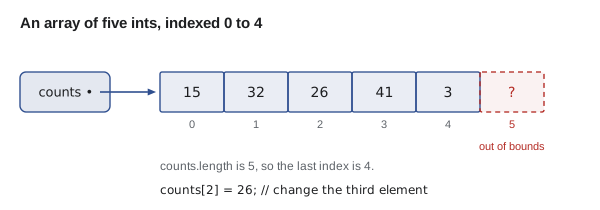
An array is a fixed-length sequence of values, all of the same type, stored one after another. Each value is an element, and each element has an index, its position, counting from 0 as with Strings. The type of an array of ints is written int[], read as "int array". You can create an array with an initializer listing its values in braces, or with new and a length, in which case every element starts with a default value: 0 for numbers, false for booleans and null for objects such as Strings.
import java.util.Arrays;

public class Main {
    public static void main(String[] args) {
        int[] counts = {15, 32, 6, 41, 3};
        System.out.println("Number of parts: " + counts.length);
        System.out.println("First count: " + counts[0]);
        System.out.println("Last count: " + counts[counts.length - 1]);

        counts[2] = 26;            // a box of 20 chains arrived
        System.out.println("After the delivery: " + Arrays.toString(counts));

        double[] prices = new double[3];
        String[] bins = new String[3];
        System.out.println("New double array: " + Arrays.toString(prices));
        System.out.println("New String array: " + Arrays.toString(bins));
    }
}Number of parts: 5 First count: 15 Last count: 3 After the delivery: [15, 32, 26, 41, 3] New double array: [0.0, 0.0, 0.0] New String array: [null, null, null]
What this code does
The initializer creates an array of five ints, and length reports its size. Elements are read and changed with square brackets and an index, so counts[2] = 26 replaces the third value. Arrays created with new start with default values, 0.0 for doubles and null for Strings, and Arrays.toString prints a whole array.
An array's length is fixed when it is created. counts.length is a field, written without brackets, unlike a String's length() method, which is a common small mix-up. To hold a list that grows and shrinks, Java programs use ArrayList, from JAVA-102 onwards. Arrays remain important: they are fast, they are what ArrayList uses inside, and many library methods take and return them.
Out of bounds
Java checks every index. Reading or writing an element that does not exist, such as counts[5] in a five-element array or counts[-1], stops the program with an ArrayIndexOutOfBoundsException. That is far better than what happens in C, where the program silently reads whatever memory happens to lie past the end. The exception message names the bad index and the length.
public class Main {
    public static void main(String[] args) {
        int[] counts = {15, 32, 26, 41, 3};
        for (int i = 0; i <= counts.length; i++) {
            System.out.println("Bin " + i + ": " + counts[i]);
        }
    }
}
What this code does
The loop condition uses <= instead of <, so on its last pass i is 5, one past the final index. Java prints the five real counts and then stops with an exception that names index 5 and length 5. The line number in the message points to the line that read the array.
$ javac Main.java
$ java Main
Bin 0: 15
Bin 1: 32
Bin 2: 26
Bin 3: 41
Bin 4: 3
Exception in thread "main" java.lang.ArrayIndexOutOfBoundsException: Index 5 out of bounds for length 5
	at Main.main(Main.java:5)
The fix is the off-by-one rule from lesson 7: indexes run from 0 to length minus 1, so loops use i < counts.length. Better still, when the index is not needed, a for-each loop cannot go out of bounds at all.
Standard array algorithms
A handful of short algorithms appear in programs again and again. Every programmer should be able to write them without looking them up: summing and averaging, finding the largest or smallest value, counting the elements that pass a test, searching for a value and reversing. They all follow the same shape, a loop with a variable that remembers something about the elements seen so far.
public class Main {
    public static void main(String[] args) {
        int[] sold = {4, 9, 2, 12, 7, 0, 5};    // tubes sold each day of a week

        int total = 0;
        for (int s : sold) total += s;
        double average = (double) total / sold.length;

        int best = sold[0];
        int bestDay = 0;
        for (int i = 1; i < sold.length; i++) {
            if (sold[i] > best) {
                best = sold[i];
                bestDay = i;
            }
        }

        int quietDays = 0;
        for (int s : sold) if (s < 3) quietDays++;

        System.out.println("Total sold: " + total);
        System.out.printf("Average per day: %.2f%n", average);
        System.out.println("Best day: day " + bestDay + " with " + best);
        System.out.println("Days with fewer than 3: " + quietDays);
    }
}Total sold: 39 Average per day: 5.57 Best day: day 3 with 12 Days with fewer than 3: 2
What this code does
The first loop is an accumulator that adds every element, and the cast makes the average a decimal division. The second loop remembers the largest value seen so far and where it was, starting from the first element. The third loop counts the days that pass a test.
Two details deserve attention. The maximum search starts with best = sold[0] rather than 0, because if every value were negative, starting at 0 would report a maximum that is not in the array. And the cast in (double) total / sold.length is essential: without it, integer division would give 5 instead of about 5.57. The short loops without braces here are kept to one line, which is the only place this course drops braces.
Searching
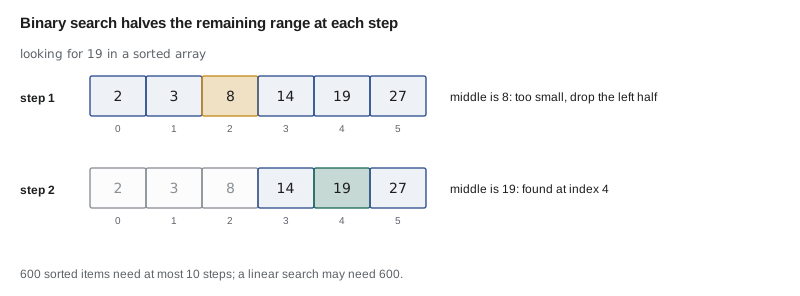
A linear search checks each element in turn until it finds a match, and returns its index, or -1 if there is none. It works on any array but checks every element in the worst case. For a sorted array, binary search is far faster: it looks at the middle element, discards the half that cannot contain the value, and repeats, so 600 sorted parts need at most 10 comparisons. Arrays.binarySearch does this for you, as long as the array is sorted first.
import java.util.Arrays;

public class Main {
    public static void main(String[] args) {
        String[] parts = {"inner tube", "brake pads", "chain", "cable", "saddle"};
        System.out.println("chain is at " + indexOf(parts, "chain"));
        System.out.println("bell is at " + indexOf(parts, "bell"));

        int[] bins = {14, 3, 27, 8, 19, 2};
        Arrays.sort(bins);
        System.out.println("Sorted bins: " + Arrays.toString(bins));
        System.out.println("Bin 19 is at index " + Arrays.binarySearch(bins, 19));
    }

    public static int indexOf(String[] items, String target) {
        for (int i = 0; i < items.length; i++) {
            if (items[i].equals(target)) {
                return i;
            }
        }
        return -1;
    }
}chain is at 2 bell is at -1 Sorted bins: [2, 3, 8, 14, 19, 27] Bin 19 is at index 4
What this code does
indexOf is a linear search: it compares each element with the target using equals and returns the index as soon as it matches. When nothing matches, the loop ends and the method returns -1. Arrays.sort puts the bin numbers in order, after which Arrays.binarySearch can find 19 quickly.
The java.util.Arrays helpers
The Arrays class in java.util has static methods for the jobs that come up constantly. Using them is shorter and less error-prone than writing your own loops, and they are well tested.
| Method | What it does |
|---|---|
| Arrays.toString(a) | Returns the elements as text, such as [1, 2, 3] |
| Arrays.sort(a) | Sorts the array in place, smallest first |
| Arrays.fill(a, v) | Sets every element to v |
| Arrays.copyOf(a, n) | Returns a new array of length n with a's elements copied in |
| Arrays.copyOfRange(a, from, to) | Returns a copy of part of the array |
| Arrays.equals(a, b) | true if both arrays have the same elements in the same order |
| Arrays.binarySearch(a, v) | Finds v in a sorted array and returns its index |
import java.util.Arrays;

public class Main {
    public static void main(String[] args) {
        int[] counts = {15, 32, 26};
        int[] alias = counts;                       // the same array
        int[] copy = Arrays.copyOf(counts, counts.length);   // a separate array

        counts[0] = 99;
        System.out.println("alias sees: " + Arrays.toString(alias));
        System.out.println("copy keeps: " + Arrays.toString(copy));
        System.out.println("== on copies: " + (copy == new int[] {15, 32, 26}));
        System.out.println("Arrays.equals: " + Arrays.equals(copy, new int[] {15, 32, 26}));

        int[] bigger = Arrays.copyOf(copy, 5);
        Arrays.fill(bigger, 3, 5, -1);
        System.out.println("Grown and filled: " + Arrays.toString(bigger));
    }
}alias sees: [99, 32, 26] copy keeps: [15, 32, 26] == on copies: false Arrays.equals: true Grown and filled: [15, 32, 26, -1, -1]
What this code does
Assigning an array to another variable copies only the reference, so alias sees the change made through counts. Arrays.copyOf makes a real, separate copy. == checks whether two variables refer to the same array, so it is false for separate arrays with equal contents, while Arrays.equals compares the elements.
Arrays behave like Strings in one respect and unlike them in another. Like Strings, they are objects, reached through references, and == compares references rather than contents. Unlike Strings, they are mutable: their elements can be changed, and every variable holding a reference to the same array sees the change. This is the point lesson 8 made about passing arrays to methods.
Parallel arrays
Hamza's first parts list used parallel arrays: one array of names, one of counts and one of bin codes, where the same index in each refers to the same part. They are simple and work well for small programs, and the capstone uses them. Their weakness is that the arrays must be kept in step by hand: sorting one without the others scrambles the data. Lesson 11 and JAVA-102 replace them with objects that keep a part's details together.
public class Main {
    public static void main(String[] args) {
        String[] names = {"inner tube", "brake pads", "chain", "cable"};
        String[] bins = {"A-02", "B-11", "C-14", "D-07"};
        int[] counts = {15, 32, 6, 41};

        System.out.printf("%-12s %-6s %5s%n", "Part", "Bin", "Count");
        for (int i = 0; i < names.length; i++) {
            System.out.printf("%-12s %-6s %5d%n", names[i], bins[i], counts[i]);
        }

        int lowest = 0;
        for (int i = 1; i < counts.length; i++) {
            if (counts[i] < counts[lowest]) lowest = i;
        }
        System.out.println("Lowest stock: " + names[lowest] + " in " + bins[lowest]);
    }
}Part Bin Count inner tube A-02 15 brake pads B-11 32 chain C-14 6 cable D-07 41 Lowest stock: chain in C-14
What this code does
The three arrays line up by index, so element i of each describes the same part. The table loop uses one index to read all three. Finding the lowest count gives an index, which then finds that part's name and bin in the other arrays.
Inserting and removing
Because an array cannot change length, adding or removing an element means building a new array or shifting elements along. To remove the element at index k, copy every later element one place to the left and treat the array as one shorter, or create a shorter copy. To insert, shift the later elements one place to the right first. These shifting loops are a classic source of off-by-one errors, and they are one of the main reasons ArrayList exists.
import java.util.Arrays;

public class Main {
    public static void main(String[] args) {
        String[] parts = {"inner tube", "brake pads", "chain", "cable"};
        parts = removeAt(parts, 1);
        System.out.println(Arrays.toString(parts));
        parts = append(parts, "bell");
        System.out.println(Arrays.toString(parts));
    }

    public static String[] removeAt(String[] a, int k) {
        String[] out = new String[a.length - 1];
        for (int i = 0, j = 0; i < a.length; i++) {
            if (i != k) out[j++] = a[i];
        }
        return out;
    }

    public static String[] append(String[] a, String value) {
        String[] out = Arrays.copyOf(a, a.length + 1);
        out[a.length] = value;
        return out;
    }
}[inner tube, chain, cable] [inner tube, chain, cable, bell]
What this code does
removeAt builds a new array one shorter and copies every element except the one at index k, using a second index j for the next free place. append makes a copy one longer and puts the new value in the last place. Both return the new array, and main stores it back in parts.
Arrays of arrays
An array's elements can themselves be arrays, which gives a two-dimensional array with rows and columns. int[][] grid = new int[3][4] has 3 rows of 4 columns, and grid[r][c] is the element in row r, column c. Nested loops, from lesson 7, visit every element. Hamza used one to hold tube sales for each repair night over three weeks, with a row per week and a column per night.
public class Main {
    public static void main(String[] args) {
        int[][] used = {
            {9, 11},     // week 1: Tuesday, Thursday
            {7, 10},     // week 2
            {12, 8},     // week 3
        };
        String[] nights = {"Tue", "Thu"};

        for (int w = 0; w < used.length; w++) {
            int weekTotal = 0;
            for (int n = 0; n < used[w].length; n++) {
                weekTotal += used[w][n];
            }
            System.out.println("Week " + (w + 1) + ": " + weekTotal + " tubes");
        }

        for (int n = 0; n < nights.length; n++) {
            int nightTotal = 0;
            for (int[] week : used) nightTotal += week[n];
            System.out.println(nights[n] + " total: " + nightTotal);
        }
    }
}Week 1: 20 tubes Week 2: 17 tubes Week 3: 20 tubes Tue total: 28 Thu total: 29
What this code does
used is an array of three rows, each an array of two numbers. The first pair of loops adds across each row to give weekly totals. The second pair adds down each column to give totals per night, using for-each to visit each row and picking out column n.
used.length is the number of rows and used[w].length is the length of row w. Rows do not have to be the same length, which is called a jagged array, so looping to used[w].length rather than a fixed number is the safe habit.
Try it yourself
Stock statistics
Given the array of counts, print the total, the smallest count and how many parts are below 10, in the form Total: 108, Smallest: 3 and Below 10: 2.
Write the loops yourself; start the smallest-value search from the first element.
public class Main {
    public static void main(String[] args) {
        int[] counts = {15, 32, 6, 49, 3};
        System.out.println("Total: ");
    }
}
Try it yourself
Find a bin
Complete findBin so that it returns the bin code for a part name, or not stocked if the part is not in the list.
The program should print chain -> C-14 and bell -> not stocked.
public class Main {
    public static void main(String[] args) {
        String[] names = {"inner tube", "brake pads", "chain", "cable"};
        String[] bins = {"A-02", "B-11", "C-14", "D-07"};
        System.out.println("chain -> " + findBin(names, bins, "chain"));
        System.out.println("bell -> " + findBin(names, bins, "bell"));
    }

    public static String findBin(String[] names, String[] bins, String part) {
        return "";
    }
}
Common mistakes
MistakeWriting counts.length() for an array.
Insteadlength is a field on arrays: counts.length, with no brackets.
MistakeLooping with i <= a.length.
InsteadThe last index is a.length - 1; use i < a.length.
MistakeCopying an array with int[] b = a; and expecting a separate copy.
InsteadThat copies the reference; use Arrays.copyOf for a real copy.
MistakeComparing arrays with ==.
InsteadUse Arrays.equals to compare their contents.
MistakeUsing Arrays.binarySearch on an unsorted array.
InsteadSort first with Arrays.sort, or the result is meaningless.
Summary and key terms
- An array is a fixed-length sequence of elements of one type, indexed from 0 to length minus 1, created with an initializer or with new, which fills it with default values.
- Reading outside the bounds throws ArrayIndexOutOfBoundsException.
- The standard algorithms, summing, averaging, finding the maximum or minimum, counting and searching, are loops with a variable that remembers what has been seen.
- Linear search works on any array; binary search needs a sorted array and is much faster. java.util.Arrays provides toString, sort, fill, copyOf, equals and binarySearch.
- Arrays are objects reached by reference and are mutable, so assignment shares them and == compares references.
- Parallel arrays keep related data at matching indexes.
- Inserting and removing need new arrays or shifting.
- Two-dimensional arrays hold rows of arrays and are processed with nested loops.
- Arrays
- Fixed-length sequences of elements of the same type.
- Element
- One value stored in an array.
- Index
- An element's position, from 0 to length minus 1.
- length
- The field holding an array's size.
- Default value
- The value new array elements start with: 0, false or null.
- ArrayIndexOutOfBoundsException
- The exception thrown when an index is below 0 or not less than the length.
- Linear search
- Checking elements one by one until a match is found.
- Binary search
- Searching a sorted array by repeatedly halving the range.
- Parallel arrays
- Separate arrays whose elements at the same index describe the same item.
- Two-dimensional array
- An array of arrays, used for rows and columns.
- Jagged array
- A two-dimensional array whose rows have different lengths.
Practice problems
Work each problem on paper first, then reveal the answer to check.
What is the index of the last element of an array of length 8?
Show answer
7.
What values does new boolean[4] contain?
Show answer
Four false values.
Why does the maximum search start from the first element rather than from 0?
Show answer
If every element were negative, starting from 0 would report a maximum that is not in the array.
After int[] b = a; b[0] = 5; what is a[0]?
Show answer
5, because a and b refer to the same array.
In int[][] g = new int[3][5], how many rows and columns are there, and how is the last element written?
Show answer
3 rows and 5 columns; the last element is g[2][4].
Lesson quiz · 5 questions
Score 60% or more to complete this lesson.
Create a free account to save your progress, take quizzes and earn a certificate.