
JAVA-101 · Lesson 6 of 12 · 22 min
Making decisions with if and switch
▶ Video coming soon A video version of this lesson is on the way.
Kofi's counting tool from lesson 5 made one decision: reorder or not. Real rules at Second Gear are more tangled. On Wednesday, October 14, Odile listed a few for Hamza. Members get 10 in 100 off parts. Youth in the earn-a-bike program get parts free for the bike they are building. Repair nights are Tuesday and Thursday, and the shop closes early on the Saturday of a long weekend. A refurbished bike's frame size depends on the rider's height. Every one of these is a decision, and this lesson covers the tools Java gives for making them: boolean expressions, if and else, the conditional operator, and switch in its old and new forms.
Boolean expressions
A decision starts with a question whose answer is true or false. In Java such a question is a boolean expression, and it usually uses a comparison operator: == for equal to, != for not equal to, < and > for less than and greater than, and <= and >= for less than or equal to and greater than or equal to. Each comparison produces a boolean value that can be printed, stored in a boolean variable or used directly in an if statement.
public class Main {
    public static void main(String[] args) {
        int stock = 15;
        int reorderLevel = 20;
        boolean low = stock < reorderLevel;
        System.out.println("Stock is low: " + low);
        System.out.println("Exactly at the level: " + (stock == reorderLevel));
        System.out.println("Not at the level: " + (stock != reorderLevel));
        System.out.println("At least 10 left: " + (stock >= 10));
    }
}Stock is low: true Exactly at the level: false Not at the level: true At least 10 left: true
What this code does
Each comparison evaluates to true or false. The first is stored in the boolean variable low, and the others are printed directly. Brackets around a comparison are needed when it is joined to text, so that Java compares before it joins.
Remember from lesson 4 that == compares Strings by object, not by content. For text, always use equals. And be careful with doubles: because decimals are stored approximately, 0.1 + 0.2 == 0.3 is false. To compare decimal measurements, check whether the difference is smaller than a tiny tolerance, as in Math.abs(a - b) < 0.000001.
if, else if and else
The if statement runs a block of code only when its condition is true. An optional else block runs when it is false. To choose between more than two possibilities, chain else if clauses: Java tests each condition in order, runs the block of the first one that is true and skips the rest. If none is true, the final else runs, if there is one.
public class Main {
    public static void main(String[] args) {
        int[] heights = {150, 168, 181, 195};   // rider heights in cm
        for (int h : heights) {
            String size;
            if (h < 160) {
                size = "XS (48 cm frame)";
            } else if (h < 172) {
                size = "S (52 cm frame)";
            } else if (h < 185) {
                size = "M (56 cm frame)";
            } else {
                size = "L (60 cm frame)";
            }
            System.out.println(h + " cm rider: " + size);
        }
    }
}150 cm rider: XS (48 cm frame) 168 cm rider: S (52 cm frame) 181 cm rider: M (56 cm frame) 195 cm rider: L (60 cm frame)
What this code does
For each height, Java tests the conditions from top to bottom and uses the first one that is true. A 168 cm rider fails the first test but passes the second, so the later tests are never checked. A 195 cm rider fails all three tests, so the else branch gives size L. The loop that tries several heights is covered in lesson 7.
Order matters in a chain. Because Java stops at the first true condition, each test can assume the earlier ones were false: the second test can simply say h < 172, without also saying h >= 160. If the tests were written in the opposite order, starting with h < 185, every short rider would match it first and get the wrong size. The sizes in this example are the shop's own rough guide, labelled for its notice board; real fitting also depends on leg length and bike type.
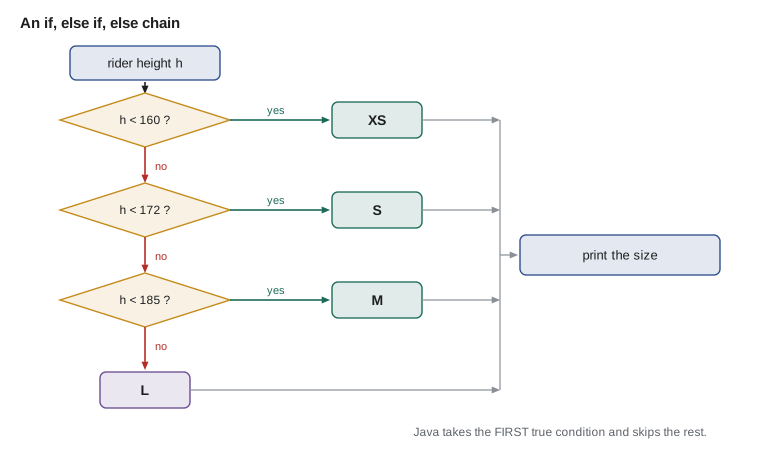
Braces can be left out when a block holds only one statement, but this course always writes them. Code without braces is easy to break later: someone adds a second line, indents it to look as if it belongs to the if, and it runs every time.
Combining conditions
Java has three logical operators for combining booleans. && means and: the result is true only if both sides are true. The or operator, written as two vertical bars, is true if at least one side is true. ! means not and flips a boolean. Both && and the or operator are short-circuit operators: Java stops evaluating as soon as the answer is known. With &&, if the left side is false the right side is never checked; with or, if the left side is true the right side is skipped. That lets you write safe checks such as name != null && name.length() > 0, where the second part would fail if the first were false.
public class Main {
    public static void main(String[] args) {
        String day = "Thursday";
        int hour = 19;
        boolean member = true;
        boolean youthBuild = false;

        boolean repairNight = (day.equals("Tuesday") || day.equals("Thursday")) && hour >= 18;
        System.out.println("Repair night now: " + repairNight);

        boolean discount = member || youthBuild;
        System.out.println("Gets a discount: " + discount);
        System.out.println("Pays full price: " + !discount);
    }
}Repair night now: true Gets a discount: true Pays full price: false
What this code does
The first expression is true when the day is Tuesday or Thursday and the time is 18:00 or later. The brackets make the or apply to the two days before the and is checked. The discount applies to members or youth builders, and the not operator gives the opposite.
| A | B | A && B | A or B | !A |
|---|---|---|---|---|
| true | true | true | true | false |
| true | false | false | true | false |
| false | true | false | true | true |
| false | false | false | false | true |
&& is evaluated before the or operator, just as multiplication comes before addition, so brackets are often needed to say what you mean. When in doubt, add brackets: they cost nothing and make the code easier to read.
A real pricing rule
Odile's discount rules translate directly into an if chain. Youth building their own bike pay nothing for parts. Members get 10 in 100 off. Everyone else pays the full price. The order of the tests matters again: a youth builder who is also a member should get the free parts, so that test comes first.
public class Main {
    public static void main(String[] args) {
        double partsTotal = 46.00;
        boolean youthBuild = false;
        boolean member = true;

        double discount;
        if (youthBuild) {
            discount = partsTotal;
        } else if (member) {
            discount = partsTotal * 0.10;
        } else {
            discount = 0;
        }
        double afterDiscount = partsTotal - discount;
        double hst = afterDiscount * 0.13;
        System.out.printf("Parts:    %7.2f%n", partsTotal);
        System.out.printf("Discount: %7.2f%n", -discount);
        System.out.printf("HST:      %7.2f%n", hst);
        System.out.printf("To pay:   %7.2f%n", afterDiscount + hst);
    }
}Parts: 46.00 Discount: -4.60 HST: 5.38 To pay: 46.78
What this code does
The chain gives free parts to youth builders first, then 10 in 100 off to members, then nothing. This customer is a member, so the discount is 4.60. Tax at 13 in 100 is worked out on the discounted amount of 41.40.
Java checks that discount has a value on every path before it is used. If Hamza forgot the final else, javac would report variable discount might not have been initialized, because on the path where neither condition is true, nothing assigns it. That is the compiler catching a real bug: a non-member customer would have had no price at all.
The conditional operator
For a simple choice between two values, the conditional operator, also called the ternary operator because it has three parts, is shorter than an if statement: condition ? valueIfTrue : valueIfFalse. It is an expression, so it produces a value that can be assigned or printed. Use it for short, obvious choices; for anything longer, an if statement is clearer.
public class Main {
    public static void main(String[] args) {
        int bikesReady = 1;
        String word = bikesReady == 1 ? "bike" : "bikes";
        System.out.println(bikesReady + " " + word + " ready for sale");

        int stock = 32;
        System.out.println("Status: " + (stock < 20 ? "reorder" : "ok"));
    }
}1 bike ready for sale Status: ok
What this code does
The first conditional chooses the singular or plural word, so the message reads correctly for one bike. The second chooses a status label inside the println. Both choices are short enough that an if statement would only add length.
The switch statement
When one value is compared against many fixed possibilities, a long else if chain becomes repetitive. The switch statement handles this. It takes a value, such as an int, a char, a String or an enum, and jumps to the matching case. In the classic form, each case ends with break, which leaves the switch. Without break, Java falls through and runs the next case's statements too, which is occasionally useful and frequently a bug.
public class Main {
    public static void main(String[] args) {
        String day = "Thursday";
        switch (day) {
            case "Tuesday":
            case "Thursday":
                System.out.println("Open 10:00 to 20:00 (repair night)");
                break;
            case "Wednesday":
            case "Friday":
                System.out.println("Open 10:00 to 18:00");
                break;
            case "Saturday":
                System.out.println("Open 09:00 to 17:00");
                break;
            default:
                System.out.println("Closed");
        }
    }
}Open 10:00 to 20:00 (repair night)
What this code does
switch compares day with each case label and jumps to the match, here Thursday. Tuesday and Thursday share one block by listing both labels with nothing between them. break leaves the switch, and default runs when no case matches.
Fall-through is the reason classic switch has a bad reputation. Leave out one break and the program quietly runs the next case as well. Hamza did exactly that on his first try and found Thursday reported as both 10:00 to 20:00 and 10:00 to 18:00.
Switch expressions
Since Java 14, switch has a modern form that avoids those problems. In a switch expression, each case uses an arrow, case "Tuesday", "Thursday" -> ..., several labels are separated by commas, and there is no fall-through, so no break is needed. A switch expression also produces a value that can be assigned. The compiler checks that every possible value is covered, usually with a default, so a forgotten case is a compile error rather than a silent bug.
public class Main {
    public static void main(String[] args) {
        String[] days = {"Monday", "Tuesday", "Friday", "Saturday"};
        for (String day : days) {
            String hours = switch (day) {
                case "Tuesday", "Thursday" -> "10:00 to 20:00";
                case "Wednesday", "Friday" -> "10:00 to 18:00";
                case "Saturday" -> "09:00 to 17:00";
                default -> "closed";
            };
            System.out.println(day + ": " + hours);
        }
    }
}Monday: closed Tuesday: 10:00 to 20:00 Friday: 10:00 to 18:00 Saturday: 09:00 to 17:00
What this code does
Each case arrow gives the value for that day, and commas join days with the same hours. There is no fall-through, so no break statements are needed. The whole switch produces a String that is stored in hours, and default covers Sunday, Monday and anything else.
When a case needs more than one statement before producing its value, put the statements in braces and finish with yield, which hands the value back. The next example uses that for a part code, where the first letter says which section of the parts room a bin is in.
public class Main {
    public static void main(String[] args) {
        String bin = "C-14";
        char section = bin.charAt(0);
        String area = switch (section) {
            case 'A' -> "tires and tubes";
            case 'B' -> "brakes";
            case 'C' -> {
                int shelf = Integer.parseInt(bin.substring(2));
                yield shelf < 10 ? "chains, top shelves" : "chains, bottom shelves";
            }
            case 'D' -> "cables and housing";
            default -> "unknown section";
        };
        System.out.println(bin + " is in " + area);
    }
}C-14 is in chains, bottom shelves
What this code does
The switch looks at the first character of the bin code. Section C needs two steps, so its case has a block that works out the shelf number and uses yield to return the value. Bin C-14 is on shelf 14, so it is on the bottom shelves.
| Situation | Best tool |
|---|---|
| One condition, do something or not | if |
| Two alternatives | if and else, or the conditional operator for a short value |
| Ranges or several different conditions | if, else if, else |
| One value against many fixed values | switch expression with arrows |
| Combining several facts | Logical operators and brackets |
Checking input with decisions
Decisions turn lesson 5's input into something sturdy. A good program checks that a count is not negative, that a menu choice exists and that a name is not blank, and says clearly what is wrong. This is called validation, and it is where most real programs spend a surprising share of their code.
import java.util.Scanner;

public class Main {
    public static void main(String[] args) {
        Scanner in = new Scanner(System.in);
        System.out.print("Count for 700x25c tubes: ");
        String text = in.nextLine().strip();
        System.out.println();
        if (text.isBlank()) {
            System.out.println("Please type a number.");
        } else if (!text.chars().allMatch(Character::isDigit)) {
            System.out.println("\"" + text + "\" is not a whole number.");
        } else {
            int count = Integer.parseInt(text);
            if (count > 500) {
                System.out.println(count + " seems too many. Please count again.");
            } else {
                System.out.println("Recorded " + count + ".");
            }
        }
    }
}Count for 700x25c tubes: 650 seems too many. Please count again.
What this code does
The chain checks for an empty answer first, then for any character that is not a digit, and only then converts the text. The digit check uses a short stream expression that later courses explain. A count of 650 passes those tests but is far more than the parts room ever holds, so a nested if asks Kofi to count again.
Try it yourself
Frame sizes
Complete the program so that it prints a frame size for each height in centimetres: under 160 is XS, under 172 is S, under 185 is M and anything else is L.
Each output line should look like 157 cm: XS.
public class Main {
    public static void main(String[] args) {
        int[] heights = {157, 172, 184, 190};
        for (int h : heights) {
            String size = "?";
            // Choose the size here.
            System.out.println(h + " cm: " + size);
        }
    }
}
Try it yourself
Service prices
Use a switch expression to set the price of each service code: FLAT costs 12, TUNE costs 45, BRAKE and GEAR both cost 20, and anything else costs 0.
Print each line as FLAT costs 12.
public class Main {
    public static void main(String[] args) {
        String[] codes = {"FLAT", "TUNE", "GEAR", "WASH"};
        for (String code : codes) {
            int price = 0;
            System.out.println(code + " costs " + price);
        }
    }
}
Common mistakes
MistakeWriting if (x = 5) to test equality.
InsteadUse == for comparison; a single = is assignment and does not compile for an int.
MistakeComparing Strings with == in a condition.
InsteadUse day.equals("Tuesday").
MistakeLeaving out break in a classic switch.
InsteadExecution falls through into the next case; use switch expressions with arrows to avoid it.
MistakePutting the widest test first in an else if chain.
InsteadOrder tests so earlier ones do not swallow cases meant for later ones.
MistakeTesting doubles with ==.
InsteadCompare the difference with a small tolerance using Math.abs.
Summary and key terms
- Decisions use boolean expressions built from comparison operators such as ==, !=, <, >, <= and >=; Strings are compared with equals and doubles with a tolerance.
- An if statement runs a block when its condition is true, else runs when it is false, and an else if chain takes the first true condition, so order matters.
- The logical operators and, or and not combine booleans; and and or short-circuit, and and binds more tightly than or.
- The conditional operator chooses between two values.
- A classic switch jumps to a matching case and needs break to avoid fall-through, while a switch expression with arrows has no fall-through, joins labels with commas, yields a value and must cover every case.
- Validation uses these tools to reject bad input with clear messages.
- Boolean expression
- An expression whose value is true or false.
- Comparison operator
- An operator such as == or < that compares two values.
- if statement
- A statement that runs a block only when its condition is true.
- else if
- A further condition tested only when the earlier ones were false.
- Logical operator
- An operator that combines booleans: and, or, not.
- Short-circuit
- Stopping evaluation as soon as the result of and or or is known.
- Conditional operator
- The three-part expression condition ? a : b.
- switch
- A statement or expression that chooses a branch by matching a value against cases.
- Fall-through
- Running into the next case of a classic switch when break is missing.
- yield
- The keyword that returns a value from a block inside a switch expression.
- Validation
- Checking input before using it and rejecting values that do not make sense.
Practice problems
Work each problem on paper first, then reveal the answer to check.
Why is the order of tests in an else if chain important?
Show answer
Java takes the first true condition and skips the rest, so an earlier, broader test can capture cases meant for later ones.
What does short-circuit evaluation mean for a && b?
Show answer
If a is false, b is not evaluated, because the result must be false.
How do you make two cases share code in a switch expression?
Show answer
List both labels in one case separated by a comma, as in case "Tuesday", "Thursday" ->.
What happens in a classic switch if you forget break?
Show answer
Execution falls through and runs the next case's statements too.
Write a conditional expression that gives "ok" when stock is at least 20 and "reorder" otherwise.
Show answer
stock >= 20 ? "ok" : "reorder"
Lesson quiz · 5 questions
Score 60% or more to complete this lesson.
Create a free account to save your progress, take quizzes and earn a certificate.