
JAVA-101 · Lesson 11 of 12 · 24 min
Introduction to classes and objects
▶ Video coming soon A video version of this lesson is on the way.
Lesson 9 ended with a warning: parallel arrays must be kept in step by hand. On Wednesday, November 11, two days before his capstone was due to be finished, Hamza sorted his array of part names alphabetically and forgot to sort the counts and bins with it. For half an hour his program reported 41 inner tubes and 6 cables, when it was the other way round. Ingrid said it was the perfect moment to meet the idea at the heart of Java: the class, a way to keep a part's name, bin and count together as one thing. This lesson is a first look at classes and objects. JAVA-102 builds on it in depth.
Classes and objects
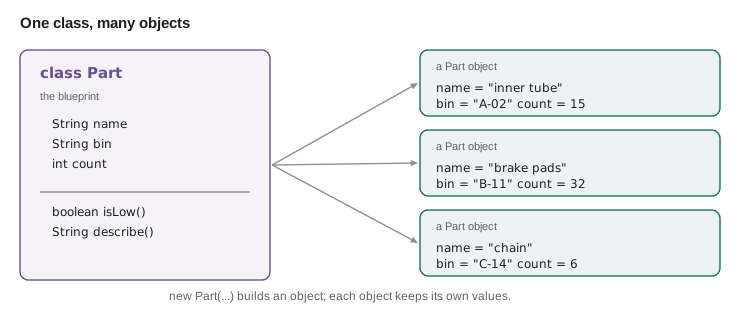
A class is a blueprint that describes a kind of thing: what data it holds and what it can do. An object is one particular thing built from that blueprint, sometimes called an instance of the class. You have used objects since lesson 4: every String is an object of the String class, every Scanner an object of the Scanner class. Now you will write your own class. A Part class can describe what every part has, a name, a bin and a count, and each object made from it holds the details of one real part.
The data an object holds lives in fields, variables declared inside the class but outside any method. The actions an object can perform are its instance methods, methods without the word static, which work on that object's fields. A class is a type, like int or String, so you can declare variables of type Part, pass Parts to methods and keep them in arrays.
Writing a first class
A Java file may contain several classes, but only one of them may be public, and the file must be named after that one. For the small programs in this course, Hamza put the Part class in the same file as Main, below it, without the word public. In larger programs each class gets its own file, which is the usual practice and the topic of JAVA-102's first lessons.
public class Main {
    public static void main(String[] args) {
        Part tube = new Part();
        tube.name = "700x25c inner tube";
        tube.bin = "A-02";
        tube.count = 15;

        Part pads = new Part();
        pads.name = "brake pads";
        pads.bin = "B-11";
        pads.count = 32;

        System.out.println(tube.name + " in " + tube.bin + ": " + tube.count);
        System.out.println(pads.name + " in " + pads.bin + ": " + pads.count);
    }
}

class Part {
    String name;
    String bin;
    int count;
}700x25c inner tube in A-02: 15 brake pads in B-11: 32
What this code does
The Part class declares three fields, so every Part object has a name, a bin and a count. new Part() creates an object, and the dot reaches into a particular object to set or read its fields. The two objects each keep their own values, so changing one never affects the other.
Setting every field by hand after new is clumsy, and it is easy to forget one, leaving it with its default value of null or 0. The next step fixes that.
Constructors
A constructor is a special method that runs when an object is created with new, and its job is to give the object a sensible starting state. It has the same name as the class and no return type, not even void. Its parameters are the values needed to build the object. Inside a constructor, the keyword this means "the object being built", so this.name = name means "set this object's name field to the name parameter", which is how Java tells a field and a parameter with the same name apart.
public class Main {
    public static void main(String[] args) {
        Part tube = new Part("700x25c inner tube", "A-02", 15);
        Part chain = new Part("chain 8-speed", "C-14", 6);
        System.out.println(tube.name + ": " + tube.count);
        System.out.println(chain.name + ": " + chain.count);
    }
}

class Part {
    String name;
    String bin;
    int count;

    Part(String name, String bin, int count) {
        this.name = name;
        this.bin = bin;
        this.count = count;
    }
}700x25c inner tube: 15 chain 8-speed: 6
What this code does
The constructor takes the three values and stores them in the new object's fields, using this to mean the object being created. Each new Part(...) call now builds a complete part in one line. Because the class has this constructor, writing new Part() with no arguments would now be a compile error, which stops half-built parts.
If a class declares no constructor at all, Java gives it an invisible default constructor with no parameters, which is why new Part() worked in the first version. As soon as you write any constructor, the default one disappears. That is usually what you want: it forces every Part to be created with its details.
Instance methods
The real power of classes is that the data and the code that works on it live together. An instance method is written inside the class without static, and it can use the object's fields directly by name. You call it on a particular object with the dot: tube.isLow(). Inside the method, the fields belong to whichever object the method was called on.
public class Main {
    public static void main(String[] args) {
        Part tube = new Part("700x25c inner tube", "A-02", 15);
        Part pads = new Part("brake pads", "B-11", 52);

        System.out.println(tube.describe());
        System.out.println(pads.describe());

        tube.receive(40);
        pads.use(14);
        System.out.println(tube.describe());
        System.out.println(pads.describe());
    }
}

class Part {
    static final int REORDER_LEVEL = 40;
    String name;
    String bin;
    int count;

    Part(String name, String bin, int count) {
        this.name = name;
        this.bin = bin;
        this.count = count;
    }

    boolean isLow() {
        return count < REORDER_LEVEL;
    }

    void receive(int amount) {
        count += amount;
    }

    void use(int amount) {
        count = Math.max(0, count - amount);
    }

    String describe() {
        return name + " (" + bin + "): " + count + (isLow() ? "  REORDER" : "");
    }
}700x25c inner tube (A-02): 15 REORDER brake pads (B-11): 52 700x25c inner tube (A-02): 55 brake pads (B-11): 38 REORDER
What this code does
isLow, receive, use and describe are instance methods, so each works on the fields of the object it is called on. tube.receive(40) changes only the tube's count, and pads.use(14) changes only the pads' count. describe calls isLow on the same object to decide whether to add REORDER.
Look at what main no longer has to do. It does not know how a part decides it is low or how stock is updated; it simply asks the part. If Kofi changes the reorder rule, only the Part class changes. Grouping data with the behaviour that belongs to it is called encapsulation, and it is the main idea behind object-oriented programming.
Private fields and toString
In the example above, main could still write pads.count = -12 directly and break the rule that stock is never negative. Java lets a class protect its fields by declaring them private, which means only code inside the class can touch them. Other code then goes through methods, such as use and receive, which can enforce the rules, and through simple getter methods, such as getCount, for reading. JAVA-102 covers this properly; the pattern is worth seeing now.
A second helpful habit is a toString method. When an object is joined to text or printed, Java calls its toString method. Without one, Java prints the class name and a code, such as Part@1b6d3586, which is not much use. Writing your own toString, marked with @Override to tell the compiler you are replacing the built-in version, makes printing objects natural.
public class Main {
    public static void main(String[] args) {
        Part cable = new Part("brake cable", "D-07", 12);
        cable.use(20);
        System.out.println(cable);
        System.out.println("Count via getter: " + cable.getCount());
    }
}

class Part {
    private final String name;
    private final String bin;
    private int count;

    Part(String name, String bin, int count) {
        if (count < 0) {
            throw new IllegalArgumentException("count cannot be negative");
        }
        this.name = name;
        this.bin = bin;
        this.count = count;
    }

    int getCount() {
        return count;
    }

    void use(int amount) {
        count = Math.max(0, count - amount);
    }

    @Override
    public String toString() {
        return name + " [" + bin + "] x" + count;
    }
}brake cable [D-07] x0 Count via getter: 0
What this code does
The fields are private, so main can change the count only through use, which never lets it drop below zero. The name and bin are also final, because a part's name and bin do not change after it is created. Printing the object calls the class's own toString, and the getter lets other code read the count without being able to change it.
The constructor now also refuses a negative starting count by throwing an exception, the IllegalArgumentException from Java's library. This is the other side of lesson 10: instead of only receiving exceptions, a class can throw one when it is asked to do something that breaks its rules, and the stack trace will point straight at the bad call.
References and null
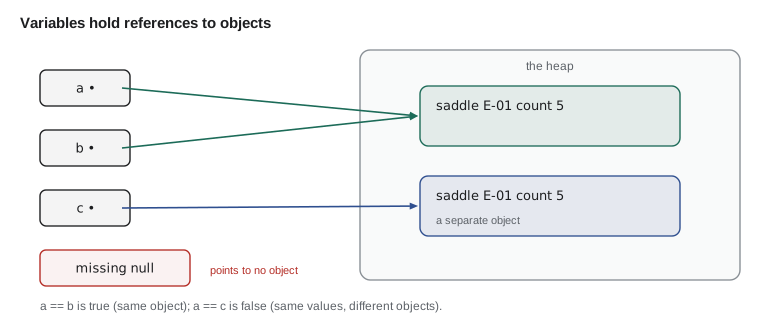
Variables of a class type do not hold the object itself. Like array variables in lesson 9, they hold a reference to an object stored on the heap. Assigning one Part variable to another copies the reference, so both names then point to the same object, and a change through either is seen through both. A reference variable can also hold null, meaning it refers to no object at all. Calling a method on null throws the NullPointerException that lesson 10 described.
public class Main {
    public static void main(String[] args) {
        Part a = new Part("saddle", "E-01", 3);
        Part b = a;               // b refers to the same object as a
        b.count = 5;
        System.out.println("a sees " + a.count);

        Part c = new Part("saddle", "E-01", 5);
        System.out.println("a == c: " + (a == c));
        System.out.println("same details: " + (a.name.equals(c.name) && a.count == c.count));

        Part missing = null;
        System.out.println("missing is null: " + (missing == null));
    }
}

class Part {
    String name;
    String bin;
    int count;

    Part(String name, String bin, int count) {
        this.name = name;
        this.bin = bin;
        this.count = count;
    }
}a sees 5 a == c: false same details: true missing is null: true
What this code does
Assigning a to b copies the reference, so setting the count through b changes the object that a also refers to. c is a separate object with the same details, so == is false even though the fields match. A reference can hold null, and comparing with == null is the safe way to check for it.
An array of objects
The fix for Hamza's sorting accident is now in reach. Instead of three parallel arrays, the program keeps one array of Part objects. Each element holds a whole part, so the name, bin and count can never come apart. Sorting the array moves whole objects. Arrays.sort can sort objects if it is told how to compare them, using a comparator; the short expression Comparator.comparing(p -> p.name) means "compare parts by name". The arrow syntax is a lambda expression, which JAVA-201 explains; for now, read it as a recipe for extracting the value to sort by.
import java.util.Arrays;
import java.util.Comparator;

public class Main {
    public static void main(String[] args) {
        Part[] parts = {
            new Part("inner tube", "A-02", 15),
            new Part("cable", "D-07", 41),
            new Part("brake pads", "B-11", 32),
            new Part("chain", "C-14", 6),
        };

        Arrays.sort(parts, Comparator.comparing(p -> p.name));
        for (Part p : parts) {
            System.out.println(p);
        }

        int total = 0;
        for (Part p : parts) total += p.count;
        System.out.println("Total items: " + total);
    }
}

class Part {
    String name;
    String bin;
    int count;

    Part(String name, String bin, int count) {
        this.name = name;
        this.bin = bin;
        this.count = count;
    }

    @Override
    public String toString() {
        return String.format("%-11s %-5s %3d", name, bin, count);
    }
}brake pads B-11 32 cable D-07 41 chain C-14 6 inner tube A-02 15 Total items: 94
What this code does
The array holds four Part objects, each created with the constructor. Sorting by name moves whole objects, so every part keeps its own bin and count. The for-each loops print each part with its toString and add up the counts, just as with an array of ints.
Static and instance members
With classes in the picture, the word static finally makes sense. An instance field or method belongs to each object: every Part has its own count. A static field or method belongs to the class as a whole and is shared: there is one REORDER_LEVEL for all parts, and Math.max needs no Math object. main is static because the JVM calls it before any objects exist. A static method cannot use instance fields directly, because it is not running on any particular object, which is why the methods in lessons 8 to 10 were all static and passed everything as parameters.
| Instance member | Static member | |
|---|---|---|
| Belongs to | Each object separately | The class as a whole |
| Declared with | No keyword | static |
| Called as | tube.isLow() | Math.max(a, b) or Part.REORDER_LEVEL |
| Can use instance fields? | Yes, of its own object | No, there is no current object |
| Example | count, describe() | REORDER_LEVEL, main |
A glimpse of records
Many classes exist mainly to carry a few values, like a line on a delivery note: a part name, a quantity and a price. Since Java 16, a record declares such a class in one line. record DeliveryLine(String part, int qty, long priceCents) {} automatically gets private final fields, a constructor, methods to read each value named after the fields, and sensible toString and equals methods. Records cannot change once created. JAVA-102 explores when to use them; here is a first taste.
public class Main {
    record DeliveryLine(String part, int qty, long priceCents) {
        long lineTotal() {
            return qty * priceCents;
        }
    }

    public static void main(String[] args) {
        DeliveryLine a = new DeliveryLine("700x25c inner tube", 40, 425);
        DeliveryLine b = new DeliveryLine("700x25c inner tube", 40, 425);
        System.out.println(a);
        System.out.println("Quantity: " + a.qty());
        System.out.println("Line total in cents: " + a.lineTotal());
        System.out.println("Equal records: " + a.equals(b));
    }
}DeliveryLine[part=700x25c inner tube, qty=40, priceCents=425] Quantity: 40 Line total in cents: 17000 Equal records: true
What this code does
The one-line record declaration creates a class with three fields, a constructor and a readable toString. Each value is read with a method named after it, such as qty(), and a record can have its own methods like lineTotal. Two records with the same values are equal by equals, unlike ordinary objects, which compare by reference by default.
Try it yourself
A Bike class
Complete the Bike class with a constructor that takes a model, a frameCm and a priceDollars, and a toString that returns text such as Commuter, 56 cm, 180 dollars.
Add a method isOnSale() that returns true when the price is under 150. The program should then print two bikes and On sale: false and On sale: true.
public class Main {
    public static void main(String[] args) {
        Bike a = new Bike("Commuter", 56, 180);
        Bike b = new Bike("Kids 20 inch", 0, 95);
        System.out.println(a);
        System.out.println(b);
        System.out.println("On sale: " + a.isOnSale());
        System.out.println("On sale: " + b.isOnSale());
    }
}

class Bike {
    String model;
    int frameCm;
    int priceDollars;

    Bike(String model, int frameCm, int priceDollars) {
    }

    boolean isOnSale() {
        return false;
    }
}
Try it yourself
Low parts from an array of objects
Using the array of Part objects, print every part whose count is below the reorder level of 40, then print how many there were, as 2 parts to reorder.
Add an isLow() method to Part and use it in the loop.
public class Main {
    public static void main(String[] args) {
        Part[] parts = {
            new Part("inner tube", 15),
            new Part("brake pads", 52),
            new Part("chain", 6),
            new Part("cable", 41),
        };
        int low = 0;
        System.out.println(low + " parts to reorder");
    }
}

class Part {
    String name;
    int count;

    Part(String name, int count) {
        this.name = name;
        this.count = count;
    }
}
Common mistakes
MistakeGiving a constructor a return type such as void.
InsteadA constructor has the class's name and no return type; with void it becomes an ordinary method.
MistakeWriting name = name; in a constructor whose parameter is also called name.
InsteadUse this.name = name; so the field, not the parameter, is assigned.
MistakeExpecting Part b = a; to make a copy.
InsteadIt copies the reference; both variables point to the same object.
MistakePrinting an object and getting Part@1b6d3586.
InsteadWrite a toString method so the object prints usefully.
MistakeDeclaring two public classes in one file.
InsteadOnly one class per file may be public, and the file is named after it.
Summary and key terms
- A class is a blueprint describing data in fields and behaviour in methods; an object, or instance, is one thing built from it with new.
- A constructor has the class's name and no return type, gives a new object its starting state and uses this to refer to the object being built; writing any constructor removes the default one.
- Instance methods work on the fields of the object they are called on, which keeps data and behaviour together, the idea called encapsulation.
- Private fields protect an object's rules, getters allow reading, a toString method controls how the object prints and a constructor can throw IllegalArgumentException for bad values.
- Class-type variables hold references, so assignment shares objects, == compares references and null means no object.
- An array of objects replaces parallel arrays.
- Static members belong to the class, instance members to each object.
- Records declare small immutable data classes in one line.
- Class
- A blueprint that defines the fields and methods of a kind of object.
- Object
- One instance of a class, created with new.
- Field
- A variable declared in a class that each object holds.
- Constructor
- A special method, named after the class, that initializes a new object.
- this
- A keyword meaning the current object.
- Instance method
- A method without static that works on a particular object.
- Encapsulation
- Keeping an object's data together with the code that uses it, and protecting the data.
- private
- An access modifier allowing use only inside the same class.
- Getter
- A method that returns a field's value.
- toString
- The method Java calls to turn an object into text.
- null
- The value of a reference that points to no object.
- Record
- A compact declaration of an immutable class that carries a few values.
Practice problems
Work each problem on paper first, then reveal the answer to check.
What is the difference between a class and an object?
Show answer
A class is the blueprint; an object is one particular thing built from it.
Why does a constructor often use this.name = name?
Show answer
The parameter and the field share a name, and this.name means the field of the object being built.
After Part b = a; b.count = 9; what is a.count?
Show answer
9, because a and b refer to the same object.
Why make fields private?
Show answer
So that only the class's own methods can change them and keep its rules, such as never having a negative count.
Why can a static method not use an instance field directly?
Show answer
It is not running on any particular object, so there is no object whose field it could use.
Lesson quiz · 5 questions
Score 60% or more to complete this lesson.
Create a free account to save your progress, take quizzes and earn a certificate.