
JAVA-101 · Lesson 5 of 12 · 21 min
Reading input and the Scanner class
▶ Video coming soon A video version of this lesson is on the way.
Every program so far has printed the same thing every time. Real programs respond to people. On Wednesday, October 7, Kofi asked whether Hamza's program could ask him what he had counted and work out the totals, instead of Hamza editing the numbers in the code each week. That meant reading input: text typed at the keyboard, or supplied in other ways. This lesson covers Java's Scanner class, converting text to numbers, the classic trap that catches nearly everyone, checking input before using it, and reading values from the command line.
Standard input and the Scanner class
Lesson 1 introduced standard output, System.out, where println sends text. Its partner is standard input, System.in, the stream of characters a program receives, usually from the keyboard. System.in delivers raw bytes, which are awkward to use directly. The Scanner class, in the java.util package, wraps it and offers friendly methods such as nextLine, which reads a whole line of text, and nextInt, which reads a whole number.
Scanner is not part of the java.lang package that every program gets automatically, so the program must import it with import java.util.Scanner; at the top of the file, before the class. Then it creates a Scanner object with new Scanner(System.in). The word new creates an object from a class, which lesson 11 explains properly.
import java.util.Scanner;

public class Main {
    public static void main(String[] args) {
        Scanner in = new Scanner(System.in);
        System.out.print("Your name: ");
        String name = in.nextLine();
        System.out.print("Bike you are working on: ");
        String bike = in.nextLine();
        System.out.println("Thanks, " + name + ". Good luck with the " + bike + "!");
    }
}Your name: Bike you are working on: Thanks, Tamsin. Good luck with the blue 3-speed cruiser!
What this code does
The import line makes the Scanner class available, and new Scanner(System.in) connects it to the keyboard. Each nextLine call waits for a line of input and returns it without the line break. The output shown here contains only what the program prints, because the typed answers came from the Input box.
In a terminal the typed answers appear after each prompt, because the terminal echoes your typing. The output above shows only what the program itself printed, so the prompts and the reply run together on one line. Both runs are the same program; the difference is only in what the screen shows. Using print rather than println for a prompt keeps the cursor on the same line as the question, which feels natural to the person typing.
Reading numbers
Scanner can turn input directly into numbers. nextInt reads a whole number and nextDouble reads a decimal. Both skip any spaces or line breaks before the number, then read characters until the number ends. This lets a person type several numbers on one line separated by spaces, or one per line; Scanner treats both the same, because it splits input into tokens, pieces separated by whitespace.
import java.util.Scanner;

public class Main {
    public static void main(String[] args) {
        Scanner in = new Scanner(System.in);
        System.out.print("Tubes on the shelf: ");
        int shelf = in.nextInt();
        System.out.print("Tubes in the bin: ");
        int bin = in.nextInt();
        System.out.print("Price per tube: ");
        double price = in.nextDouble();

        int total = shelf + bin;
        System.out.println();
        System.out.println("Total tubes: " + total);
        System.out.printf("Stock value: %.2f%n", total * price);
    }
}Tubes on the shelf: Tubes in the bin: Price per tube: Total tubes: 25 Stock value: 212.50
What this code does
nextInt reads each count as a whole number and nextDouble reads the price as a decimal. Because Scanner works in tokens, the two counts could also have been typed on one line. The program then adds the counts and prints the value of the stock with two decimal places.
Scanner reads decimals according to the computer's locale, just as printf formats them. On a computer set to a language that uses a decimal comma, nextDouble expects 8,50 rather than 8.50. If a program must accept a point everywhere, create the Scanner and then call in.useLocale(Locale.ROOT), importing java.util.Locale.
The nextInt then nextLine trap
Almost every Java learner meets this bug in their first month. Hamza wrote a program that asked for a quantity with nextInt and then a part name with nextLine. When he ran it, the program never waited for the name: it printed the result straight away with an empty name. Ingrid smiled and said, "Welcome to Java."
import java.util.Scanner;

public class Main {
    public static void main(String[] args) {
        Scanner in = new Scanner(System.in);
        System.out.print("Quantity: ");
        int qty = in.nextInt();
        System.out.print("Part name: ");
        String name = in.nextLine();
        System.out.println();
        System.out.println("Ordering " + qty + " of [" + name + "]");
    }
}Quantity: Part name: Ordering 4 of []
What this code does
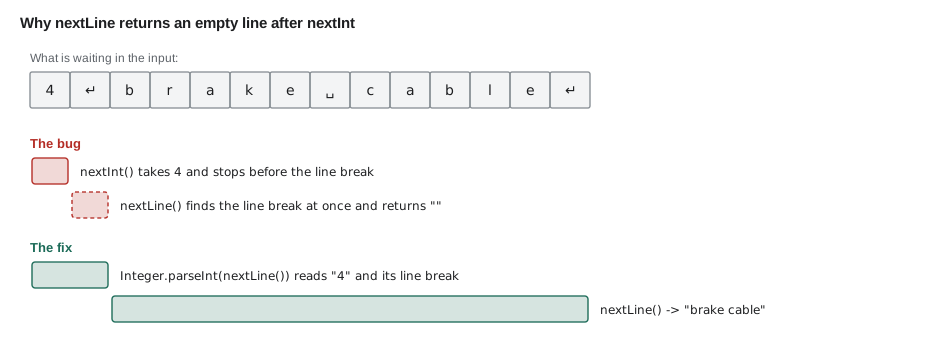
nextInt reads the digits 4 but leaves the line break after them waiting in the input. The following nextLine finds that line break immediately and returns the empty text before it. As a result the part name in the output is empty, even though a name was typed.
The explanation is the token model. When the person types 4 and presses Enter, the input holds the characters 4 and a line break. nextInt takes the 4 and stops, leaving the line break. nextLine reads up to the next line break, finds one at once, and returns the empty text in front of it. There are two common fixes. One is to call in.nextLine() once after nextInt to throw away the rest of that line. The other, which many developers prefer, is to read every line with nextLine and convert the text to a number yourself.
import java.util.Scanner;

public class Main {
    public static void main(String[] args) {
        Scanner in = new Scanner(System.in);
        System.out.print("Quantity: ");
        int qty = Integer.parseInt(in.nextLine().strip());
        System.out.print("Part name: ");
        String name = in.nextLine().strip();
        System.out.println();
        System.out.println("Ordering " + qty + " of [" + name + "]");
    }
}Quantity: Part name: Ordering 4 of [brake cable]
What this code does
Every line is now read with nextLine, so no stray line break is left behind. Integer.parseInt converts the text of the first line into an int, after strip removes any spaces. The part name is read correctly and appears in the output.
Converting text to numbers
Integer.parseInt turns text into an int, Long.parseLong into a long and Double.parseDouble into a double. They are useful whenever numbers arrive as text: from nextLine, from split in lesson 4, from files and from the command line. If the text is not a valid number, such as twelve or 12a, they throw a NumberFormatException and the program stops unless it handles the problem. Going the other way, String.valueOf(42) or "" + 42 turns a number into text.
public class Main {
    public static void main(String[] args) {
        String row = "C-14;700x25c inner tube;18;8.50";
        String[] f = row.split(";");
        int count = Integer.parseInt(f[2]);
        double price = Double.parseDouble(f[3]);
        System.out.println(f[1] + " in bin " + f[0]);
        System.out.println("Count plus delivery: " + (count + 24));
        System.out.printf("Value: %.2f%n", count * price);
        String back = String.valueOf(count);
        System.out.println("As text it has " + back.length() + " characters");
    }
}700x25c inner tube in bin C-14 Count plus delivery: 42 Value: 153.00 As text it has 2 characters
What this code does
split cuts the spreadsheet row into four text fields. parseInt and parseDouble turn the count and price into numbers so they can be used in arithmetic. String.valueOf turns the count back into text, which has two characters.
Checking input before using it
People make typing mistakes, and a program that crashes on the first one is not much use in a busy shop. Scanner can look ahead without consuming anything: hasNextInt returns true if the next token is a valid whole number, and hasNextDouble, hasNext and hasNextLine do the same for other kinds of input. A program can check first and respond politely. Lesson 6 covers if statements properly; this example uses one to show the idea.
import java.util.Scanner;

public class Main {
    public static void main(String[] args) {
        Scanner in = new Scanner(System.in);
        System.out.print("How many tubes did you count? ");
        if (in.hasNextInt()) {
            int tubes = in.nextInt();
            System.out.println();
            System.out.println("Recorded " + tubes + " tubes.");
        } else {
            String bad = in.next();
            System.out.println();
            System.out.println("Sorry, \"" + bad + "\" is not a whole number.");
        }
    }
}How many tubes did you count? Sorry, "twelve" is not a whole number.
What this code does
hasNextInt looks at the next token without reading it and reports whether it is a whole number. Here the input is the word twelve, so the else branch runs. It reads the bad token with next and prints a helpful message instead of crashing.
With parseInt, the equivalent check uses try and catch to handle the NumberFormatException. Lesson 10 introduces exceptions, and JAVA-102 covers them in depth, so for now hasNextInt is the simpler tool.
Command-line arguments
The args parameter of main finally gets used. When a program is started with words after the class name, as in java Main 2 brake-cable, the JVM puts those words into args as an array of Strings: args[0] is "2" and args[1] is "brake-cable". args.length says how many there are. Command-line arguments suit programs that are run from scripts or with a few settings, while Scanner suits programs that hold a conversation.
public class Main {
    public static void main(String[] args) {
        if (args.length < 2) {
            System.out.println("Usage: java Main <quantity> <part>");
            return;
        }
        int qty = Integer.parseInt(args[0]);
        String part = args[1];
        System.out.println("Reorder " + qty + " x " + part);
    }
}Usage: java Main <quantity> <part>
What this code does
args holds the words typed after the class name, so the program first checks that two were given. With none, as when it runs here, it prints a usage line and return ends main early. Run as java Main 6 brake-cable it would print Reorder 6 x brake-cable.
java Main 6 brake-cable
java MainReorder 6 x brake-cable Usage: java Main <quantity> <part>
What this code does
The first command passes two arguments, so the program prints the reorder line. The second passes none, so it prints the usage message. Arguments are separated by spaces, so a part name with spaces must be put in quotes.
Closing the Scanner and other ways to read
A Scanner can be closed with in.close() when the program is finished with it, which also closes System.in. In a small program that reads until it ends, closing is optional, because the JVM releases everything when the program stops; but never close a Scanner on System.in in the middle of a program, because no other code can read the keyboard afterwards. For reading large amounts of text quickly, professional code often uses BufferedReader, which reads whole lines efficiently. Files, covered in JAVA-102 and JAVA-120, can be read with Scanner too, by giving it a file instead of System.in.
Kofi's first counting tool
By the end of the evening Hamza had a small program Kofi could run at the parts room computer. It asks for a part name, the count on the shelf and the count in the bin, then reports the total and whether it is time to reorder. Kofi's rule is to reorder any part when fewer than 20 are left. It uses everything from this lesson, plus a preview of the if statement from lesson 6.
import java.util.Scanner;

public class Main {
    public static void main(String[] args) {
        final int REORDER_LEVEL = 20;
        Scanner in = new Scanner(System.in);

        System.out.print("Part: ");
        String part = in.nextLine().strip();
        System.out.print("On the shelf: ");
        int shelf = Integer.parseInt(in.nextLine().strip());
        System.out.print("In the bin: ");
        int bin = Integer.parseInt(in.nextLine().strip());

        int total = shelf + bin;
        System.out.println();
        System.out.println(part + ": " + total + " in stock");
        if (total < REORDER_LEVEL) {
            System.out.println("Reorder now (" + (REORDER_LEVEL - total) + " below the level)");
        } else {
            System.out.println("Stock is fine");
        }
    }
}Part: On the shelf: In the bin: 700x25c inner tube: 15 in stock Reorder now (5 below the level)
What this code does
The program reads every answer with nextLine and converts the counts with parseInt, so the nextInt trap cannot happen. It adds the two counts and compares the total with the reorder level of 20. With 9 and 6 tubes the total is 15, so it asks Kofi to reorder and says how far below the level the stock is.
Try it yourself
Hours on a repair night
Read a volunteer's name on the first line and the number of hours they worked on the second line, then print Thanks Tamsin: 3 hours logged (using the name and hours from the input).
Read both lines with nextLine and convert the hours with Integer.parseInt so the nextInt trap cannot happen. Print a blank line after the prompts, as in the lesson, before the result.
import java.util.Scanner;

public class Main {
    public static void main(String[] args) {
        Scanner in = new Scanner(System.in);
        System.out.print("Name: ");
        System.out.print("Hours: ");
        System.out.println();
        System.out.println("Thanks");
    }
}
Try it yourself
Splitting a stock line
The input is one line in the form bin;part;count, for example D-07;brake pads;12. Read it, split it at the semicolons and print brake pads (bin D-07): 12 left, 24 after the delivery.
Convert the count with Integer.parseInt and add a delivery of 12.
import java.util.Scanner;

public class Main {
    public static void main(String[] args) {
        Scanner in = new Scanner(System.in);
        String line = in.nextLine();
        System.out.println(line);
    }
}
Common mistakes
MistakeForgetting import java.util.Scanner;.
InsteadAdd the import above the class, or javac reports that it cannot find the symbol Scanner.
MistakeCalling nextLine right after nextInt and getting an empty line.
InsteadRead every line with nextLine and parse it, or add one extra nextLine after nextInt.
MistakeCalling Integer.parseInt on text with spaces around it.
Insteadstrip the text first; " 12" throws NumberFormatException.
MistakeReading args[0] when no arguments were given.
InsteadCheck args.length first, or the program throws ArrayIndexOutOfBoundsException.
MistakeClosing a Scanner on System.in halfway through the program.
InsteadClosing it closes the keyboard input for the rest of the program.
Summary and key terms
- Programs read standard input, System.in, usually through a Scanner from java.util, which must be imported. nextLine reads a whole line, while nextInt, nextDouble and next read whitespace-separated tokens and leave the rest of the line behind, which is why nextLine straight after nextInt returns an empty line.
- Reading every line with nextLine and converting it with Integer.parseInt, Long.parseLong or Double.parseDouble avoids the trap; invalid text throws NumberFormatException. hasNextInt and its relatives check input before reading it.
- Command-line arguments arrive in main's args array, and args.length says how many there are.
- Scanner follows the locale for decimals, and BufferedReader is a faster alternative for large input.
- Standard input
- The stream of characters a program receives, usually from the keyboard: System.in.
- Scanner
- A java.util class that reads text and numbers from input.
- import
- A line that makes a class from another package available by its short name.
- Token
- A piece of input separated from the others by whitespace.
- Whitespace
- Spaces, tabs and line breaks.
- nextLine
- The Scanner method that reads the rest of the current line.
- Integer.parseInt
- A method that converts text such as "42" into an int.
- NumberFormatException
- The exception thrown when text cannot be converted to a number.
- hasNextInt
- A Scanner method that checks whether the next token is a whole number without reading it.
- Command-line argument
- A word typed after the class name when starting a program, delivered in args.
Practice problems
Work each problem on paper first, then reveal the answer to check.
Why does nextLine return an empty String right after nextInt?
Show answer
nextInt leaves the line break after the number in the input, and nextLine reads up to that line break at once.
What happens with Integer.parseInt("12a")?
Show answer
It throws a NumberFormatException.
How does a program find out how many command-line arguments it received?
Show answer
By reading args.length.
What is the difference between next and nextLine?
Show answer
next reads one whitespace-separated token; nextLine reads everything to the end of the line.
How can a program avoid crashing when someone types a word instead of a number?
Show answer
Check with hasNextInt before calling nextInt, or catch the NumberFormatException from parseInt.
Lesson quiz · 5 questions
Score 60% or more to complete this lesson.
Create a free account to save your progress, take quizzes and earn a certificate.