
JAVA-101 · Lesson 7 of 12 · 22 min
Loops: while, for and for-each
▶ Video coming soon A video version of this lesson is on the way.
Computers are at their most useful when they repeat work tirelessly. On Wednesday, October 21, three days before the second time that month the shop ran out of 700x25c tubes, Kofi asked Hamza a question that needed repetition: if the shop uses about 9 tubes every repair night, and there are two repair nights a week, how many weeks will the current 47 tubes last? Ingrid said they could work it out on paper, but a loop would answer that question and every other one like it. This lesson covers Java's loops: while, do-while, for and for-each, along with break, continue, nested loops and the classic mistakes.
The while loop
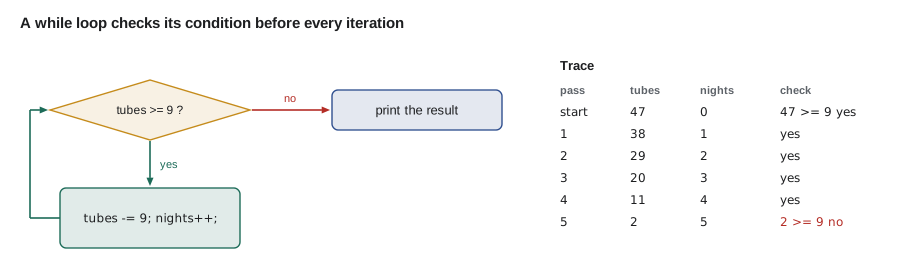
A while loop repeats a block for as long as its condition is true. Java checks the condition first; if it is true, the body runs, and then Java checks again. When the condition becomes false, the loop ends and the program continues after it. If the condition is false the very first time, the body never runs at all. Something inside the body must eventually make the condition false, or the loop runs forever.
public class Main {
    public static void main(String[] args) {
        int tubes = 47;
        int perNight = 9;
        int nights = 0;
        while (tubes >= perNight) {
            tubes -= perNight;
            nights++;
            System.out.println("After night " + nights + ": " + tubes + " left");
        }
        System.out.println("Enough for " + nights + " full repair nights");
        System.out.println("That is about " + nights / 2 + " weeks");
    }
}After night 1: 38 left After night 2: 29 left After night 3: 20 left After night 4: 11 left After night 5: 2 left Enough for 5 full repair nights That is about 2 weeks
What this code does
The condition checks whether there are enough tubes for another night. Each time round, the body takes nine tubes away and counts the night, so tubes keeps shrinking and the loop must end. After five nights only two tubes remain, the condition is false, and the program reports five nights, which is two whole weeks.
Each pass through the body is called an iteration. The variable nights is a counter: it starts at zero and goes up by one each iteration. Counters and their cousins, accumulators, which add up a running total, appear in nearly every loop you will write.
Reading input until the person is done
A while loop is the natural way to read input whose length is not known in advance. Kofi wanted to type the counts from each bin, one per line, and finish with a blank line. Scanner's hasNextLine says whether more input is available, and the program can also stop when it sees the agreed end marker. This pattern, reading until a sentinel value appears, is common in console programs.
import java.util.Scanner;

public class Main {
    public static void main(String[] args) {
        Scanner in = new Scanner(System.in);
        int total = 0;
        int bins = 0;
        System.out.println("Type each bin count, then a blank line to finish.");
        while (in.hasNextLine()) {
            String line = in.nextLine().strip();
            if (line.isEmpty()) {
                break;
            }
            total += Integer.parseInt(line);
            bins++;
        }
        System.out.println("Bins counted: " + bins);
        System.out.println("Total: " + total);
    }
}Type each bin count, then a blank line to finish. Bins counted: 4 Total: 41
What this code does
The loop keeps reading lines while there is input. A blank line is the sentinel: break leaves the loop at once, before the parse. Every other line is converted to a number and added to the running total, and the counter records how many bins there were.
The do-while loop
A do-while loop checks its condition at the end of each iteration instead of the start, so the body always runs at least once. That suits menus and prompts, where the program must ask before it can know whether to ask again. It is the least used of Java's loops, but in those situations it is exactly right. Watch for the semicolon after the closing condition.
import java.util.Scanner;

public class Main {
    public static void main(String[] args) {
        Scanner in = new Scanner(System.in);
        int choice;
        do {
            System.out.println("1) Count a part  2) Show totals  0) Quit");
            choice = Integer.parseInt(in.nextLine().strip());
            if (choice == 1) {
                System.out.println("(counting...)");
            } else if (choice == 2) {
                System.out.println("(totals...)");
            }
        } while (choice != 0);
        System.out.println("Goodbye");
    }
}1) Count a part 2) Show totals 0) Quit (totals...) 1) Count a part 2) Show totals 0) Quit (counting...) 1) Count a part 2) Show totals 0) Quit Goodbye
What this code does
The menu is printed before any choice exists, so a do-while loop fits. After each choice the condition at the bottom decides whether to show the menu again. The input chooses 2, then 1, then 0, so the menu appears three times before the program says goodbye.
The for loop
When a loop counts through a known range, the for loop puts the three counting parts on one line: an initializer that runs once before the loop, a condition checked before each iteration, and an update that runs after each iteration. for (int i = 1; i <= 5; i++) means start i at 1, keep going while i is at most 5, and add 1 after every pass. The variable i exists only inside the loop.
public class Main {
    public static void main(String[] args) {
        for (int week = 1; week <= 4; week++) {
            System.out.println("Week " + week + ": two repair nights");
        }

        int total = 0;
        for (int night = 1; night <= 8; night++) {
            total += 9;
        }
        System.out.println("Tubes for 8 nights: " + total);

        for (int count = 10; count >= 0; count -= 5) {
            System.out.println("Countdown: " + count);
        }
    }
}Week 1: two repair nights Week 2: two repair nights Week 3: two repair nights Week 4: two repair nights Tubes for 8 nights: 72 Countdown: 10 Countdown: 5 Countdown: 0
What this code does
The first loop runs four times with week taking the values 1 to 4. The second uses an accumulator to add nine tubes for each of eight nights, giving 72. The third counts down in steps of five, showing that the update can be any change, not only adding one.
| Part | Example | When it runs |
|---|---|---|
| Initializer | int i = 0 | Once, before the first check |
| Condition | i < 10 | Before every iteration; the loop ends when it is false |
| Body | the block in braces | Each time the condition is true |
| Update | i++ | After every iteration, before the next check |
Most for loops in Java count from 0 up to, but not including, some size: for (int i = 0; i < n; i++). That form runs exactly n times and matches the zero-based indexes of Strings and arrays. Going from 1 to n inclusive with <= is fine for counting things that people number from one, such as weeks or nights.
Off-by-one errors and infinite loops
Two mistakes account for most loop bugs. An off-by-one error runs the loop one time too many or too few, usually by mixing up < and <=, or starting at 1 instead of 0. An infinite loop never ends because its condition never becomes false, often because the update was forgotten or moves the wrong way. When a program seems to hang, an infinite loop is the first suspect; press Ctrl+C in the terminal to stop it.
public class Main {
    public static void main(String[] args) {
        String bin = "C-14";
        // Correct: indexes 0 to length - 1
        for (int i = 0; i < bin.length(); i++) {
            System.out.print("[" + bin.charAt(i) + "]");
        }
        System.out.println();

        // Off by one: stops one character early
        for (int i = 0; i < bin.length() - 1; i++) {
            System.out.print("[" + bin.charAt(i) + "]");
        }
        System.out.println();
    }
}[C][-][1][4] [C][-][1]
What this code does
The first loop visits every index from 0 up to one less than the length, so it prints all four characters. The second loop's condition stops one position too soon and misses the last character. Writing i <= bin.length() instead would go one too far and throw an exception.
A good habit is to check the first and last iteration of every loop by hand. What is the value on the first pass, and is that right? What is the value on the last pass, and does the loop then stop? Two quick checks catch nearly all off-by-one errors.
The for-each loop
The enhanced for loop, usually called for-each, visits every element of an array or collection in order without an index variable: for (String part : parts) reads "for each part in parts". It is shorter and cannot go off by one, so it is the best choice whenever the loop only needs each element. Use an ordinary for loop when you need the index itself, want to skip elements or need to change the array.
public class Main {
    public static void main(String[] args) {
        String[] parts = {"inner tube", "brake pads", "chain", "cable"};
        int[] counts = {15, 32, 6, 41};

        for (String part : parts) {
            System.out.println("Check: " + part);
        }

        int total = 0;
        for (int c : counts) {
            total += c;
        }
        System.out.println("Items on hand: " + total);

        for (char ch : "700x25c".toCharArray()) {
            if (Character.isDigit(ch)) {
                System.out.print(ch);
            }
        }
        System.out.println();
    }
}Check: inner tube Check: brake pads Check: chain Check: cable Items on hand: 94 70025
What this code does
The first for-each prints every part name without needing an index. The second adds up all the counts into an accumulator. The third turns a String into an array of characters with toCharArray and prints only the digits.
break and continue
Two statements change a loop's flow from inside the body. break leaves the loop at once, skipping the rest of the body and any remaining iterations. continue skips the rest of the current iteration and goes straight to the next one; in a for loop, the update still runs. Use them sparingly. A loop with several breaks and continues can be hard to follow, but one well-placed break, such as stopping when something is found, often makes code clearer.
public class Main {
    public static void main(String[] args) {
        String[] parts = {"inner tube", "brake pads", "chain", "cable", "saddle"};
        int[] counts = {15, 32, 0, 41, 3};

        System.out.println("Parts below 10 (skipping empty bins):");
        for (int i = 0; i < parts.length; i++) {
            if (counts[i] == 0) {
                continue;
            }
            if (counts[i] < 10) {
                System.out.println("  " + parts[i] + ": " + counts[i]);
            }
        }

        int firstEmpty = -1;
        for (int i = 0; i < counts.length; i++) {
            if (counts[i] == 0) {
                firstEmpty = i;
                break;
            }
        }
        System.out.println("First empty bin: " + (firstEmpty >= 0 ? parts[firstEmpty] : "none"));
    }
}Parts below 10 (skipping empty bins): saddle: 3 First empty bin: chain
What this code does
In the first loop, continue skips the empty chain bin so that only low but non-empty parts are listed. The second loop searches for the first empty bin and uses break to stop as soon as it is found. The variable firstEmpty starts at -1 so that the program can tell whether anything was found.
Nested loops
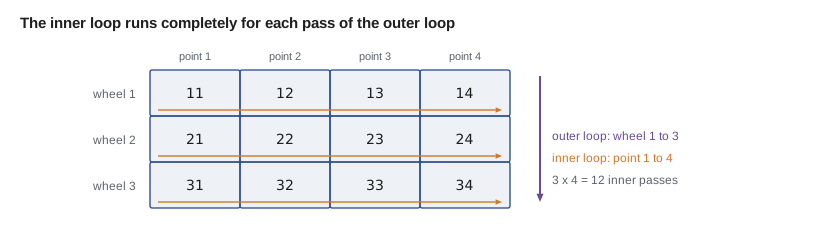
A loop inside another loop is a nested loop. The inner loop runs completely for every single iteration of the outer loop, so a 3 by 4 pair of loops runs the inner body 12 times. Nested loops print tables and grids and compare every item with every other item. They can also be slow: two nested loops over 10,000 items each run the inner body 100 million times.
public class Main {
    public static void main(String[] args) {
        String[] days = {"Tue", "Thu"};
        String[] stations = {"Wheels", "Brakes", "Gears"};
        int station = 0;

        for (String day : days) {
            System.out.print(day + ":");
            for (String s : stations) {
                station++;
                System.out.print("  " + s + "(#" + station + ")");
            }
            System.out.println();
        }

        System.out.println("Spoke tension check, 3 wheels x 4 points:");
        for (int wheel = 1; wheel <= 3; wheel++) {
            StringBuilder row = new StringBuilder("Wheel " + wheel + ":");
            for (int point = 1; point <= 4; point++) {
                row.append(" ").append(wheel * 10 + point);
            }
            System.out.println(row);
        }
    }
}Tue: Wheels(#1) Brakes(#2) Gears(#3) Thu: Wheels(#4) Brakes(#5) Gears(#6) Spoke tension check, 3 wheels x 4 points: Wheel 1: 11 12 13 14 Wheel 2: 21 22 23 24 Wheel 3: 31 32 33 34
What this code does
For each day the inner loop runs through all three stations, so the station counter reaches six. The second pair of loops builds one row per wheel, with four numbered check points on each row. Each check-point label is computed from both loop variables, wheel times ten plus the point.
Choosing a loop
| Situation | Loop to use | Example |
|---|---|---|
| Repeat while something is true; count unknown | while | Use tubes until too few are left |
| Must run at least once | do-while | Show a menu, then ask again |
| Counting through a known range | for | Weeks 1 to 12, or indexes 0 to n - 1 |
| Every element of an array or collection | for-each | Every part in the parts list |
| Reading input until it runs out | while with hasNextLine | Bin counts until a blank line |
Any loop can be rewritten as any other, so this is about clarity rather than power. Choose the loop that says what you mean, so that the next person reading the code, often yourself a month later, understands it at a glance.
Kofi's question answered
Hamza finished the evening by turning Kofi's question into a small planning tool. It simulates the coming weeks: each week the shop uses two nights' worth of tubes, 18 in all, and when stock falls below the reorder level Kofi orders 40 more. The supplier takes two weeks to deliver. Running it with Kofi's reorder level of 20 showed exactly why the shop kept running out: by the time stock dropped below 20, there was only enough left for one more week, but the delivery was still two weeks away.
public class Main {
    public static void main(String[] args) {
        int stock = 47;
        int usePerWeek = 18;
        int reorderLevel = 20;
        int delivery = 40;
        int leadTimeWeeks = 2;
        int weeksUntilDelivery = 0;     // 0 means nothing is on order

        for (int week = 1; week <= 6; week++) {
            if (weeksUntilDelivery > 0) {
                weeksUntilDelivery--;
                if (weeksUntilDelivery == 0) {
                    stock += delivery;
                    System.out.print("Delivery arrived. ");
                }
            }
            stock -= usePerWeek;
            if (stock < 0) {
                System.out.println("Week " + week + ": RAN OUT (short by " + (-stock) + ")");
                stock = 0;
            } else {
                System.out.println("Week " + week + ": " + stock + " left");
            }
            if (stock < reorderLevel && weeksUntilDelivery == 0) {
                weeksUntilDelivery = leadTimeWeeks;
                System.out.println("  Order placed for " + delivery);
            }
        }
    }
}Week 1: 29 left Week 2: 11 left Order placed for 40 Week 3: RAN OUT (short by 7) Delivery arrived. Week 4: 22 left Week 5: 4 left Order placed for 40 Week 6: RAN OUT (short by 14)
What this code does
Each week of the for loop first counts down any order in progress and adds the delivery when it arrives, then subtracts a week's use. If stock goes below zero, the program reports the shortage and sets stock to zero. When stock falls below the reorder level and nothing is on order, it places an order that arrives two weeks later.
The output shows two shortages in six weeks, which matches what happened in October. The reorder level has to cover the use during the delivery time, two weeks of 18 tubes, or 36, plus a small safety margin. Hamza changed reorderLevel to 40, ran the program again and the shortages disappeared. Kofi wrote 40 on the tube bin in marker the next day.
Programs like this one are called simulations: they step through time and apply rules, and they let people try different settings without waiting for real weeks to pass. In lesson 8 Hamza turns pieces of it into methods so that the rules can be tested one at a time.
Try it yourself
Saving for a new truing stand
The shop saves 35 dollars every week towards a truing stand that costs 260 dollars. Use a while loop to count the weeks until the savings reach at least the price.
Print Week 1: 35 and so on for each week, then Ready after 8 weeks.
public class Main {
    public static void main(String[] args) {
        int price = 260;
        int perWeek = 35;
        int saved = 0;
        int weeks = 0;
        System.out.println("Ready after " + weeks + " weeks");
    }
}
Try it yourself
Low-stock report
Use a for loop over the indexes to print each part whose count is below 10, as chain: 6. Skip parts whose count is exactly 0.
After the loop, print how many parts were listed, as 2 parts need reordering.
public class Main {
    public static void main(String[] args) {
        String[] parts = {"inner tube", "chain", "cable", "saddle", "bell"};
        int[] counts = {15, 6, 0, 3, 22};
        int listed = 0;
        System.out.println(listed + " parts need reordering");
    }
}
Common mistakes
MistakeForgetting to change the loop variable inside a while loop.
InsteadSomething in the body must move the condition towards false, or the loop never ends.
MistakeWriting i <= text.length() when looping over indexes.
InsteadThe last index is length minus one; use i < text.length().
MistakeUsing for-each and expecting to change array elements through the loop variable.
InsteadThe loop variable is a copy; use an index loop to assign elements.
MistakeLeaving out the semicolon after while (condition) in a do-while.
InsteadA do-while ends with while (condition); including the semicolon.
MistakePutting a semicolon right after for (...) or while (...).
InsteadThat makes an empty loop body; the block after it runs only once.
Summary and key terms
- A while loop checks its condition before each iteration and suits repetition whose count is unknown, such as reading input until a sentinel.
- A do-while loop checks at the end, so its body always runs at least once.
- A for loop puts an initializer, condition and update on one line and suits counting through a known range, usually from 0 up to but not including a size.
- The for-each loop visits every element of an array or collection without an index. break leaves a loop and continue skips to the next iteration.
- Nested loops run the inner loop fully for every outer iteration.
- Counters and accumulators track progress, and checking the first and last iteration catches off-by-one errors and infinite loops.
- Loop
- A statement that repeats a block of code.
- Iteration
- One pass through the body of a loop.
- Counter
- A variable that goes up by one each iteration to count passes.
- Accumulator
- A variable that builds a running total across iterations.
- Sentinel
- A special input value, such as a blank line, that signals the end of the data.
- do-while
- A loop that checks its condition after the body, so it runs at least once.
- for-each
- The enhanced for loop that visits every element of an array or collection.
- break
- A statement that leaves the loop immediately.
- continue
- A statement that skips the rest of the current iteration.
- Off-by-one error
- A loop that runs one time too many or too few.
- Simulation
- A program that steps through time applying rules to model a situation.
Practice problems
Work each problem on paper first, then reveal the answer to check.
How many times does for (int i = 0; i < 5; i++) run its body?
Show answer
Five times, with i taking the values 0 to 4.
When is a do-while loop a better choice than a while loop?
Show answer
When the body must run at least once, such as showing a menu before asking for a choice.
What is the difference between break and continue?
Show answer
break leaves the loop entirely; continue skips the rest of the current iteration and moves to the next.
Two nested loops each run 20 times. How many times does the inner body run?
Show answer
400 times, 20 for each of the 20 outer iterations.
Why can a for-each loop not go off by one?
Show answer
It has no index; it simply visits each element once.
Lesson quiz · 5 questions
Score 60% or more to complete this lesson.
Create a free account to save your progress, take quizzes and earn a certificate.