
JAVA-101 · Lesson 12 of 12 · 26 min
Capstone: a console inventory tool
▶ Video coming soon A video version of this lesson is on the way.
On Monday, November 2, 2026, Hamza started the project that the whole course had been building towards. Kofi's parts room had run out of 700x25c inner tubes twice in October, on Saturday the 10th and Saturday the 24th, and both times the clipboard said there were plenty. Odile asked Hamza to build a small program Kofi could use at the parts room computer to look up parts, record what came in and went out, and see what needed reordering. Hamza gave it a name, PartsDesk, and set himself two weeks. On Saturday, November 14, he showed it to Odile and Kofi at the shop. This lesson follows the project from requirements to demonstration, and puts every earlier lesson to work.
Starting with requirements
Ingrid's first piece of advice was not to open the editor. "Spend the first evening with Kofi, not with Java," she said. Hamza sat in the parts room for an hour and wrote down what Kofi actually did. He looked parts up by bin code, the letter and number painted on each shelf, more often than by name. He counted when a delivery arrived and when volunteers took parts for repair nights. And each part had its own reorder point: tubes needed a high level because they went fast, while chains could run lower. Hamza turned this into a short list of requirements, the things the program must do, and agreed it with Kofi before writing any code.
| Number | Requirement | Why Kofi wants it |
|---|---|---|
| R1 | List every part with its bin, name, count and reorder level | A quick check of the whole room |
| R2 | Find parts by part of the name, ignoring capitals | Volunteers ask for "a tube" or "cable" |
| R3 | Record parts received and used, by bin code | Bin codes are painted on the shelves |
| R4 | Refuse to take more than is in stock, and refuse amounts of zero or less | Stop the counts going wrong |
| R5 | Show parts at or below their own reorder level, with a suggested order | The tube shortages in October |
| R6 | Never crash on a typing mistake; explain what went wrong | Volunteers of all ages use the computer |
| R7 | Work in a plain terminal on the old parts room computer | No budget for anything else |
Writing requirements down did two useful things. It showed what was out of scope for a first version: saving the counts to a file between runs, printing labels and handling several shops were all left for later courses. And it gave Hamza a checklist to test against at the end. Requirements that are numbered and specific, such as R4, are much easier to test than vague ones such as "make it reliable".
Designing before coding
Next Hamza sketched the design on paper. The data would be a Part class from lesson 11, with a bin, a name, a count and a reorder level, and an array of Parts with a size counter, because there were at most about 600 parts and arrays were what he knew. The program would be a command loop: print a prompt, read a line, split it into words, and choose what to do with a switch expression. Each command would be one method that returned a String to print, so that every command could be checked on its own, the habit from lessons 8 and 10.
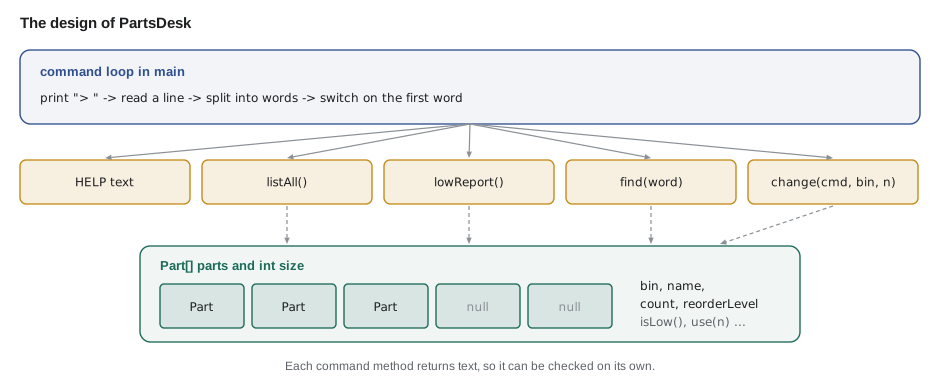
| Piece | Job | Lessons it draws on |
|---|---|---|
| Part class | Holds one part's details and rules: isLow, suggestedOrder, receive, use | 11 |
| parts array and size | Stores up to 600 parts; size counts how many are in use | 9 |
| Command loop in main | Reads lines until quit or end of input | 5, 7 |
| switch expression | Chooses the method for each command word | 6 |
| listAll, lowReport, find | Build reports with StringBuilder and printf-style formatting | 4, 9 |
| change | Finds a part by bin, checks the amount, updates the count | 6, 8, 10 |
| Error messages | Explain bad input instead of crashing | 5, 10 |
Ingrid added one rule of her own: build in small steps and run the program after each one. A program that is written all at once and run for the first time at the end produces a wall of errors that are hard to untangle. Hamza's plan had five steps: the Part class with a few hard-coded parts, then list, then find, then receive and use with their checks, and finally the low report.
Step 1: the Part class
The Part class came first, with its rules inside it. isLow compares the count with the part's own reorder level. suggestedOrder brings stock up to twice the reorder level, Kofi's rule of thumb. use returns false and changes nothing if asked for more than is in stock, which is how requirement R4 is kept in one place. Hamza checked these methods with the PASS and FAIL style from lesson 10 before writing anything else.
public class Main {
    public static void main(String[] args) {
        Part tube = new Part("A-02", "700x25c inner tube", 15, 40);
        check("15 of level 40 is low", tube.isLow(), true);
        check("suggested order tops up to 80", tube.suggestedOrder(), 65);
        check("using 20 of 15 is refused", tube.use(20), false);
        check("count unchanged after refusal", tube.count, 15);
        check("using 9 is allowed", tube.use(9), true);
        check("count is now 6", tube.count, 6);
        tube.receive(40);
        check("receiving 40 gives 46", tube.count, 46);
        check("46 is not low", tube.isLow(), false);
    }

    static void check(String name, Object actual, Object expected) {
        System.out.println((actual.equals(expected) ? "PASS  " : "FAIL  ") + name);
    }
}

class Part {
    final String bin;
    final String name;
    int count;
    final int reorderLevel;

    Part(String bin, String name, int count, int reorderLevel) {
        this.bin = bin;
        this.name = name;
        this.count = count;
        this.reorderLevel = reorderLevel;
    }

    boolean isLow() { return count <= reorderLevel; }
    int suggestedOrder() { return reorderLevel * 2 - count; }
    void receive(int amount) { count += amount; }

    boolean use(int amount) {
        if (amount > count) return false;
        count -= amount;
        return true;
    }
}PASS 15 of level 40 is low PASS suggested order tops up to 80 PASS using 20 of 15 is refused PASS count unchanged after refusal PASS using 9 is allowed PASS count is now 6 PASS receiving 40 gives 46 PASS 46 is not low
What this code does
Each check exercises one rule of the Part class with a known starting state. The refusal checks matter most: asking for 20 of 15 must return false and leave the count at 15. The final checks show that receiving stock clears the low flag once the count passes the reorder level.
Kofi's earlier rule in lesson 7 was "below the level"; for PartsDesk he asked for "at or below", so that a part sitting exactly on its level is flagged. The <= in isLow is that decision, and it is written down in the requirements so that nobody later changes it back by accident.
Step 2 and 3: the command loop, list and find
The command loop reads one line at a time, splits it on runs of spaces with the regular expression \s+, and looks at the first word. Using toLowerCase on that word means LIST and List work too. A switch expression maps each command to a method call that returns the text to print. Unknown words get a friendly message rather than nothing. Because input might end without a quit, for example when a file of commands is fed in, the loop also stops when hasNextLine is false.
public class Main {
    public static void main(String[] args) {
        String[] typed = {"LIST", "  find   Tube ", "receive c-14 20", "count"};
        for (String line : typed) {
            String[] words = line.strip().split("\\s+");
            String command = words[0].toLowerCase();
            String action = switch (command) {
                case "list" -> "show every part";
                case "find" -> "search for " + (words.length > 1 ? words[1] : "(nothing)");
                case "receive", "use" -> command + " stock in bin " + words[1].toUpperCase();
                default -> "unknown command";
            };
            System.out.println("[" + line + "] -> " + action);
        }
    }
}[LIST] -> show every part [ find Tube ] -> search for Tube [receive c-14 20] -> receive stock in bin C-14 [count] -> unknown command
What this code does
strip removes spaces at the ends, and split with the pattern for one or more spaces cuts the line into words even when there are several spaces between them. The first word is changed to small letters so that LIST and list are treated the same. The switch expression then chooses what the command means, with a friendly default for unknown words.
One small detail made testing easier. After reading each line, PartsDesk prints it straight back after the prompt. In a terminal that would show each command twice, so Hamza's real version left that line out; the version below keeps it so that a recorded session, like the one in the next section, reads naturally with the commands visible. That is the only difference.
Step 4: changing counts safely
The change method handles both receive and use, because they share most of their checks. It finds the part by bin code, ignoring capitals, and returns a message if there is none. It converts the amount with Integer.parseInt inside try and catch, so twenty instead of 20 gets an explanation rather than a stack trace, which is requirement R6. It refuses amounts of zero or less, and for use it relies on the Part's own refusal when there is not enough stock. Every way the command can fail produces a message that says what to do.
The finished program
Here is PartsDesk as Hamza demonstrated it, about 150 lines. It is long for a course example, but every part of it is something from the earlier lessons. Read it method by method, starting with main.
import java.util.Scanner;

public class PartsDesk {
    static final int MAX_PARTS = 600;
    static Part[] parts = new Part[MAX_PARTS];
    static int size = 0;

    public static void main(String[] args) {
        loadStartingStock();
        Scanner in = new Scanner(System.in);
        System.out.println("PartsDesk 1.0 - Second Gear Cycles parts room");
        System.out.println("Type help for the list of commands.");
        while (true) {
            System.out.print("> ");
            if (!in.hasNextLine()) break;
            String line = in.nextLine().strip();
            System.out.println(line);
            if (line.isEmpty()) continue;
            String[] words = line.split("\\s+");
            String command = words[0].toLowerCase();
            if (command.equals("quit")) {
                System.out.println("Goodbye. " + size + " parts on file.");
                break;
            }
            String reply = switch (command) {
                case "help" -> HELP;
                case "list" -> listAll();
                case "low" -> lowReport();
                case "find" -> words.length < 2 ? "Usage: find <word>" : find(words[1]);
                case "receive", "use" -> words.length < 3 ? "Usage: " + command + " <bin> <amount>"
                                                         : change(command, words[1], words[2]);
                default -> "Unknown command: " + command + " (type help)";
            };
            System.out.println(reply);
        }
    }

    static final String HELP = """
        list                  show every part
        low                   show parts at or below their reorder level
        find <word>           search part names
        receive <bin> <n>     add n to the part in that bin
        use <bin> <n>         take n away from the part in that bin
        quit                  leave PartsDesk""";

    static void loadStartingStock() {
        add(new Part("A-02", "700x25c inner tube", 15, 40));
        add(new Part("A-03", "26 inch inner tube", 22, 20));
        add(new Part("B-11", "brake pads (pair)", 32, 15));
        add(new Part("C-14", "chain 8-speed", 6, 10));
        add(new Part("D-07", "brake cable", 41, 25));
        add(new Part("D-08", "gear cable", 9, 25));
    }

    static void add(Part p) {
        if (size == MAX_PARTS) throw new IllegalStateException("parts list is full");
        parts[size] = p;
        size++;
    }

    static Part findByBin(String bin) {
        for (int i = 0; i < size; i++) {
            if (parts[i].bin.equalsIgnoreCase(bin)) return parts[i];
        }
        return null;
    }

    static String listAll() {
        StringBuilder sb = new StringBuilder(String.format("%-5s %-20s %5s %5s", "Bin", "Part", "Count", "Level"));
        for (int i = 0; i < size; i++) sb.append('\n').append(parts[i]);
        return sb.toString();
    }

    static String lowReport() {
        StringBuilder sb = new StringBuilder();
        int n = 0;
        for (int i = 0; i < size; i++) {
            if (parts[i].isLow()) {
                sb.append(parts[i]).append("  order ").append(parts[i].suggestedOrder()).append('\n');
                n++;
            }
        }
        return n == 0 ? "Nothing to reorder." : sb + (n + " part(s) to reorder.");
    }

    static String find(String word) {
        StringBuilder sb = new StringBuilder();
        for (int i = 0; i < size; i++) {
            if (parts[i].name.toLowerCase().contains(word.toLowerCase())) {
                if (sb.length() > 0) sb.append('\n');
                sb.append(parts[i]);
            }
        }
        return sb.length() == 0 ? "No part matches \"" + word + "\"." : sb.toString();
    }

    static String change(String command, String bin, String amountText) {
        Part p = findByBin(bin);
        if (p == null) return "No part in bin " + bin + ".";
        int amount;
        try {
            amount = Integer.parseInt(amountText);
        } catch (NumberFormatException e) {
            return "\"" + amountText + "\" is not a whole number.";
        }
        if (amount <= 0) return "The amount must be more than zero.";
        if (command.equals("receive")) {
            p.receive(amount);
        } else if (!p.use(amount)) {
            return "Only " + p.count + " in stock; nothing taken.";
        }
        return p.name + " now " + p.count + (p.isLow() ? " (at or below reorder level)" : "");
    }
}

class Part {
    final String bin;
    final String name;
    int count;
    final int reorderLevel;

    Part(String bin, String name, int count, int reorderLevel) {
        this.bin = bin;
        this.name = name;
        this.count = count;
        this.reorderLevel = reorderLevel;
    }

    boolean isLow() {
        return count <= reorderLevel;
    }

    int suggestedOrder() {
        return reorderLevel * 2 - count;
    }

    void receive(int amount) {
        count += amount;
    }

    boolean use(int amount) {
        if (amount > count) return false;
        count -= amount;
        return true;
    }

    @Override
    public String toString() {
        return String.format("%-5s %-20s %5d %5d", bin, name, count, reorderLevel);
    }
}PartsDesk 1.0 - Second Gear Cycles parts room Type help for the list of commands. > help list show every part low show parts at or below their reorder level find <word> search part names receive <bin> <n> add n to the part in that bin use <bin> <n> take n away from the part in that bin quit leave PartsDesk > list Bin Part Count Level A-02 700x25c inner tube 15 40 A-03 26 inch inner tube 22 20 B-11 brake pads (pair) 32 15 C-14 chain 8-speed 6 10 D-07 brake cable 41 25 D-08 gear cable 9 25 > find tube A-02 700x25c inner tube 15 40 A-03 26 inch inner tube 22 20 > use a-02 9 700x25c inner tube now 6 (at or below reorder level) > use C-14 8 Only 6 in stock; nothing taken. > receive C-14 twenty "twenty" is not a whole number. > receive C-14 20 chain 8-speed now 26 > low A-02 700x25c inner tube 6 40 order 74 D-08 gear cable 9 25 order 41 2 part(s) to reorder. > count Unknown command: count (type help) > quit Goodbye. 6 parts on file.
What this code does
main loads six starting parts, then loops reading a command, choosing a method with a switch expression and printing the returned text until quit. Each command method uses the parts array and the Part class's rules, and every error path returns a message instead of throwing. The session in the Input box tries every command, including a wrong part code, a word instead of a number and an unknown command.
The session exercises each requirement. list covers R1 and find tube covers R2, matching both tubes and ignoring capitals. use a-02 9 and use C-14 8 test R3 and R4: the bin code is accepted in small letters, and taking 8 chains when there are 6 is refused with the count left alone. receive C-14 twenty tests R6. low shows R5, with suggested orders. count, which is not a command, shows the unknown-command message.
Testing against the requirements
Before the demonstration, Hamza went through the requirements table one row at a time and wrote down how he had checked each one. Testing like this, against agreed requirements rather than against whatever the programmer happens to try, is called acceptance testing, and it is how clients decide whether software does what they asked for.
| Requirement | How it was checked | Result |
|---|---|---|
| R1 list | list shows all six parts with four columns | Pass |
| R2 find | find tube, find CABLE and find bell | Pass; bell gives No part matches |
| R3 receive and use | receive and use by bin code, in capitals and small letters | Pass |
| R4 refusals | use more than in stock; receive 0; use -5 | Pass; counts unchanged |
| R5 low report | Compare low output with the counts by hand | Pass |
| R6 no crashes | Words for numbers, unknown commands, blank lines, missing words | Pass |
| R7 plain terminal | Ran on the parts room computer with Java 21 | Pass |
One test failed the first time. find with no word after it, which Hamza tried on Friday the 13th, crashed with ArrayIndexOutOfBoundsException, because the program read words[1] without checking that it existed. The fix was the words.length < 2 check you can see in the switch, and the same kind of check for receive and use. Hamza added "commands with missing words" to the R6 row so that it would be tested every time.
The demonstration
On Saturday, November 14, Hamza set the laptop on the parts room counter. Kofi typed the commands himself while Hamza watched and said nothing, a trick Ingrid had suggested because it shows where a program is confusing. Kofi used it for twenty minutes on 40 real parts. He liked the low report most. He found two things he wanted changed: he wanted the starting counts to be remembered between runs, instead of retyping them, and he wanted a command that printed the whole list for the clipboard. Hamza wrote both down as the first entries in a list of future work.
Odile asked the question every client asks: when can Kofi use it for real? They agreed a plan. From Tuesday, December 1, Kofi will trial PartsDesk alongside the clipboard for a month, entering the full parts list at the start of each session. In January, JAVA-102 will teach Hamza to restructure the program properly into several classes and files, and later courses will add saving to a file, a database and finally a small web page so volunteers can check stock from their phones.
| Kofi's request | Why it waits | Where it is taught |
|---|---|---|
| Remember counts between runs | Needs reading and writing files | JAVA-102 and JAVA-120 |
| Print the list for the clipboard | Needs files or a printer | JAVA-120 |
| Grow past 600 parts without a limit | Needs ArrayList | JAVA-102 |
| Several volunteers at once, from their phones | Needs a database and a web service | Year 2 courses |
Looking back at the course
In nine weeks Hamza went from not knowing what javac was to a working tool that solved a real problem for people he knew. Ingrid pointed out what had really changed: not the number of Java keywords he knew, but how he worked. He now read error messages calmly, checked methods with known answers, built in small steps, and talked to the person who would use the program before writing it. Those habits matter more than any single feature of the language, and the rest of his program builds on them.
Try it yourself
A value report for PartsDesk
Add a method totalValueCents(Part[] parts, int size) that returns the total value of the stock in cents, where each Part has a count and a priceCents.
The program should print Stock value: 1149.50, using the given formatCents method.
public class Main {
    public static void main(String[] args) {
        Part[] parts = new Part[10];
        parts[0] = new Part("A-02", 15, 425);
        parts[1] = new Part("B-11", 32, 675);
        parts[2] = new Part("C-14", 6, 1995);
        int size = 3;
        System.out.println("Stock value: " + formatCents(totalValueCents(parts, size)));
    }

    static long totalValueCents(Part[] parts, int size) {
        return 0;
    }

    static String formatCents(long cents) {
        return String.format("%d.%02d", cents / 100, cents % 100);
    }
}

class Part {
    String bin;
    int count;
    long priceCents;

    Part(String bin, int count, long priceCents) {
        this.bin = bin;
        this.count = count;
        this.priceCents = priceCents;
    }
}
Try it yourself
Parse a command
Write a method describe(String line) that splits a command line on spaces and returns receive 20 into C-14 for receive C-14 20, use 3 from A-02 for use A-02 3, and bad command for anything else, including lines with too few words.
The program prints the result for four sample lines.
public class Main {
    public static void main(String[] args) {
        String[] lines = {"receive C-14 20", "use A-02 3", "use A-02", "list"};
        for (String line : lines) {
            System.out.println(describe(line));
        }
    }

    static String describe(String line) {
        return line;
    }
}
Common mistakes
MistakeWriting the whole program before running any of it.
InsteadBuild and run in small steps, checking each piece before adding the next.
MistakeReading words[1] without checking how many words there are.
InsteadCheck words.length first, or a short command throws ArrayIndexOutOfBoundsException.
MistakeLooping to parts.length over a partly filled array.
InsteadLoop to size; the unused elements are null.
MistakeStarting to code before talking to the user.
InsteadWrite requirements with the person who will use the program, and test against them.
MistakeLetting a typing mistake crash the program.
InsteadCatch NumberFormatException and check for missing or unknown words, returning a clear message.
Summary and key terms
- A project starts with requirements agreed with the person who will use the program, numbered and specific enough to test, with out-of-scope items written down.
- The design for PartsDesk uses a Part class holding each part's data and rules, an array with a size counter, a command loop that reads lines, splits them into words and chooses a method with a switch expression, and one method per command returning text.
- The program is built and run in small steps, with each piece checked using known answers.
- Every error path returns a helpful message: unknown bins, words instead of numbers, amounts that are not positive, taking more than is in stock and commands with missing words.
- Acceptance testing goes through the requirements one by one, and a demonstration where the user drives produces the next list of future work.
- Requirement
- A specific statement of something a program must do, agreed with its users.
- Out of scope
- Deliberately left out of the current version of a project.
- Command loop
- A loop that repeatedly reads a command, carries it out and prints the result.
- Design
- A plan of a program's pieces and how they fit together, made before coding.
- Incremental development
- Building a program in small steps and running it after each one.
- Acceptance testing
- Checking a program against its agreed requirements.
- Edge case
- An unusual or boundary input, such as a missing word or an amount of zero.
- Future work
- A list of agreed improvements left for later versions.
Practice problems
Work each problem on paper first, then reveal the answer to check.
Why did Hamza write numbered requirements before coding?
Show answer
To agree with Kofi what the program must do, to record what was out of scope, and to have a checklist for testing.
Why does each PartsDesk command method return a String instead of printing?
Show answer
So each command can be checked on its own with known answers, and main decides how to show the result.
What bug did acceptance testing find, and how was it fixed?
Show answer
find with no word crashed reading words[1]; checking words.length first fixed it.
Why do the loops in PartsDesk go to size rather than parts.length?
Show answer
Only the first size elements hold parts; the rest of the array is null.
Name two things on PartsDesk's future work list and the course that will teach them.
Show answer
Remembering counts between runs (files, JAVA-102 and JAVA-120) and growing without a 600-part limit (ArrayList, JAVA-102).
Lesson quiz · 5 questions
Score 60% or more to complete this lesson.
Create a free account to save your progress, take quizzes and earn a certificate.