
GCP-194 · Lesson 7 of 12 · 20 min
Review: Data management
▶ Video coming soon A video version of this lesson is on the way.
Section 4 is about 25 in 100 of the exam, roughly 15 questions on a 60-question form, almost as many as analysis. It was Mateo's weakest section in the diagnostic: 6 of 10. He had thought of governance as the part of the job other people did, Teresa Okonjo with access reviews and Daniel Ferreira with retention schedules. Ravi was blunt about it. "On this exam, the data practitioner is the person who sets the permissions and the lifecycle rules," he said. "If you leave a quarter of the marks to other people, you will not pass comfortably."
The section has four objectives in the copy of the guide we read: access control and governance; lifecycle management; high availability and disaster recovery; and encryption and compliance, which the guide numbers 4.2 a second time. This lesson takes them in that order.
Least privilege with IAM
Identity and Access Management controls who can do what to which resource. A principal, such as a user, a group or a service account, is granted a role, which is a bundle of permissions, on a resource, such as a project, a BigQuery dataset or a Cloud Storage bucket. Grants are inherited downward: a role on a project applies to every dataset and bucket in it. Least privilege means giving each principal only the permissions it needs, at the narrowest level that works.
| Kind of role | Examples | Use on the exam |
|---|---|---|
| Basic roles | Owner, Editor, Viewer | Almost always too broad; a red flag in a least-privilege question |
| Predefined BigQuery roles | BigQuery Data Viewer, Data Editor, Data Owner, Job User, User, Admin | The usual right answer, granted on a dataset or table where possible |
| Predefined Cloud Storage roles | Storage Object Viewer, Object Creator, Object User, Object Admin, Storage Admin | Choose by whether the principal reads, writes or manages objects |
| Custom roles | A chosen list of permissions | When no predefined role is narrow enough |
Two BigQuery details appear often. First, reading data and running queries are separate. BigQuery Data Viewer lets a principal read tables in a dataset; BigQuery Job User lets it run jobs, including queries, in a project, and is granted at the project level. An analyst who must query one dataset usually needs Data Viewer on that dataset and Job User on the project where queries run. Second, BigQuery Data Editor can change data and Data Owner can also manage access, so neither belongs to someone who only reads.
Worked problem
Granting the narrowest access
A finance analyst must query the curated dataset in project bl-data-prod and save results to a personal scratch dataset in the same project. She must not see the raw or staging datasets. Which roles, granted where, give her what she needs and nothing more?
Show solution
- To read curated tables: BigQuery Data Viewer on the curated dataset only, not on the project.
- To run queries: BigQuery Job User on the project, because jobs run at project level and the role grants no access to data.
- To save results: BigQuery Data Editor on her scratch dataset only.
- No basic roles, and nothing on raw or staging.
Answer: Data Viewer on curated, Job User on the project, Data Editor on her scratch dataset.
Birchline's access review in GCP-222 found the opposite pattern: 61 people could read the curated dataset, 23 of them through grants to named individuals rather than groups, and four pipeline service accounts held BigQuery Admin. The review replaced named grants with groups, narrowed the service accounts to the roles each pipeline used, and set expiry dates on temporary access with IAM conditions. Those three moves, groups rather than individuals, the narrowest role, and time limits for temporary access, are the habits the exam rewards.
Access to Cloud Storage
The guide asks candidates to compare methods of access to Cloud Storage. By default buckets and objects are private. Uniform bucket-level access means only IAM controls access to a bucket and everything in it; object-level access control lists are switched off. Google recommends it for most buckets because it is simpler to reason about. Fine-grained access keeps object ACLs as well, for the rare case where individual objects need different permissions. Public access prevention blocks any grant that would make data public. A signed URL gives anyone who has the link time-limited access to one object, without a Google account, which suits sharing a single file with an outside party.
| Need | Method |
|---|---|
| Simple, consistent control over a whole bucket | Uniform bucket-level access with IAM roles |
| Make sure nothing in a bucket ever becomes public | Public access prevention |
| Let a supplier download one file for 24 hours, without an account | A signed URL |
| Serve public product images on a website | A public bucket, deliberately, with nothing else in it |
Sharing data with BigQuery sharing
The guide asks when to share data with Analytics Hub, which Google now calls BigQuery sharing. A data owner publishes a listing of a dataset in an exchange. A subscriber, in another project or another organization, subscribes and gets a linked dataset: a read-only reference to the shared data, which they query in their own project and pay for with their own query costs. The data is not copied, so subscribers always see the current version, and the publisher can revoke access. It fits sharing data with partners, suppliers or other business units at scale. For sharing inside one team, a dataset grant or an authorized view is simpler.
Lifecycle management
Objective 4.2 asks candidates to choose Cloud Storage classes by access frequency and retention, to set deletion rules for BigQuery and Cloud Storage, and to evaluate archiving options.
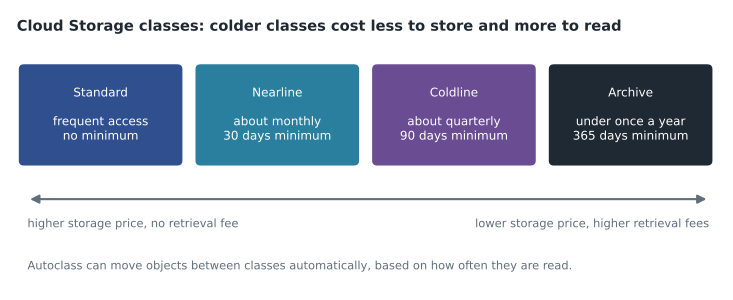
| Class | Typical access | Minimum storage duration | Example |
|---|---|---|---|
| Standard | Frequent, or kept only briefly | None | The landing zone for new till files |
| Nearline | About once a month | 30 days | Monthly report extracts |
| Coldline | About once a quarter | 90 days | Raw files kept for audits |
| Archive | Less than once a year | 365 days | Tax records kept for many years |
Object Lifecycle Management rules change an object's class or delete it when a condition is met, such as its age. Autoclass moves each object between classes based on how often it is actually read, which suits buckets where access is unpredictable. A retention policy stops objects from being deleted or replaced before a set period has passed, and locking the policy makes it permanent, which suits records that must be kept by law.
Worked problem
A lifecycle for raw files
Birchline keeps raw till files for 400 days. New files are read often for the first 30 days, then rarely, mostly for audits. The bucket's rule moves each file from Standard to Coldline at 30 days and deletes it at 400 days. How many days does each file spend in each class, and does the Coldline minimum cause an early-deletion charge?
Show solution
- Days in Standard: from day 0 to day 30, so 30 days.
- Days in Coldline: from day 30 to day 400, so 370 days.
- Coldline's minimum is 90 days, and 370 is more than 90, so no early-deletion charge applies.
- If the rule moved files to Archive at 30 days instead, they would spend 370 days there, which is above Archive's 365-day minimum, but audits would pay higher retrieval costs.
Answer: 30 days in Standard and 370 in Coldline, with no early-deletion charge.
BigQuery has its own deletion controls. A table expiration deletes a table at a set time; a default table expiration on a dataset applies to every new table in it, which suits scratch datasets such as Birchline's, where tables vanish after seven days. A partition expiration deletes partitions older than a set age, which suits keeping, for example, 25 months of web events in a date-partitioned table without deleting the table. Birchline's retention schedule from GCP-222 set sales and tax records at seven years, raw files at 400 days and web events at 25 months.
High availability and disaster recovery
Objective 4.3 asks candidates to compare Google-managed backup and recovery options for Cloud Storage and Cloud SQL, to decide when to use replication, and to distinguish location types for redundancy.
| Service | Protection against mistakes | Protection against a regional outage |
|---|---|---|
| Cloud Storage | Soft delete keeps deleted objects for a period (7 days by default, settable from 7 to 90); object versioning keeps older versions | Dual-region or multi-region buckets keep copies in more than one region; turbo replication speeds that up |
| BigQuery | Time travel lets you read or restore data as it was up to 7 days ago (settable from 2 to 7); table snapshots keep a copy for longer | Multi-region datasets, or copies or replicas in another region |
| Cloud SQL | Automated backups and point-in-time recovery | High availability with a standby in another zone; cross-region read replicas for regional failures |
Two pairs of ideas are easy to confuse. Backup protects against mistakes and corruption: you restore an earlier copy. High availability protects against failures: a standby takes over. Cloud SQL's high-availability configuration keeps a standby in another zone of the same region, written synchronously, and fails over in about a minute, but it does not protect against someone deleting a table, because the deletion is copied to the standby too. Replication across regions protects against the loss of a region. A question about recovering from an accidental deletion wants backups or time travel; a question about surviving a zone or region failure wants high availability or replication.
Encryption and keys
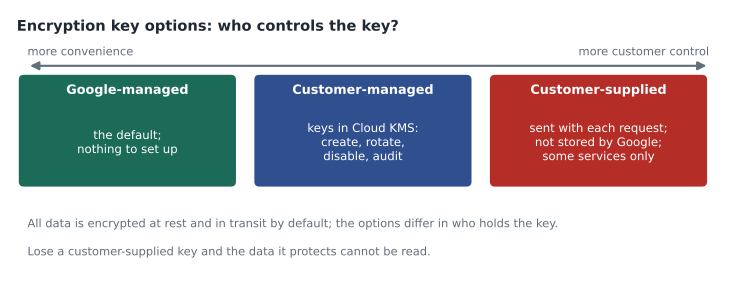
The last objective asks candidates to identify use cases for Google-managed, customer-managed and customer-supplied encryption keys, to understand the role of Cloud KMS, and to tell encryption in transit from encryption at rest. Google Cloud encrypts all data at rest and in transit by default. The options differ in who controls the keys.
| Option | Who controls the key | Choose it when |
|---|---|---|
| Google-managed (GMEK) | Google creates, stores and rotates it | No rule requires anything else; the default for most data |
| Customer-managed (CMEK) | The customer, in Cloud KMS: create, rotate, disable, destroy, audit | Policy or regulation requires control over keys, rotation schedules or the ability to revoke access |
| Customer-supplied (CSEK) | The customer, outside Google; sent with each request and not stored | The key must never be held by Google; supported by a few services only |
Cloud KMS is the service that holds customer-managed keys. A practitioner grants a service, such as BigQuery or Cloud Storage, permission to use a key, and every use is logged. Disabling the key makes the data unreadable until it is enabled again, which is both the point of CMEK and its main risk. Encryption at rest protects stored data; encryption in transit protects data moving across networks, and Google applies both by default.
Location as a compliance choice
Location appears in section 4 as well as in section 1. In section 1 it is about latency, cost and redundancy; in section 4 it is about rules. Some data must stay in a given country or region, for example because of a contract or a privacy law. A BigQuery dataset's location is fixed when the dataset is created and cannot be changed afterwards, so the decision has to be made first; moving data means copying it to a new dataset in the new location. A Cloud Storage bucket's location is also fixed at creation. Organization policies can restrict the locations in which resources may be created at all, which stops a well-meaning engineer from creating a bucket in the wrong place. On the exam, a scenario with a residency rule points to choosing a region or dual-region inside the required area and to a location restriction policy, not to a multi-region that may span a wider area. Birchline keeps its customer data in Canadian locations for exactly this reason, as GCP-220 explained.
Common mistakes
MistakeGranting Editor because it is quick.
InsteadGrant the narrowest predefined role on the narrowest resource.
MistakeGiving an analyst Data Viewer and expecting queries to run.
InsteadRunning queries also needs Job User on the project.
MistakeMoving short-lived files to Archive to save money.
InsteadArchive has a 365-day minimum; early deletion is billed as if kept the minimum.
MistakeRelying on Cloud SQL high availability to undo a deleted table.
InsteadUse backups or point-in-time recovery; the standby copies the deletion.
MistakeChoosing customer-supplied keys for BigQuery.
InsteadBigQuery supports customer-managed keys in Cloud KMS, not customer-supplied keys.
Summary and key terms
- Section 4 is about 25 in 100 of the exam.
- Grant predefined roles to groups at the narrowest level; basic roles are usually wrong.
- Reading BigQuery data and running queries need separate roles.
- Uniform bucket-level access, public access prevention and signed URLs control Cloud Storage access.
- BigQuery sharing, formerly Analytics Hub, shares live datasets with other projects and organizations.
- Storage classes trade storage price against retrieval cost and minimum durations; lifecycle rules, Autoclass, retention policies and BigQuery expirations manage data over time.
- Backups undo mistakes, high availability survives failures and replication survives regional loss.
- Google-managed keys are the default; customer-managed keys live in Cloud KMS; customer-supplied keys are held by the customer.
- Least privilege
- Granting only the permissions needed, at the narrowest level.
- BigQuery Job User
- A role that lets a principal run jobs, such as queries, in a project.
- Uniform bucket-level access
- A Cloud Storage setting where only IAM, not object ACLs, controls access.
- Signed URL
- A link that gives time-limited access to one Cloud Storage object.
- Linked dataset
- A read-only reference to a dataset shared through BigQuery sharing.
- Minimum storage duration
- The shortest period a storage class bills for, even if an object is deleted sooner.
- Time travel
- BigQuery's ability to read or restore table data as it was up to seven days earlier.
- CMEK
- Customer-managed encryption keys, created and controlled by the customer in Cloud KMS.
Practice problems
Work each problem on paper first, then reveal the answer to check.
Why is a grant of BigQuery Data Viewer on the project usually wrong for an analyst who needs one dataset?
Show answer
It gives read access to every dataset in the project.
A supplier needs to download one price file this week without a Google account. What fits?
Show answer
A signed URL with a short expiry.
Which protects against an accidental DELETE in Cloud SQL: high availability or point-in-time recovery?
Show answer
Point-in-time recovery; the high-availability standby copies the deletion.
Lesson quiz · 5 questions
Score 60% or more to complete this lesson.
Create a free account to save your progress, take quizzes and earn a certificate.