
GCP-193 · Lesson 5 of 12 · 18 min
Review: Managing core Workspace services
▶ Video coming soon A video version of this lesson is on the way.
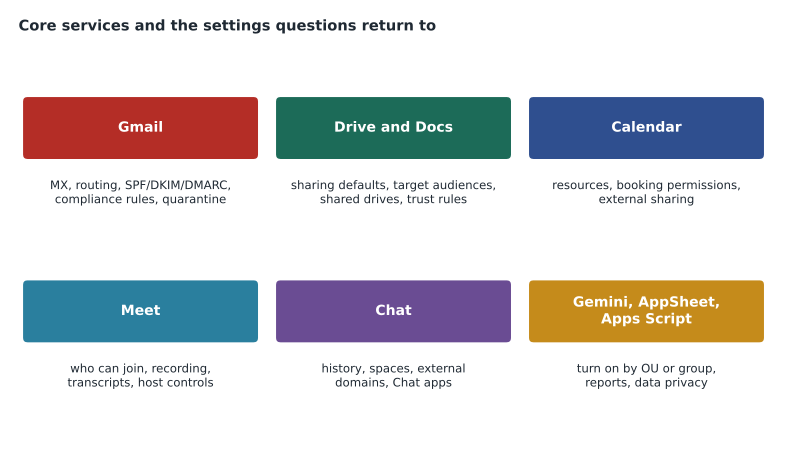
Section 2 is the largest section of the guide, about 23 in every 100 questions, and the broadest. It has seven objectives: Gmail, Drive and Docs, Calendar, Meet, Chat, generative AI, and development tools. Owen configured all of them for Birchline in GCP-211, but Birchline's choices cover only some of the options. This review goes objective by objective, with particular attention to the options Birchline did not choose.
2.1 Gmail
Gmail has the most considerations in the section, and they fall into four groups: getting mail in and out, filtering it, authenticating it, and controlling what users can do with it.
| Area | Key points for the exam |
|---|---|
| MX records and routing | MX records tell the world where to deliver mail; Google now publishes a single MX record (smtp.google.com), and the older five-record set still works. Split delivery and dual delivery send mail to two systems during coexistence; routing settings, inbound gateways and outbound gateways control the path. |
| Content compliance and other rules | Content compliance rules act on messages that match words, patterns or attributes; objectionable content rules use word lists; attachment compliance acts on file types and sizes. Actions include reject, quarantine, modify headers, add a footer and change the route. |
| Spam, phishing and malware | Approved and blocked sender lists, an inbound gateway when mail passes through another system first, an IP allowlist for trusted servers, and the safety settings for attachments, links and spoofing. |
| Authentication | SPF lists the servers allowed to send for a domain; DKIM signs messages with a key published in DNS; DMARC tells receivers what to do when SPF and DKIM fail and where to send reports. Bulk senders to Gmail need all three. |
| User capabilities | Automatic forwarding, POP and IMAP access, delegation of a mailbox to another user, attachment size limits and blocked file types. |
| Quarantines and footers | Administrative quarantines hold messages for review; compliance footers add legal text to outgoing mail. |
Owen's coexistence work at Birchline, where Exchange stays primary and mail for pilot users is routed to Gmail through a routing subdomain, makes the routing questions easier than they would otherwise be. The questions he finds hardest are the ones about the inbound gateway. Sofia states the rule plainly: when mail reaches Gmail through another server, such as an on-premises system or a filtering service, Gmail sees that server's address, not the original sender's. Configuring the other server as an inbound gateway lets Gmail look past it to the real sender, so SPF checks and spam filtering work properly. Adding the other server to an IP allowlist is a different thing: it tells Gmail to trust that server, which can let spam through if used carelessly.
Email authentication also returns in section 6, for troubleshooting. Here the exam expects the setup: add Google to the SPF record without passing the limit of 10 DNS lookups, generate a DKIM key in the Admin console and publish it in DNS, then turn on signing, and publish a DMARC record starting at a monitoring policy before moving to quarantine or reject.
2.2 Drive and Docs
| Consideration | What to know |
|---|---|
| Default sharing for new files | Who new files are shared with by default, such as private or the user's target audience |
| Target audiences | Named groups of people suggested in the sharing window in place of "anyone in the organization" |
| External sharing | Allowed, allowed only to allowlisted domains, or off, per OU or group; warnings when sharing outside |
| Trust rules | A newer, rule-based way to control who can share with whom, by OU, group, domain or user; section 3 covers them in depth |
| Shared drives | Files owned by the organization; who can create shared drives; shared drive settings follow the shared drive's OU |
| Storage | Pooled storage and limits per user, OU or group |
| Drive for desktop and offline access | Allow or block the desktop app and offline use per OU |
| Ownership transfer | Move files from one user to another, often during offboarding |
| Labels | Metadata on files, set by users or automatically; used by DLP and search |
| Templates | Custom Docs, Sheets and Slides templates for the organization |
The shared drive rule from GCP-212 deserves repeating because it explains so many questions. A file in a shared drive is owned by the organization, not the uploader, and its sharing is controlled by the settings of the shared drive's OU. If Marketing can share outside but the shared drive sits in an OU where external sharing is off, files in that shared drive cannot be shared outside, whoever uploads them. Owen also reviews the opposite case: moving a shared drive to a different OU changes its settings immediately.
2.3 Calendar
Calendar objectives overlap with section 1's resources and add sharing. The guide lists resource calendars and booking policies, delegated access, the default internal sharing level, team calendars, external sharing, transferring event ownership and blocking invitations from unknown senders.
| Setting | What it controls | Typical question |
|---|---|---|
| Internal sharing default | How much colleagues see of a user's calendar by default, from free/busy only to all details | "Staff should see when others are free, but not meeting titles" |
| External sharing | How much people outside the organization can see | "Partners should see free/busy only" |
| Delegation | An assistant manages a manager's calendar | "An assistant needs to accept invitations for a director" |
| Event ownership transfer | Moves future events from a departing user to someone else | "A manager leaves; recurring meetings must keep working" |
| Invitations from unknown senders | Whether invitations from outside appear automatically | "Users receive spam invitations" |
2.4 Meet and 2.5 Chat
Meet settings are turned on per OU or group and control who can join meetings, whether external participants can join, host management controls, recording, transcripts and automatic note taking, and video quality. Exam questions often contrast a meeting safety setting, which controls access, with a feature setting, which controls recording or transcription. Availability of some features depends on edition; recording, for example, is not in every edition, which is a classic clue.
Chat settings cover chat history, whether users can create spaces, external chat with users in other domains, moderation, invitation settings and Chat apps. Owen remembers the distinction that tripped him in GCP-211: allowing external chat for users is one setting; allowing spaces to include outside members is another; and allowlisting particular domains is a third. A question that says users can chat one to one with a partner but cannot add the partner to a space points to the space setting.
2.6 Generative AI
The guide's generative AI objective covers keeping data private and secure when using generative AI, turning Gemini on for the organization or for OUs, extensions that let the Gemini app reach Workspace data, and reports on Gemini usage. In exam terms, four points matter. First, Gemini features are included in Business and Enterprise editions, with the separate add-on billing ended after January 31, 2025. Second, access is managed per OU or configuration group, with the group setting winning when they conflict. Third, Google's terms for Workspace say customer data is not used to train models outside the organization and Gemini respects existing access permissions: it can only use files a user can already open. Fourth, turning Gemini off in one app does not by itself stop the Gemini app from reaching that app's data through an extension, so a complete restriction needs both settings.
Birchline's rollout, from GCP-211, staged Gemini through a configuration group, cfg-gemini-early. For the exam, Owen reviews the reports: usage reports show adoption by app and user, which helps decide whether a staged rollout is working.
2.7 Supporting Workspace development
The smallest objective covers AppSheet and Apps Script. AppSheet builds apps without code from data in Sheets and other sources; administrators turn it on or off per OU and can control which data sources are allowed. Apps Script runs JavaScript-based scripts that automate Workspace tasks; administrators control whether scripts can run, which third-party scripts are trusted, and whether users can grant scripts access to data, through the API controls covered in GCP-211. A question that describes a team wanting to automate an approval workflow without developers is usually pointing to AppSheet; one that describes a script needing access to all users' data points to API controls and domain-wide delegation, with great care.
Edition clues in section 2
Section 2 questions often depend on what an edition includes, and the scenario usually states the edition in its first sentence. Owen builds a short table from Google's edition comparison pages, and Sofia asks him to treat it as a living document, because Google moves features between editions from time to time. The patterns that matter most for the exam are stable enough to learn: the lower Business editions have smaller limits and fewer controls; Meet recording and some advanced meeting features start in higher editions; Vault, shared drive controls and some security features are in Business Plus and above; and the Enterprise editions add the most advanced security and data controls. Frontline editions are designed for workers who mostly use phones and shared devices, with smaller storage and fewer features than Business or Enterprise editions.
The exam's recommended experience mentions Business Plus by name, so Owen pays particular attention to what Business Plus adds over Business Standard and what Enterprise adds over Business Plus. When a question asks for the cheapest way to get a feature, the answer is often the lowest edition that includes it, or an add-on where Google offers one. When a question says the organization cannot change its edition, any option that needs a higher edition is out, however good it sounds.
Owen's unsure list for section 2
- The exact difference between split delivery and dual delivery, and which one sends a copy to both systems.
- Which Meet features, such as recording and transcripts, are missing from the lower editions.
- Target audiences: how they are created and how they differ from allowlisted domains.
- Attachment compliance versus content compliance: which rule type handles encrypted attachments.
- Chat history settings: what users can change and what administrators can force.
- How to restrict the Gemini app's access to Workspace data through extensions.
Sofia answers the first one on the spot, because it comes up often. Split delivery sends each message to one system or the other, depending on whether the recipient's mailbox has moved; dual delivery sends a copy to both systems. Birchline uses split delivery during the migration, with Exchange primary.
Worked problem
A section 2 scenario
A company's users receive mail first through a third-party filtering service, which then passes it to Gmail. Since the change, Gmail marks many legitimate messages as spam and SPF checks fail. What should the administrator configure?
Show solution
- Mail now reaches Gmail from the filtering service, so Gmail sees the service's IP address, not the original sender's.
- SPF checks against that IP address fail, because the service is not listed in the senders' SPF records.
- Configure the filtering service's IP addresses as an inbound gateway in Gmail's spam settings.
- Gmail then skips the gateway's address and checks the original sending server, so SPF and spam filtering work correctly.
- Avoid adding the service to the IP allowlist instead, which would make Gmail trust everything it passes on.
Answer: Configure an inbound gateway with the filtering service's addresses, rather than an IP allowlist.
Common mistakes
MistakeUsing an IP allowlist to fix spam problems caused by a filtering service in front of Gmail.
InsteadConfigure an inbound gateway, which lets Gmail check the original sender.
MistakeAssuming files in a shared drive follow the uploader's sharing settings.
InsteadShared drive files follow the shared drive's OU settings.
MistakeTurning Gemini off in Gmail and assuming no Gemini feature can read mail.
InsteadRestrict the Gemini app's Workspace extensions too.
MistakeTreating external chat and external members in spaces as one setting.
InsteadThey are separate settings, alongside domain allowlisting.
MistakeCalling split delivery and dual delivery the same thing.
InsteadSplit delivery sends each message to one system; dual delivery sends to both.
Summary and key terms
- Section 2 is the largest section and covers Gmail, Drive and Docs, Calendar, Meet, Chat, generative AI and development tools.
- For Gmail, know MX and routing, compliance rules, spam controls including inbound gateways, SPF, DKIM and DMARC, and user capabilities such as forwarding and delegation.
- Drive questions turn on default sharing, target audiences, external sharing, trust rules and shared drives, which follow their own OU.
- Calendar covers sharing levels, delegation, event ownership transfer and unknown-sender invitations.
- Meet and Chat settings are per OU or group, and some features depend on edition.
- Gemini is included in Business and Enterprise editions, managed by OU or group, respects existing permissions, and needs app and extension settings for full control.
- AppSheet and Apps Script are turned on and controlled by OU and API controls.
- Inbound gateway
- A server that receives mail before Gmail, configured so Gmail checks the original sender.
- Split delivery
- Routing that sends each message to one of two mail systems during coexistence.
- Dual delivery
- Routing that sends a copy of each message to two mail systems.
- Content compliance rule
- A Gmail rule that acts on messages matching words, patterns or attributes.
- Target audience
- A named group suggested in the sharing window as a narrower alternative to everyone in the organization.
- Event ownership transfer
- Moving future calendar events from one user to another.
- AppSheet
- A no-code app builder administrators turn on per OU.
- Gemini extension
- A connection that lets the Gemini app use data from a Workspace app.
Practice problems
Work each problem on paper first, then reveal the answer to check.
Why does an inbound gateway fix SPF failures for mail passing through another service?
Show answer
It lets Gmail look past the gateway to the original sending server.
Which setting controls sharing for a file stored in a shared drive?
Show answer
The sharing settings of the shared drive's OU.
What happens when Gemini settings for a user's OU and a configuration group conflict?
Show answer
The group setting wins.
Lesson quiz · 5 questions
Score 60% or more to complete this lesson.
Create a free account to save your progress, take quizzes and earn a certificate.