
GCP-193 · Lesson 2 of 12 · 19 min
Registering, scheduling and exam delivery
▶ Video coming soon A video version of this lesson is on the way.
A surprising number of exam attempts go wrong before the first question appears: a name on the booking that does not match an ID card, a laptop that fails the system test, a webcam that cannot see the whole desk, a candidate who arrives at the wrong building. Sofia has seen colleagues lose a fee to each of these. In the second session she walks Owen through every step from creating an account to sitting down, so that on exam day the only thing he has to think about is Workspace.
The details in this lesson come from Google's certification help pages as we read them in November 2026. Google and its testing partner update these pages from time to time, and the rules that apply to you are the ones on the pages when you book. Treat this lesson as a map of what to check, not a substitute for checking.
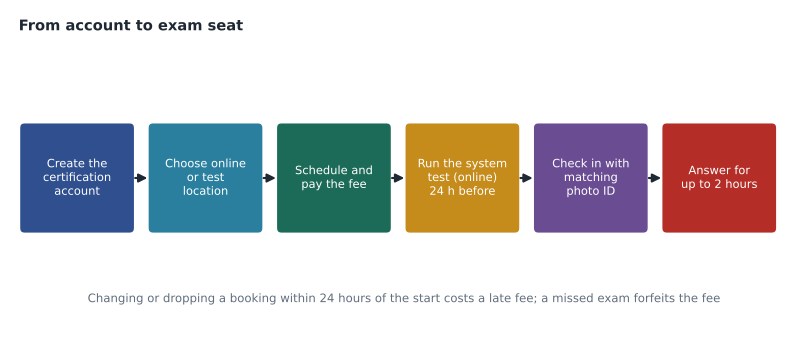
Who can take the exam
Google's certification help pages say that anyone at least 18 years old can take a Google Cloud certification exam. There are no prerequisite certifications for this one, and no requirement to have completed a particular course. The recommended experience in lesson 1, about six months as a super admin and familiarity with Business Plus and Enterprise features, is advice, not a rule. Owen will have run Birchline's tenant from October 2026 to May 2027, a little over seven months, by his planned exam date.
Creating the account and the legal name
Registration starts in Google's certification portal, which Google's pages call CM Connect, reached from the Register link on the certification page. Owen signs in with a personal Google account rather than his Birchline work account. Sofia explains why: certifications belong to the person, not the employer, and if Owen ever leaves Birchline, a certificate tied to a work account he no longer controls becomes hard to manage. The same account will later receive his results, his certificate and the reminders when it is time to renew.
The most important field in the profile is the legal name. Google's testing requirements say the legal name in the portal must match the government-issued photo ID that will be checked on exam day, and that the field must use Romanized characters. A shortened first name, a missing middle name the ID shows, or a married name not yet on the ID are all common causes of a refused check-in. Owen's passport says Owen James Mitchell. He enters exactly that.
| Check before booking | Why it matters |
|---|---|
| Legal name in the portal matches the photo ID exactly | A mismatch can mean the attempt is refused and the fee lost |
| ID is valid on the exam date, not just today | An ID that expires in between is not acceptable |
| Personal email address on the account | Results, certificates and renewal reminders go there |
| Time zone set correctly | Appointment times are shown in the account's time zone |
| The exam selected is the Associate Google Workspace Administrator, in the right language | English and Japanese versions are separate choices |
Online or at a testing centre?
The exam can be taken in two ways. Online-proctored delivery uses the testing partner's remote proctoring software on the candidate's own computer, with a proctor watching through the webcam and microphone. Onsite delivery takes place at a testing centre run by the partner; the certification page tells candidates to search for Google Cloud on the partner's site to find a location. The exam itself is the same; what differs is the environment and what can go wrong.
| Factor | Online-proctored | Onsite at a testing centre |
|---|---|---|
| Where | Home or a quiet office room | The partner's testing location |
| Equipment | Your computer, webcam, microphone and connection must pass the system test | Provided by the centre |
| Room rules | Quiet, well lit, no one else present; a room scan; clear desk; external monitors disconnected | Personal items stored in a locker before entering |
| Breaks | None; you cannot leave the camera's view | Ask the centre about its rules before booking |
| Identification | One government-issued photo ID | Two forms of ID, one a government-issued photo ID |
| Typical risks | Connection drops, background noise, someone entering the room, a work laptop that blocks the software | Travel time, parking, arriving late |
Google's program policies also say an online exam can be suspended or its result invalidated for problems such as lost or poor video, poor audio or too much background noise, an unauthorized person in the area, or pressing a forbidden key such as Print Screen, and that fees are not refunded in those cases. That list makes Owen's choice for him. He lives in a busy apartment with a partner who works from home and a dog that barks at deliveries. He books a testing centre.
The nearest location to Birchline's head office is a short subway ride away. Owen plans to visit the building once beforehand to find the entrance and the right floor, so that on the morning of the exam there are no surprises.
If you choose online delivery
Many candidates prefer online delivery, and it works well when the setup is right. Google's requirements ask candidates to download the proctoring application and run its system test at least 24 hours before the session, and to have their ID ready at check-in. The system test checks the camera, microphone, connection and whether the software can run. Sofia adds three pieces of advice from colleagues who tested online.
- Use a personal computer if you can. Company laptops often have security software or policies that stop the proctoring application from running or from closing other programs. Birchline's own laptops are managed with the policies Owen helped write; he knows exactly why they would get in the way.
- Test in the same room, at the same time of day. A connection that is fine at 7 in the morning may be slow when the household starts streaming in the evening. Run the system test where and when you will sit the exam.
- Clear the desk completely. The requirements say papers, writing instruments and extra devices must be removed. Notes on a wall behind you or a second monitor can be a problem, so take them down or disconnect them before check-in rather than during it.
Scheduling, rescheduling and the fee
Once the account is ready, scheduling means choosing the exam, the delivery method, a location or online, and a date and time, then paying the fee. The fee in November 2026 was 125 US dollars plus tax where it applies. Each attempt is paid for separately; there is no free retake if an attempt fails.
The program policies set two money rules. First, rescheduling or cancelling within 24 hours of the scheduled start costs a late fee. Second, missing the exam without cancelling, a no-show, forfeits the whole fee with no refund. Both rules apply to online and onsite exams. Rescheduling and cancelling are done in the portal, from the scheduled exam's entry.
Owen books early, in December, for the date in his plan: Tuesday, May 25, 2027, at 9:00. Booking early does two things. It secures a morning slot at the location he prefers, and it turns the plan into a commitment. If his March practice set shows he is not ready, he can still move the date with weeks to spare and no late fee.
Worked problem
Deciding whether to reschedule
On Saturday, May 8, Owen's second full practice set goes worse than expected because two weeks of store migrations left little time to study. His exam is at 9:00 on Tuesday, May 25. What should he consider, and by when must he decide to avoid a late fee?
Show solution
- List what the practice set showed: which sections were weak and by how much, using the error log from lesson 10.
- Estimate whether the remaining 16 days can close those gaps, given his work schedule.
- Check the next available dates at the same location in the portal, so the choice is between two real dates.
- The late fee applies within 24 hours of the start, so the last moment to change without it is just before 9:00 on Monday, May 24.
- Decide well before that, ideally within a day or two of the practice set, so the decision is not made in a panic.
Answer: Decide within a few days of the practice set; the absolute deadline to avoid the late fee is before 9:00 on Monday, May 24.
Sofia notes one complication: Monday, May 24, 2027 is Victoria Day. The portal works on holidays, but a support line may not, so any change should be made on a working day well before then.
Accommodations
Candidates who need accommodations, such as extra time or a separate room, request them through the process described in Google's certification help pages before scheduling, because an approved accommodation can change which dates and delivery methods are available. Requests usually need supporting documents and take time to review. The practical rule is to start early: an accommodation approved after the only suitable date has been booked by someone else does not help.
Exam day at a testing centre
Google's onsite requirements ask candidates to arrive at least 15 minutes before the appointment, to bring two forms of identification, one of them a government-issued photo ID, and to store personal items in the locker or space provided before entering the testing area. Food and drink are not allowed in the testing room. The centre staff check identity, may take a photo, and seat the candidate at a workstation where the exam is already loaded.
Owen writes a short exam-day list now, so that he does not write it under pressure in May.
| Item | Done when |
|---|---|
| Passport and a second ID with name and signature | Packed the night before |
| Confirmation email with location and time | Saved on the phone and printed |
| Route, travel time and a 30-minute buffer | Checked the week before, and again the night before |
| Water and a snack for before and after (not in the room) | Packed the night before |
| Phone switched off and stored in the locker | At check-in |
What happens on the screen
Once the exam starts, the clock runs for the full 2 hours. The software shows one question at a time with a count of questions and the time remaining. Candidates can move forward and back, and the interface lets them mark questions to revisit; lesson 9 explains how to use that feature without wasting time. Multiple select questions say how many answers to choose. When the candidate submits, or the time runs out, the exam ends and a provisional result appears on screen, as lesson 12 describes.
There are no notes, no access to the Admin console, and no internet. Everything must come from memory and judgement. That is why Sofia insists on practice sets without notes from March onward: knowing where to look something up is a work skill, but it is not an exam skill.
Rules and conduct
Every candidate must accept the exam terms and conditions before testing. They forbid sharing exam content, using unauthorized materials, having someone else take the exam, and getting around the retake rules, for example by registering under a different name. The program policies say that circumventing the rules can lead to a certification being denied or revoked. Owen notices that the terms also make some study materials risky: websites that claim to offer real exam questions are offering exactly the content the terms forbid sharing, and their answers are often wrong anyway.
Sofia's advice is simple. Use the exam guide, Google's documentation and learning path, the official sample questions, and practice questions written by people who wrote them from the guide, such as the sets she writes for Owen. Practice that teaches how to reason about a setting lasts; memorized answers do not.
Common mistakes
MistakeRegistering with a work email account.
InsteadUse a personal account; the certification belongs to you and must outlive any job.
MistakeEntering a nickname or leaving out a middle name the ID shows.
InsteadEnter the legal name exactly as it appears on the photo ID, in Romanized characters.
MistakeRunning the online system test on a different computer or in a different room.
InsteadRun it at least 24 hours before, on the same computer, in the same room and at the same time of day.
MistakeRescheduling on the morning of the exam.
InsteadDecide early; changes within 24 hours of the start cost a late fee, and a no-show forfeits the fee.
MistakeStudying from sites that claim to have real exam questions.
InsteadUse the guide, documentation and practice written from the guide; sharing real questions breaks the terms.
Summary and key terms
- Anyone 18 or older can take the exam, and there are no prerequisites.
- Registration happens in Google's certification portal, ideally with a personal account.
- The legal name must match the government-issued photo ID exactly.
- The exam can be taken online with remote proctoring or onsite at a testing centre.
- Online delivery needs a passing system test at least 24 hours before, a quiet room with no one else present, a clear desk and no breaks.
- Onsite delivery needs arrival at least 15 minutes early and two forms of ID.
- Changes within 24 hours of the start cost a late fee and a no-show forfeits the fee.
- Every attempt is paid for.
- The exam terms forbid sharing or using real exam content.
- CM Connect
- Google's certification portal for registering, scheduling and viewing results.
- Legal name
- The name on the account, which must match the photo ID shown at check-in.
- Online-proctored exam
- An exam taken on your own computer while a remote proctor watches.
- Onsite exam
- An exam taken at the testing partner's location.
- System test
- The check of camera, microphone, connection and software required before an online exam.
- Late fee
- The charge for rescheduling or cancelling within 24 hours of the start.
- No-show
- Missing a scheduled exam without cancelling, which forfeits the fee.
- Accommodation
- An approved change to testing conditions, such as extra time, requested before scheduling.
Practice problems
Work each problem on paper first, then reveal the answer to check.
Why does Owen choose onsite delivery?
Show answer
His home has noise and other people, and online exams can be invalidated for background noise or someone entering the room.
How many forms of ID are needed at a testing centre?
Show answer
Two, one of which is a government-issued photo ID.
What is the last moment to reschedule a 9:00 Tuesday exam without a late fee?
Show answer
Just before 9:00 on the Monday, 24 hours before the start.
Lesson quiz · 5 questions
Score 60% or more to complete this lesson.
Create a free account to save your progress, take quizzes and earn a certificate.