
GCP-193 · Lesson 4 of 12 · 18 min
Review: Managing user accounts, domains and directories
▶ Video coming soon A video version of this lesson is on the way.
Section 1 of the exam guide, about 20 in every 100 questions, covers the foundations: getting people into the directory, organizing them, grouping them, the domains they use, and the rooms and resources they book. It is the section Owen knows best, because he built all of it in GCP-210. That is exactly why Sofia wants it reviewed first. "The things you know best are the things you stop checking," she says. "Let's see whether you know the options, not just the choices we made."
Each review lesson in this course follows the same pattern. It walks through the objectives in the guide, summarizes what to know in exam terms, names the decisions the exam likes to test, and lists the points Owen marked as unsure. It is not a replacement for the earlier course; it is a structured check against the guide.
1.1 The user life cycle
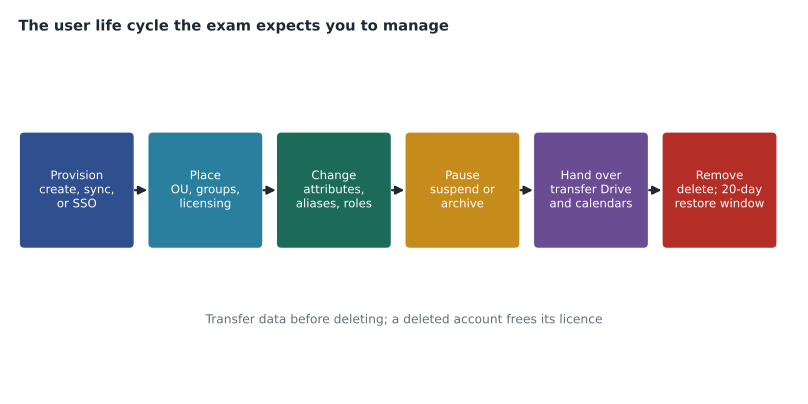
Every account goes through the same stages: it is created, placed, changed, paused and finally removed, with data handed over before removal. The exam asks which tool fits each stage, and especially which provisioning method fits an organization.
| Situation | Provisioning method | Notes for the exam |
|---|---|---|
| A few new users | Add users one at a time in the Admin console | Fine for small numbers; does not scale |
| Hundreds of users once, no directory to keep in step | Bulk upload with a CSV file | Columns for name, email, password, OU; good for a one-off |
| On-premises Active Directory or LDAP is the source of truth | Google Cloud Directory Sync (GCDS), installed on a server | One-way from the directory to Google; can sync users, groups and OUs |
| Active Directory or Microsoft Entra ID, without installing software | Directory Sync, set up in the Admin console | Was in public beta when GCP-210 was written; check its status |
| A third-party identity provider manages accounts | Automatic provisioning from that provider, often with SAML single sign-on | The provider creates, updates and suspends users in Workspace |
| Users join through an HR system or script | The Admin SDK Directory API | For developers; automation of the life cycle |
Single sign-on appears in this objective at a basic level. With SAML single sign-on, Workspace trusts another identity provider to authenticate users: the user goes to Google, is sent to the provider to sign in, and returns with a signed assertion. The exam expects candidates to know the pieces: the provider's sign-in page URL, its signing certificate, an SSO profile assigned to OUs or groups, and that super admins sign in with Google rather than through the third-party provider, so they can still get in if the provider fails. Birchline uses Google as its identity provider, but Owen reviews the opposite case because questions often describe it.
Migration tools are part of 1.1 too. The guide asks candidates to match migration strategies to tools. In exam terms: the data migration service in the Admin console moves mail, calendars and contacts from servers or other Google accounts for small and medium moves; Google Workspace Migrate is a larger, server-based tool for big migrations with many sources, including file shares; and a desktop or server tool for Microsoft Exchange and Outlook moves mail, calendar and contacts. Google renames these tools from time to time, so Owen checks the current names in the documentation before the exam rather than relying on GCP-210's list.
Changing, pausing and removing accounts
| Action | What happens | When to choose it |
|---|---|---|
| Suspend | User cannot sign in; data is kept; a licence is still used (for most editions) | Temporary absence, investigation, or the first step when someone leaves |
| Archive (Archived User licence) | User cannot sign in; data is kept at a lower cost; a separate Archived User licence is needed | Former employees whose data must be kept for a long time |
| Delete | Account and data are removed; the licence is freed; the account can be restored for a limited time (about 20 days) | After data has been transferred or retained in Vault |
| Transfer data | Drive files and other data move to another user | Before deleting, so work is not lost |
| Restore | A deleted account comes back within the restore window | An account deleted by mistake |
The exam often tests the order of offboarding: suspend or reset sign-in immediately, transfer data to a manager or a shared drive, confirm that Vault retention or holds cover anything legally required, then delete or archive. Deleting before transferring loses files the restore window may not recover in time. Owen also reviews password objectives: administrators can reset a password and require a change at next sign-in, enforce strength and length, and see password strength status per user, but they cannot see a user's password.
Licence management belongs here as well. Licences can be assigned automatically by OU, assigned in bulk, or managed per user. A user with no licence for a service cannot use it even if the service is on for their OU. That combination, service on but no licence, is a favourite exam explanation for "one user cannot use Meet".
1.2 Organizational units
An organizational unit is the main way to apply settings to a set of users or devices. Child OUs inherit settings from their parent unless the child overrides them. Each user belongs to exactly one OU. The guide asks candidates to design an OU structure that reflects the organization and follows Google's recommended practices. In exam terms, those practices are: create OUs for groups of users that need different settings, not to mirror the org chart; keep the tree shallow; and use configuration groups for exceptions that cut across OUs.
Birchline's tree, from GCP-210, is a good example: Head office with department children, Warehouses, Stores, Pilot, Contractors, Admin accounts and Departed staff. Stores has four region OUs, created only so that regional coordinators could be given a custom admin role scoped to their stores. That is a legitimate reason for an OU: settings or delegated administration differ. A question that suggests creating an OU for every manager's team, with identical settings, is usually describing a design mistake.
1.3 Groups
Groups do several jobs, and the exam tests whether candidates can tell them apart.
| Group use | What it does | Exam clue |
|---|---|---|
| Email distribution list | One address delivers to all members | "send to everyone in Finance" |
| Collaborative Inbox | Members can assign, track and resolve conversations sent to the group | "a shared mailbox for support requests" |
| Access control | Share files, calendars or sites with the group instead of individuals | "give the team access to a shared calendar" |
| Configuration group | Apply Admin console settings to members across OUs | "some users in several OUs need a different setting" |
| Security group | A group labelled as security, used for access control, with restrictions on who can be a member | "a group used for access control should not contain outside members" |
| Dynamic group | Membership updated automatically from a query on user attributes, such as department | "everyone whose department is Sales, kept up to date automatically" |
Dynamic groups depend on edition, and Owen marks them as unsure: he has never built one because Birchline uses GCDS to maintain group membership from Active Directory. He adds a note to check which editions include dynamic groups. Group settings such as who can join, who can post, who can view members and whether outside members are allowed are also fair game, because many data-leak scenarios begin with a group that allowed external members.
1.4 Domains
Workspace has three kinds of domain, and the difference is tested often.
| Domain type | What it gives users | Birchline example |
|---|---|---|
| Primary domain | The domain the account was created with; every user has an address here unless placed in a secondary domain | birchline.example |
| Secondary domain | Separate user accounts with their own addresses in another domain, managed in the same tenant | trailheadrentals.example, for the acquired rental business |
| Domain alias | Every user gets an extra address in the alias domain automatically; mail to it reaches the same inbox | birchlineoutfitters.example, the old brand |
| User alias | One extra address for one user | returns@ as an alias on one person, though a group is usually better |
Adding any domain requires verifying ownership, usually with a TXT record at the domain's DNS host, and setting MX records if it will receive mail. The exam likes the choice between a secondary domain and a domain alias. If the people are different, with their own accounts, it is a secondary domain. If the same people need another address, it is a domain alias. Primary domain changes are possible but have consequences, so they are seldom the answer to a simple question.
1.5 Buildings and resources
Rooms and equipment are managed as calendar resources, organized by buildings and floors. The guide lists bulk creation of buildings and resources, creating bookable resources, booking permissions, and resource features such as capacity, video equipment, whiteboards and accessibility. Owen created Birchline's rooms in GCP-211 with a CSV upload; for the exam he reviews the order: buildings first, then features, then resources that reference them, because a resource cannot point to a building that does not exist yet.
Booking permissions are set by sharing each resource calendar: who can see it, who can book it, and whether bookings need to be approved. The boardroom at Birchline can be booked only by members of acl-boardroom-bookers, an access group. A question that asks how to stop everyone booking the executive room is answered by changing the resource's sharing, not by deleting the room or writing a policy memo.
Owen's unsure list for section 1
After marking the guide, Owen has six considerations in section 1 marked unsure. He writes each as a question to answer from the documentation over the next two weeks.
- Which editions include dynamic groups, and how are their queries written?
- What is the current name and scope of each migration tool, and which one fits a migration from another cloud mail provider?
- How does third-party automatic provisioning interact with SAML single sign-on, and what happens to a user deleted at the provider?
- How does an Archived User licence differ from suspension in what users and administrators can do with the data?
- What happens to a user's aliases and group memberships when the user is moved to a secondary domain?
- Which resource features can be set in bulk, and how does the CSV for buildings differ from the one for resources?
Sofia adds a seventh: how to transfer calendar event ownership when someone leaves, which sits at the boundary between sections 1 and 2.
Worked problem
A section 1 scenario
A company is acquiring a 60-person business with its own domain. The acquired staff will keep their own email addresses and need their own accounts in the company's Workspace tenant. Their settings will differ from the parent company's for the first year. What should the administrator set up?
Show solution
- Different people with their own accounts and addresses: this rules out a domain alias, which would give existing users extra addresses.
- Add the acquired domain as a secondary domain and verify it with a TXT record.
- Create an OU for the acquired staff, because their settings will differ; an OU fits a group with different settings.
- Create the accounts in the secondary domain, in bulk with a CSV if there is no directory to sync, and assign licences.
- Point the domain's MX records to Google when it is time to move their mail.
Answer: A secondary domain for the acquired business, an OU for its different settings, and bulk-created accounts with licences.
Common mistakes
MistakeUsing a domain alias for an acquired company whose staff need their own accounts.
InsteadUse a secondary domain when the people are different; use an alias when the same people need another address.
MistakeCreating OUs to mirror the org chart.
InsteadCreate OUs for groups that need different settings or delegated administration; use groups for the rest.
MistakeDeleting a departing user right away.
InsteadSuspend first, transfer data, confirm Vault coverage, then delete or archive.
MistakeAssuming a service is available because it is turned on for the user's OU.
InsteadCheck the user's licence as well; a service needs both.
MistakeCreating resources before their buildings.
InsteadCreate buildings and features first, then resources that reference them.
Summary and key terms
- Section 1 covers the user life cycle, organizational units, groups, domains, and buildings and resources.
- Choose a provisioning method by scale and source of truth: manual, CSV, GCDS, Directory Sync, third-party provisioning or the API.
- SAML single sign-on lets another provider authenticate users, while super admins still sign in with Google.
- Suspend, archive and delete differ in sign-in, data and licences; transfer data before deleting.
- OUs exist for groups needing different settings; groups handle mail, access, cross-OU settings, security and dynamic membership.
- Secondary domains are for different people; domain aliases give the same people extra addresses.
- Buildings and features come before resources, and booking permissions are set by sharing the resource calendar.
- GCDS
- Google Cloud Directory Sync, a server tool that syncs users, groups and OUs one way from a directory to Google.
- Directory Sync
- An Admin console feature that syncs from Active Directory or Entra ID without installing software.
- SAML single sign-on
- A setup in which another identity provider authenticates users for Workspace.
- Archived User licence
- A lower-cost licence that keeps a former user's data while preventing sign-in.
- Secondary domain
- An extra domain with its own user accounts in the same tenant.
- Domain alias
- An extra domain that gives every existing user another address.
- Collaborative Inbox
- A group setting that lets members assign and track conversations.
- Dynamic group
- A group whose membership is kept up to date from a query on user attributes.
Practice problems
Work each problem on paper first, then reveal the answer to check.
What is the difference between a secondary domain and a domain alias?
Show answer
A secondary domain holds separate accounts; a domain alias gives existing users another address.
A user cannot use Meet although Meet is on for their OU. What should be checked?
Show answer
Whether the user has a licence that includes Meet.
Why do super admins sign in with Google even when SAML SSO is configured?
Show answer
So they can still get in if the third-party identity provider fails.
Lesson quiz · 5 questions
Score 60% or more to complete this lesson.
Create a free account to save your progress, take quizzes and earn a certificate.